Table Manager Plugin Guide for Busy Restaurant Floors
Learn what a table manager plugin does, which features to compare, and how to cut no-shows and add covers per shift.
Your host stand has two versions of the truth and they disagree. The booking screen says the 20:00 turn is full, the paper layout says a four-top has been free since 19:20, and a guest standing in front of you wants to know if there's room. Someone walks the floor to check. By the time they're back, the walk-in has gone next door.
That gap between what the software thinks the room is doing and what the room is doing is where a table manager plugin earns its money or wastes it. What follows is a working guide to judging one on the things that show up at 20:00 on a Friday, not on the things that look good in a demo.
Table of Contents
- What a Table Manager Plugin Does for Your Floor
- Features to Compare Before You Choose
- How the Plugin Picks a Table and Matches Party Sizes
- Which No-Shows to Act On and How Much to Protect
- Measuring Results Without Overbooking Your Kitchen
- Compare Pricing Models Against Your Margin
- Shortlist and Test a Plugin This Week
What a Table Manager Plugin Does for Your Floor
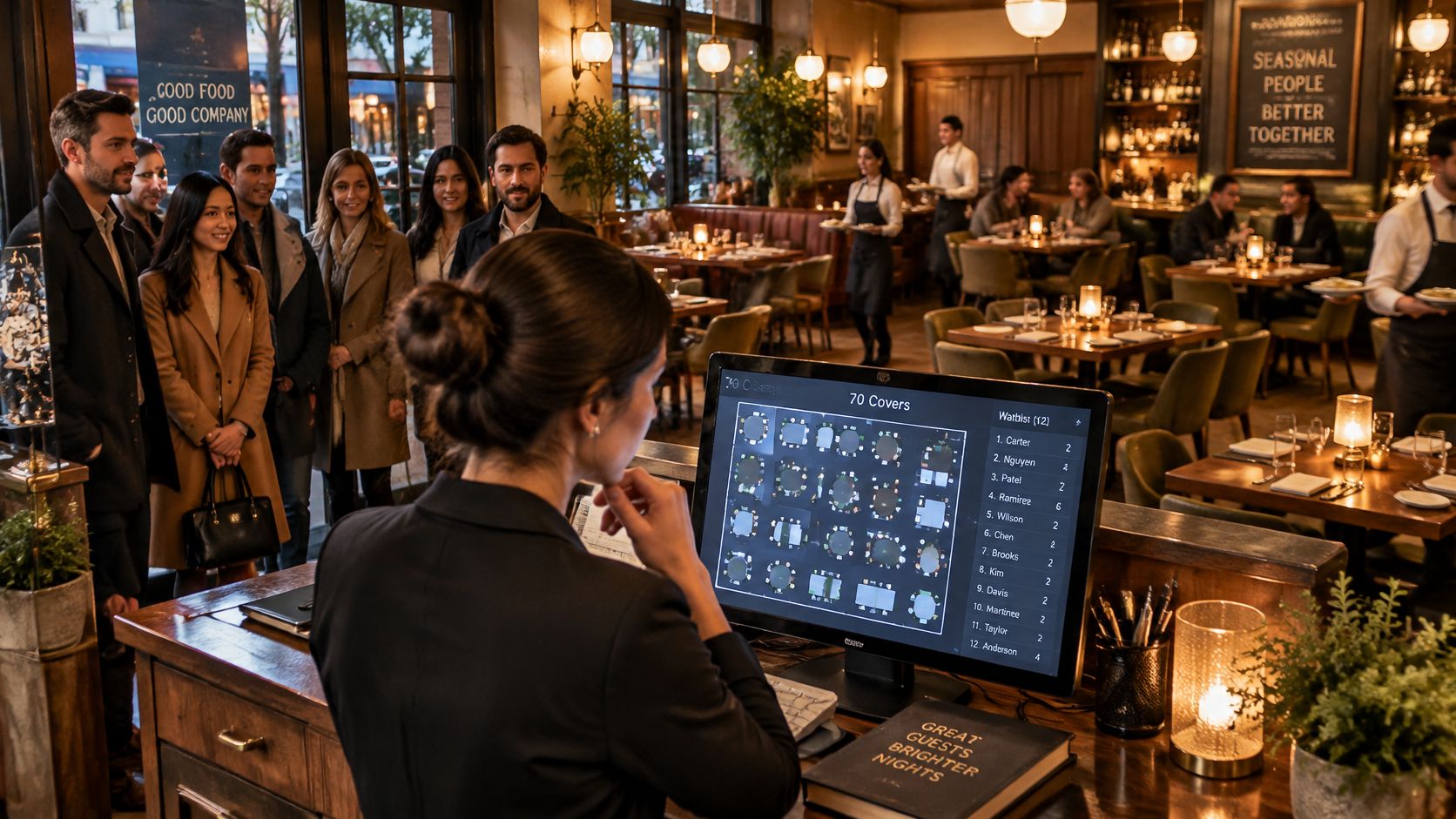
Friday, 19:45. The booking screen shows 70 covers. Half the dining room sits empty because the 20:00 bookings haven't arrived and the first turn is running late. A party of six stands at the door, and nobody can see at a glance which tables are free, which are held for later, and which are about to clear. The host walks the floor with a menu in hand, and that walk costs you covers.
A table manager plugin is software that sits on top of your reservations and shows the floor: table sizes, live status, booking times, allowed combinations and walk-ins on a single screen that moves with service. It doesn't add seats. It helps you fill the seats you already have.
A 2008 study in the Journal of Foodservice Business Research treated table management as a capacity and revenue problem rather than a booking function, and found that seating policies can reduce customer waiting time, improve seat turnover and raise satisfaction without expanding the physical restaurant. For a 50-seat room, allowing tables to be combined produced higher revenue per available seat hour in 50% of the possible party-size configurations than keeping tables permanently dedicated.
Here is what that looks like on a screen.
The plugin does three jobs, and a weak one will fail at least one of them:
- Decide where each party sits, using table sizes, allowed combinations and the time the table is needed, rather than the first free square on the plan.
- Keep status current during service, so a table that's been cleared stops looking occupied and one that's seated stops looking available.
- Hold reservations and walk-ins in one view, because two lists means two truths and a host who has to reconcile them in their head while a guest waits.
Digital booking only created value once it was tied to real inventory. Cornell hospitality research on online reservations records one platform growing from 10 participating restaurants in 1999 to more than 14,100 by mid-2010. The lesson wasn't the booking page. It was connecting that demand to tables, durations and pacing.
The test to run before any demo: name the one floor problem you want solved. Walk-ins squeezed out at peak, tables held too long, no-shows on large parties. If you can't name it in one sentence, every demo will look good.
Many owners bought reservation tools that added screens rather than removing work. 10Seat was built because restaurant owners were struggling with reservation systems that added complexity instead of removing it, and that's the right yardstick. Judge a plugin by what changes at 20:00, not by how tidy the calendar looks at 11:00.
Features to Compare Before You Choose
Vendors demo what they're proud of, not what you'll use. The table below lists eight capabilities in the order they matter on a busy night, with the specific thing to verify before you sign.
| Capability | What it does | What to verify in a demo |
|---|---|---|
| Live floor status | Shows each table as occupied, available or about to clear | Every host device updates at the same moment |
| Table combinations | Joins tables for larger parties | You can set which combinations are allowed |
| Party size matching | Assigns the table that fits the party | Warns before a party of six is placed at a two-top |
| Waitlist and walk-ins | Adds walk-ins and quotes a wait time | Wait times come from real clearing data |
| Deposits and no-show controls | Collects deposits and flags risky bookings | Deposit amount and refund rules by party size |
| Guest profiles | Stores preferences, allergies and occasions | How data is stored, exported and deleted |
| POS connection | Syncs reservations and orders with the till | Which POS systems are supported and setup time |
| Reporting | Shows covers, turnover and no-shows per service | Covers per labour hour and kitchen ticket times |
The three rows that decide a Saturday night
Live floor status is the one that fails unnoticed. If the host tablet and the bar screen disagree by even one table, staff stop trusting the system and go back to the paper plan. Ask the vendor to open the floor on two devices and change a table status while you watch.
Party size matching protects tomorrow's bookings. Placing a six at two pushed-together four-tops at 19:00 means the large table you needed at 21:00 is gone. The plugin should refuse the placement or warn you, not allow it because the seats exist.
Waitlist accuracy decides whether walk-ins stay. A quoted 25 minutes that comes from a fixed guess is worse than no quote at all, because the guest leaves at minute 30 believing you misled them.
One extra note for operators in Belgium. Businesses whose annual turnover from restaurant and catering services exceeds EUR 25,000, excluding drinks when calculating the threshold, are generally required to use a registered cash register system. Under the reported GKS 2.0 schedule, new qualifying hospitality businesses must use GKS 2.0 from 1 July 2026, with existing systems transitioning by purchase date through 2027, 2028 and 2029, as EFSTA's summary of the Belgian GKS rules sets out. A table manager that can't talk to certified fiscal equipment leaves staff retyping covers into a second system, which is exactly the work you're trying to remove.
How the Plugin Picks a Table and Matches Party Sizes
A good host keeps a mental map of the room and checks it before every seating. A plugin runs the same check, in four steps, and the order is what makes it usable.
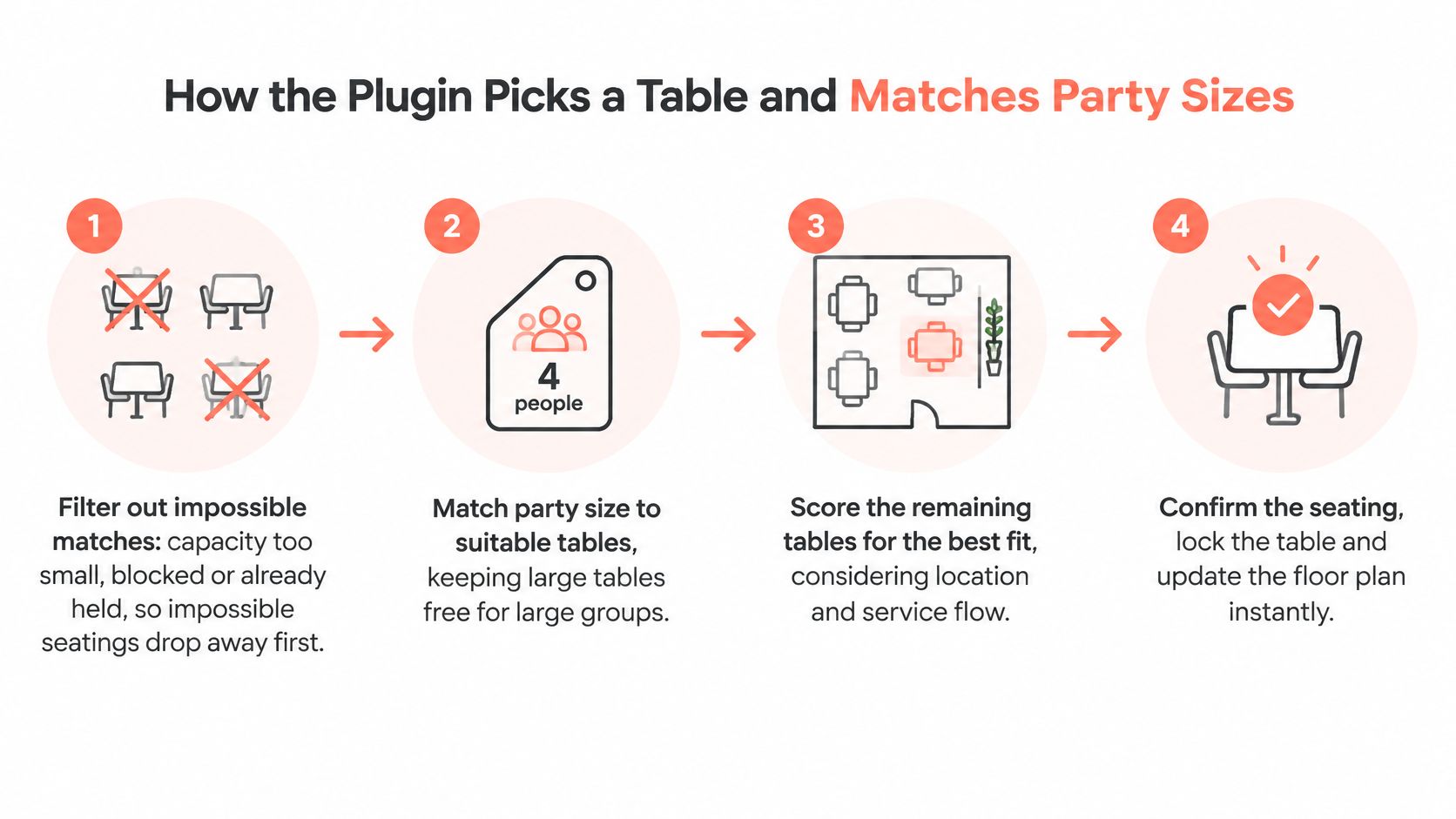
- Filter out impossible options. A party of six can't sit at a two-top, a combination you've blocked is removed, and a table that's already booked or not yet cleared is excluded. This layer runs first and runs fast, so everything after it only ranks workable plans.
- Score what's left. Each remaining option earns points for seats used, expected turnover and fit with the current service pace.
- Choose the highest score with a stability penalty. Moving guests who are already seated costs points, so an assignment holds unless the gain is real. Without that penalty, one new booking reshuffles half the floor and the host spends the next hour apologising.
- Re-check only when something changes. A new booking, a changed party size, a table running late, a walk-in at the door. Everything else stays still.
That structure mirrors a seating problem described in research on a constraint-programming table assignment system, where a feasibility layer rejects impossible assignments before a scoring function ranks the rest, and re-optimisation is event-driven with a penalty for unnecessary reassignment. Stability isn't a nicety. It's what stops host confusion from cascading across the room.
Where comfort becomes a hard limit
Spacing and comfort are constraints, not tie-breakers. A Cornell study of more than 1,400 meal transactions found that meal duration and sales per minute varied by table characteristics, and recommends favouring shorter-duration table types at peak while placing larger parties at suitable freestanding tables rather than automatically using banquettes. Guests seated at closely spaced tables reported significantly lower satisfaction and lower spending per minute, while putting a two-person party at a four-top did not significantly reduce satisfaction or spending. Read that as permission: seat the couple at the four-top, keep the banquette free.
| Party size | Best fit first | Fallback | Watch for |
|---|---|---|---|
| 1-2 guests | Two-top | Four-top at a quiet spot | Close spacing lowers satisfaction and spend |
| 3-4 guests | Four-top | Freestanding four-top over a banquette | Banquettes can run longer at peak |
| 5-6 guests | Freestanding six-top | Two combined four-tops if allowed | Confirm combination rules before service |
| 7 or more guests | Pre-set combined tables | Split seating only with guest agreement | Lock the layout early and block the space |
Store the attributes the scoring needs: table type, location, spacing class, estimated meal duration and party-size compatibility. Without them, the engine is guessing. For the physical side of the plan, this guide to the restaurant seating chart covers how to lay out tables so the software has sensible options in the first place.
Ask each vendor two questions: how does the system handle a party that arrives 25 minutes late, and can seated guests ever be moved without a host approving it?
Which No-Shows to Act On and How Much to Protect
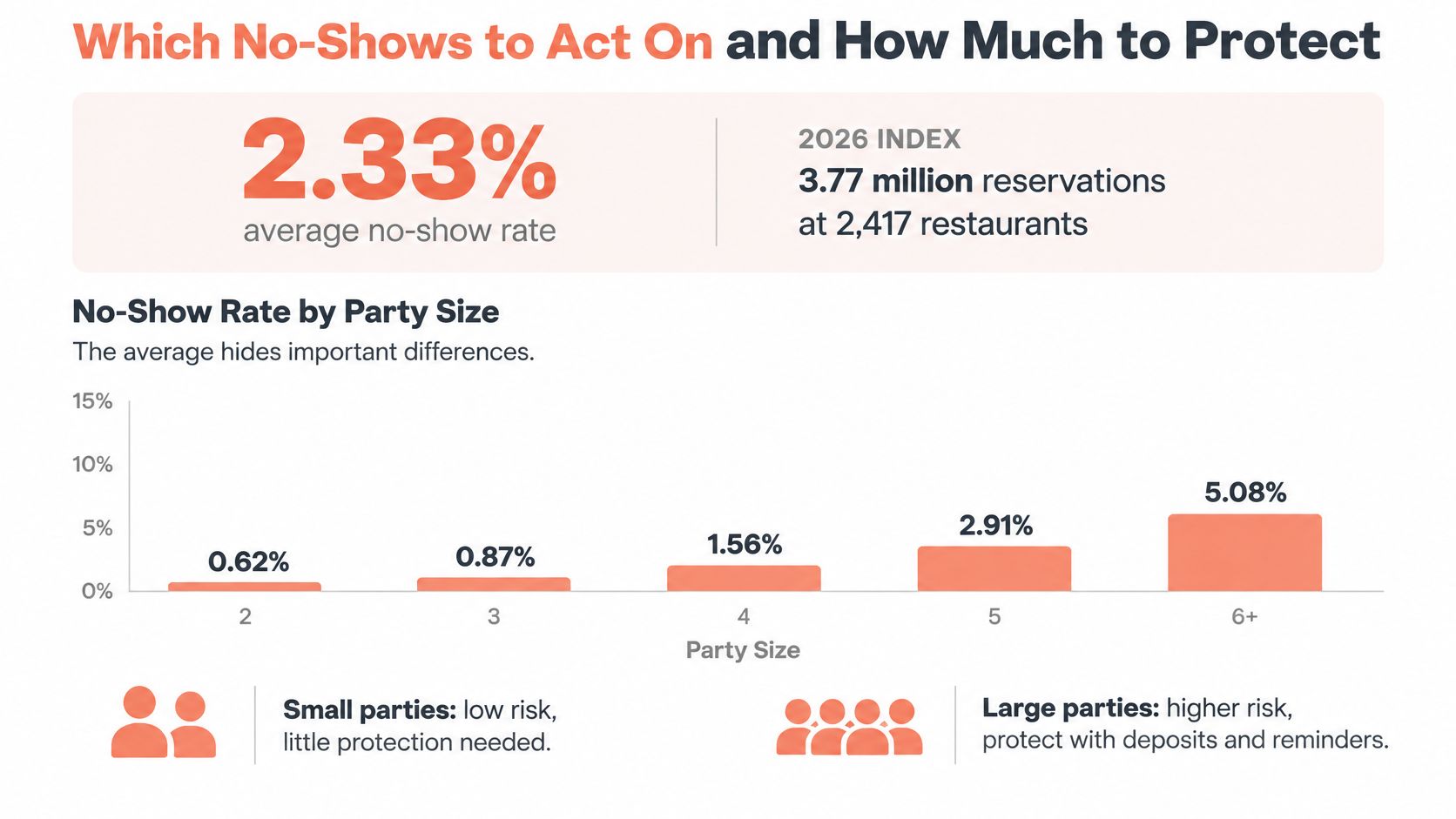
A no-show matters most when it removes several covers from a high-demand service and leaves too little time to refill the table. A single average rate can hide that exposure: a restaurant serving mostly couples faces a different risk from one regularly holding large tables. The chart of no-show rates by party size highlights why party size belongs in the decision.
A single percentage hides where the money is
Two restaurants can have similar overall no-show rates but very different service risks. One may take mostly couples who can be reseated easily; another may hold a large table in a separate room. The lost covers, replacement options and effect on kitchen pacing are not the same.
No-shows also vary with demand. Kellogg School research on restaurant reservations reports observed rates ranging from 3% to 15%, says rates around 20% are not unusual, and records rates reaching 40% on high-demand occasions such as New Year's Eve. Treat those figures as context, not a forecast for your own room. For each booking, consider party size, lead time, venue type and the chance of replacing the covers if guests do not arrive.
A large party booked well ahead for a Friday at a restaurant with a standing waitlist calls for a different policy from the same booking on a quiet night with few replacement guests. The goal is to protect covers without creating a second problem: a full room that the kitchen cannot serve at a workable pace.
Controls in the order they pay back
- Written confirmation for large parties and peak dates. Include the booking time, table arrangement and cancellation terms.
- Deposits when the potential loss is high. Set the amount and refund window according to party size, and show the policy during booking. This guide to restaurant reservation deposits explains how to set terms guests can understand before they commit.
- Waitlist refill so a released table has potential guests waiting. Releasing a table without a queue does not recover the covers.
Set a grace period that suits the booking, then release the table and record what happened. The log helps identify which party sizes and service periods are most exposed, so the policy can respond to actual patterns instead of applying the same rule to every guest.
Blanket overbooking is a poor fit for a stretched kitchen. Seats the team cannot serve on time can turn a missed booking into slow tickets and complaints.
| Party size | Lost covers per no-show | Control to apply |
|---|---|---|
| Table for two | About two covers | Reminder and grace-period release |
| 3 to 9 guests | Varies with party size | Confirmation and waitlist refill |
| Party of 10 or more | A larger block of covers | Deposit, written confirmation and protected table |
Handle late and partial arrivals with a clear service rule. Seat late guests only where space remains, rather than holding a table already released to someone else. If two guests arrive from a booking for six, seat them when the floor can accommodate them and adjust the cover count. On weather-sensitive nights, consider a lower deposit if retaining the booking matters more than applying a strict rule. And do not release a table that cannot be reassigned because of its configuration or the service pace.
Choose one control for large parties, apply it consistently, and track the covers recovered alongside guest complaints before extending the rule to other bookings.
Measuring Results Without Overbooking Your Kitchen
A full dining room can still be a poor service. At 95% occupancy, slow tickets, remakes and a kitchen running behind can cost more than an 82% full room where dishes leave on time. Measure contribution margin, ticket times, remakes, guest complaints and covers per labour hour alongside occupancy and turnover. The aim is to fill seats at a pace the roster and kitchen can sustain.
A table manager plugin should respect the service's capacity, not keep accepting bookings. Set a limit for each time block, and let the host adjust it when the room or kitchen requires a change. Use the controls as guardrails:
- Maximum covers per time block. Set the number the kitchen can handle at each sitting. Fifteen covers at 19:30 is a production limit, not a measure of how many chairs are available.
- Manual override for the host. Hosts need room to respond to the queue, party mix and dining room as it stands.
- Pacing limits per section. Stagger arrivals across sections so the pass does not receive a single rush of orders.
- A physical check before release. A table marked available in software still needs to be cleared, wiped and reset before it can take another party.
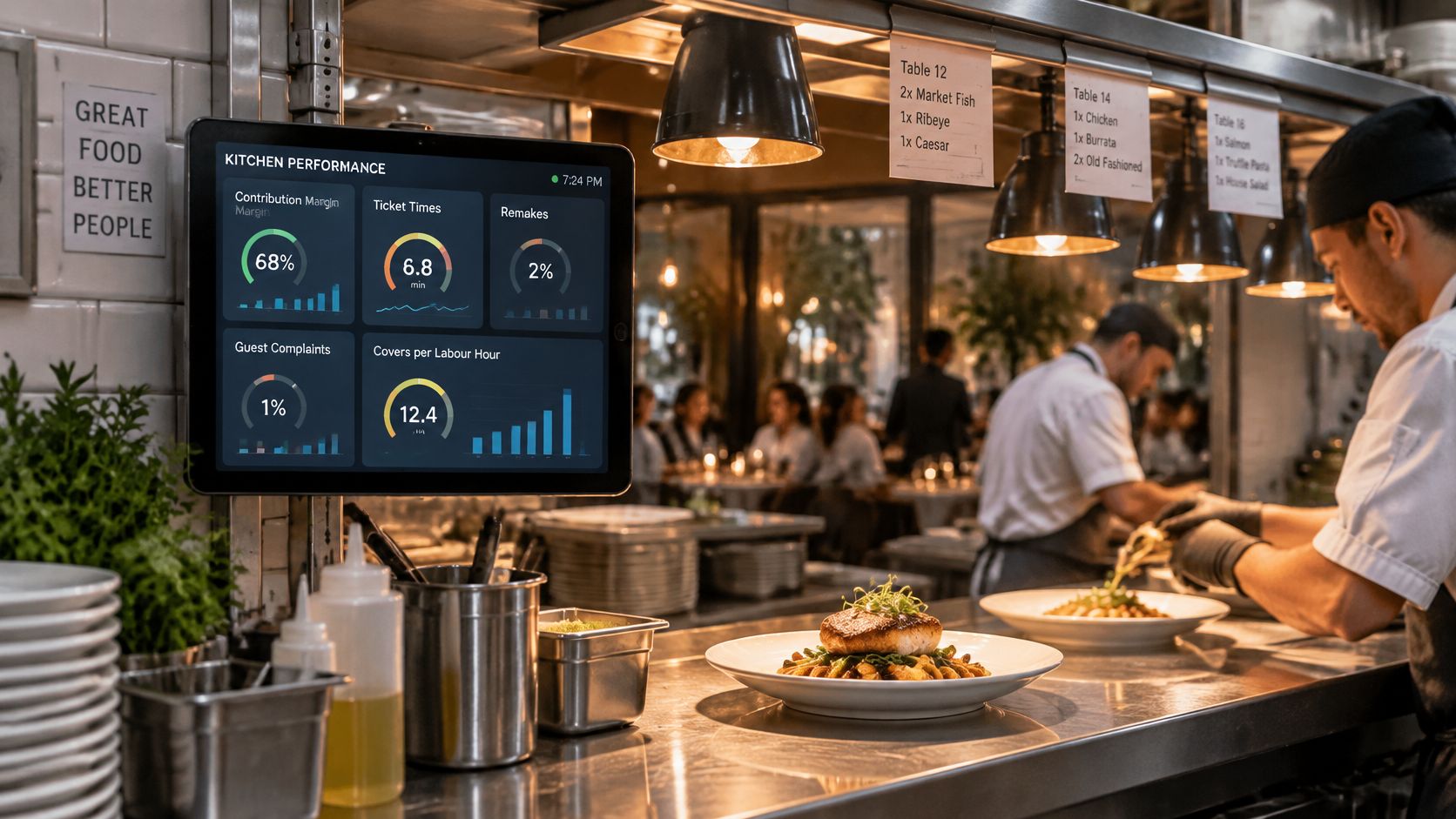
Table duration matters, but the right target depends on the pace of service. A hospitality study on table duration reports that longer visits affect turnover and revenue. It also finds that alcohol orders lengthen visits, while their positive revenue effect weakens as the restaurant approaches full capacity. Use that distinction when deciding whether to turn a table quickly or let a guest stay: a quiet service and a nearly full one do not need the same pacing.
The arithmetic of one shift
Use your own figures to test whether extra covers are worthwhile. For a Friday service with 60 covers, a 10% lift adds 6 covers. At an average spend of 45 euro per cover, that is 270 euro per service. Across three services a week for 50 weeks, the arithmetic is roughly 40,500 euro in gross sales a year, before food, labour and other costs. The 10% lift is an assumption to test, not a guaranteed result.
Then compare the gain with labour saved and kitchen performance. If the plugin saves around 20 minutes of phone calls and manual seating per service, that is about an hour a week across three services. That time matters only if it reduces avoidable work without leaving the host short of control during a rush.
Record a four-week baseline before go-live, then compare it with the same four weeks afterwards. Track covers per shift, no-show rate, host time on the phone and ticket times from the pass. Read the revenue per available seat hour alongside those measures, so more covers do not disguise weaker returns per seat or a strained kitchen. Restaurants using 10Seat see 30% more reservations, 40% fewer no-shows and 10-15% more covers per shift. Compare your own baseline before treating those figures as a likely result for your service.
Compare Pricing Models Against Your Margin
On a busy Saturday, a pricing model can take a meaningful share of the extra sales your table manager helps generate. Compare the cost against covers per labour hour and kitchen flow, not just the occupancy figure.
- Flat monthly fee. The charge stays the same on a quiet Tuesday and a packed Saturday. It is predictable, and it does not rise with bookings you would have taken anyway.
- Per booking or per cover. Costs fall when volume is low and rise when it is high. The busiest services may carry the highest bill.
- Commission on spend. The fee grows with sales, so a strong quarter can also mean a larger platform cost.
Compare platforms such as TheFork, OpenTable, Zenchef and Formitable on both their features and charging models. The fee structure affects which services cost you most.
For a worked example, take a Friday service with 2,700 euro in sales and an illustrative commission of 2%. That comes to 54 euro per service, or about 8,100 euro across 150 services a year. Set that cost against the uplift you are testing in your own baseline. If the added covers slow the kitchen or require extra host time, the sales figure alone will overstate the benefit.
Ask both questions in writing: the total annual cost at your current volume, and the total annual cost at 20% more covers. A quote that answers only the first leaves the higher-volume cost unclear.
Check for extra charges for setup, data export and additional floor screens. Ask how pricing changes if you add another location. 10Seat offers a free “On the House” plan for up to 50 covers with no credit card required, so you can run this comparison against your own covers.
Shortlist and Test a Plugin This Week
Five steps, and none of them require a meeting with a sales team first.
- Pick three capabilities from the comparison table that match your biggest floor problem. If walk-ins are the leak, that's live status, waitlist accuracy and party size matching. Ignore the other five for now.
- Start the four-week baseline if you haven't. Covers per shift, no-show rate, host time, ticket times. Without it you'll be judging a feeling.
- Demand a demo on your floor plan, not a sample one. Import your real table layout with its awkward corner banquette and its two-tops that can't be joined, then ask the vendor to seat a simulated service.
- Run the margin test from the pricing section with your own covers and average spend, at current volume and at 20% more.
- Trial during a quiet week and compare against the baseline. 10Seat moves a restaurant's entire reservation system in 15 minutes, with no third-party platform and no lost reservations, and it's a smart reservation system that fills tables faster, reduces no-shows and sets up in minutes. A live walkthrough of the floor and reservation features is available at 10Seat's product page.
Before the next busy service, write the one floor problem you want solved on the shift sheet, and confirm that somebody is recording the baseline numbers. Those two lines decide whether the tool is worth paying for.
10Seat combines a capacity engine with smart auto seating and walk-in handling, so online bookings land in the most efficient table configuration instead of a list your host has to interpret at 20:00. If you want to see how it fits the floor you run, take a live walkthrough or start on the free plan at 10Seat and put your own covers, tables and no-show rules against it before your next full service.