Reservation Software for Restaurants: A Practical Guide
Learn how reservation software for restaurants works, which features improve table utilization, and how to choose the right platform for your service.
Friday service is building. A walk-in couple is waiting, a booked party is late, and the kitchen has asked the host to slow arrivals. The reservation book shows space, but the only free tables are also needed for the next wave. That's when reservation software for restaurants has to earn its place, by helping the team run service, not just collect bookings.
Table of Contents
- Why Reservation Decisions Break Under Pressure
- How Restaurant Reservation Software Works
- Features That Improve Every Busy Shift
- See Reservations in Real Restaurant Scenarios
- Compare Pricing Models and Platform Fit
- Evaluate and Roll Out the Right Platform
- Make the Final Choice Service by Service
Why Reservation Decisions Break Under Pressure
The host's hardest job isn't entering a reservation. It's deciding whether accepting or seating that party will create a problem later.
An empty table can look available while being operationally committed. A small party might fit there now, but seating them could remove the only workable configuration for a larger booking. Meanwhile, a delayed arrival changes the sequence the host planned before doors opened.
The pressure comes from making these decisions together. Party size, dining duration, table combinations, kitchen workload, and expected arrivals all matter. A calendar that displays names and times leaves the host to calculate the consequences mentally.
Buy decision support, not another dashboard
Good reservation management reduces the work between seeing a change and acting on it. The host should be able to identify a viable seating option, understand the conflict it avoids, and override it when hospitality requires a different choice.
That's the practical purpose of restaurant yield management: selling available capacity without making promises the dining room can't keep.
Practical rule: Judge software by the decisions it removes from a pressured host, not by the number of screens in the demonstration.
10Seat combines a Capacity Engine, Smart Auto Seating, Auto Seating Puzzle, and Walk-in Squeeze. Its product claim is 10 to 15% more covers per busy shift without adding tables, not a guaranteed result for every restaurant.
That's a capacity claim, not proof of faster service or higher profit. Extra covers only help when the kitchen, servers, and guest experience can support them.
During a trial, record:
- Decision effort: Where does the host pause, calculate, or call a manager?
- Capacity lost: Which parties get declined despite apparently empty seats?
- Service strain: Does accepting another party create an avoidable arrival peak?
Start with the reservation's journey through service. Then assess the features, commercial model, and implementation work against those actual decisions.
How Restaurant Reservation Software Works
A guest requests a table through a website, a social booking link, or a QR code. Another guest phones, and the host enters the request manually. For evaluation purposes, all of those routes should feed the same operational reservation book.
That record needs more than a name. Date, arrival time, party size, expected duration, booking source, notes, and status should remain visible as the visit progresses. Otherwise, the team ends up reconciling separate lists during service.
The booking journey below shows the connection between incoming requests and the host's working floor view.
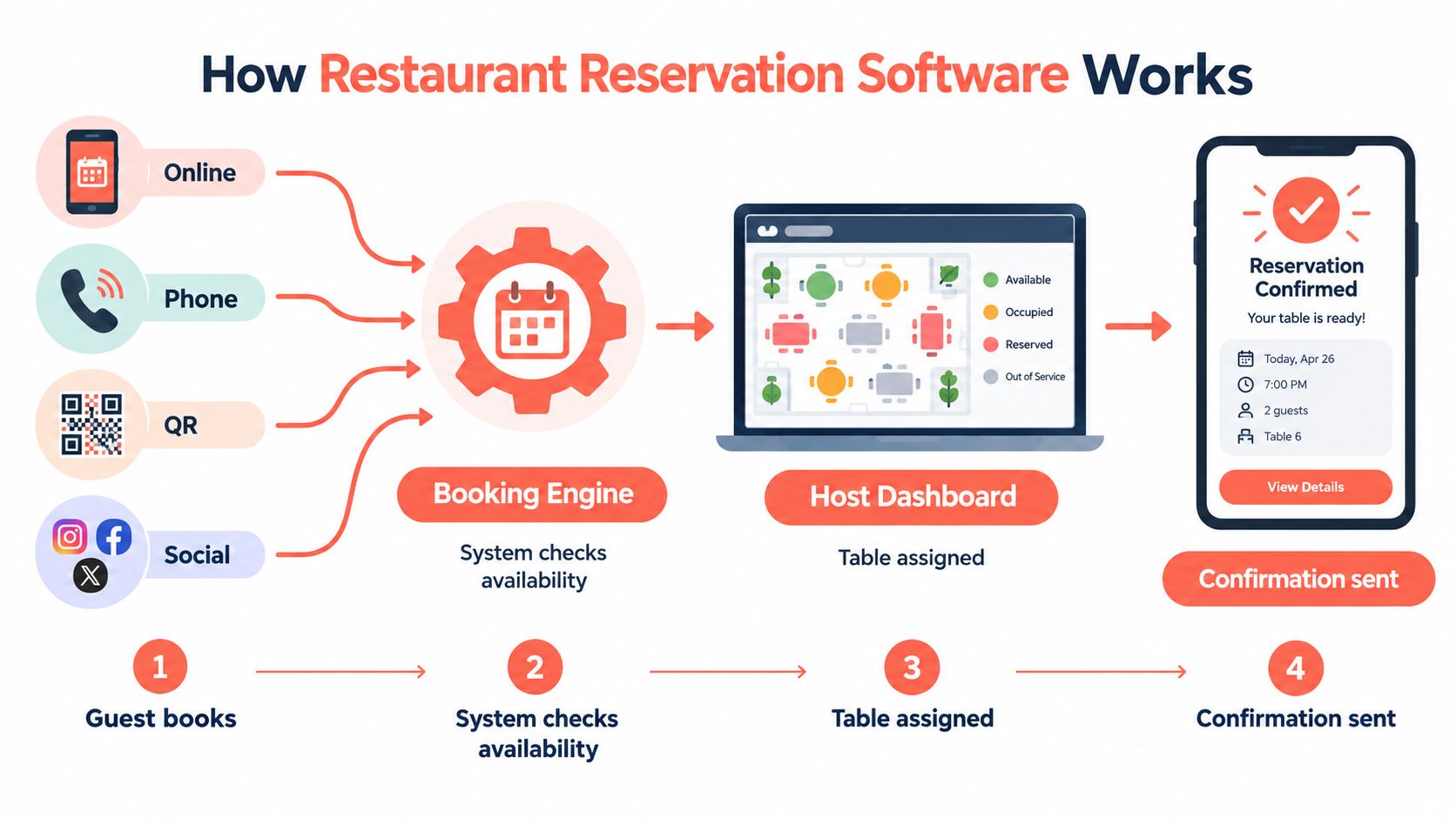
From request to workable reservation
Think of the request as an order arriving at the pass. Receiving it doesn't mean the restaurant can execute it immediately. Someone, or the software's configured rules, must check whether the floor can accommodate it.
The important distinction is between capturing demand and committing capacity. An online form does the former. Operational reservation software should connect the request to suitable seating, permitted combinations, and enough time before the next commitment.
That distinction has shaped the category from its early development. The Harvard account of the electronic reservation book describes the pairing of consumer reservations with a restaurant-side view of bookings and table availability.
- Before confirmation: Check that the requested party can fit under the restaurant's rules.
- Before arrival: Keep changes to time, size, and requirements attached to the booking.
- During service: Make arrival, seating, and departure status clear to the team.
- After departure: Retain only useful, appropriate information for a future visit.
From planned service to live service
A confirmed reservation is a plan, not a prediction that must come true. Guests arrive early, meals take longer, and staff sometimes need to close a section.
Ask the vendor to demonstrate what happens when those conditions change. Does the system revise availability? Does it identify a conflict? Can the host make a correction without rebuilding the whole evening?
A useful guest record also develops through completed visits. Staff should distinguish a lasting preference from a request that applied only to that occasion.
The test is continuity. A detail entered during booking should reach the person who needs it during service, without copying, searching, or relying on a handwritten reminder.
Features That Improve Every Busy Shift
Start with the floor, not the booking widget. The essential feature is a trustworthy view of what the team can do next. If the floor display doesn't reflect service reality, automatic recommendations won't deserve the host's confidence.
A real-time view should distinguish occupied tables, tables awaiting reset, blocked seating, and upcoming commitments. Test whether staff can update those conditions from the device they'll use, not just from the vendor's demonstration laptop.
Protect the next workable layout
Automatic seating needs rules. Party-size limits, legal table combinations, expected duration, and manual table locks should influence its recommendations.
The host should also retain control. A guest with a mobility requirement or a service issue may need a different table from the one the software proposes. The system should make that intervention clear and show any resulting conflict.
Research on restaurant table assignment connects table-management decisions with waiting time, turnover, and revenue from existing capacity. Its use of RevPASH, revenue per available seat-hour, provides a useful way to judge whether seating capacity is earning effectively over time.
During evaluation, concentrate on these operating controls:
- Combination rules: Permit only arrangements staff can physically and safely create.
- Manual assignments: Keep deliberate host choices stable unless an authorized person changes them.
- Pacing views: Show concentrated arrivals before the kitchen receives a concentrated workload.
- Reservation statuses: Distinguish a cancellation, a late arrival, and an actual no-show.
- Waitlist actions: Connect a released opportunity to a suitable waiting party.
A seating suggestion should explain enough for the host to trust it, without requiring the host to solve the same problem again.
Make supporting features earn their place
Reminders, deposits, and card guarantees belong in the workflow where the restaurant needs them. Ask how staff see confirmation status, explain the policy, process an exception, and resolve a disputed charge. A policy that only exists in the booking confirmation won't help the floor team enforce it consistently.
Guest profiles need equally practical treatment. Allergy information should be prominent for authorized staff, while preferences and special occasions should remain relevant rather than becoming permanent assumptions.
Integration deserves a demonstration, not a logo wall. Ask which fields move between systems, what triggers the transfer, and who corrects mismatches. Avoid integrating data that nobody uses to make a service decision.
Finally, test the less attractive features:
- Permissions: Can hosts run service without accessing unnecessary guest information or commercial settings?
- Mobile operation: Are essential actions usable on the restaurant's actual devices?
- Failure recovery: What remains available if the connection or POS link stops working?
- Audit history: Can a manager establish who changed a booking and why?
Those checks separate dependable service tools from decorative features.
See Reservations in Real Restaurant Scenarios
Consider these as rehearsal scenarios, not reported customer results. Each exposes a different weakness that can remain hidden in a tidy sales demonstration.
The illustration provides a starting point for testing early arrivals, mixed party sizes, and overlapping demand.
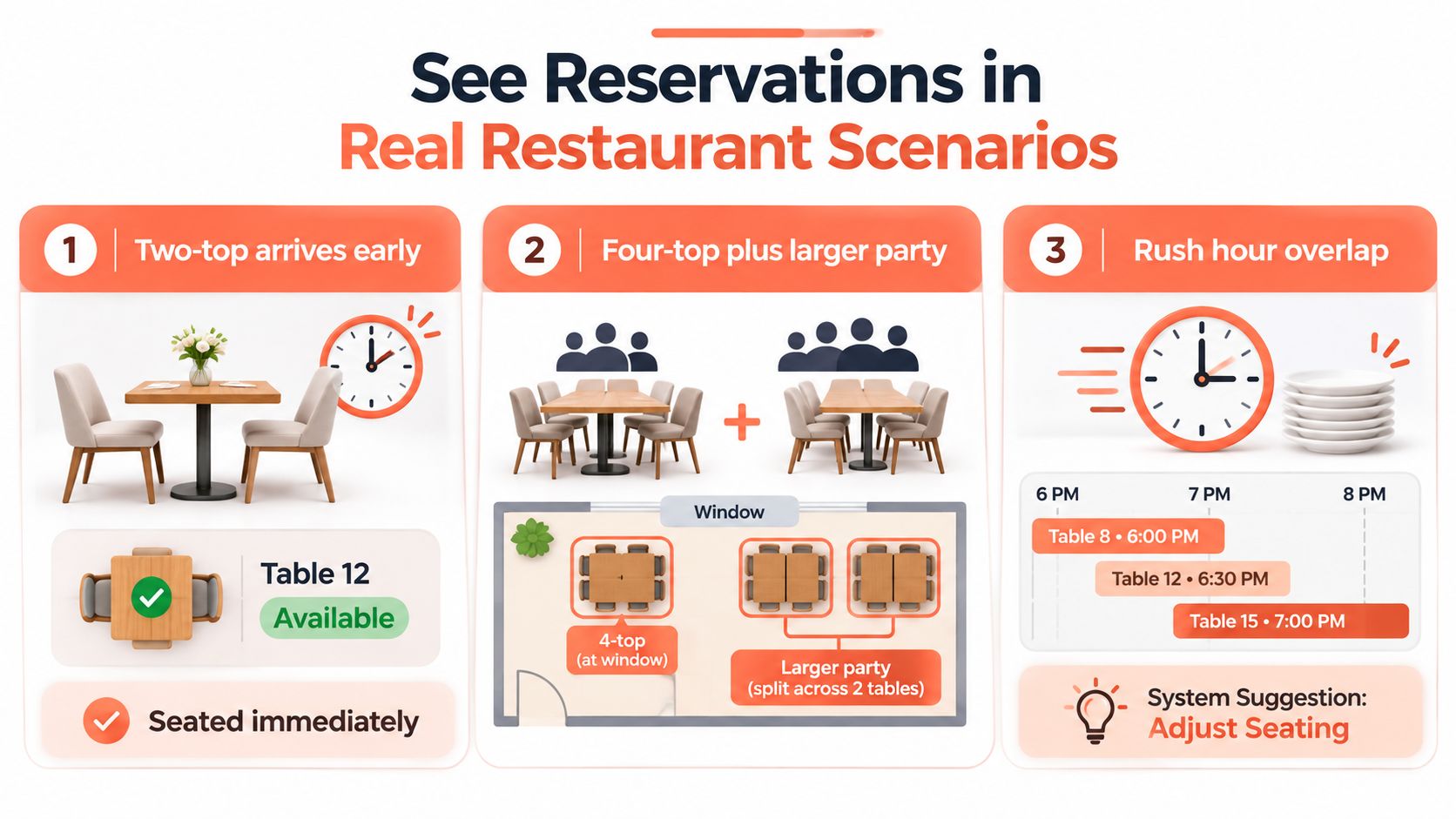
An early couple meets a constrained floor
A two-top arrives before a four-top and a larger party. Seating the couple at the first attractive empty table could consume part of the arrangement needed later.
Ask the host to make the placement using the proposed software. Then introduce the later parties and check whether the plan still works. The restaurant seating-chart guide is a useful companion for documenting the physical arrangements the system must respect.
Next, cancel a booking. The host should be able to identify the released capacity, contact a suitable waitlist guest, and confirm that the replacement won't create an arrival bottleneck.
A long meal meets a short opening
A lingering table hasn't reached dessert, while a walk-in wants a shorter visit. Don't test this by shortening a duration until the screen turns green. Ask whether the host can offer an honest dining window without depending on an unrealistically fast reset.
Kitchen readiness belongs in that decision. For owner-chefs reviewing equipment alongside service pacing, Everti's restaurant quality pans explained is a separate resource, not evidence that booking software can resolve a production bottleneck.
Use the video below alongside a host rehearsal, pausing to discuss how the restaurant would handle changes.
An absent party leaves usable capacity
No-show handling should help staff recover a seating opportunity, not merely record an absence. The benchmark requires care: a peer-reviewed study citing preceding-year U.S. data reported 28% of reservations weren't honored, whereas a separate dataset recorded an average no-show rate of 2.33%.
Those datasets aren't interchangeable. Use the restaurant's own attendance history before changing guarantees, reminders, or acceptance rules.
Finish the rehearsal with a returning guest whose profile contains a dietary note. Staff should verify that it remains accurate and relevant, then communicate it appropriately. Recognition is good hospitality only when the underlying information is trustworthy.
Compare Pricing Models and Platform Fit
Compare the commercial model before comparing the headline subscription. A restaurant seeking new diners has a different buying problem from a busy venue trying to control direct bookings.
10Seat represents commission-free reservation management for independent restaurants in Benelux. In a pricing-model comparison, TheFork and OpenTable represent marketplace-led options where commission or cover-based charges warrant checking. Zenchef and Formitable belong in the comparison when assessing broader management packages and bundled commercial terms.
These are purchasing categories, not universal descriptions of every current plan. Ask each vendor to confirm the applicable local contract, booking-source charges, and included services in writing. Verify 10Seat's current pricing terms on the same basis.
Reservation platform decision matrix
| Buyer priority | Commission-free direct management | Marketplace-led booking | Broader management platform |
|---|---|---|---|
| Commission sensitivity | Check subscription and ancillary costs | Check charges by booking source | Check package inclusions and extras |
| Direct booking control | Inspect the restaurant's booking journey | Separate direct and marketplace journeys | Check branding and configuration rights |
| Consumer reach | Establish how guests will find the restaurant | Assess whether marketplace discovery is useful | Verify any acquisition services separately |
| Live table management | Rehearse floor decisions | Rehearse the same decisions | Test the relevant operating module |
| Team size | Check permissions and handovers | Check account and workflow responsibilities | Assess administrative workload |
| Setup burden | Request a written setup scope | Include channel migration work | Include wider configuration dependencies |
| Required integrations | Verify essential connections | Check source attribution and data transfer | Check compatibility across the package |
Weight the restaurant's actual problem
Give the most importance to requirements that currently interrupt service or damage the economics of a booking. A discovery-led venue may accept acquisition costs that an established neighborhood restaurant doesn't need.
Don't let a broad package win because it contains more functions. An unused module still creates evaluation, configuration, and training work. Equally, don't reject a marketplace charge without assessing whether the associated demand is useful.
For managers building a formal supplier scorecard, the GM GROUP risk management comparison offers a separate procurement reference. Keep the restaurant's evidence grounded in demonstrations, contracts, and operating tests.
Request a total-cost proposal using actual booking activity. Include setup, messaging, payment handling, support, integrations, and exit arrangements wherever applicable.
Buying discipline: A lower advertised price isn't a lower operating cost if the team needs extra work to make the system usable.
Evaluate and Roll Out the Right Platform
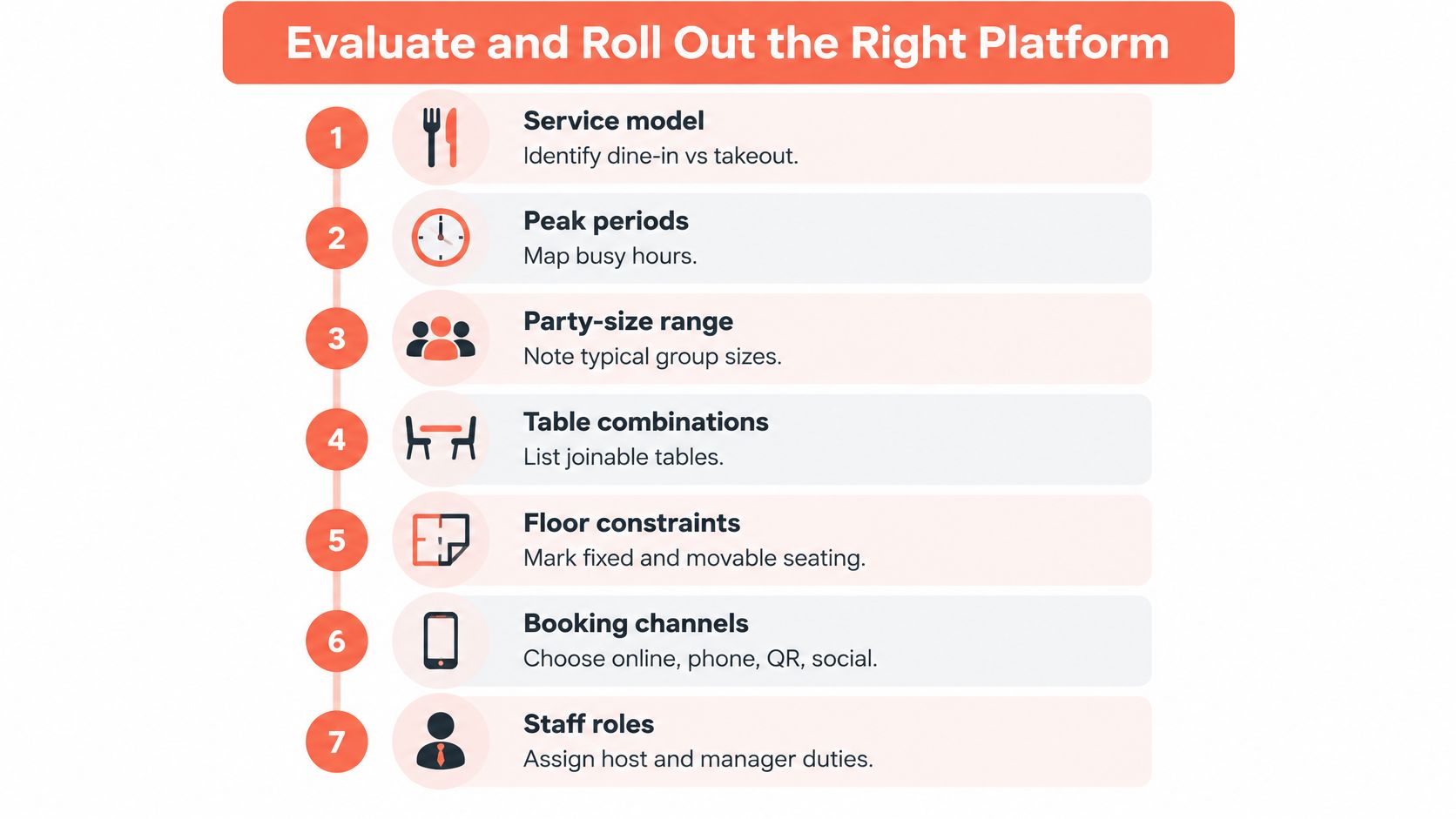
Begin with the service model, not a vendor shortlist. Document peak periods, party sizes, permitted combinations, fixed floor constraints, booking channels, staff roles, and essential integrations.
The checklist below gives the implementation conversation a practical starting point.
Rehearse before switching
Run the earlier service scenarios with a host, not just the manager purchasing the software. Add a late arrival and an unavailable table. Observe where the host needs explanation and record the training time rather than accepting an unsupported estimate.
Implementation effort deserves serious weight. A restaurant technology report identified insufficient staff to implement and manage technology, actionable-data difficulties, and integration compatibility as operator challenges.
- Assign ownership: Name who configures the floor, policies, permissions, and booking channels.
- Test dependencies: Confirm what happens when the POS connection or internet fails.
- Secure an exit: Request usable data exports and written migration responsibilities.
- Agree on support: Establish who responds during service and what staff should do while waiting.
Use the restaurant POS system guide to frame the integration discussion. Require the vendor to demonstrate the specific workflow instead of promising general compatibility.
Hospitality procurement also benefits from checking delivery and support commitments before signing. Avistar's guide to avoid bad hotel amenity vendors is an adjacent supplier-vetting resource, not a reservation-platform assessment.
Test accessibility and guest-data handling
Complete the booking journey on mobile, with a keyboard, and using a screen reader. Check date selection, labels, validation messages, cancellation, and every social-link entry point.
Accessibility and privacy guidance for restaurant reservations highlights relevant European accessibility requirements and the sensitivity of allergy information. Confirm the obligations applicable to the business rather than assuming a widget makes the whole journey compliant.
Collect only necessary information. Set retention and deletion rules, restrict staff access, and keep allergies distinct from preferences.
Check Belgian GKS boundaries
For Belgian operations, GKS, Geregistreerd Kassasysteem, requires a separate compliance checkpoint. The obligation applies when qualifying annual restaurant and catering turnover exceeds €25,000 excluding VAT and drinks, assessed per establishment, according to Moore's explanation of the Belgian cash-register circular.
Reservation records don't replace certified fiscal transaction registration. The GKS framework combines a cash register with a Fiscal Data Module; document how completed service reaches that fiscal workflow.
Before switching, establish a baseline for completed covers, seating corrections, declined demand, cancellation recovery, and host effort. Compare similar services and investigate exceptions rather than crediting every change to the new software.
Make the Final Choice Service by Service
The final choice should survive an ordinary difficult shift. A polished demonstration isn't enough if the host can't recover from a late party, a blocked table, or an unexpected change without calling the manager.
Choose the platform whose recommendations the team can understand and whose controls match the restaurant's actual service. Reject features that add administration without improving a decision, protecting a commitment, or helping staff deliver hospitality.
Use an operational acceptance test
The buying decision should answer practical questions:
- Can staff act confidently? The host can identify a suitable placement and understand any conflict.
- Can managers control exceptions? Overrides remain visible and accountable.
- Can the team recover? Staff know what to do when a connection or integration fails.
- Can the business verify value? Comparable shifts show whether the system improves completed service.
- Can the restaurant leave cleanly? Costs, data export, and contractual responsibilities are clear.
10Seat describes its focused host screen as designed for 0.5-second decisions, a product design benchmark, not independently established time savings for every restaurant. Test that claim with the people who will stand at the host station.
For independent restaurants in Benelux, its commission-free reservation and table-management model merits consideration when the main problem is executing service with existing capacity. The deciding evidence should come from realistic party sizes, documented setup effort, and a rehearsed recovery process.
Inspect the operating model, compare like-for-like terms, and ask for measurable rollout support. Then make the decision from observed service performance, not the longest feature list.
10Seat offers commission-free reservation and table management for independent restaurants in Benelux, with capacity and seating tools designed around the working dining room. Visit 10Seat to inspect the product, then bring a recent busy-shift booking sheet and test how it handles the decisions that slowed the team down.