Online Reservation System for Restaurant: Features and ROI
Learn how an online reservation system for restaurant fills more seats, what features to demand, and what it returns in covers and staff time.
A Friday service is already moving when the phone rings. The host pauses, checks the paper book, asks the caller to wait, then discovers the table they want is listed in another channel too. A reservation system should prevent that sort of scramble. Its real job isn't just to accept bookings, it's to help you manage the seats, arrival times and staff attention you already have.
For an independent restaurant, the useful test is practical: does the system keep every booking channel in sync, give the host a clear floor view, and help turn available capacity into served covers? The right setup can also reduce time spent on routine phone bookings. The numbers below show how to test that value in your own dining room before trusting a vendor's performance claim.
Table of Contents
- What an Online Reservation System Actually Does
- Must-Have Features and How to Compare Them
- Covers, Pacing and the Return You Can Measure
- Common Floor Problems and How Auto Seating Fixes Them
- Guest Data, Privacy and Fair No-Show Rules
- GKS Rules to Keep Separate From Your Reservations
- How to Choose and Launch Your System This Month
What an Online Reservation System Actually Does
An online reservation system for a restaurant is one shared booking book tied to a live floor map. It manages seat-slots: one seat, for one party, for one stretch of service. The website form is only an input. The useful part is the system deciding which table can take an early party without taking the same chairs away from the next seating.
That has a clear order of operations. A public booking page or widget collects the request. The central book records it. The table layout turns it into an assignment. The host-stand view shows pressure building before service. Confirmations and reminders close the loop so the book reflects reality, not hope.
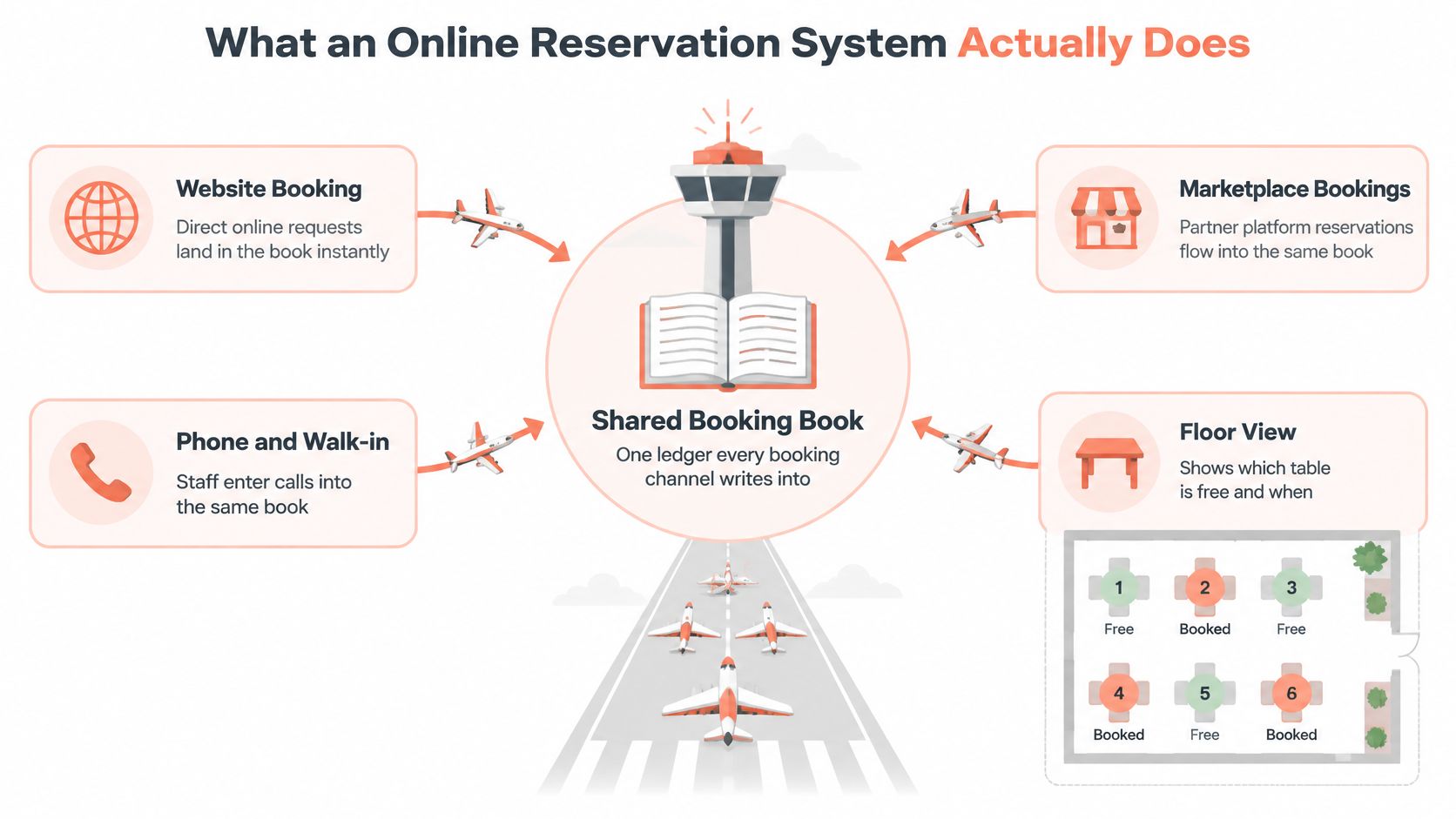
One book for every channel
Phone bookings still matter. A Cornell consumer study found the telephone was the most common reservation method overall, so online booking should complement direct and offline channels rather than pretend they disappeared. When the same book takes website, phone, walk-in, social and QR entries, availability stays honest across the room.
A lagging book creates a specific loss: a table held in two places sits empty while the host sorts out which party owns it. The category took shape in the late 1990s, when OpenTable, founded in 1998, linked a consumer site to restaurant-side booking software. To test one today, change a single booking and watch every screen; any view that still shows the old table is a view the floor cannot trust.
Must-Have Features and How to Compare Them
Must-haves should decide the purchase. Loyalty tools and marketing emails can help later, but they won't fix a double-booked Friday. Start with real-time availability, an embeddable booking page, social and QR links, an editable floor plan, capacity controls by time and party size, and a waitlist that includes walk-ins.
Must-have features and what to verify
| Feature | What it does | What to verify before you buy | Red flag |
|---|---|---|---|
| Real-time availability | Shows open tables across every channel | A phone entry appears online within seconds | Separate booking lists per channel |
| Multichannel booking | Takes bookings from website, social, QR and listings | Booking widget works well on mobile | Bare form with no table logic behind it |
| Table and seat mapping | Assigns each party to tables on your floor plan | You can edit the floor plan in under an hour | Fixed layout you cannot change |
| Capacity and pacing controls | Limits covers per slot and per party size | Limits can be set per 15-minute slot | Only a total daily cover limit |
| Auto seating | Suggests table combinations for each party | Manual override is always one tap away | Assignments with no explanation or override |
| Walk-in and waitlist | Holds spare capacity and quotes waits | Walk-ins can be added in one tap | No waitlist, or a paper list kept beside the system |
| Guest profiles and notes | Stores preferences, allergies and occasions | Notes can be edited, deleted and shown by role | Notes visible to all staff by default |
| No-show and cancellation tools | Sends confirmations and reminders, releases unclaimed tables | Confirmation timing is configurable | Only manual phone calls to confirm |
| Reporting | Tracks covers, turns, no-shows and average spend | Data exports to your accounting tool | Only booking counts |
Guest records should hold only what service needs. Notes must be editable and deletable, and visibility should depend on staff role. Keep a manual override for every automatic seating decision, plus a clear log of who changed what.
Ask every vendor three questions before signing: What happens when the internet drops? Can the host override every seating suggestion? How can guest and cover data be exported if the restaurant leaves? If guest feedback is part of the service plan, practical restaurant review templates can help staff collect useful comments without confusing reviews with booking records.
Rate each row 0, 1 or 2 for your venue. A zero on a must-have row is a reason not to sign.
Covers, Pacing and the Return You Can Measure
A booking channel can win a guest who needs to secure a table for a business lunch. In a Cornell study of casual restaurants, more than half of respondents said they wouldn't consider a restaurant for a business meal if reservations were unavailable. That's why reservations are a demand-capture channel, not just an administrative convenience. The Cornell study of casual restaurants compared advance reservations, calling ahead for an estimated wait and first-come, first-served seating.
Three operational gains are worth measuring:
- Less phone work. The host can manage calls and arrivals from one list rather than stopping repeatedly to check a paper book. For example, a caller asking for a table can be entered once and appear on the same floor view as online bookings.
- Better pacing. Spreading arrivals across 15-minute slots helps avoid a surge of 40 covers at 19:30 while the kitchen is quiet at 18:00. Set limits that match the kitchen's capacity and the floor's table mix.
- Recovered covers. A table that appears available in the system can be offered to another guest instead of sitting empty because nobody knew it had opened. A late cancellation can go to the waitlist rather than disappear from the service plan.
10seat says its Capacity Engine can deliver 10 to 15 percent more covers per busy shift. Treat that as a vendor claim, not a forecast. The only useful result is the one measured against your restaurant's own baseline.
Work through the annual return
Take a hypothetical dinner service with 40 covers and a €45 average spend. Six services a week for 52 weeks gives 312 services a year. The arithmetic is straightforward:
| Line item | Assumption | Per service or day | Per year |
|---|---|---|---|
| Baseline gross sales | 40 covers at €45 average spend | €1,800 per service | €561,600 |
| Extra covers from capacity | 10% more covers, or 4 extra per service | €180 per service | €56,160 |
| Phone time saved | 15 of 25 daily bookings moved online, 2 minutes each | 30 minutes per trading day | 156 hours |
| Revenue per seat-hour | Total revenue divided by seats and open hours | Track weekly | Compare four weeks before and after launch |
The annual sales gain is gross revenue, not profit. Food, labour and other service costs still apply. Revenue per seat-hour helps assess whether the dining room is producing more from the capacity already open. It divides total revenue by available seats and the hours those seats are open, combining occupancy, turns and average spend. A worked revenue-per-seat-hour example illustrates how additional covers can use existing capacity without adding tables.
Run a clean test. Record covers, average check, turn time and no-shows for four weeks before launch, then record the same measures for four weeks after. Compare equivalent service periods where possible, and note changes that could distort the result, such as a special event or a different opening schedule. Don't assume a 10% lift; measure it.
For help connecting booking data to the restaurant's wider promotion plan, use hospitality marketing advice from Carlos Alba Media as a separate planning resource. Keep the operational test focused on covers, revenue per seat-hour and phone time saved.
Common Floor Problems and How Auto Seating Fixes Them
Two problems waste the most capacity: double bookings from separate lists, and empty seats left by no-shows. A 2025 German hospitality survey found that 87% of surveyed restaurateurs and hoteliers had experienced no-shows, and about 40% of affected businesses estimated losses above 5% of annual revenue. A no-show response needs to sit inside floor management alongside card policy, because the empty table is the problem and the deposit is only one way to prevent it.
Auto seating works like a jigsaw. The host has pieces, the parties, and a board, the floor plan. The software tests table combinations to seat the parties without leaving awkward gaps. The Capacity Engine calculates how many covers the floor can take in each slot, based on table sizes, permitted combinations and pacing rules. Smart Auto Seating recommends a suitable table, so a two-top doesn't occupy a six-top while a larger party waits.
When a large party books, Auto Seating Puzzle can rearrange combinations around the reservation. Walk-in Squeeze looks for space for a walk-in on the floor plan. On a focused host screen, the suggestion is a half-second decision rather than a walk around the room. These tools help only if the floor plan matches the actual room and the host can override the suggestion.
Practical rule: The system suggests. The host decides.
The release rule matters as much as the seating rule. Configure confirmation timing, activate a waitlist when capacity opens, and set a release window for unclaimed tables. A restaurant might release a table 15 minutes after its booked time, then log the release and offer the seat to the next guest. Applied consistently, that one rule recovers seats a lax policy leaves empty for the whole service.
For a visual way to map tables and combinations, this restaurant seating chart guide can help the team document the room. A small table tent can also direct walk-ins to a booking page or waitlist, and you can order custom tent cards when printed signs suit the service style. To see the floor logic in action, look at how the Capacity Engine and Smart Auto Seating work on 10seat's product page.
Guest Data, Privacy and Fair No-Show Rules
Start with the details needed to seat and serve the guest: name, one contact method, party size, seating time, and allergy or accessibility notes that affect the booking. Leave out birthdays, spend history or other personal details unless there's a clear service reason and the guest has opted in.
Set a retention rule for each field. For example, a restaurant might delete free-text preferences after 12 months of inactivity and keep an allergy note only while it's relevant to the booking. Check each rule with a privacy adviser against GDPR obligations.
Access should match the job. Hosts need seating notes. Managers need operational reports. Only owners should be able to export full profiles. Require a visible log of who changed a note, and log shared front-of-house tablets out between shifts.
Ask a vendor where data is hosted, whether staff logins support two-factor authentication, and how quickly the restaurant will be told about a breach. Keep automation operational: confirmations, reminders and table holds help service, while profiling a guest's predicted spend can feel intrusive. Give guests a simple way to opt out of marketing, and apply the same no-show rule to everyone. A card deposit can be one option among several, not the only route to a table. For a practical policy discussion, see this guide to restaurant reservation deposits.
GKS Rules to Keep Separate From Your Reservations
A Belgian restaurant serving meals on site must use a Geregistreerd Kassasysteem (GKS) when annual turnover from restaurant and catering services exceeds €25,000 excluding VAT. Drinks are excluded from the calculation, and takeaway meals aren't included in the qualifying turnover figure. Horeca Vlaanderen's GKS guidance explains the threshold and the required cash-register tickets.
That means total sales aren't the right number to check. A drinks-heavy venue may have substantial headline revenue while qualifying meal and catering turnover remains below the threshold. A food-led restaurant or a busy catering operation may cross it. Track qualifying sales separately rather than applying the threshold to all revenue.
Below the threshold, the restaurant still has to issue required VAT receipts for meals and accompanying drinks consumed on site. Above it, tickets must come from a registered cash system, not a pro forma ticket. The booking system has a different job: it manages covers, arrival times and seating. It doesn't replace certified cash-register obligations.
A practical checkpoint is to review qualifying meal and catering turnover every month, then check the position with the accountant at year end and during peak seasons. A reservation system can support service planning, while a compliant POS handles the applicable sales records. Keep the distinction clear when reviewing the restaurant's POS system requirements. This is general information, not tax advice.
How to Choose and Launch Your System This Month
A reservation system earns its keep on the seats the restaurant already owns. Judge it by whether it fills the right table at the right time, keeps the kitchen pace honest, and moves repeat demand toward booking channels the venue controls.
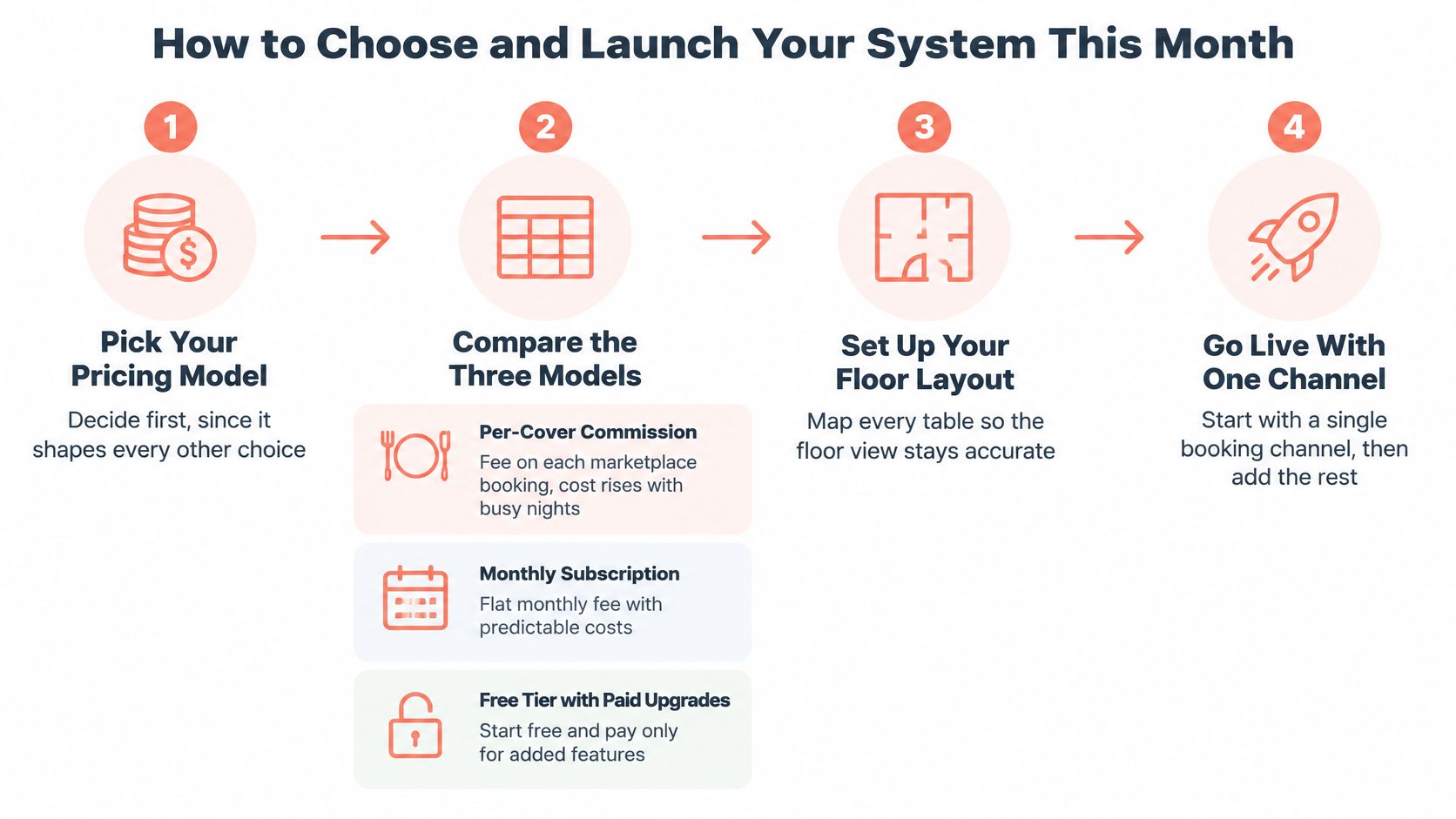
Start with the pricing model, because it changes the cost of each additional booking. A per-cover marketplace commission can suit a restaurant that needs new diners quickly, but the bill rises with covers, including diners who might have booked directly. A monthly subscription makes costs predictable and stays due in quiet months. A free tier with paid upgrades suits a smaller venue testing the workflow, provided the cover limit and upgrade trigger are clear.
For a simple comparison, a hypothetical €2 fee on 100 covers a week would cost €200 a week, or €10,400 a year. A quieter venue may spend less on commission, while a busy venue could find that a fixed fee is cheaper. Compare the models using the restaurant's own channel mix and table map, not the starting price alone.
Pricing models compared
| Model | How you pay | Best fit | Watch for |
|---|---|---|---|
| Per-cover commission on marketplace bookings | A fee for each diner booked through the marketplace, with TheFork as a common example | Venues that need new diners quickly | Costs rise with success, including on guests you might have won directly |
| Monthly subscription | A fixed monthly fee with no per-cover charge | Busy venues with steady direct demand | Fixed cost in quiet months |
| Free tier with paid upgrades | Free up to a cover limit, paid plans beyond it | Smaller venues testing a system | Check exactly when the limit triggers an upgrade |
| 10Seat On the House plan | Free up to 50 covers, no credit card required | Independents starting out | Confirm the cover limit and upgrade path on 10Seat pricing |
The 10Seat On the House plan is free up to 50 covers, requires no credit card and is presented as a five-minute setup. Check the plan details and upgrade path before relying on any free tier for a full service.
Launch in six steps
- Count four weeks of bookings by channel. Separate website, social, phone, walk-in and marketplace bookings. That baseline shows where the new system must work first and which demand is already direct.
- Draw the floor plan. Record table sizes and which tables can be combined. Check the drawing against the actual room before entering it into the system, because one wrong four-top can distort every slot.
- Set pacing slots and party-size limits. Match availability to the kitchen's working capacity and the floor's table combinations. Keep the first version tight, then widen it after service data confirms the room can turn faster.
- Publish the booking page. Add it to the website, social profiles and a QR code, then test the guest journey on a phone from first click to confirmation.
- Run both lists side by side for one week. Use the new system alongside the existing book, and check for mismatches in times, table assignments and party sizes before retiring the old process.
- Retire the paper book and measure. Compare covers, channel mix and no-shows with the four-week baseline. Keep the results visible to the owner, manager and host team, and adjust pacing before changing the room.
This week, choose one pricing model and draw the floor plan. Those two decisions give the restaurant a grounded starting point for comparing systems and testing a live service.
10Seat offers a free On the House plan up to 50 covers with no credit card required, plus booking pages, capacity controls and table management in one workflow. Visit 10Seat to review the product and pricing, then test the system against your own floor plan and four-week service baseline.