Online Restaurant Table Booking System Guide
Learn what an online restaurant table booking system controls: seating, waitlists, covers, pacing, GKS rules, and how to choose without per-cover fees.
In some large cities, approximately 20% of restaurant reservations resulted in an empty table, according to a Wharton analysis of restaurant no-shows. That reframes the buying decision: an online restaurant table booking system shouldn't just collect names. It should help the host turn promised demand into seated covers without overwhelming the kitchen.
For independent Benelux restaurants, the useful model is one capacity plan with several entrances. Website bookings, phone calls and walk-ins belong on the same floor. Belgian fiscal records belong somewhere else, in the compliant cash register.
Table of Contents
- What an Online Table Booking System Is
- Features That Decide Who Sits Where
- How the System Protects Covers and Pacing
- What Different Venues Need From Booking
- Phone Web and Walk-ins on One Floor
- How to Set Up Booking and Stay GKS Ready
- How to Choose Without Paying Per Cover
What an Online Table Booking System Is
An online restaurant table booking system is the live inventory of a dining room. It records party size, arrival time, expected duration, permitted table combinations and booking channel, then presents one availability picture to the website and host stand.
Think of a floor plan with a clock attached. A paper diary records a name; a properly configured system checks whether that party still fits when the next reservation arrives.
Say a bistro receives an early booking for a couple. The smallest available table looks suitable, but it forms part of a combination needed by a later group. Accepting the couple isn't necessarily a problem. Assigning them without considering duration and future commitments is.
Availability means more than an empty table
A table can be empty now and unavailable for a new booking. The host needs enough time to seat the party, deliver the intended experience, settle the bill and reset before the next arrival.
The shift toward planned dining makes that distinction important. The reservation-behaviour analysis published by OpenTable reported that online restaurant reservations in June 2021 were 42% higher than in June 2019, while walk-in bookings declined by more than 6% during reopening and subsequently lost an additional 3% share of bookings.
Those figures describe a particular reopening period, not a forecast for every Benelux dining room. The operational lesson remains useful: advance demand needs managing alongside space for guests who haven't booked.
Practical rule: Availability is a promise about a table, a service window and the kitchen's ability to serve the party.
What the system doesn't replace
Reservation software doesn't replace the cash register, the chef's judgement about pacing or a person handling an access arrangement. Nor should a guest's unusual request disappear into an unreviewed notes field.
Before service, the host should be able to read these measures without rebuilding the plan:
- Seats still available by party size, including combinations that remain feasible.
- Parties already promised, with arrival windows and expected departures.
- Promises carrying uncertainty, such as unconfirmed bookings or parties already running late.
A booking list answers who might arrive. A capacity plan answers whether the restaurant can serve them properly.
Features That Decide Who Sits Where
What each booking feature is allowed to change
| Feature | Decides | Inputs it uses | Fails when |
|---|---|---|---|
| Capacity engine | How many parties of each size can still be accepted | Table sizes, joins, duration, daypart, expected no-shows | One static table count is used all week |
| Auto seating | Which physical tables a booking locks | Party size, arrival window, future large parties, walk distance, kitchen load | Small parties fragment the floor |
| Waitlist | Who is offered a released table and when | Live gaps, realistic wait, party-size match | Names sit in a book with no time promise |
| Guest record | What the host must know before seating | Allergies, access needs, occasion, prior no-show | Notes live in someone's head |
| Till link | That a seated party and the order stay matched | Table status and check opening or closing | The book and cash system drift apart |
The tidy floor-plan trap
Automatic assignment should protect future service, not merely make the current screen look neat. Say a couple arrives before a large reservation. Seating them on a table needed for that later join can make the group impossible to accommodate, even while other seats remain empty.
The opposite mistake is holding every useful combination indefinitely. That protects theoretical demand while the restaurant turns away real guests.
A useful assignment engine weighs seat use now against future feasibility. It considers expected turnover, larger parties still to arrive, walking distance for staff and the load that simultaneous arrivals will put on the pass.
The table-management simulation study published in the Journal of Foodservice Business Research found that assignment policies can improve waiting and turnover, but that the best policy changes with party-size distribution and arrival rate. A brunch configuration therefore shouldn't be copied unchanged into peak dinner.
Define the constraints before trusting automation
Managers should enter the room as it operates, not as it appears on an architectural drawing. A nominally combinable table may obstruct a service route, remove wheelchair clearance or create a poor seat beside the door.
Useful constraints include:
- Permitted joins, restricted to combinations the team will use.
- Service requirements, including high chairs, access space and suitable locations.
- Locked seated parties, so recalculation never implies moving guests mid-course.
- Manager overrides, with a visible reason rather than an unexplained exception.
The restaurant seating-management guide is a useful companion when translating those rules into a floor plan.
The waitlist should then match a waiting party to the actual opening. The next name isn't automatically the right fit if its size or likely dining duration would break a later commitment.
The acceptance test is straightforward: a late party, a cancellation and a walk-in should each trigger a fresh feasible plan. If the manager must rebuild every assignment by hand, the software is displaying the floor rather than managing capacity.
How the System Protects Covers and Pacing
On 100 reserved covers at a hypothetical 10% no-show rate, 10 seats could go unused unless staff reallocate them during service. This is floor arithmetic, not a forecast: the restaurant's own attendance history must determine the working assumption.
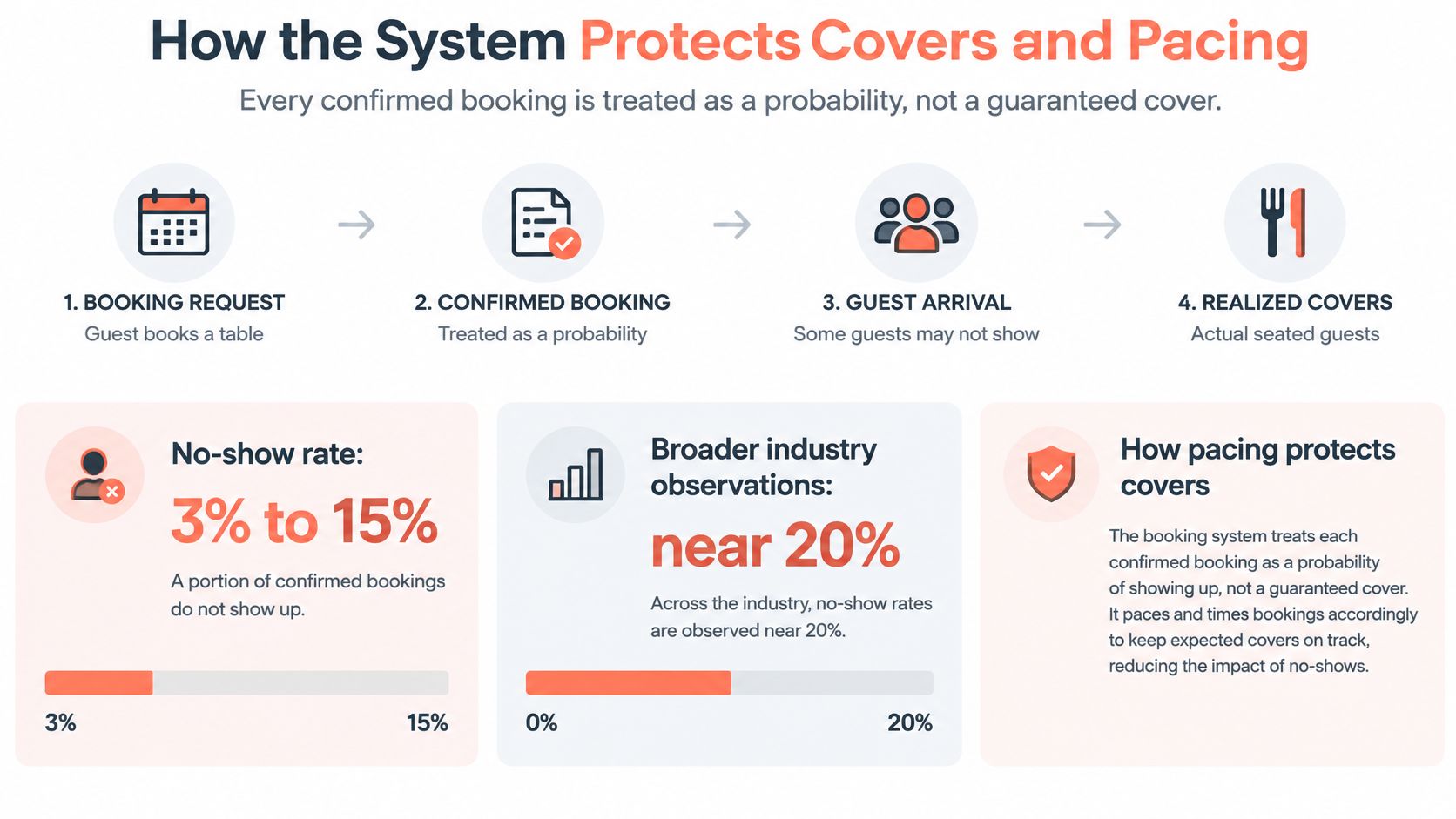
The restaurant-reservations paper hosted by Northwestern's Kellogg School reports observed no-show rates of 3% to 15% in one studied operation, alongside broader observations near 20% for normal service and as high as 40% for special events. These aren't interchangeable benchmarks, but they establish why confirmed bookings shouldn't be treated as guaranteed attendance.
The capacity problem is easier to understand when the booking funnel separates commitments from arrivals.
Track states, not just totals
Each booking needs a clear operational state: booked, confirmed, arrived, late, cancelled or no-show. A late booking still occupies a different kind of promise from a cancelled one.
Expected occupancy should update as those states change. Staff need to know which tables can be released, which guests should receive a message and which arrivals require a decision from the host.
For a higher-risk service, the appropriate sequence is a timed reminder, a simple cancellation route and a ready waitlist. Overbooking should come only after the restaurant has enough relevant history to assess the consequences.
An empty table costs money. A promised table that doesn't exist costs trust as well.
Protect attendance without blocking genuine bookings
Harder cancellation policies aren't automatically better. The cancellation-policy experiments published in the International Journal of Consumer Studies found that stricter rules and more complex cancellation procedures reduced stated no-show intention but also reduced booking intention.
The deadline, fee and cancellation route should be visible before commitment. Staff should attach the applicable policy to the reservation rather than reconstruct it during a dispute.
Restaurants using 10Seat see 30% more reservations, 40% fewer no-shows and 10–15% more covers per shift. Those business results don't remove the need for a local baseline or careful pacing.
The final check is the pass, not the booking counter. Large parties should be spread across arrival windows, suitable small tables retained for expected walk-ins, and cancelled inventory released promptly. A fuller dining room isn't an improvement if every main course lands at once.
What Different Venues Need From Booking
The product category stays the same across restaurant types. The constraints change. These are starting rules to validate against actual service, not universal settings.
Booking settings by venue type
| Venue | Main constraint | Walk-in hold | Collect before confirm |
|---|---|---|---|
| Fine dining | Long turns and a full pass | Small, late slots only | Allergies, occasion, pace of menu |
| Chef's table or tasting | Fixed seat count and prepaid courses | None on those seats | Menu choice, allergies, deposit |
| Brasserie or bistro | Mixed turns and table joins | Set from walk-in arrivals by daypart | Party size, high chair, time limit |
| Brunch | Wave arrivals of fours | Short gaps between waves | Kids, access, hard end time |
| Bar with seated service | Party size versus rail seats | Most standing and small tables | Time cap, minimum if used |
| Second site | Different turns than site one | Set per room, not copied | Which room and which manager |
Long services need certainty before arrival
Fine dining: A late arrival can compress the menu against the next sitting. Before configuration, the manager should record target covers, average turn in minutes and the share of seats reserved for walk-ins, with reset time included in the service assumptions.
Chef's table or tasting menu: A guest's allergy arrives after the kitchen has committed to a fixed sequence. Structured intake should resolve that before confirmation, with a deposit where the policy requires one. The same daypart worksheet needs target covers, the full experience duration and a walk-in allocation that excludes committed counter seats.
Mixed rooms need flexibility without guesswork
Brasserie or bistro: A later large party only works if earlier couples haven't occupied its join. Target covers, measured turn time and the walk-in share should reflect the room's mixture of quick meals and longer dinners.
Brunch: Several family groups arrive together and all need attention before ordering. The manager should set target covers for the wave, average turn duration and walk-in capacity between waves, then check high-chair availability and the hard stop for dinner preparation.
Seated drinks and additional sites need separate rules
Bar with seated service: An unrestricted group booking occupies the rail needed for drinks trade. Target seated covers, expected stay and protected walk-in space should be written separately from standing capacity.
Second site: Copying the original restaurant's settings produces optimistic departure times in a room with a different menu or service style. Its manager needs a separate target-cover figure, measured turn time and walk-in allocation.
Those settings are the venue strategy. Software should enforce them consistently, not invent them from the number of chairs.
Phone Web and Walk-ins on One Floor
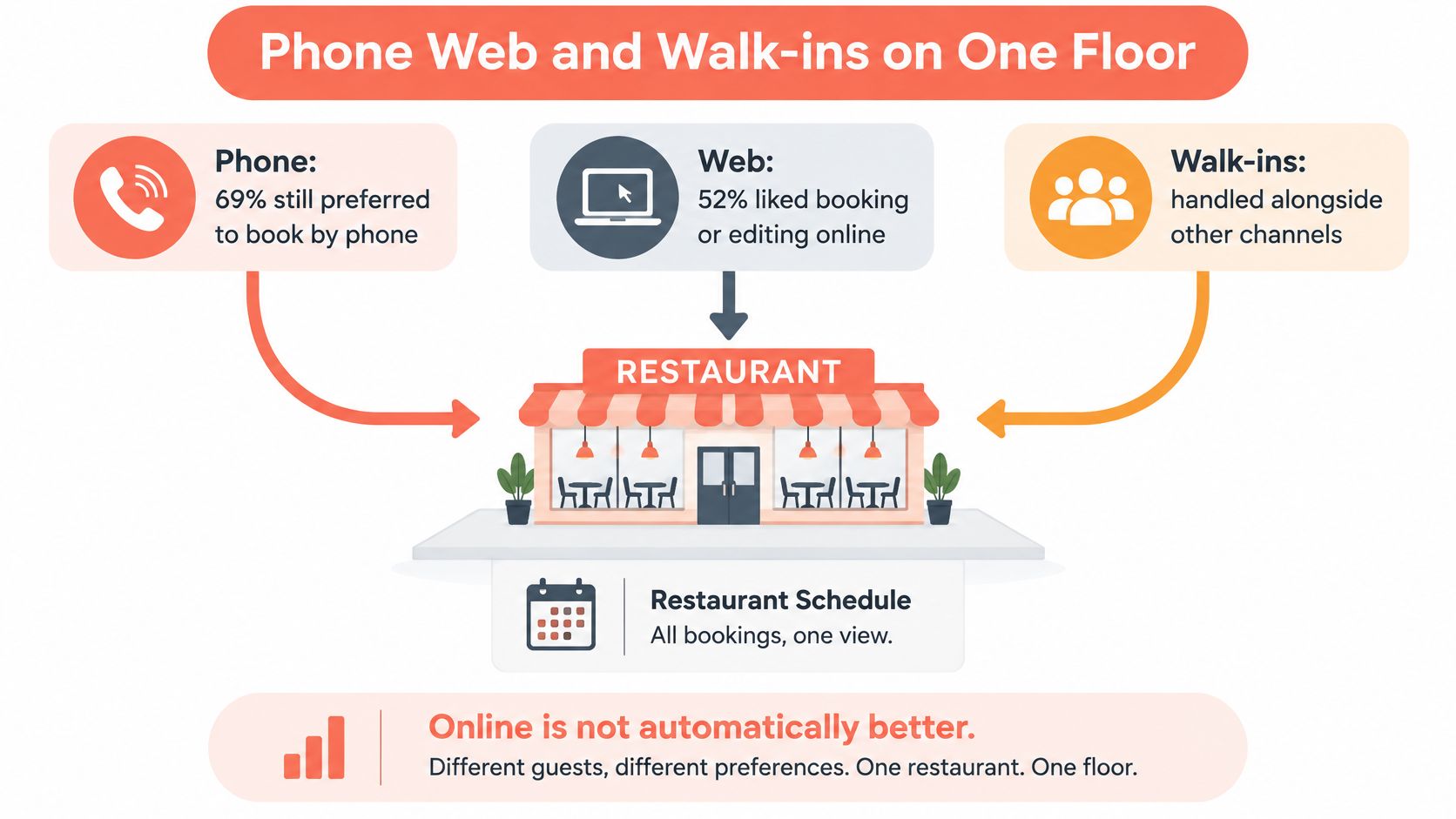
69% of diners in a 2025 Australia and New Zealand survey still preferred booking by phone, while 52% liked being able to book or edit online, according to ResDiary's diner survey. That isn't a Benelux channel forecast. It is a reason to check the restaurant's own channel mix before making booking digital-only.
The practical objective is channel inclusion, with every route contributing to the same schedule.
Let the request determine the route
Straightforward parties can book through the website, a social link or a door QR code. The restaurant reservation-widget guide covers the website entry point without turning it into a separate availability pool.
Complex requests need a person. Large groups, access arrangements and guests seeking reassurance should reach staff who can enter the reservation directly into the shared book.
Walk-ins belong on the same operational screen, with a realistic wait and a suitable-table match. A handwritten overflow list creates a second version of availability precisely when service gets busy.
Missed-call handling deserves the same discipline. Expressify's resource on faster responses to home service inquiries offers a cross-sector comparison for response workflows, although restaurant enquiries still require live table availability and a clear handoff to staff.
Keep safeguards understandable
Deposits are also a trust decision. The booking flow should explain why payment details are requested, when a charge applies and how cancellation works.
For GDPR-conscious handling, the restaurant should document the purpose and retention period for each guest field and any payment-related information. Card collection should use the payment provider's secure process, not free-text reservation notes.
- Human review: Route allergy and accessibility notes to someone responsible.
- Clear alternative: Give guests who can't leave a card a defined route to discuss the booking.
- Consistent terms: Apply the same relevant policy to phone and web reservations.
A shared-channel workflow can be assessed against a simple service demonstration.
The host-stand test is whether staff can accept a web booking, change a phone reservation and add a walk-in from one screen, without opening another list.
How to Set Up Booking and Stay GKS Ready
A booking system works only when its availability matches the room, service pace and fiscal workflow. Start setup during a quiet period, then test the exceptions staff will face during a busy service.
Configure the service in order
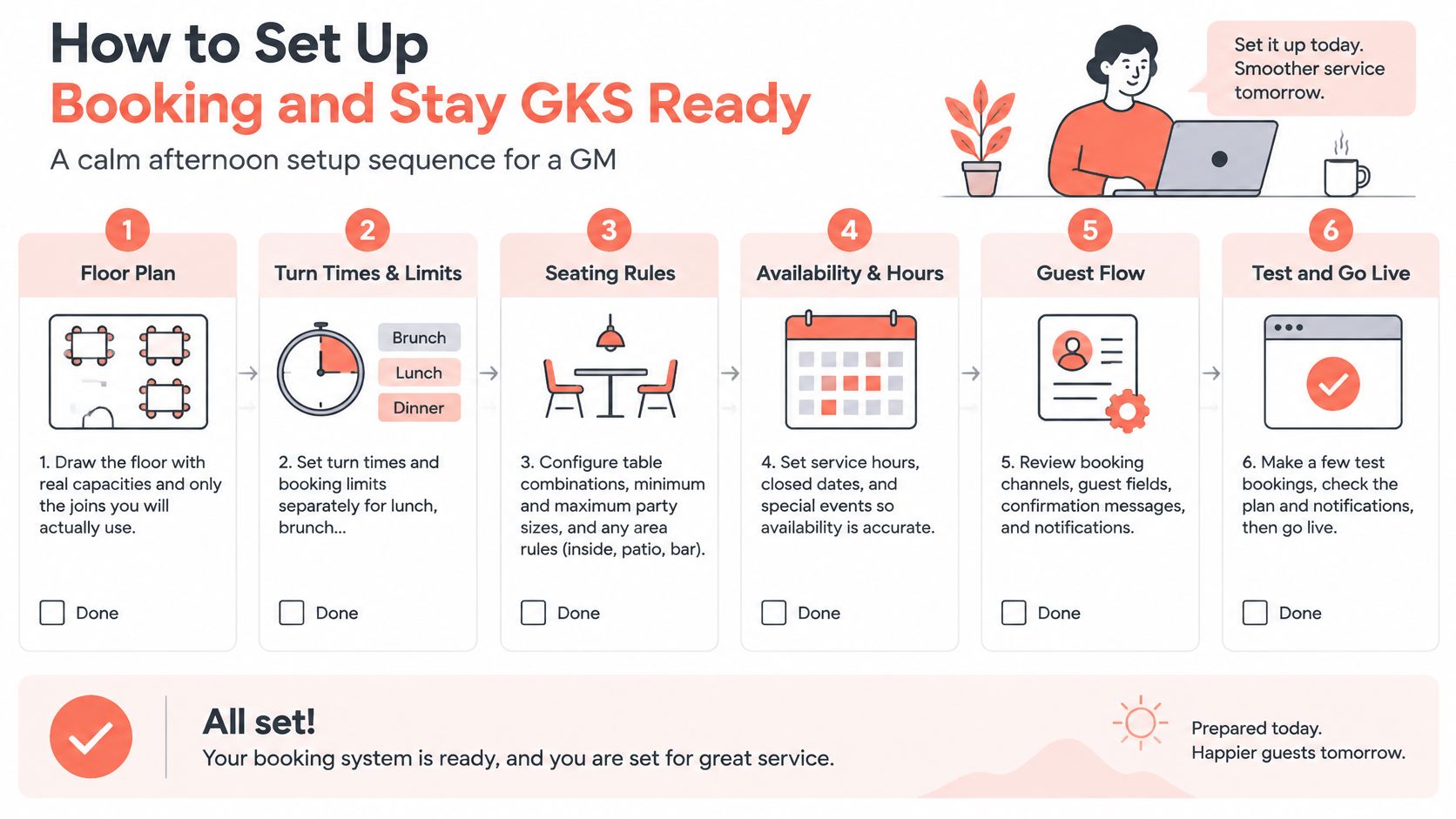
- Draw the floor. Enter actual table capacities and the combinations staff will use. Keep service routes and access space clear.
- Set daypart rules. Configure turn times and booking limits separately for lunch, brunch and dinner. These settings determine how online bookings fit the capacity plan.
- Write the policy. Explain deposit requirements, cancellation deadlines and how guests can cancel. Use consistent terms across web and phone bookings.
- Test confirmations and cancellations. Check that both messages work before opening more availability.
- Publish one booking route. Use the same destination on the website, social profiles and door QR code. Phone staff should check and update bookings against the same availability.
- Connect the till. Confirm that reservation and order information stays synchronized, while keeping operational booking data separate from fiscal records.
- Run a mock service. Add a web booking, a larger phone party, a cancellation and a walk-in. Make sure staff can resolve each through the host workflow.
The goal is a workable service plan, not just a completed settings screen.
Keep Belgian fiscal compliance separate
Belgian restaurants subject to GKS, Geregistreerd Kassasysteem, need a fiscal workflow separate from reservation management. The published GKS 2.0 guidance describes the extension to businesses selling on-site and accepting cash, the requirement for a professional registered cash system compatible with Blackbox 2.0, and the transition schedule based on the cash register's purchase date.
The guidance also covers connections to government systems, remote inspector access to sales data and a standardised transaction audit file. Check the applicable transition schedule against the register's purchase date.
GKS 2.0 transition deadlines by register purchase date
| Cash register purchased | Transition deadline |
|---|---|
| Before 2018 | 1 July 2027 |
| 2018 through 2021 | 1 July 2028 |
| From 2022 onward | 1 January 2029 |
These are scheduled compliance dates, not booking-software milestones. A reservation tool does not replace a certified fiscal system. Guest counts and table status guide service operations; sales and VAT records belong in the compliant register.
Go-live condition: Every mock-service change must leave a feasible table plan and a separate, accurate fiscal workflow.
After launch, compare no-shows and covers per shift with the restaurant's own baseline. Record target covers, average turn and walk-in allocation by daypart. That makes it easier to identify whether a shortfall comes from booking settings or from service execution.
How to Choose Without Paying Per Cover
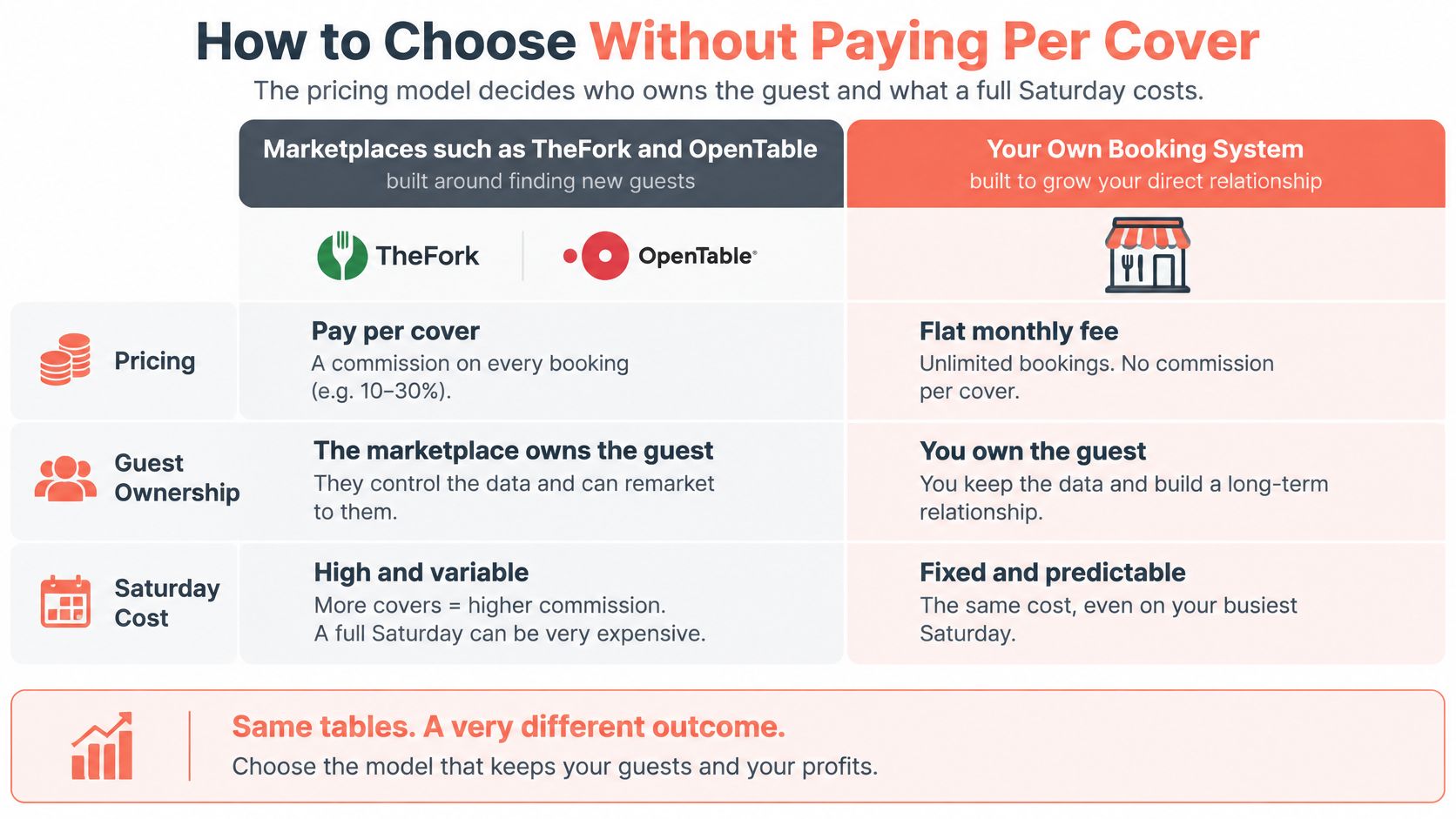
Compare how each system charges before comparing features. Marketplace booking combines discovery with reservation handling. Direct reservation software supports bookings through a restaurant's own channels. Either can fit, depending on whether you need more demand or better control over demand you already have.
Marketplaces such as TheFork and OpenTable may charge for bookings from relevant channels. Direct subscriptions such as Zenchef and Formitable charge for software. Check the current terms, payment charges and add-ons before signing, since the headline model may not show the full cost.
Booking models and who pays
| Model | Examples | Cost shape | You keep | Fits when |
|---|---|---|---|---|
| Marketplace | TheFork, OpenTable | Fee or commission linked to qualifying bookings, confirm current terms | Shared discovery and shared rules | The restaurant still needs to be found |
| Direct subscription | Zenchef, Formitable | Software fee, confirm current pricing | The restaurant's site, phone and operating rules | The restaurant already has demand |
| Direct reservation system | 10Seat | Check current plan and payment terms | Control of availability, party sizes and guest records | The restaurant wants to manage bookings across its own channels |
The useful comparison is where bookings come from, what they cost, and who controls availability and guest information.
Check the contract behind the headline fee
A marketplace may earn its cost when it brings incremental diners. If bookings come from regulars, the phone or the restaurant's website, check whether a distribution charge applies to demand you already had.
Use this per-cover commission cost guide to structure the comparison. Check these points before agreeing to terms:
- Charging basis: Per booking, seated cover, subscription tier or a combination.
- Export rights: Which guest records can leave with the restaurant.
- Data responsibilities: GDPR roles, permitted communications and retention obligations.
- Fiscal impact: Whether an integration changes the existing cash-register workflow.
10Seat is a restaurant reservation system designed to fill tables faster, reduce no-shows and set up in minutes. It can migrate a restaurant's entire reservation system in 15 minutes, with no third-party platform and no lost reservations. Its instant booking page can be shared through social media, QR codes or messages, including when the restaurant has no website.
For a practical Saturday comparison, multiply chargeable covers by the proposed per-cover fee. Treat that service-level figure as an initial check, then compare a full month of expected charges, including add-ons, against the other option's terms. Review 10Seat's plans and assess its floor-management tools against the restaurant's service needs.
A booking tool should feed one capacity plan, not replace the phone. Managers still need to control availability, timing and party sizes so online bookings, calls and walk-ins fit the same service. Restaurant owners and managers can request a demonstration through 10Seat and assess the booking flow against their own floor plan.