AI for Restaurants: Where It Pays Off and How to Start
See where AI for restaurants pays off: forecasting, seating, guest tools, real ROI numbers, GKS rules and a practical rollout plan.
It's Friday, the book looks full, and the room already feels uncertain. Two parties are running late, a table of six hasn't confirmed, walk-ins are gathering at the door, and the kitchen prepped for a quieter night than the reservations suggest. The host is answering calls instead of watching the floor, and every decision, hold this table, release that one, call another server in, depends on a guess about who will arrive.
That gap between the book and the shift is where AI for restaurants either earns its place or doesn't. Judge each tool by three numbers you can check: covers served, waste avoided, and host hours recovered. If a tool can't move one of those, or it puts a machine in front of a guest conversation that needs judgment, leave it off. The practical question isn't whether the software sounds impressive. It's whether Friday runs fuller, calmer, and with less food in the bin than last Friday.
Table of Contents
- Where AI Fits in a Restaurant Today
- Forecasting Covers, Seating and No-Shows
- Guest Chatbots and Personalization, and Where to Stop
- Measuring Return With Numbers You Can Check
- Test One Workflow Before Switching Anything
- Risks, Ethics and Keeping Hospitality Human
- GKS Compliance for Belgian Restaurants
Where AI Fits in a Restaurant Today
On a busy service, an AI tool earns its place by improving a measurable part of the shift: more covers served, less waste, or fewer host hours spent on repetitive admin. The most established applications are guest experience and inventory management, according to the Deloitte 2025 State of AI in Restaurants Survey, which surveyed 375 restaurant executives across 11 countries in October and November 2024. In that survey, 63% reported daily use of AI for customer experience and 26% reported pilots or limited implementation. For inventory management, 55% reported daily use and 25% were testing it.
These figures show adoption, not guaranteed results. Guest messaging and inventory tools are already part of restaurant operations. Forecasting, seating, and personalization are useful when they fit the reservation book and floor plan, and less useful when they sit in separate dashboards that nobody checks before service.
Applications Mapped to Daily Work
| Application | Day-to-day job | Adoption signal |
|---|---|---|
| Guest experience | Guest messaging, chatbots, reservation replies | 63% daily use, 26% pilots |
| Inventory management | Ordering and waste control | 55% daily use, 25% testing |
| Demand forecasting | Predicts covers and prep volume | Adoption varies by restaurant |
| Dynamic seating | Matches parties to table layouts | Adoption varies by restaurant |
| Personalization | Guest preferences and visit history | Adoption varies by restaurant |
| Hiring and scheduling | Screening, scheduling and training | About 25% of restaurants use tools with AI |
Hiring and scheduling are another practical application. The 2026 National Restaurant Association research report found that approximately 25% of restaurants use tools incorporating AI, including 28% of full-service and 24% of limited-service restaurants. The same report found that 94% of operators said technology investments in the previous two to three years had not permanently eliminated jobs. For a dining room, the useful test is whether automation returns time to the team, not whether it removes the person responsible for welcoming guests.
Treat the adoption figures as context, then judge each application against your own service. A forecast should help the kitchen prepare for the covers likely to arrive; seating software should help the host use tables well; personalization should help staff remember what matters to regulars. If a tool does not improve covers, reduce waste, or return host hours, keep it as a trial rather than making it part of the shift.
Forecasting Covers, Seating and No-Shows
At 6 p.m. on a busy Friday, a forecast that counts only reservations can leave the kitchen short on prep and the dining room poorly paced. Useful cover planning also accounts for day of week, weather, local events, cancellations, late arrivals, party-size mix and walk-in patterns. Those signals need to translate into portions, prep batches and table turns.
The process below connects demand signals to a seating plan the team can brief before doors open.
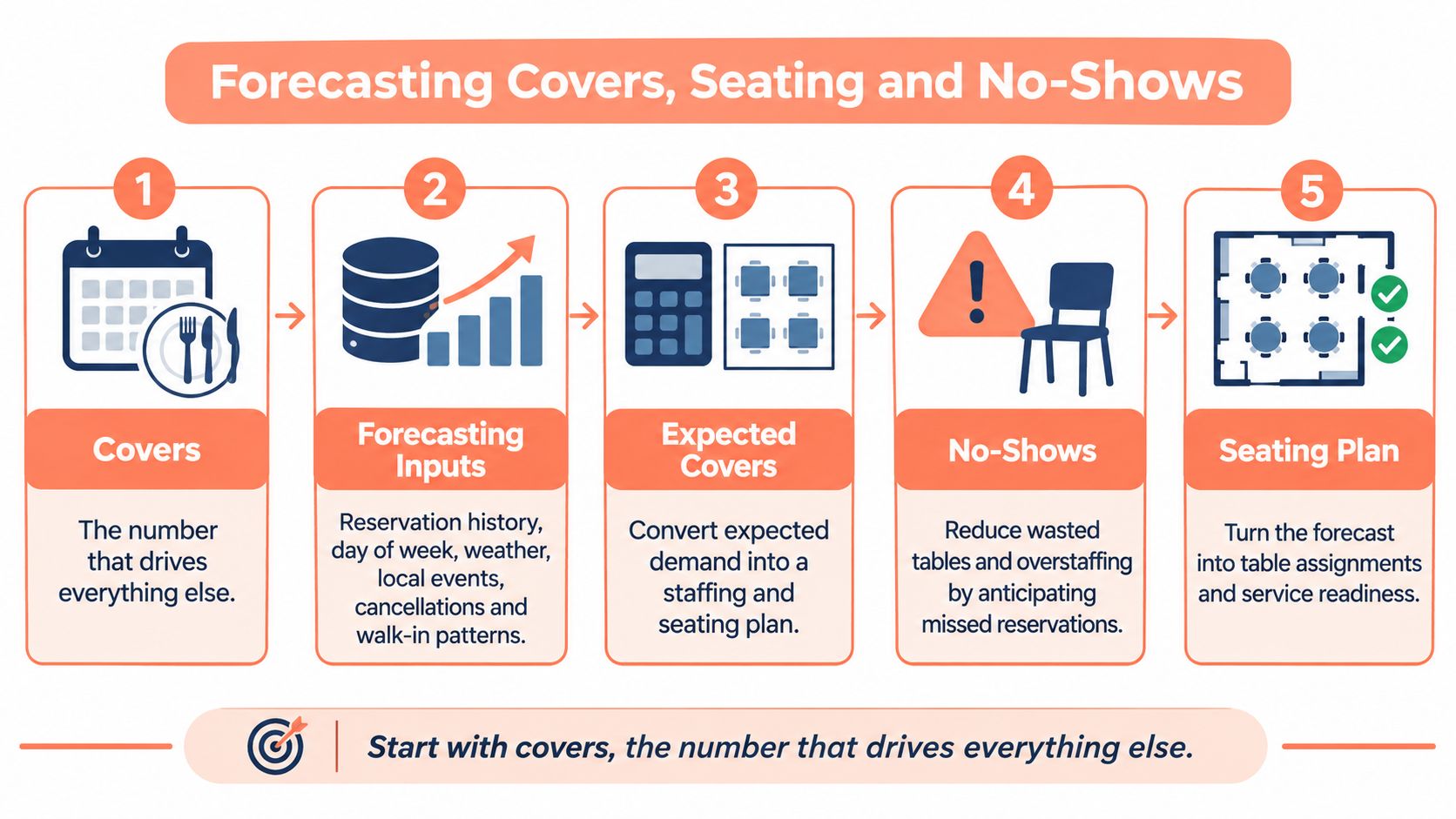
A six-week study across five restaurants found that a machine-learning system reduced average daily food waste from 4.12 kg to 2.76 kg, a 33.0% decrease significant at p < 0.001. The study used Random Forest and Gradient Boosting, but the operational lesson is the same with any forecasting tool: use only information available before service, test predictions in time order, and turn expected demand into item-level prep and purchasing quantities.
Keeping a Forecast Honest
A separate restaurant food-waste model, evaluated with a chronological 70/30 split and five-fold time-series cross-validation, reported a Random Forest mean absolute error of 6.19 kg, root-mean-square error of 8.36 kg, and R² of 0.817 when leakage-prone variables were excluded. Menu diversity, operational area and temporal activity patterns were its main drivers. For seating, compare forecasts with covers by service period, party-size mix, table use and arrival intensity. The restaurant demand forecasting guide for covers and prep offers a way to connect those estimates to service planning.
Practical rule: If a forecast relies on information you would only know after service, it will not hold up on Friday.
No-shows can overturn a seating plan. A review of reservation research reports no-show rates ranging from 3% to 15%. Research summarized by Wharton reports that in some large cities, roughly 20% of reservations result in an empty table. That variation makes a copied policy a poor fit. Track confirmed covers, cancellations, late cancellations and arrivals by daypart before choosing one.
No-Show Policy by Demand Situation
| Situation | Policy that fits | Likely effect |
|---|---|---|
| Weak off-peak demand | 5% discount on reservations | Can stimulate off-peak attendance |
| Peak nights near capacity | No-show fee equal to one meal | Protects scarce peak capacity |
| Reliable regulars | Reminder message only | Protects goodwill without a fee |
| New or unknown booking pattern | Track confirmed covers, late cancellations and arrivals for 4 to 6 weeks first | Sets your own baseline before deposits |
Choose the policy to match demand. Discounts may help attract guests during weak periods; a clearly explained fee can protect peak capacity. Then use the adjusted forecast to assign tables, keeping parties together and avoiding a dining room that is overloaded in one section. Judge the result by covers served, avoidable waste and host time spent reworking the seating plan.
Guest Chatbots and Personalization, and Where to Stop
A good host remembers that a regular wants the corner booth, dislikes bread service, and brings a partner with a shellfish allergy. Guest profiles do that remembering at scale. They store preferences, allergies, visit history, party patterns, and special occasions so your team can prepare before the guest reaches the door, instead of asking the same questions under pressure.
Chatbots and automated messaging should take the repetitive layer around that memory. Confirmations, reminders, directions, opening hours, parking, waitlist status, and table-ready alerts don't need a fresh human sentence each time. If a host takes 20 calls a day at two minutes each as a rough worked example, moving routine confirmations and waitlist updates to automation can return roughly 30 to 40 minutes per shift to the floor.
Profiles only help when the menu information behind them is current. If dishes, allergens, or set menus change often, tidy that source first. Small cafés reviewing layout and item wording can use cafe menu planning guidance from QRMenu as supporting reading, then make sure the same wording appears in booking replies and host notes.
Guest Tasks Sorted by Risk
| Guest task | Automate? | Reason |
|---|---|---|
| Booking confirmations and reminders | Yes | Fixed wording, low risk |
| Waitlist status and table-ready alerts | Yes | Cuts repeat phone calls |
| Directions, opening hours, parking | Yes | Static answers |
| Allergy and dietary questions beyond the menu | Human confirmation | A wrong answer carries health risk |
| Special occasion setup | Hybrid | Bot collects details, host confirms |
| Complaints and service recovery | Human only | Needs judgment and tone |
| Accessibility needs | Human only | Affects seating, safety and access |
Write the boundary down before switching anything on. Put it at the host stand and brief it like an allergen procedure. The bot collects, reminds, and routes. People answer health questions, recover complaints, handle accessibility, and confirm VIP requests. For the profile structure behind that handoff, see what customer profiles should hold.
Measuring Return With Numbers You Can Check
A busy Friday can look full while still leaving covers on the table: a gap between bookings, a no-show, or hours spent managing calls. Judge each tool by the covers it adds, waste it reduces, and host time it returns. Track the numbers before and after, by daypart and day of week.
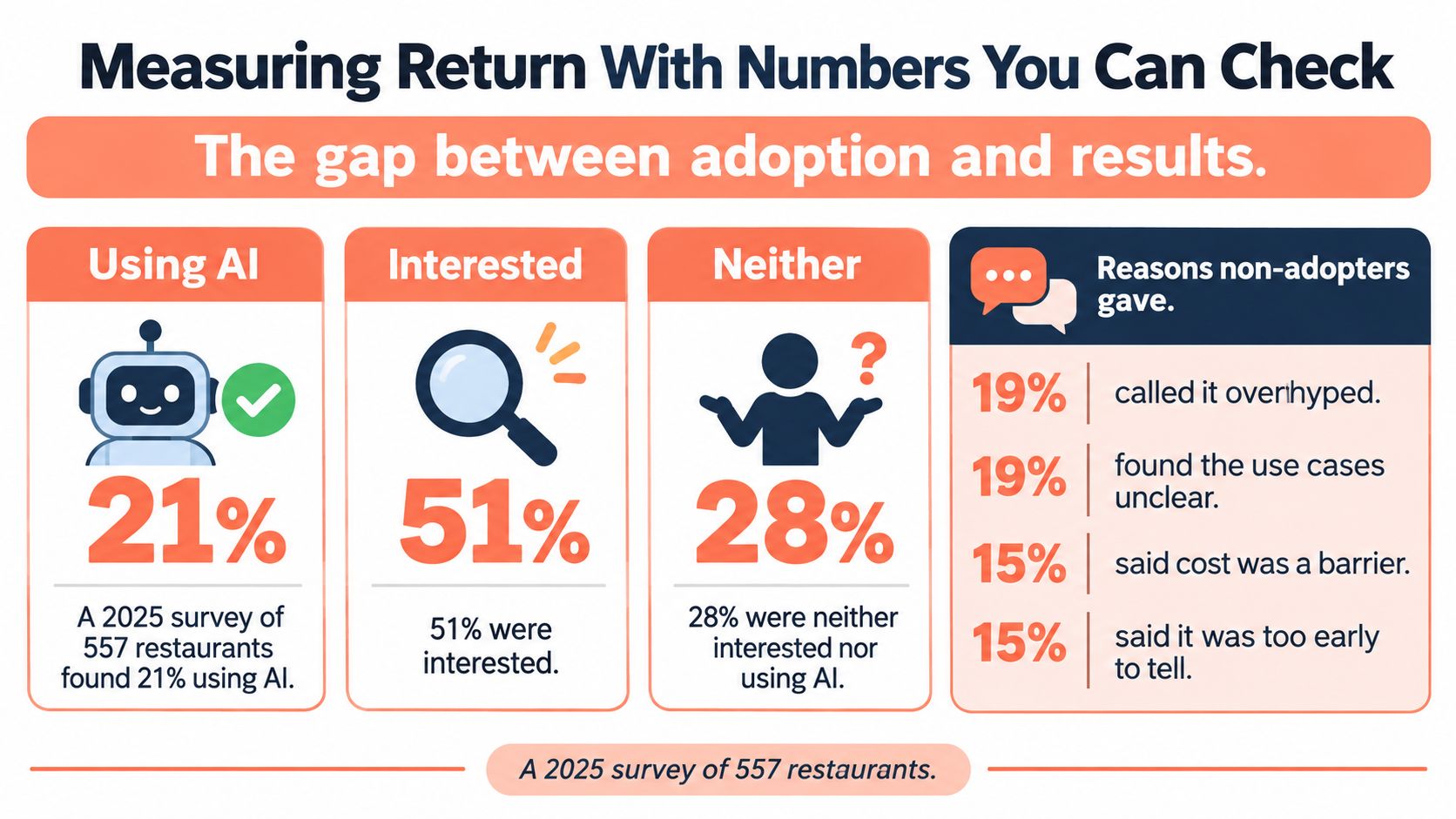
The Deloitte AI in restaurants report cites a 2025 survey of 557 restaurants: 21% were using AI, 51% were interested, and 28% were neither using it nor interested. Among non-adopters, 19% viewed AI as overhyped, 19% said its uses were hard to understand, and 15% said it lacked clear ROI. Many operators see technology as a competitive advantage, while fewer report clear profit gains, according to Deloitte's restaurant technology analysis.
The infographic summarizes the adoption figures. Use your own operating records to find out whether a tool improves service economics.
Metrics to Baseline Before and After Go-Live
| Metric | Baseline to capture | How to calculate | Signal of return |
|---|---|---|---|
| Covers per busy shift | 4-week average | Covers after go-live minus baseline | 10 to 15% more, per 10Seat customer figures |
| No-show rate | Missed bookings divided by total bookings | Compare the same weeks and dayparts | Fewer empty tables |
| Food waste | kg discarded per week | Weekly waste log before and after | Lower kg discarded each week |
| Host admin time | Hours per week on phones and bookings | Timed log of a typical week | Hours returned to service |
| Hiring time | Days from vacancy to first shift | Track your next two hires | Shorter than your last two hires |
Restaurants using 10Seat report 30% more reservations, 40% fewer no-shows, and 10 to 15% more covers per busy shift. Treat these figures as a comparison point, not a forecast for your restaurant. A short video walkthrough can help the team agree which booking and floor numbers to review each week.
Then calculate the contribution from any extra covers. For example, 10 additional covers a week at €45 average spend and a 60% contribution margin would mean about €270 a week, or roughly €14,000 a year, before tool costs. Divide the monthly cost by weekly contribution to estimate how many weeks it takes to cover that cost. Compare like-for-like weeks where possible, and record promotions, weather, roadworks, and local events alongside the figures. A consistent restaurant data analytics routine makes those comparisons easier to review.
Test One Workflow Before Switching Anything
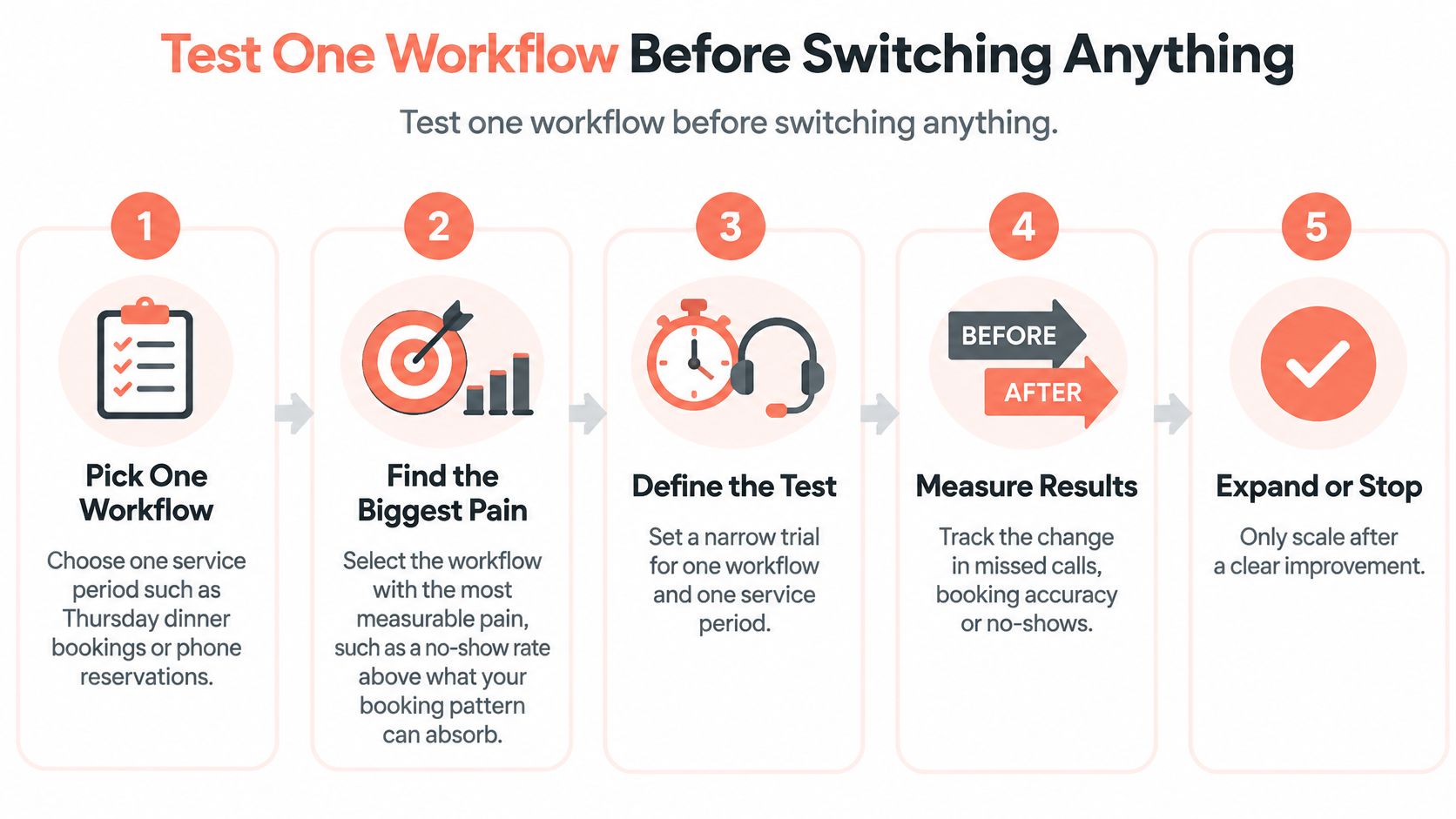
Don't rebuild the whole reservation operation in one go. Pick one workflow and one service period, such as Thursday dinner bookings, phone reservations, or Friday waitlist handling. Choose the pain you can measure cleanly, missed calls, unconfirmed tables, no-shows, or gaps between seatings that hosts refuse because the floor looks full on paper.
The sequence below keeps the trial narrow enough to judge.
A Four-Week Rollout You Can Run
- Record the baseline: Log covers, no-shows, host admin time, and waste for the selected service period over four comparable weeks.
- Choose a testable platform: Use a live demo with your real floor plan, party sizes, pacing rules, and busiest arrival window.
- Set rules before go-live: Fix reminder timing, peak-night deposit rules, release times for unconfirmed tables, and who may override a seating suggestion.
- Train by shift: Run one short session per shift and leave a one-page guide at the host stand covering overrides and escalation.
- Review one number first: Compare covers per busy shift with baseline, then inspect no-shows, guest complaints, and host time before expanding.
Setup speed shouldn't decide the trial. 10Seat is a smart reservation system for independent restaurants in Benelux, and most restaurants are up and running within 24 hours. The rules matter more than the install date. Its Walk-in Squeeze identifies short, hidden time slots so hosts can fill gaps they'd otherwise refuse, which makes walk-in handling a clean first test because accepted parties and refused parties are easy to count.
Compare pricing models with your real volume, not headline prices. Per-cover fees, common among marketplace platforms such as TheFork and OpenTable, rise as your covers rise. Flat subscriptions, such as those offered by Zenchef and Formitable, stay fixed across the month. Multiply last month's actual covers by any per-cover fee, add fixed charges, and compare totals side by side. Check current published tariffs before quoting a competitor price, and review 10Seat pricing against that same month.
Keep, adjust, or stop after four weeks. A trial without a stop decision becomes another permanent subscription.
Risks, Ethics and Keeping Hospitality Human
The strongest objection to AI in a dining room isn't technical. It's that automation can make service feel handled rather than hosted. FSR Magazine reporting on restaurant technology and simplicity draws on Deloitte's 2025 survey of 375 executives across 11 countries, which found identifying the right use cases and managing risks tied as leading barriers at 48% each, with lack of technical skills at 45%. Intellectual-property issues and misuse of customer data were among the frequently cited risks.
The workable answer is quiet AI. Software reduces load backstage, sorting bookings, flagging likely gaps, preparing notes, and drafting routine replies. Guests still meet people who can read the table, notice anxiety about an allergy, move a chair without fuss, and recover a mistake with the right tone.
Safeguards to Put in Writing
- Data minimization: Give each tool only the fields its task needs. A seating suggestion doesn't need payment history.
- Role-based access: Restrict allergy, accessibility, and personal notes to staff who need them during service.
- Consent and correction: Tell guests what's stored, and give hosts a simple path to correct or remove a profile note.
- Logged human override: Record when a host rejects a seating suggestion and why, especially for accessibility, pacing, or a regular's usual table.
- Incident logging: Let hosts flag wrong messages, bad table matches, and profile errors without blame, then review them weekly.
Train for judgment, not just buttons. Run scenarios aloud before go-live. A guest asks whether a sauce can be made without nuts. A wheelchair user arrives early while the suggested table blocks an aisle. A regular is celebrating after a bereavement and doesn't want attention. Software can surface the note. A person decides what to say and do.
Finish with a short fixed list at the host stand. Allergy answers beyond published menu information, complaints, accessibility needs, safeguarding concerns, and VIP requests always need a person. If a tool can't route those quickly and visibly, it isn't ready for your guest-facing work, however many minutes it saves elsewhere.
GKS Compliance for Belgian Restaurants
A Friday booking system can manage tables and guest details, but the fiscal record of a sale belongs in the restaurant's cash-register process. In Belgium, GKS means Geregistreerd Kassasysteem, or registered cash register system. PIA Group's guidance on GKS 2.0 says the new system applies to new hospitality businesses from 1 July 2026 when they fall under the legal registered-cash-register requirement. Whether the requirement applies depends on the restaurant's statutory circumstances, not on whether it accepts online reservations.
The checklist separates the legal trigger from the practical system checks.
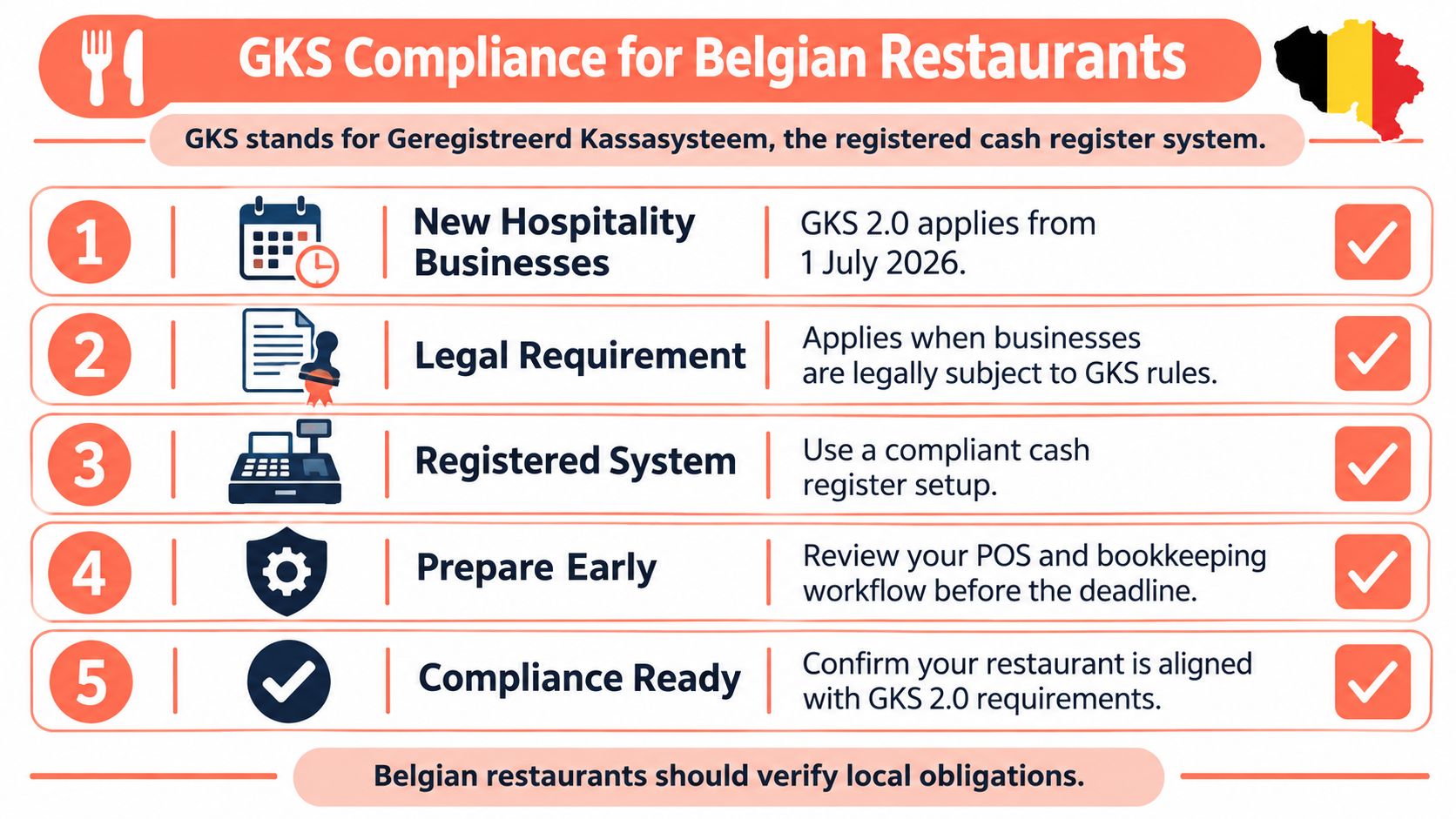
GKS 2.0 uses a fiscal data module that transmits sales data and performs VAT calculations in the module rather than in the cash register itself. Reservation and floor-management tools serve a different job. Keep booking, seating, payment and fiscal records clearly mapped, and document any integration so the path from booking to till remains easy to reconcile.
Owner Checklist Before Any System Change
- Confirm the obligation: Ask your accountant or the Belgian tax authority whether your activity meets the statutory GKS criteria.
- Check the register path: Confirm whether your current register can move to GKS 2.0 before the deadline that applies to your business.
- Map each system: Record which system handles bookings, deposits, gift vouchers, payments and final sales.
- Keep sales records clear: Confirm that reservation software is not being used as the record of sale.
- Reconcile deposits and vouchers: Check how they appear in guest systems and how they are settled through the till.
- Name one owner: Assign responsibility for supplier answers, dates and the compliance file.
A cleaner reservation process should not make the fiscal trail harder to follow. Test one workflow, such as Friday seating or Thursday confirmations, and judge it by covers, no-shows, waste and host time recovered. 10Seat offers reservation and table management with clear floor controls and guest notes your team can act on. Start a narrow trial at 10Seat and expand only when your own baseline improves.