What Is Customer Profiles for Restaurant Teams
What is customer profiles in a restaurant: the guest notes, visit history and consent rules that help you personalize service without storing junk data.
A customer profile is a living record of one guest that joins identity, needs the guest has stated, and visit behavior so the team can act on it tonight.
During a busy arrival period, that means the host doesn't have to search old emails to find a seating request, and the chef doesn't have to rely on a message passed verbally through the dining room. The useful record is short enough to read before seating a table, with clear boundaries between a confirmed fact, an old request, and a guess.
Table of Contents
- What a Customer Profile Is on the Floor
- Which Guest Details Are Worth Keeping
- How Allergy Notes Stay Useful and Safe
- Consent Rules and Belgian Cash Register Limits
- Where Profiles Pay Back in Covers and Time
- Keeping Profiles Accurate Without Junk Records
- One Table From Booking to the Next Visit
- Build the Profile Your Team Will Actually Open
What a Customer Profile Is on the Floor
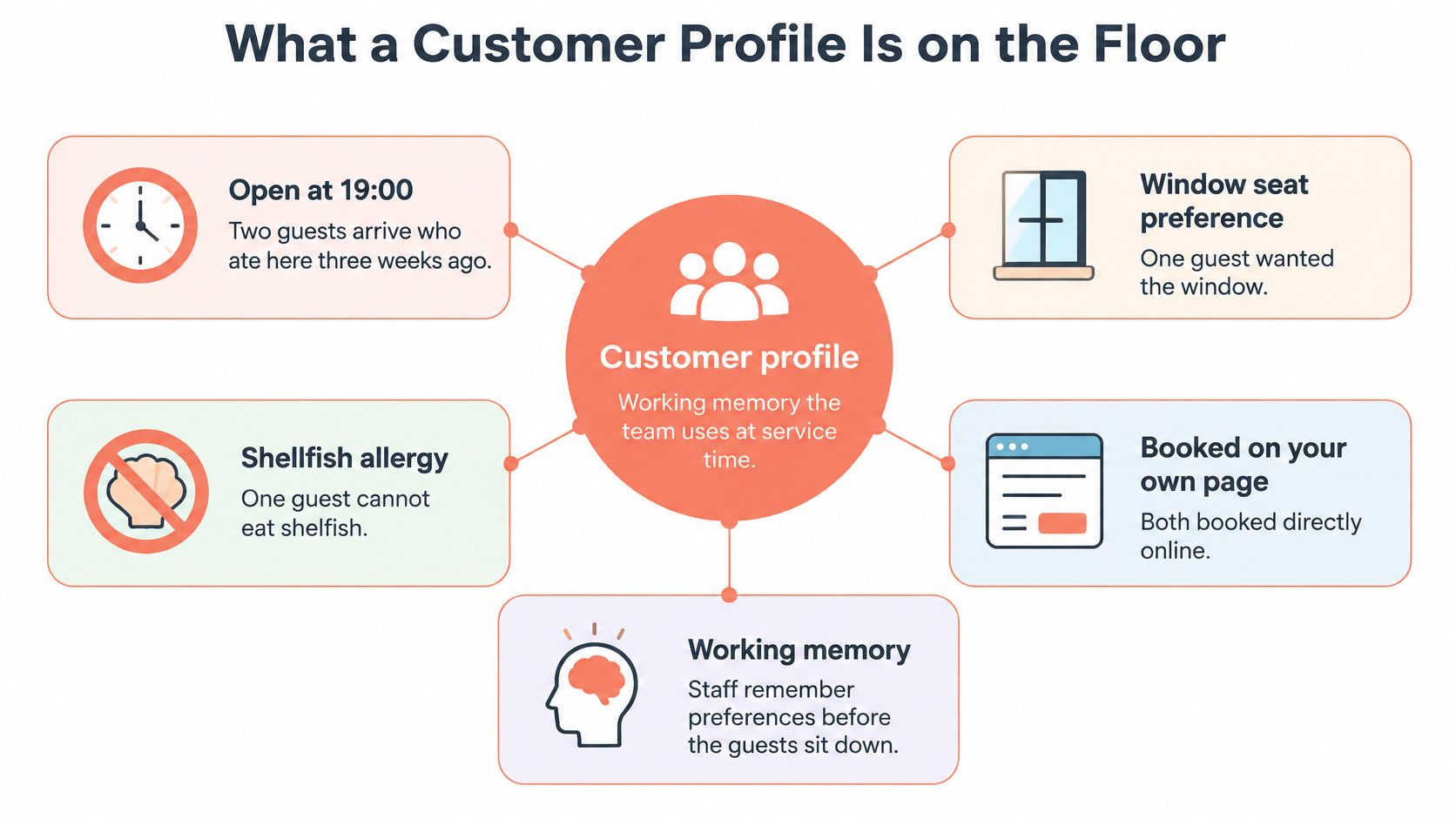
Say it's 19:00 and two guests arrive who ate at the restaurant three weeks ago. The host can see that one requested the window, one declared a shellfish allergy, and both booked directly through the restaurant's page.
The host can prepare the seating and flag the allergy for confirmation before the guests sit down. That's the practical answer behind the awkward search phrase what is customer profiles: information attached to a returning guest that changes how the team handles the visit.
A customer profile is operational memory, not a dossier. It connects a guest's identity, stated needs, and visit behavior so the floor and kitchen can make appropriate service decisions.
A contact card isn't a working profile
A contact card holds a name, phone number, and email address. It tells the restaurant how to reach someone, but not how that person dines.
A segment groups guests with similar characteristics, such as occasional celebration diners. A profile follows an individual guest across visits, connecting identity with behavior and commercial context, a distinction supported by this academic review of customer profiling and segmentation.
The relationship is straightforward:
Keep the floor record separate from audience planning
The dining room needs actionable details, not a fictional description of an ideal customer.
- Before arrival: Visit frequency, usual party size, and a confirmed seating preference help the host prepare.
- During service: Stated dietary needs and volunteered occasions inform the brief.
- After service: Booking source and permitted communication channels help guide appropriate follow-up.
For broader audience planning, PostSyncer's a practical guide to marketing your restaurant offers a separate resource. That work shouldn't turn the service record into a collection of speculative personal traits.
If a field won't change a seat, a plate, or a permitted message, leave it off for now.
Which Guest Details Are Worth Keeping
Keep a field only when it changes seating, the plate, pacing, or a message the guest has allowed. Available data isn't automatically useful data.
Now Book It's guide to guest profiles identifies visit frequency, spending, booking habits, dietary requirements, seating preferences, and occasions as practical restaurant information. The important distinction is between recording those details and knowing when staff should act on them.
Restaurant profile fields worth keeping
| Field | What to record | Act on it when | Skip or verify |
|---|---|---|---|
| Name and contact | Phone, email, preferred language | Changing a booking or sending a message they allowed | Job, income, or other demographics the restaurant won't use |
| Visit pattern | Last visit, frequency, usual time, party size | Recognition, pacing, and a timely invite back | Guessing loyalty from a single large bill |
| Seating and access | Window, quiet table, high chair, step-free need | Assigning the table before arrival | A preference heard once and never confirmed |
| Diet and allergy | Guest's own words, tagged allergy, intolerance, religious rule, dislike, or one-night request | Briefing floor and kitchen before the order | Treating an old note as a safety guarantee |
| Occasion | Birthday, anniversary, or business meal the guest volunteered | A discreet greeting, not a public performance | Storing a reason the guest didn't offer |
| Spend and channel | Typical spend, booking source, cancellation or no-show pattern | Deposits, table mix, and relevant offers | Ranking guests where they can see or hear it |
| Consent | Channel, date, source, and any opt-out | Any contact beyond running the booking | Assuming email permission also covers SMS |
Mark uncertainty instead of hiding it
A guest seated beside the window hasn't necessarily requested that area. The host may have assigned the only available table.
The useful note distinguishes guest-requested, staff-observed, and unconfirmed information. An overheard preference can prompt a question next time, but shouldn't become an instruction that overrides the current booking.
The same restraint applies to occasions. A volunteered anniversary can justify a quiet greeting; staff shouldn't infer a relationship or record personal explanations that the guest never offered.
Use commercial information discreetly
Visit pattern is more useful for recognizing a regular than an isolated expensive meal. A large bill might reflect a celebration, a larger party, or an unusually costly bottle, not a dependable spending habit.
Cancellation history needs context too. Staff should distinguish a genuine no-show from a restaurant-side booking error before applying a deposit policy.
- Keep decisions defensible: Base deposit requests on a documented pattern and a consistent policy.
- Keep labels professional: Avoid visible descriptions such as cheap, difficult, or big spender.
- Keep access proportionate: The server needs service information, not unrestricted access to every contact and marketing field.
A concise record makes the meaningful details easier to find. More fields create more maintenance, more uncertainty, and more opportunities for staff to act on the wrong information.
How Allergy Notes Stay Useful and Safe
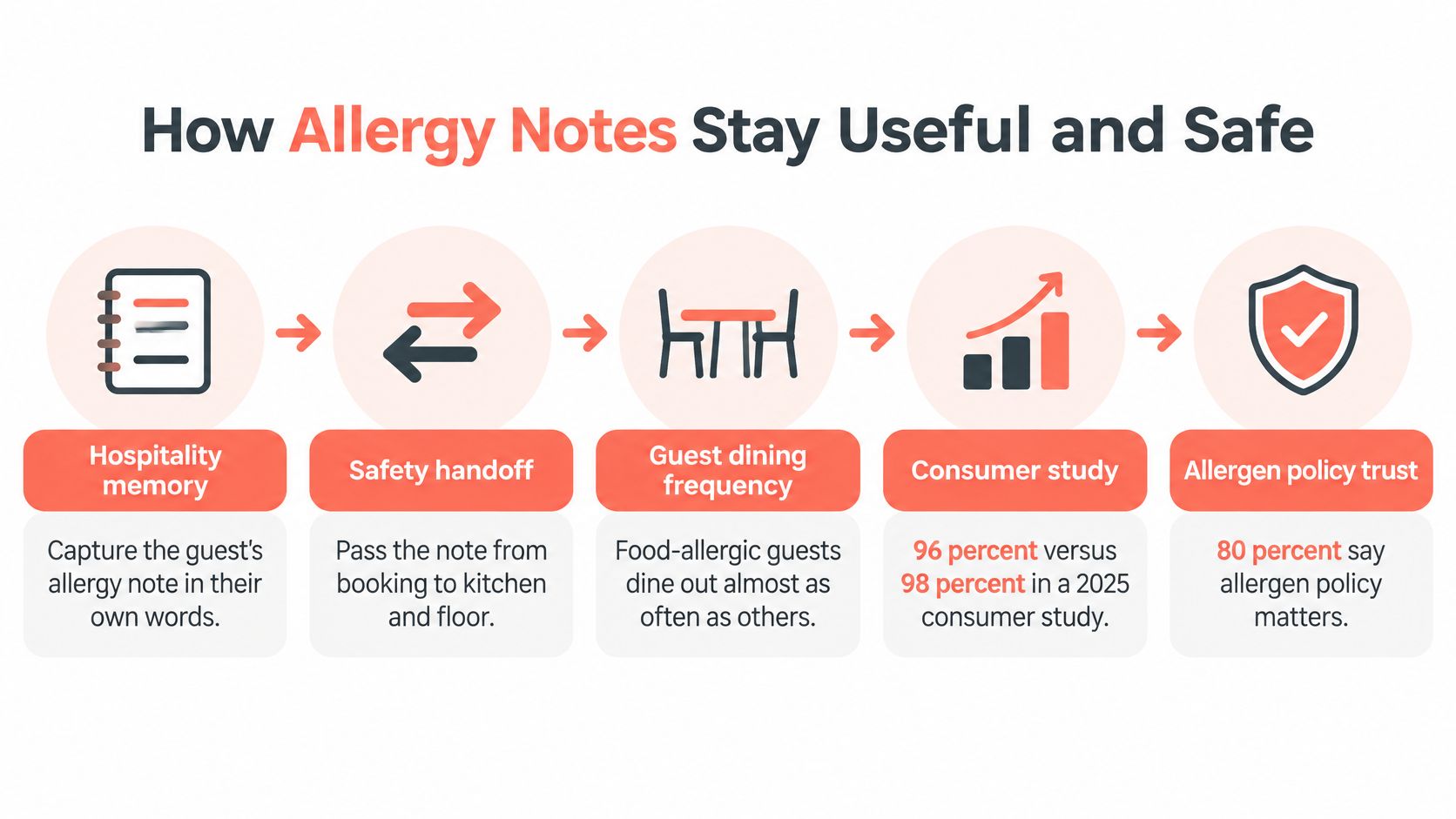
Food-allergic consumers dine out almost as often as consumers without allergies, 96% versus 98% in a 2025 consumer study, while 80% say allergen-management policies influence restaurant choice, according to Food Safety's article on allergen management. The article also reports that only 53.9% of affected customers informed staff beforehand, and 13.7% of reactions occurred when staff had been informed and menus also provided allergen information.
Those reaction figures aren't a guarantee of safety or a calculation of an individual diner's risk. They reinforce the need for a reliable conversation and handoff rather than reliance on a stored flag.
Record the statement and complete the handoff
An allergy note should make the right conversation easier, not suggest that the restaurant has already checked tonight's meal.
- Preserve the guest's words. Record the substance of the statement without rewriting it as a medical diagnosis. If the wording is unclear, ask for clarification.
- Choose the correct category. Distinguish a declared allergy from an intolerance, religious restriction, dislike, or temporary request. Staff shouldn't decide that a declared allergy is merely a preference.
- Show the note before ordering. Both floor and kitchen need the information, presented discreetly rather than announced across the entrance.
- Confirm it for the current party. Ask at booking and again on arrival. The person with the allergy may not be the person whose name appears on the reservation.
- Check the actual dish. Ingredient verification, cross-contact controls, and a manager's confirmation remain separate responsibilities.
The handoff should remain visible from booking through service:
An old flag isn't tonight's clearance
A stale shellfish note can create a false sense of safety if staff assume someone else has checked the meal. It can also follow the wrong diner when companions change.
Each note needs its source, recording date, and current confirmation status. In a restaurant group, those details help another venue distinguish inherited information from a conversation completed locally.
A menu allergy warning supports communication, but neither the menu nor the profile replaces a dish-level check. If the kitchen can't establish whether a dish is suitable, staff must say so plainly.
The guest still needs to disclose the relevant requirement, and the team still needs to verify what can be served. The profile's job is to stop that information disappearing between the reservation and the pass.
Consent Rules and Belgian Cash Register Limits
Running a reservation and sending a promotion are different purposes. A phone number supplied for a booking change shouldn't become permission for offers.
GDPR has applied in the European Union since May 2018 and requires a lawful basis for each use of personal data, as explained in Momos' customer-data-platform guide. Operational details and optional marketing permissions therefore need separate treatment.
Make permission visible by channel
The profile should record what the guest allowed, the communication channel, when permission was collected, and its source. An email permission doesn't automatically cover SMS, and an opt-out must remain effective even when the contact details are still needed for a reservation.
Health-related information needs particular care. A guest supplying an allergy note doesn't give unrestricted permission to retain it indefinitely, share it widely, or use it for targeting.
| Purpose | Practical handling |
|---|---|
| Reservation changes | Use the details needed to manage the current booking |
| Service requirements | Restrict access to relevant staff and establish appropriate handling |
| Promotional contact | Check the recorded permission for the intended channel |
| Correction or deletion | Provide a clear route for the guest's request |
For restaurants collecting permissions through guest Wi-Fi, Splash Access's guide to managing marketing consent through captive portals helps distinguish connectivity from marketing choices. Joining a network shouldn't be treated by staff as blanket permission to contact the diner.
Keep GKS responsibilities separate
For Belgian operations, GKS, the Geregistreerd Kassasysteem, is a separate compliance responsibility. A guest profile isn't a cash register and doesn't replace a certified till where one is required.
Fiscal tickets, VAT records, and required fiscal recording belong in the appropriate cash-register workflow. Connecting reservations with spending history doesn't turn the guest book into a substitute for that process.
- Keep payment credentials out: Don't paste card numbers or full payment details into guest notes.
- Keep venue responsibilities clear: Sharing a guest record across a group doesn't replace each Belgian venue's applicable fiscal obligations.
- Keep corrections consistent: When information is corrected or permission withdrawn, shared copies and connected systems need appropriate updates.
The host's screen should separate service notes from marketing flags so seating a table doesn't accidentally trigger a campaign. Retention rules should also distinguish operational records, optional guest notes, and records subject to separate legal obligations.
The 10Seat privacy policy provides the platform's privacy information. Restaurants still need their own clear explanation of how guest information is collected and used.
Where Profiles Pay Back in Covers and Time
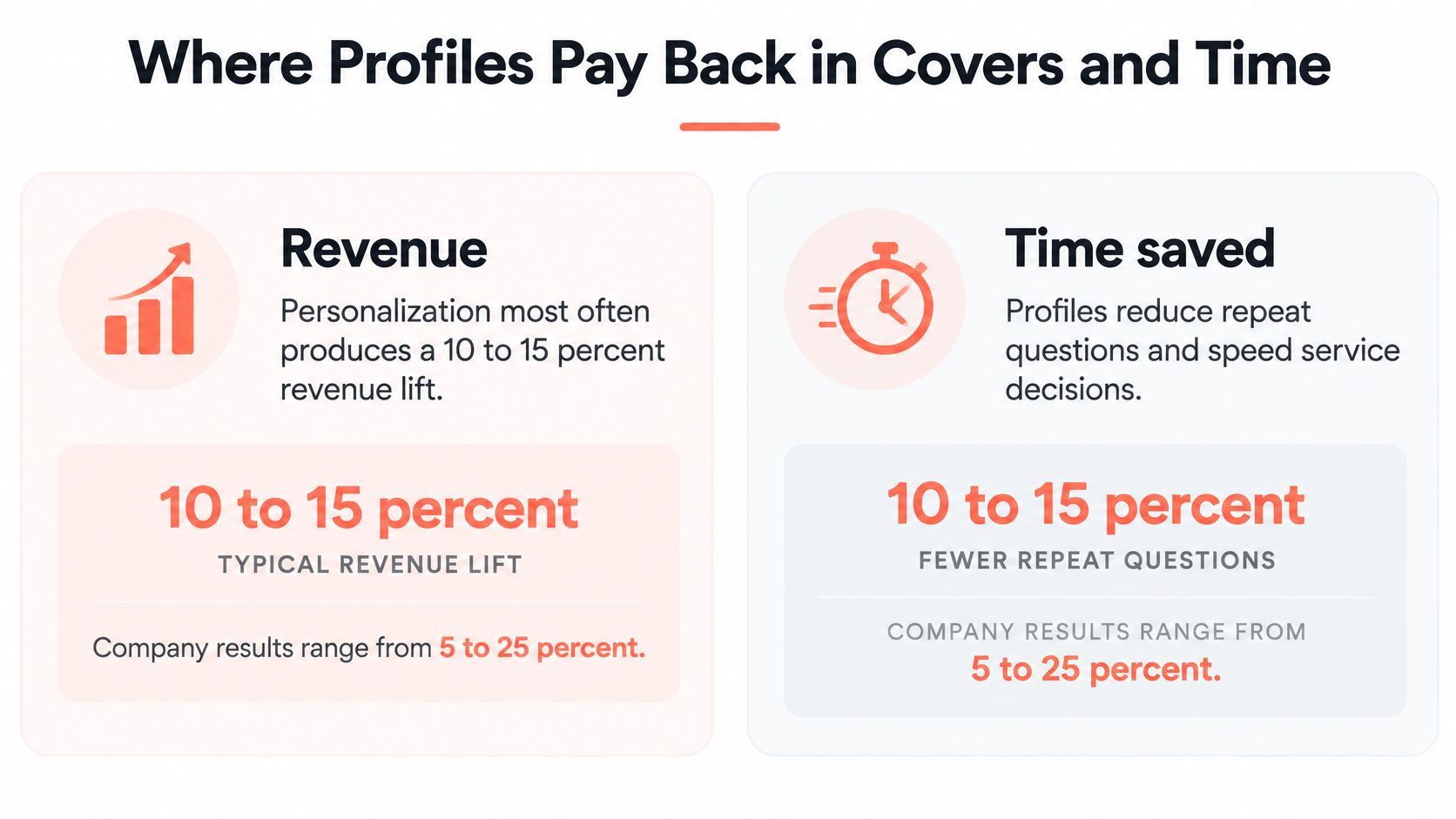
McKinsey's personalization report finds that personalization most often generates a 10% to 15% revenue lift, with company-specific results ranging from 5% to 25%. It also reports that companies excelling at personalization generate 40% more revenue from personalization activities than average performers.
These are cross-company findings, not a promised restaurant return. A stored list of names doesn't justify adding that uplift to next month's forecast.
Revenue needs a relevant action
For a restaurant, useful personalization might mean inviting a suitable, opted-in regular to a quieter service, acknowledging a celebration, or suggesting a dish aligned with a stated preference. A blanket discount sent to everyone may fill seats while reducing the margin on bookings that would've happened anyway.
Time savings should be measured locally. As a hypothetical Saturday calculation, saving 30 to 60 seconds of searching or repeated non-safety questions for each of 20 returning parties would release roughly 10 to 20 minutes for the host.
That example isn't a measured industry benchmark. Allergy confirmation must remain part of the service, even when other repetitive questions disappear.
The potential benefits are summarized below, with commercial results dependent on execution:
Measure contribution, not just campaign bookings
A GM needs to know whether the intervention improved the service's economics. Full tables aren't enough if the offer displaced normal-price demand or created additional kitchen pressure.
A useful review compares:
- Incremental covers: Bookings that plausibly wouldn't have happened without the invitation.
- Contribution after the offer: Revenue remaining after discounts and relevant service costs.
- Host workload: Less time searching records, without removing necessary checks.
- Execution quality: Whether the right guest received the right message and the floor could deliver the promised experience.
Better dietary handoffs can help avoid preventable remakes. A documented cancellation pattern can also support targeted deposit decisions rather than a blanket restriction on every reservation.
The broader work of building customer loyalty for restaurants depends on delivering a dependable experience, not merely recognizing a name. Guests notice whether the restaurant follows through.
A duplicate record, an incorrect allergy, or a message sent after an opt-out can erase the value of a carefully targeted invitation. Quality comes before volume, because an inaccurate profile makes staff more confident about the wrong decision.
Keeping Profiles Accurate Without Junk Records
A name alone is a poor basis for merging guest records. A duplicate can hide a regular's history, while an incorrect merge can attach one diner's notes to another person. Keep uncertain records separate until the identity is clear.
Control errors at capture
- Check booking contact details: Correct obvious email errors and incomplete phone numbers while the guest can still be reached.
- Standardize formats, not identities: Clean up spacing and phone formats, but don't assume Jan Peeters and J. Peeters are the same person.
- Review possible duplicates cautiously: Matching contact details and a compatible name can prompt a review. Keep records separate when household details are shared or the match is unclear.
- Keep the source and date of notes: A preference reported by a guest is different from an assumption. Preserve that distinction when updating the record.
Assign someone to review outdated notes and handle correction requests. Keep marketing suppression records available during cleanup so an old opt-out is not lost.
Watch for records splitting again
Track how often bookings connect to existing guest profiles. A drop can point to duplicate records, but it can also reflect more first-time diners. Treat the figure as a prompt to investigate, not proof of a data problem.
Keep campaign planning separate from service records. Guidance on ecommerce influencer marketing concerns online campaigns, not what belongs in a restaurant guest profile.
A useful guest book does not need every field filled. It needs accurate details, clear uncertainty, and records that staff can trust without confusing guests who happen to share a name.
One Table From Booking to the Next Visit
Consider a hypothetical party of four booking a Ghent brasserie five days ahead for Saturday at 19:30. The booking form includes a shellfish allergy in the guest's own words, an anniversary, and a request for the banquette.
The arrival workflow should support a quiet conversation rather than a public reading of the record:
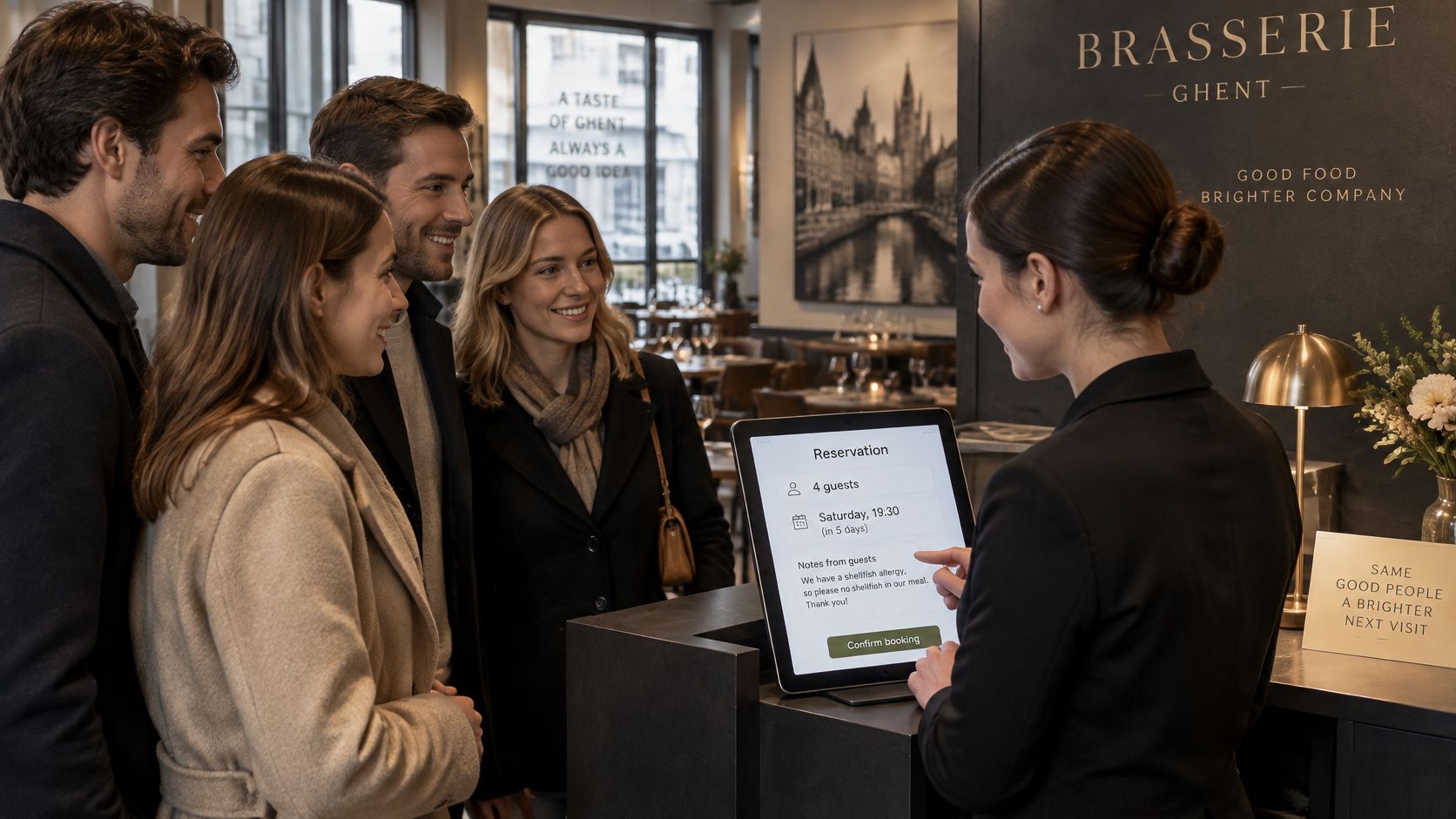
Before the door opens
The host finds a compatible previous booking under the same guest record, six weeks earlier, also for four, with no cancellation history. The banquette is assigned where the floor plan allows it.
The allergy line appears in the service brief, with tonight's confirmation still marked incomplete. No marketing communication is scheduled because the guest hasn't opted in.
The pre-service handoff identifies:
- Host action: Confirm which diner has the shellfish allergy and whether the recorded wording is accurate.
- Kitchen action: Check the intended dishes and preparation controls.
- Server action: Acknowledge the anniversary discreetly, without arranging an unsolicited room announcement.
At the table and after departure
At arrival, the host confirms the allergy statement and records that the conversation happened tonight. The kitchen checks the dishes, including a sauce that previously contained prawn, rather than assuming the profile establishes suitability.
The server offers a short anniversary greeting. Otherwise, service stays ordinary on purpose: the guests receive attention without being made to feel that staff have rehearsed their personal history.
A reservation workflow can be considered alongside this practical walkthrough:
After departure, the record updates the last visit, party size, seating request, and confirmed allergy wording. It doesn't add a favorite wine merely because someone ordered a bottle for the table.
The decision not to send
Three weeks later, Tuesday bookings are soft. The manager considers contacting previous guests, but this party has no marketing permission, so no promotional text is sent.
Their history remains useful if they book again, or if they later choose to receive relevant offers. The restaurant doesn't invent permission from familiarity.
The profile changed the seating plan, the kitchen brief, and the decision not to message. It supported hospitality without pretending that a reservation creates an unrestricted relationship.
Build the Profile Your Team Will Actually Open
A host preparing the floor needs a useful record, not a long intake form. Start with contact details, visit history and party size, seating or access needs, the guest's own wording about dietary requirements, and communication history. Keep only fields staff can use to make a clear service decision.
Make the record usable during service
- Put service-critical details first: The host should find access needs without scrolling through communication history.
- Show the source and date: Staff need to tell a recent statement from an older note.
- Make corrections straightforward: A guest's update should not depend on finding the employee who entered the original detail.
- Keep boundaries intact: Payment credentials stay outside the profile, and Belgian fiscal recording stays in the applicable GKS workflow.
A record the host and kitchen can read and act on matters more than a larger guest book nobody trusts.
Choose the workflow before adding fields
10Seat guest profiles bring together preferences, visit history, and communication history. They build a guest book over time, remembering preferences, allergies, special occasions, and regulars. Customers who cancel can export their data.
The 10Seat product overview explains how guest records fit within reservation management. The 10Seat pricing page lets you assess plans against the booking activity and services your restaurant needs.
At the next busy service, check whether each field changes a seating decision, a kitchen brief, or an authorized message. Add fields when they serve a specific task, not just to make the profile more complete.
10Seat combines reservation management with guest profiles that retain preferences, allergies, visit history, and communication history. Visit 10Seat to consider how those records could support your booking and service routine.