Restaurant Host Training: A Step-by-Step Plan for 2026
Restaurant host training plan with a weekly schedule, ready-to-use scripts, 10seat floor tools and the KPIs to track for busy owners and GMs.
It is 19:10 on a Friday. Three parties arrive together, the phone is ringing, a table of six is late, and the new host is guessing wait times while a server waits to know where to turn next. The food may be right, but the room already feels out of control. Restaurant host training fixes that moment before it spreads. Trained hosts do not just greet and seat. They control arrival flow, protect pacing, give honest information, and escalate early enough for a manager to act.
Table of Contents
- Four-Week Host Training Schedule
- Set GKS Roles Before Your First Training Week
- How to Run the Five-Step Training Cycle
- Greeting, Waitlist and Recovery Scripts
- Teaching the Floor Plan and 10seat Host App
- Peak-Service Scenarios and Decision Rules
- Measuring Host Performance With KPIs
Four-Week Host Training Schedule
Print this schedule, pin it at the host stand, and do not let a host move to the next week until the sign-off test is passed and dated.
| Week | Focus | Practice | Sign-off test |
|---|---|---|---|
| Week 1 | Greeting, reservation check, dining room map | Shadow two full services | Ten greetings scored against checklist |
| Week 2 | Table status and 10seat Host App | Two supervised seatings | No seating errors in one full service |
| Week 3 | Waitlist quotes, walk-ins, late arrivals | Scenario drills before service | Quoted waits within five minutes for 80% of parties |
| Week 4 | Solo shifts | Manager audits a fixed sample of arrivals | Four audited shifts with no unrecovered errors |
Week 1 and Week 2
Week 1 covers greeting standards, reservation verification, party-size capture, and the dining room map during two shadowed services. The host watches first, then repeats the same checks with a trainer beside the stand. The test is simple, ten greetings scored for speed, name use, party size, and clear next steps. If the basics wobble here, later floor work will not hold.
Week 2 adds table status, seating rotation, and the Host App on a tablet at the stand, with two supervised seatings. The trainer checks that every seating follows rotation, respects table readiness, and updates status immediately. Passing requires zero seating errors across one full service, including wrong tables, skipped sections, and parties seated out of order.
Week 3 and Week 4
Week 3 brings waitlist quotes, walk-in handling, late arrivals, and recovery language before the rush. Drills use uneven rooms, incomplete parties, and a kitchen that needs pacing protected. The sign-off target is quoted waits within five minutes for 80% of parties.
Week 4 moves to solo shifts with a manager audit of a fixed sample of arrivals. A host works alone only after four audited shifts with no unrecovered errors. If a host misses a test, repeat that week's practice with different scenarios rather than moving on. The manager who ran the test signs the checklist with a date, and signed sheets stay with the schedule. Managers who want a broader onboarding structure around this host plan can plan consistent training for new hires so every cohort follows the same steps.
Set GKS Roles Before Your First Training Week
Belgian operators need GKS roles settled before the first drill runs. Under the Fiscal Requirements guide to Belgium, the registered cash register system becomes mandatory once annual turnover from on-premise food-service activities exceeds €25,000 excluding VAT. Drinks fall outside that calculation, and the obligation is assessed per establishment, so a group running three sites checks each site on its own numbers.
A compliant setup pairs a certified cash register with a Fiscal Data Module, the FDM or black box, which records transactions and supports the required fiscal receipts. Hosts should know which system holds reservations and live table status, because seating decisions during service depend on that view being accurate. The cashier or manager closing service confirms every qualifying sale ran through the certified GKS workflow. POS integration keeps this clean by linking reservations and orders to the restaurant's cash register system so the records stay synchronised.
Complete three steps before Week 1:
- Calculate turnover per location: Count on-premise food-service turnover for each establishment, excluding VAT and drinks.
- Name the closer in writing: Record the person responsible for closing service at each location.
- Confirm the system of record: Verify that reservations and live table status sit in the tool the host will run at the stand, and that it connects to the cash register before the first training shift.
For a wider view of required staff training topics outside Belgium, Premiere Education's restaurant staff training guide is a useful reference to compare against your own checklist.
How to Run the Five-Step Training Cycle
Run every new skill through the same five steps. Consistency matters more than volume, especially when training time is short and new hosts learn on the floor.
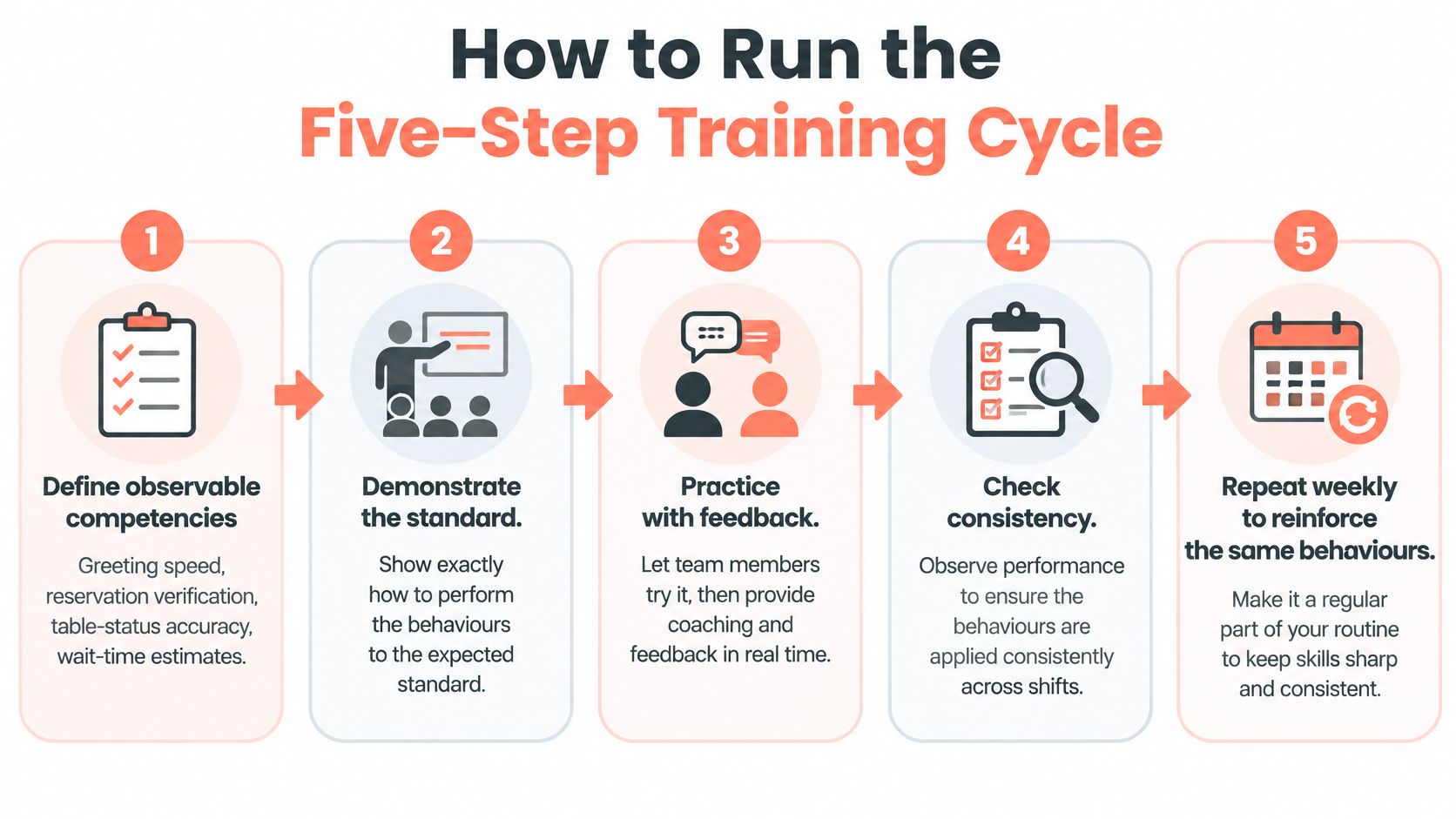
- Define observable competencies: Write down greeting speed, reservation verification, table-status accuracy, wait-time estimates, seating-path judgment, accessibility awareness, allergy escalation, and recovery language. Each competency must be something a manager can see and score.
- Demonstrate each behaviour: Show the standard during live or simulated service and narrate choices aloud. Hosts learn the reasoning, not just the movement.
- Require coached practice: Use early arrivals, missing reservations, incomplete parties, table turns, VIP requests, walk-ins, and phone and in-person demand arriving together. Correct one behaviour at a time.
- Certify with a checklist: The observing manager signs only what was seen. Attendance at orientation is not proof of competence.
- Reinforce weekly: Run short drills and brief manager observations every week. Retrain the weakest behaviour with targeted role-play instead of rereading policy.
That cycle reflects the approach set out in restaurant training research indexed by KCI, which links training content, trainer capability, and learning environment to job satisfaction, organisational commitment, and customer orientation.
Course completion tells you little. Competency records tell you where to act next.
Greeting, Waitlist and Recovery Scripts
Short scripts work under pressure because guests can follow them in noise, and hosts can repeat them without hunting for words. Print these lines on a card at the stand, in the languages your guests speak, and keep the wording identical across shifts.
Four lines to memorise
- Greeting: "Good evening, welcome in. Do you have a reservation with us tonight?" Use the guest's name when the booking shows it, greet within ten seconds of arrival, and ask for party size before anything else. That order prevents a friendly chat from blocking the decisions that follow.
- Waitlist quote: "The wait is about 15 minutes, and you will get a message the moment your table is ready." Give a number and a promise. Never say "shortly" without a time, because guests hear a commitment the host cannot prove.
- Recovery: "You are right, that took longer than promised. The table will be ready at 20:20, and the manager is aware." Acknowledge the failure in one sentence, offer one concrete fix such as a drink or an updated time, and tell the manager at once.
- Allergy: "To confirm, that is a nut allergy for table 12. It is written on the ticket and the server has been told directly." Repeat the allergy back, write it down, and hand it to the server in person.
Regulars and plain language
Add a regulars line that uses guest notes properly. Guest notes store preferences so restaurants can remember regulars and their preferences, which makes a greeting by name and a stored preference feel personal rather than scripted. "Welcome back, Ms Peeters. The quiet corner table you prefer is ready" takes seconds and signals control.
Plain language matters for multilingual teams and guests. Short sentences travel better across accents, languages, and background noise, and part-time hosts can deliver them reliably on a first Friday shift. Practise each line in role-play before solo work, and connect the standard to how you improve guest satisfaction at the door. A quote is only useful if the host would stand behind it at the end of the night.
Teaching the Floor Plan and 10seat Host App
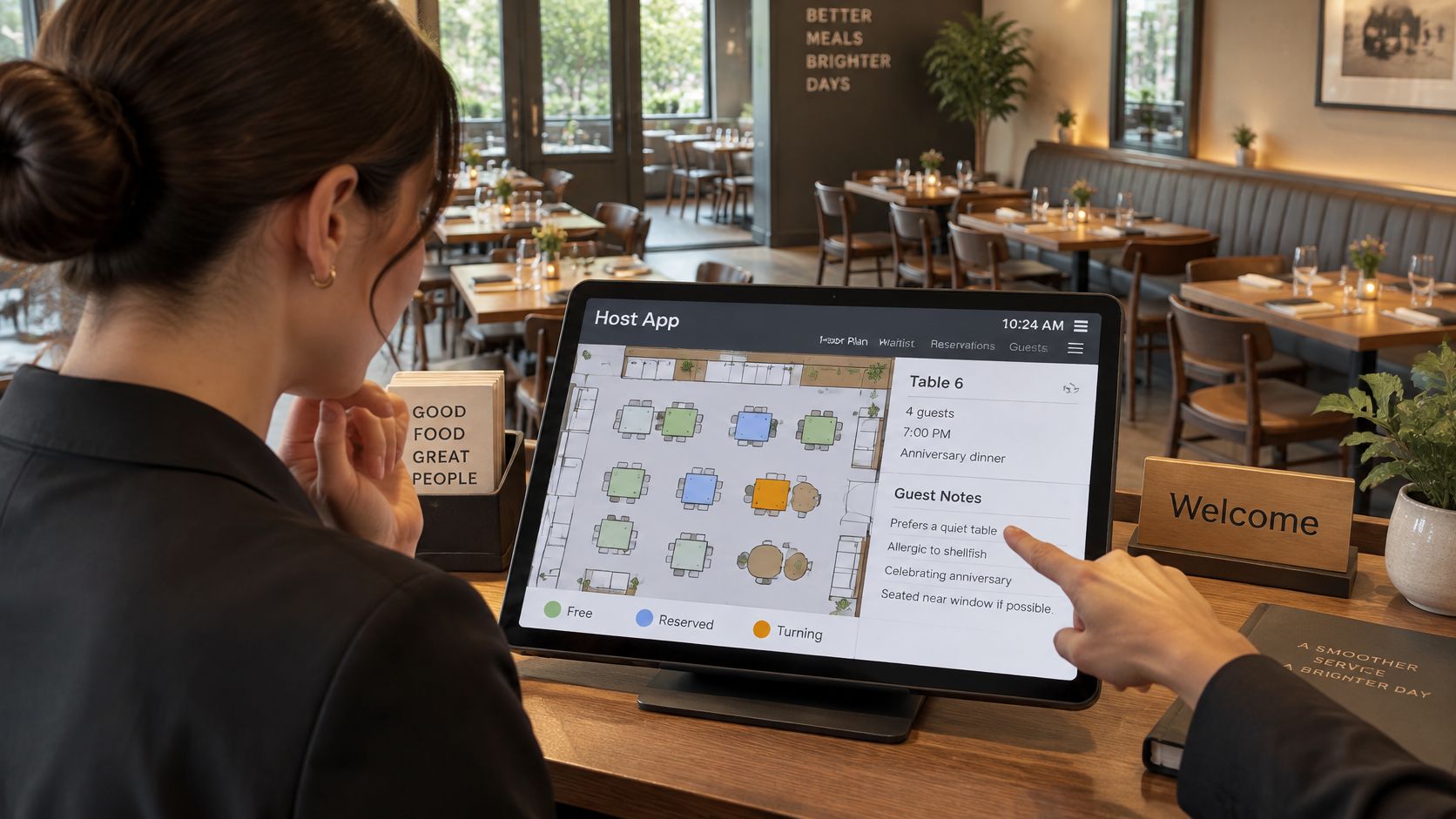
Train hosts on three views in this order, the live table floor, the Host App for seating, and guest notes. Start in an empty room so table states are learned without pressure, then repeat the same actions during service until they are automatic.
The training view below shows the tablet position hosts should practise from at the stand.
Five steps in order
- Walk the floor view: Name each table status aloud, free, reserved, seated, or turning. The host should be able to call the state of the room from one glance.
- Seat a booked party: Confirm the booking, walk the party to the table, and check that the table changes state immediately.
- Handle a walk-in against the live map: Match party size to table fit and section load, not just to the first empty chairs.
- Clear a table: Practise clearing until it reopens cleanly for the next seating, with no stale status left behind.
- Read guest notes and allergy flags: Check preferences, occasions, accessibility needs, and allergies before seating anyone, then pass anything relevant to the server.
Table and floor management shows all tables live during service, so staff can seat guests, manage changes, and handle walk-ins from one view. The Host App is a simple app for hosts during service to seat guests and stay in control, and guests can be seated and tables cleared with a single tap. Full detail on the workflow sits in the 10seat Host App product overview.
The short walkthrough below is worth running during a quiet pre-service session so the whole team hears the same sequence.
The time saving is concrete. If a host checks the floor in one glance rather than walking the room, a busy host can save about two minutes per seating. Over 40 seatings in one service, that is roughly 80 minutes returned to greeting, quoting, and recovery work that protects the guest experience.
Practical rule: If the screen and the room disagree, trust the room, fix the screen immediately, and tell the next host on the stand what changed.
Peak-Service Scenarios and Decision Rules
Greetings and seating are the visible part of the job. The harder skill is judgment under pressure, when table readiness, party-size fit, pacing, walk-ins, late arrivals, and kitchen capacity pull in different directions. Train decision rules with timed role-play, then hold hosts to them during service. Good floor management depends on those calls being consistent, not improvised by whoever is on the door.
| Scenario | Host action | Escalate when |
|---|---|---|
| Early arrival | Offer bar seating and quote an honest wait | No table is free within 15 minutes |
| Missing reservation | Check deposit or card hold, then follow the late-time rule | Large or special-occasion party may be held longer |
| Incomplete party | Seat when the named guest is present, hold the rest per policy | Remaining guests are still outside after the hold |
| Walk-in during rush | Add to waitlist with a realistic time | Quoted wait exceeds 30 minutes |
| Dinner no-show | Release the table at the stated late time | Venue policy requires an exception |
| VIP or special request | Note it on the ticket and confirm with kitchen | Request changes pacing or table allocation |
Why dinner needs a stricter rule
No-shows are not evenly spread across the day. One industry index cited by Yahoo Travel covering 3,768,761 reservations across 2,417 restaurants recorded a 2.63% dinner no-show rate versus 1.84% at lunch. On 1,000 dinner reservations, that is about 26 empty bookings compared with about 18 at lunch, before any deposit or reminder policy is applied.
Train hosts to know the exact time an unarrived reservation counts as late, when a large or special-occasion party can be held longer, and when the table must be released. Dinner services need stricter confirmation and release procedures, especially for peak-time tables and larger parties.
Deposits change the numbers before the rush starts. In the resos no-show rate dataset covering 3.77 million reservations at 2,417 restaurants, reservations with no-show protection had a 0.80% no-show rate, compared with 2.47% for reservations without a payment requirement. Train hosts to sort every booking into confirmed, secured by deposit or card hold, or financially unprotected. Hosts should know the cancellation window, log late cancellations correctly, and send disputed charges to a manager.
A host decides within the rule. Anything outside the rule goes to the manager at once.
Measuring Host Performance With KPIs
Measure what hosts control. Accurate availability statements, consistent queue updates, clean server handoffs, precise party-size capture, and documented recovery improve service quality first, and satisfaction follows from that quality.
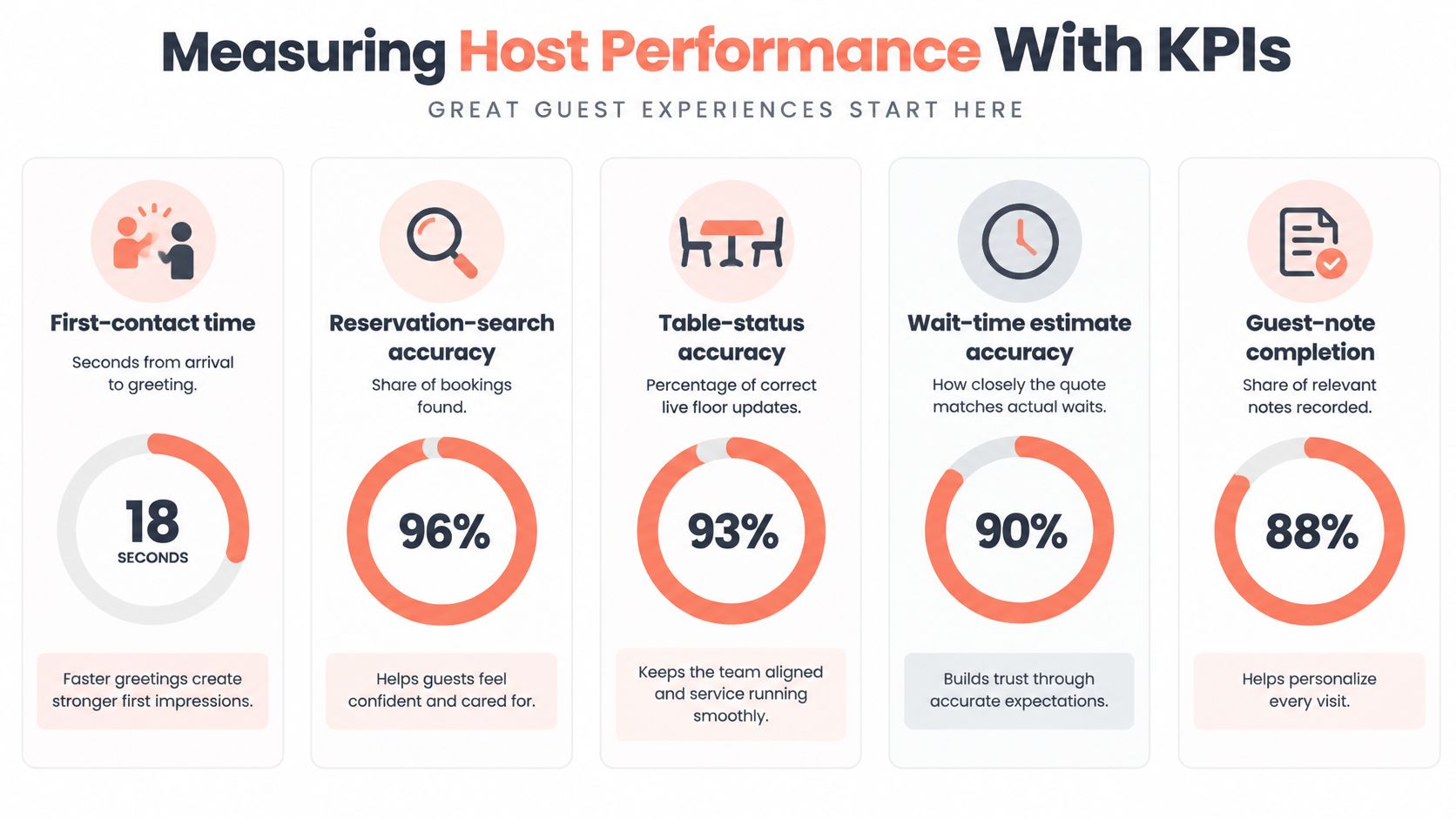
| KPI | How to measure | Target |
|---|---|---|
| First-contact time | Seconds from guest arrival to greeting | Within 10 seconds |
| Reservation-search accuracy | Share of bookings found on the first search, per shift | 95% or higher |
| Quoted-versus-actual wait variance | Minutes between the quote and the seating | Within 5 minutes for 80% of parties |
| Seating errors per shift | Parties seated at the wrong table or out of order | Zero in a full service |
| Recovery completion | Share of failed promises closed with a fix and manager notice | All failures logged |
Run a 30-day design. Record one baseline week, train, then compare the next three weeks using identical definitions, reviewed by shift and by host.
Keep satisfaction separate from operational results. Hospitality research, including work published in the Barista journal, treats training variables and customer satisfaction as distinct outcomes, so a friendliness score cannot stand in for seating accuracy or honest wait quotes.
Set a daily control: a five-minute scenario drill before service and a manager audit of the first ten parties each evening. When one error recurs, change the script, the table-status rule, or the floor procedure rather than blaming the host. Watch for vague "be welcoming" instructions, sign-offs given without observed service, training scheduled during peak demand, and no refresher after floor-plan or reservation-rule changes.
10Seat gives independent restaurants reservation management, a Host App where hosts seat guests and manage table status live during service, guest notes for preferences, waitlist handling with realistic wait times, and deposits that secure peak-time bookings. Train hosts on the same screens they will use during service. Start the free "On the House" plan, covering up to 50 covers, at 10Seat and have the floor configured in minutes before your next pre-shift drill.