Restaurant Automation: Where to Start and What It Pays
Restaurant automation explained: where to automate front and back of house, what it costs, and how to roll it out step by step.
It's 19:15 on a Friday. The host is holding a phone, checking a paper reservation book, and trying to work out whether a four can fit where two tables of two are sitting. A walk-in party is waiting by the door, the kitchen is calling for a missing ticket, and one booked table still hasn't shown up. Nobody on the team is standing still, yet covers are leaking out of the service.
That scene is where restaurant automation earns its keep. It's not about removing the people who make a dining room work. It's about moving the calculations, reminders, re-keying, and routine checks off your team's plate so they can look after guests, judge exceptions, and fix problems before they reach the table. Done well, automation protects hospitality. Done badly, it adds another screen to babysit during a rush.
The practical approach is narrow and measurable. Map the work front and back of house, find the bottleneck that's costing you the most covers or minutes, put a number on it, and test one tool against that number. The sections below follow that order, from the area map and a worked payback example to Belgian fiscal compliance and a four-phase rollout you can run without stopping service.
Table of Contents
- Where Automation Fits Front and Back of House
- What Lost Covers Cost and How Automation Pays Back
- Kitchen and Ordering Automation That Saves Labor Minutes
- GKS Compliance for Belgian Restaurants Before You Automate
- How to Roll Out Automation in Four Phases
- Choose One Bottleneck to Automate This Month
Where Automation Fits Front and Back of House
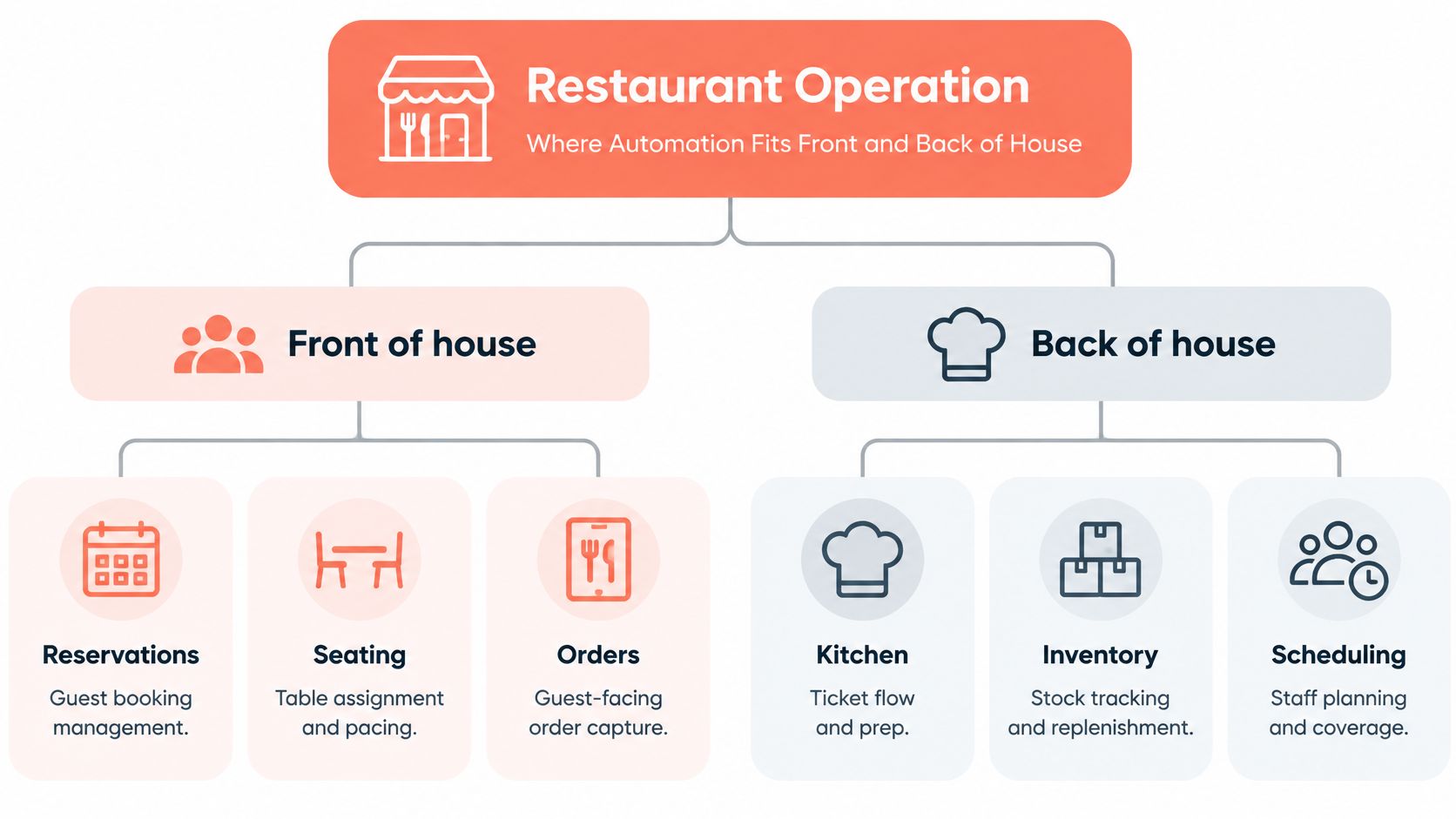
A restaurant runs on two linked sides. Front of house is what guests see, from the booking they make at home to the moment they pay. Back of house runs out of sight, where tickets, prep, stock, and rotas decide whether the dining room can deliver what it promised. Automation fits on both sides, but the work it should take over isn't the same on each.
The diagram below maps those areas before any purchasing decision gets made.
The Task and Judgment Split
Front of house, the repeatable work is reservations, seating and waitlists, and order capture and payment. Software can confirm a booking, send a reminder, hold a walk-in queue in order, and calculate which table combination fits a party without wasting seats. A host still owns the judgment calls that surround those tasks, such as moving a regular to a preferred table, handling a late arrival with grace, or recovering a guest who's had a bad start to the evening.
Back of house, the repeatable work is kitchen ticket routing, prep timing, inventory and purchasing, and shift scheduling. Software can send each dish to the right station, suggest prep quantities from expected covers, flag stock below par level, and build a rota from a template. A chef or manager still decides when a dish needs refiring, when to hold a course, and when to pull someone across sections.
Practical rule: automate a calculation or a routine step, and keep a named person responsible for the exception that follows it.
Guest marketing sits across both sides. Reminders reduce empty tables, review requests go out while the visit is fresh, and win-back messages reach lapsed guests without anyone working through a list by hand. Those messages support service only when the underlying booking and seating records are accurate.
Labor is why saved minutes matter so much. Bank of America's restaurant technology analysis reported that labor costs in restaurants averaged nearly 30% of gross sales. You don't need to remove a whole shift for automation to pay. Removing ten minutes of re-keying or phone tag from every service, across a full week, returns real paid time to work that guests notice.
A Simple Test for Any Tool
Before you look at features, apply one test. Does the tool remove repetitive work without slowing the guest or the kitchen? If a booking flow adds steps for guests, or a kitchen screen forces cooks to confirm items twice, the work hasn't disappeared. It has moved.
| Area | Side of house | Typical tasks automated | Metric to watch |
|---|---|---|---|
| Reservations | Front of house | Online booking, confirmations, reminders | Covers booked versus covers seated |
| Seating and waitlist | Front of house | Table allocation, walk-in queue, pacing | Seating delay in minutes |
| Ordering and payment | Front of house | Order capture, tableside devices, payments | Order errors and payment time |
| Kitchen coordination | Back of house | Ticket routing, prep timing | Ticket-time variance |
| Inventory and purchasing | Back of house | Stock counts, par levels, reorders | Food waste cost |
| Scheduling | Back of house | Shift templates, demand-based rotas | Labor cost as share of sales |
| Guest marketing | Both | Reminders, review requests, win-back messages | Repeat visit rate |
Use the metric column as your shortlist. Pick the row where your current number hurts most, and start there rather than buying across every row at once.
What Lost Covers Cost and How Automation Pays Back
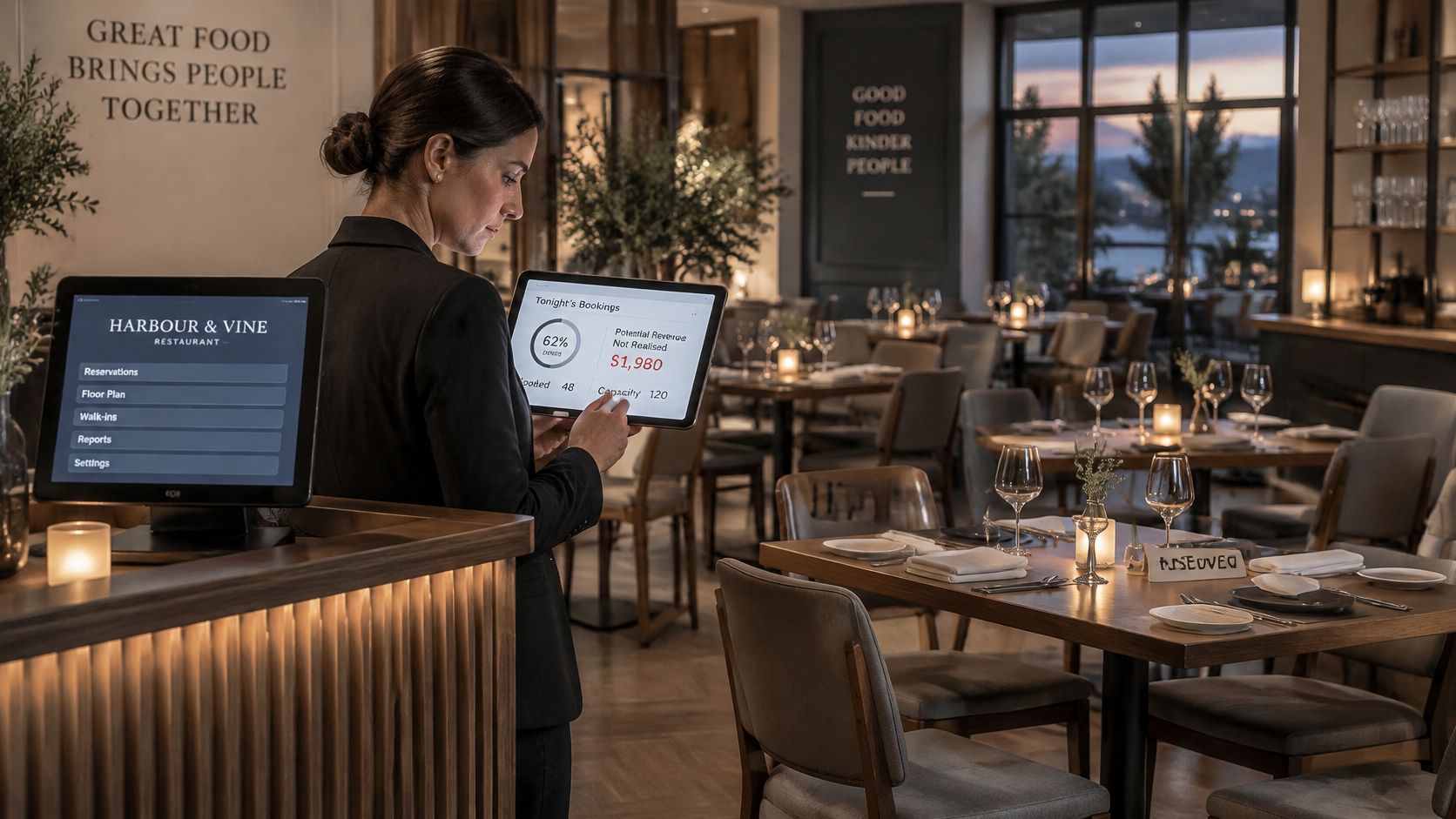
A full reservation book at 17:00 doesn't mean a full dining room at 19:30, because bookings leak. Bloom Intelligence's summary of POS-linked reservation records reported 3.7% advance-booking no-shows and 15% cancellations, so 18.7% of booked tables never seated a guest. The split by party size matters for how you respond: parties of seven or more had a no-show rate of 1.8% in that dataset, while smaller parties accounted for more than half of all no-shows.
A blanket deposit on every booking therefore adds friction for your most reliable guests while doing little on the segment that's leaking. Target the fix where the loss sits.
The host stand is where that leakage becomes visible, and where a live booking view replaces guesswork.
Selective Protection Works Better Than Blanket Rules
Deposits do more than hold a booking; they change how guests treat it. Resos data across 3.77 million reservations at 2,417 restaurants recorded a 0.80% no-show rate for reservations with a deposit or other no-show protection, compared with 2.47% without a payment requirement. That's a reduction of 1.67 percentage points, or roughly 68% relative to the unprotected rate. On 1,000 protected reservations, those rates correspond to about eight no-shows instead of approximately 25, a difference of about 17 reservations.
Apply that protection selectively, in this order:
- Use deposits on peak sittings and large groups. Saturday at 20:00 and a table of ten carry the highest cost when they sit empty, so that's where a card guarantee earns its friction.
- Send reminders to smaller parties. They're the larger source of lost covers, and a timely reminder costs nothing in goodwill.
- Confirm the day before and release at a set time. Tell guests the release time in the confirmation, then free unconfirmed tables for the waitlist instead of holding them on hope.
Restaurants using 10Seat report 30% more reservations, 40% fewer no-shows and 10-15% more covers per shift, so measure your own dining room against those benchmarks. If you want the underlying numbers to work with, this guide to restaurant data analytics covers which booking and service figures to pull before you set a target.
The Payback Arithmetic on One Shift
Thin margins are why recovered covers matter out of proportion to their count. The National Restaurant Association's State of the Industry 2026 report reported median 2024 income-before-tax margins of 2.8% for full-service restaurants and 4% for limited-service restaurants, while food and labor costs had risen by at least 35% since the pandemic. Extra covers on a shift you've already staffed, in a room you're already renting, drop far more to the bottom line than the same covers on a shift you'd have to open specially.
The formula stays simple. Payback equals extra covers per shift, multiplied by average spend per cover, multiplied by the number of shifts. Say a busy shift seats 60 covers at an example spend of €45. A 10% gain takes you to 66 covers, and a 15% gain takes you to 69.
| Measure | Baseline | With 10% more covers | With 15% more covers |
|---|---|---|---|
| Covers per busy shift | 60 | 66 | 69 |
| Average spend per cover (example) | €45 | €45 | €45 |
| Extra revenue per shift | €0 | €270 | €405 |
| Extra revenue per six-shift week | €0 | €1,620 | €2,430 |
Set that against the actual costs: a software subscription, tablets or kitchen displays if the tool needs them, setup time, and training hours for the team. If the weekly gain in the table holds for even part of your week, a subscription-priced tool clears its cost quickly, provided the covers arrive without extra labor hours attached.
Recovered covers only count as profit when the kitchen and floor absorb them inside the shift you've already staffed.
One caution belongs in every payback calculation. Extra bookings that overload the pass create longer ticket times and worse reviews, which cost repeat visits later. This is the failure mode pacing controls exist to prevent: 10Seat's service pacing and capacity control spreads guest arrivals across the service so the kitchen isn't hit all at once. Count the recovered covers only when they rise while ticket times and guest feedback hold steady.
Kitchen and Ordering Automation That Saves Labor Minutes
Ordering and kitchen tools save money in a different way from reservation tools. They don't fill more seats. They remove minutes and errors from work your team already does, so the same covers take less paid effort to serve. The savings show up task by task, in the order work moves through a service.
Where the Minutes Come Out
Order capture is the first leak. A server who writes an order by hand, walks it to a terminal, and keys it in again has handled the same information three times, and each handling is a chance to misread a modifier or an allergy. Capturing the order once, at the table or on a handheld device, removes the re-keying step and the handwriting errors that come with it. If you're weighing that change, this overview of tablet ordering systems for restaurants sets out how tableside capture fits a normal floor routine.
Ticket routing is the next step. Sending each item straight to the right kitchen display or printer station cuts the walk between pass and printer and removes the lost-ticket problem entirely. Cooks see items in firing order rather than in the order someone happened to pin them up, and the pass stops being a sorting station.
Prep quantities follow expected covers rather than habit. When the forecast says a quiet Tuesday, the prep list shrinks with it, and less food gets cooked speculatively. Inventory automation works the same way, with par levels and reorder triggers turning the walk-in check into a comparison against a number instead of a guess made under time pressure.
Scheduling closes the loop. A rota template tied to forecast covers gives the manager a starting point that already reflects expected demand, so the weekly scheduling job becomes adjustment rather than construction from a blank page. The manager still handles availability requests, skill mix, and the judgment calls a template can't see.
How to Prove a Saving Is Real
Vendors will tell you a tool saves time. Your own service records can confirm or deny it in a month. Record a baseline for two weeks before any change, then measure the same two weeks after, matching comparable services where you can.
Track five numbers, and keep the calculations plain enough that a shift manager can run them from existing records:
| Metric | How to calculate it | Direction that signals a saving |
|---|---|---|
| Labor minutes per cover | Total kitchen and floor minutes divided by covers | Down |
| Order error rate | Corrected orders divided by total orders | Down |
| Ticket-time variance | Gap between fastest and slowest tickets in a service | Narrower |
| Manager interventions | Manual overrides logged per service | Down |
| Food waste cost | Discarded stock valued at cost, per week | Down |
Read the results together, not one at a time. If labor minutes per cover fall while order errors and ticket-time variance stay flat or improve, the tool is saving work. That's the outcome you're paying for.
If minutes fall but errors rise, or managers step in more often to fix what the system produced, the automation hasn't removed work. It has shifted work onto someone more expensive, usually at the worst moment of the service. That pattern means the setup needs fixing, the training was too thin, or the tool doesn't fit how your kitchen runs.
Rule of thumb: automate the repetitive task, and keep a person on the exception.
That rule also tells you where to stop. Refires, allergy escalations, a table that needs a course held, and a cook who's falling behind all need a person's judgment in the moment. A good system surfaces those exceptions clearly and gets out of the way. A poor one buries them under confirmations and alerts nobody has time to read.
GKS Compliance for Belgian Restaurants Before You Automate
Belgian restaurants have one compliance question to settle before automation touches ordering or payment: whether GKS, the Geregistreerd Kassasysteem, applies to the business. Fiscal Requirements' GKS 2.0 guidance sets the scope test and the migration timetable used below: the obligation generally applies when annual turnover from on-site restaurant and catering services exceeds €25,000, excluding VAT and, for the threshold calculation, drinks.
If the restaurant is in scope, the certified setup does the fiscal work. You need a certified cash register system connected to a fiscal data module, a VAT receipt for each sale, and the registration and receipt rules that go with them. A reservation, waitlist, seating, or pacing tool sits alongside that register and can feed it cleaner covers, arrival times, and order context. It does not issue fiscal receipts.
Use the purchase date of the current register to plan the migration window, then confirm the applicable date and upgrade path with the supplier before building integrations around old hardware.
| Register purchase date or case | GKS 2.0 deadline |
|---|---|
| Before 1 January 2018 | 1 July 2027 |
| 2018 through 2021 | 1 July 2028 |
| 2022 onward | 1 January 2029 |
| New in-scope hospitality business | 1 July 2026 |
Four Steps Before You Buy Anything
Work through these in order, because each step changes what you are allowed to connect:
- Check turnover against the threshold. Use on-site restaurant and catering turnover, excluding VAT and drinks for the calculation, so the scope decision is grounded in the right revenue figure.
- Find the purchase date of the current register. That date places the business in one migration row and tells you whether the existing checkout is near end of useful life.
- Confirm the deadline and path with the supplier. Get the migration date, replacement unit, fiscal data module, and any certificate or registration steps in writing before you schedule other software around it.
- Test integrations after the certified system is in place. Run a full service rehearsal: reservation arrives, table is seated, order reaches the POS or kitchen flow, receipt is issued, payment closes, and the day-end record still matches.
The useful separation is simple. Keep the certified register as the fiscal system of record, then let operational tools recover covers around it. A read-only POS connection can still expose sales and cover patterns for better seating decisions without disturbing the compliant checkout path. If the POS review is happening anyway, this guide to choosing a restaurant POS system helps separate checkout choice from reservation workflow.
VAT treatment runs beside the register question because the receipt must reflect the correct rate for what was served. Snyp explains how VAT applies to restaurant food; use it with your accountant's advice for menu-specific cases.
Done in this order, compliance stops being a blocker. It becomes the base layer that lets seating automation protect Friday night instead of discovering, mid-service, that the register it depends on was due for replacement.
How to Roll Out Automation in Four Phases
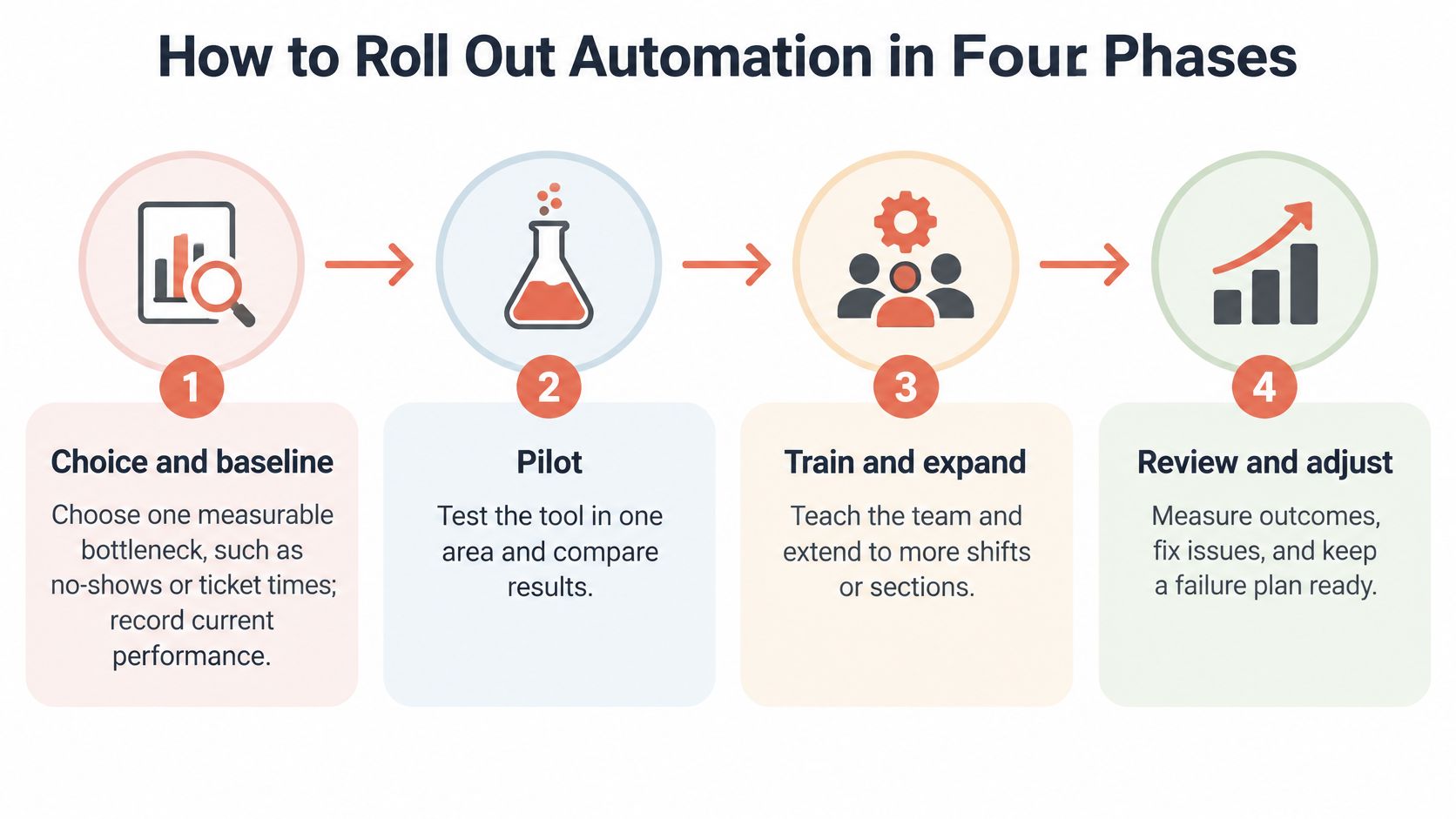
Automation projects fail at rollout more often than at the software. A tool lands in a full Friday service with no baseline, no owner, and no fallback, and the first dropped connection costs you the walk-ins and held tables it was bought to recover. The four phases below build the safety net first, so a problem during a rush costs you minutes rather than the whole evening.
Run them in order, even when a supplier pushes for a faster go-live.
Phase One and Two Cover Choice and the Pilot
Phase one is choice and baseline. First, choose one measurable bottleneck from the area map, such as no-shows, seating delays, or ticket times. One bottleneck means one number to beat, and the whole team knows what success looks like before anything changes. Second, record a baseline for two to four weeks using the metrics you already track: no-show rate per service, minutes from door to table, average ticket time at the pass. Without a starting number, every later argument about value becomes opinion.
Phase two is the pilot. Third, set a manual fallback before go-live. A paper waitlist, a printed run sheet, or a reservation printout at the host stand means a dead battery or dropped connection slows you down without stopping you. Fourth, name one owner who checks the tool at every service during the pilot. Shared ownership means nobody notices the small faults that compound into a Saturday-night failure.
Fifth, test edge cases on a quiet day. Run a large party, a changed booking, a failed card payment, and a device dropping offline, and watch what the system does with each. The edge cases you rehearse on Tuesday afternoon are the ones that stay quiet when the dining room is full.
Phase Three and Four Cover Integration and Review
Quiet failures start at integration, where two systems disagree about what happened at 19:40 on a Friday. Industry reporting on restaurant technology keeps surfacing the same two complaints: operators are dissatisfied with the integrations and APIs they already pay for, and many lack the staff hours to manage or implement new tools. Connect less, and connect it slowly.
Phase three is integration. Sixth, link only the systems the bottleneck needs. If the problem is no-shows, the reservation tool needs the point-of-sale record of who arrived, and nothing else has to move yet. Every extra connection is another place for data to stall. Where a read-only link exists, take it first: 10Seat offers a read-only POS integration for exactly this reason, so you can see whether bookings and arrivals agree without anything being written back into the register. If sync fails during a rush, switch to the paper fallback for that service, finish the night cleanly, and add no further connection until the first has stayed stable for a month.
Phase four is review. Seventh, compare results by service period rather than by week. Lunch and dinner behave differently, and a weekly average can hide a tool that helps lunch and hurts dinner. Review each period against its own baseline, including whether arrivals stayed paced evenly enough to protect the kitchen, and keep the fallback in place until the numbers hold across both.
A system that fails in a rush can cost more than it saves, so recoverability matters more than advanced features.
Take brunch as a worked example. Measure walk-in wait times for two weekends with the paper list. Run the digital queue the following weekend with the paper list still on the stand, and define "clean" before you start: no missed notifications, no double-seated tables, no guest lost while a screen reloaded. Keep both running until the queue has held that standard for a month, then retire the paper. The pace feels slow on paper and calm in the dining room, and calm is what keeps the covers you bought the tool to win back.
Choose One Bottleneck to Automate This Month
One bottleneck. That's the whole assignment for this month. Pick the point on your area map that loses the most covers or the most minutes, attach a 30-day number to it, and count that number at the end of every service. The rest of the map waits until the first number moves.
Let the symptom pick the tool. Empty tables on busy nights call for confirmations, selective deposits, and automatic table allocation. A slow pass with uneven ticket times calls for ticket routing and faster order capture. Software bought for a symptom you don't have is software nobody opens.
Whatever tool you shortlist, run it against four service tests:
- Offline fallback exists. A paper or printed backup is ready for the night a device drops offline mid-service.
- Checkout stays in sync. Reservations and payments stay aligned with your certified checkout, so covers and receipts agree.
- A new host learns it fast. One practice shift should be enough for a new team member to run a full service.
- Costs are fully visible. Ask the provider for a complete cost breakdown, including any per-booking or per-cover fees, before you sign. A quote that hides variable charges makes your payback math unreliable.
With 10Seat, those tests translate into concrete features. Smart Auto Seating locks every online booking into the most efficient table configuration with no manual work. Live floor management shows every table during service, so staff can seat guests, manage changes, and take walk-ins without losing the plot. Service pacing spreads arrivals across the shift so the kitchen never gets a wall of tickets at once. Read-only POS integration adds insight without touching daily checkout operations. The details sit on the 10Seat product page, and the 10Seat pricing page is where you price the pilot.
Switching friction is lower than most owners expect. A full reservation system migrates in 15 minutes, with no third-party platform and no lost reservations, and most restaurants are up and running within 24 hours.
Then run the test properly. Pilot on one service type for two weeks, with the fallback in place and one named owner. Keep the tool only if your chosen number improves, whether that's no-show rate, labor minutes per cover, or ticket-time variance, and manager interventions stay flat. If interventions rise, the tool is pushing work uphill: fix the setup or walk away.
Before this week ends, name the owner, book the pilot dates, and write the target number where the whole team can see it during service. A target on the wall changes behavior faster than a target in a spreadsheet.
If lost covers are your bottleneck, 10Seat covers reservations, table management, and an instant booking page that takes bookings from your website, social channels, or a QR code within minutes. Start with your busiest service, measure covers seated against covers booked for two weeks, and keep the tool only if that gap closes. Restaurants using the platform see 10-15% more covers per shift, which is the kind of movement your 30-day number is there to catch.