Online Reservation System: A Practical Guide for Restaurants
Learn what an online reservation system does, which features matter, and how to pick the right one. Built for owner-chefs and restaurant GMs who need clarity
Friday night exposes the truth fast. The phone keeps ringing, three parties are waiting, two tables are technically free, and none of them fit the people standing in front of the host. A paper book, a tablet, and a floor plan that lives in someone's head are not a system, they're a gamble.
An online reservation system is only useful if it helps the dining room make better decisions under pressure. The point is not to digitize the old chaos. The point is to turn scattered demand into usable capacity, so the host can seat more covers, protect the kitchen, and stop guessing.
Table of Contents
- The Friday Night Problem Every Host Knows
- What an Online Reservation System Actually Does
- Which Features Matter for Your Type of Restaurant
- The Math Behind Fewer Empty Tables and Fewer No-Shows
- Implementing Without Breaking the Floor
- Pricing Models and Why They Change the Math
- How to Choose and What to Ask Before You Sign
The Friday Night Problem Every Host Knows
At 19:45, the room feels busy enough to stay under pressure, but not organized enough to stay in control. Two-top tables are open, the waiting parties need four seats, and one of them has a stroller. The host is answering the phone, moving the waitlist, and trying to remember which reservation wanted a quiet corner.
That is the capacity problem an online reservation system should solve. It gives the host one live view of demand, so walk-ins, phone bookings, and website bookings stop fighting each other in separate piles. With availability in one place, seating moves faster and the room stops drifting into guesswork.
Practical rule: if the host still has to check three places before saying yes, the system is too loose.
The bigger issue is no-shows and late cancellations. A peer-reviewed revenue-management study found the combined probability of either problem at 9.07 percent to 12.95 percent, with the lowest rate on Thursdays and the highest on Saturdays for both lunch and dinner (source). A Saturday book is not guaranteed capacity, it is demand that needs control.
The first job is to make the floor readable on the host screen, table by table and party by party. Then the host can seat with confidence instead of treating every booking as fixed and every gap as a surprise.
For operators still running on memory and paper, reservation books for restaurants show how quickly that approach breaks down.
What an Online Reservation System Actually Does
An online reservation system is not one feature, it's a chain of decisions that starts when a guest books and ends when the right party lands at the right table. If one link is weak, the whole floor pays for it. The host notices this immediately, because the day gets slower even when the room is full.
The parts that matter on service
The booking widget sits on the website or social channel and takes the booking without a phone call. That matters when guests decide at night, on the train, or after checking availability on their phone. A good widget removes friction before the reservation reaches the host.
The next layer is real-time mapping. Every booking needs to land against actual table inventory, not against a vague promise that “something will work.” That's how double-bookings are avoided and why the host can trust the screen instead of double-checking the book.
The capacity engine is the part most operators underestimate. It should not act like a passive calendar, it should decide how many covers to accept for a given service based on pace, table sizes, dining duration, and expected demand. Consider it a sous chef who only accepts as many orders as the pass can handle.
The best systems don't just store reservations, they decide whether the room can still absorb more demand.
The waitlist catches what the room can't immediately seat. When a party no-shows, arrives late, or when a table turns faster than expected, the waitlist should be able to absorb that opportunity without a scramble. That keeps the floor moving and turns near-misses into covers.
Finally, guest profiles keep useful details attached to the reservation history. Preferences, allergies, special occasions, and repeat-party behavior belong there because they help the host make better decisions next time.
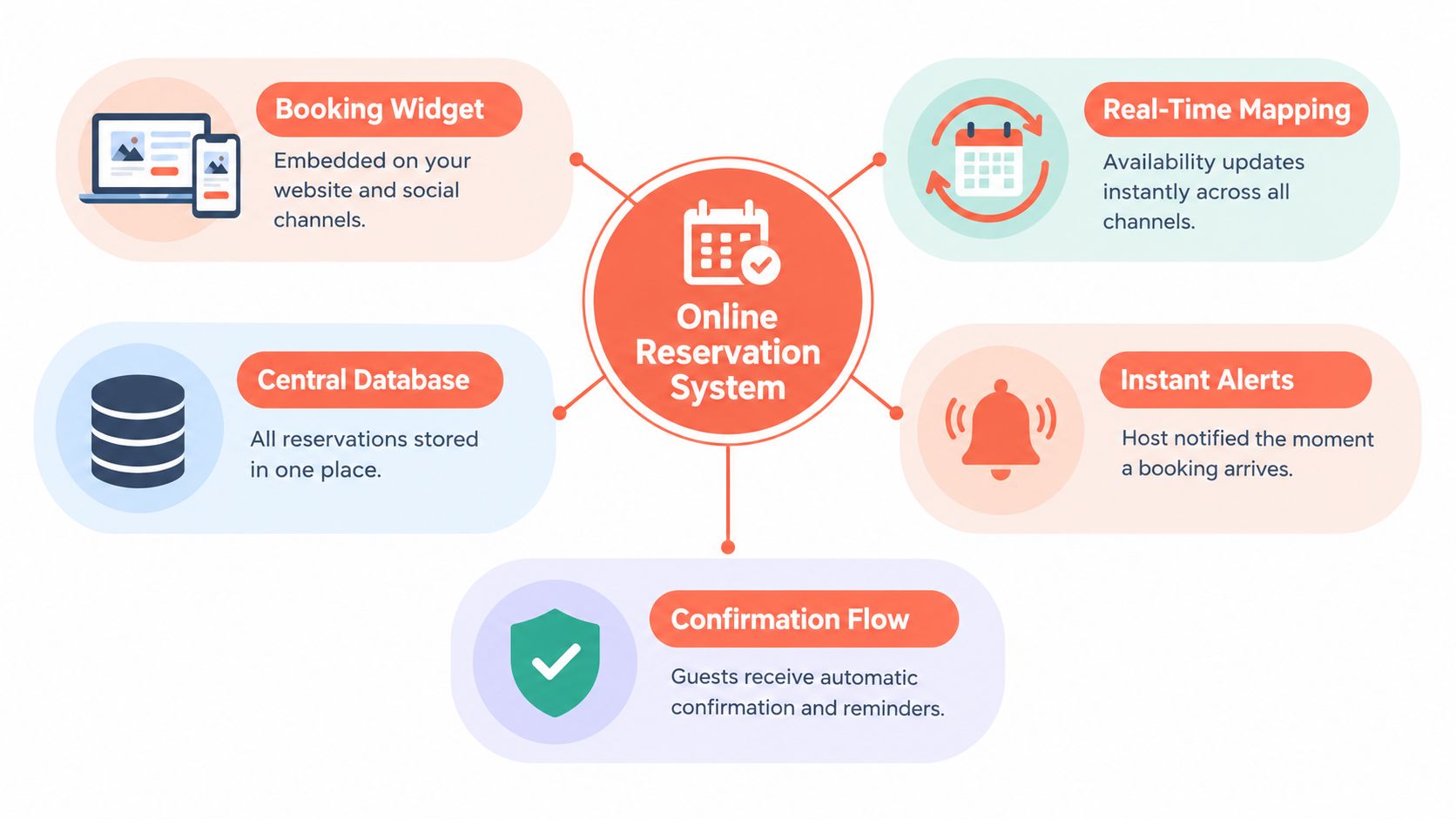
| Capability | What it does | The service moment it fixes |
|---|---|---|
| Booking widget | Takes bookings online | The guest books without calling |
| Real-time mapping | Ties bookings to live tables | The host avoids double-booking |
| Capacity engine | Decides how much demand to accept | The floor stays balanced during peak service |
| Waitlist | Holds overflow demand | A table release becomes a seated cover |
| Guest profiles | Stores preferences and history | Repeat guests feel recognized without slowing service |
Reservation optimization using real Atlanta restaurant data improved revenue by 3.5 percent at low load factors and 7.3 percent at high load factors relative to first-come first-served allocation, by combining advance booking limits with real-time seating decisions (source). That is the operational lesson here. The system should help the room make better choices across the whole service, not just display empty slots.
For a deeper look at guest data workflows, the current setup should be compared with guest management software.
Which Features Matter for Your Type of Restaurant
Not every room needs the same machinery. A fine dining room, a brunch spot, and a bar with seated service all use reservations differently, and a generic feature list usually wastes time. The right question is which two or three controls move covers, protect pacing, or reduce host stress.
Match the tool to the room
Fine dining needs tight pacing, guest history, and table control. The host has to protect the meal flow, not just fill seats. A restaurant that cares about sequencing and service rhythm should look for stronger notes, table timing, and visible control over party placement.
Brasserie and bistro service lives on turnover and flexibility. Walk-ins matter more, the bar often acts as a buffer, and short booking windows keep the room honest. A rigid platform slows that kind of dining room down.
Casual dining and brunch care about party-size handling, peak-hour buffers, and simple waitlist movement. Weekend traffic is messy by nature, so the platform should make it easy to say yes to the right party and no to the wrong one without creating friction.
A bar and lounge with seated service needs quick decisions and sensible table rules. Guests may want drinks first and food later, which means the floor has to adapt without losing control of pace.
Multi-location groups need consistent rules across venues, visible demand across the network, and a way to compare performance without each site inventing its own version of truth.
OpenTable's growth to more than 31,000 participating restaurants by 2014 shows how online reservation systems moved from an experiment to core hospitality infrastructure (source). That scale matters because it tells operators the category is no longer optional, but the local fit still matters more than the logo.
For a practical example of how a focused setup works in service-heavy rooms, see fine dining solutions. For busy operators who need a live line to guests, travel industry chat solutions are worth studying because they show how fast-response messaging changes conversion without changing the core operation.
Strong setup rule: if the feature doesn't help the host seat faster, protect pacing, or reduce no-shows, it's probably not a priority.
The Math Behind Fewer Empty Tables and Fewer No-Shows
A booking looks simple until a Friday night proves otherwise. Every reservation is a bet on whether a guest arrives, whether the table turns on time, and whether the room can absorb the miss without throwing off the whole service. The right system treats that as a capacity-allocation problem first.
Control should change by day and by service
Saturday dinner deserves tighter control than Tuesday lunch. The risk is not constant across the week or across service periods, so the confirmation rules should not be constant either. A busy service can justify stronger friction. A quiet weekday usually cannot.
Blanket rules waste either tables or patience. Deposit-or-no-deposit is too blunt. A better setup uses party size, booking lead time, time slot, guest history, and demand level to decide whether to send a reminder, ask for confirmation, require a deposit, or hold the table more tightly.
Across 3.77 million reservations at 2,417 restaurants, the reported average no-show rate was 2.33 percent. Reservations with no-show protection had a 0.80 percent no-show rate versus 2.47 percent without, a difference of roughly 17 fewer no-shows per 1,000 reservations. That is the kind of gap a host feels immediately on the floor.
Why the floor should think in protected covers
A lower no-show rate protects pace, not just revenue. When a table shows up, the host stops building false availability into one corner of the room. That makes turns cleaner and keeps the kitchen from reacting to a room that looks full on paper but is not full in reality.
Protect peak inventory first. Low-risk bookings should stay easy, but scarce Friday and Saturday capacity deserves stronger controls.
A U.S. restaurant industry survey found that 28 percent of diners had missed a reservation without canceling in the previous year, with restaurant workers estimating a missed table for two at about $80 on average and 56 percent saying no-shows can force the restaurant to turn away another booking (source). That is the math operators have to watch. Even a small cut in wasted covers buys back real service time.
This three-minute walkthrough shows how confirmation prompts and deposit rules are configured before a Saturday service.
Implementing Without Breaking the Floor
A reservation system fails on the floor when it is treated like decoration. The screen has to help the host seat people faster, keep the waitlist current, and keep guest data out of fiscal records. If it does not do that, it adds noise.
Start with the booking path, not the back office
Set up the public booking path first. Guests need a booking page or booking link that works on the website, social profiles, and QR touchpoints without dead ends. Once the booking lands, it should map to the floor plan, not sit in a spreadsheet.
Then wire in the waitlist and confirmation flow. Guests should see their status clearly, and the host should see what can be promoted, shifted, or released. If those changes do not appear fast, the tool is just a prettier inbox.
The POS boundary comes next. Reservation data belongs to operations, but it is not fiscal sales data. Keep the two systems connected only where the workflow needs it.
Belgian operators need a hard line on GKS
Belgium's Geregistreerd Kassasysteem, or GKS, is mandatory for restaurant operators whose annual turnover from meals exceeds 25,000 euros, excluding drinks and VAT, and it requires a certified cash register, a Fiscal Data Module, and a VAT Signing Card (source). The reservation platform handles availability, table assignment, guest notes, and deposits. The certified cash register handles the fiscal transaction.
That boundary matters because reservation software is not a substitute for the legally required cash-register process. Even if the platform and POS are integrated, the integration has to respect the certified architecture.
| Responsibility | Reservation platform | Certified cash register (GKS) |
|---|---|---|
| Availability | Yes | No |
| Table assignment | Yes | No |
| Guest notes | Yes | No |
| Deposits | Yes, if used operationally | No |
| VAT receipt | No | Yes |
| Fiscal record integrity | No | Yes |
Check with the accountant first: once the meal-turnover threshold is crossed, reservation convenience cannot override fiscal compliance.
Roll out in service order, not software order
Train the host team before you switch on every setting. They need to know how to override a booking, how to read special requests, and how to spot bad data before it reaches the floor. A clean setup with poor habits still creates confusion at peak service.
Start with one service period or one location if the room is busy. That gives you a chance to catch table-map problems, duplicate guest records, and weak confirmation rules before the whole operation depends on them. Fix the workflow while the stakes are small.
A short test run should answer one question: does the system help the host seat better, faster, and with fewer mistakes? If the answer is no, the setup is wrong, no matter how polished the interface looks.
Pricing Models and Why They Change the Math
A busy Friday exposes the pricing model fast. If the room fills and the software bill rises with each booking, the platform is taking a cut from the very volume you worked to create. A flat fee keeps that cost tied to the month, not to each cover.
Commission versus subscription: which one fits your cost structure
Per-cover commission works like a toll road. Every confirmed booking adds cost, so growth raises the software bill along with revenue. Some operators can live with that, but it should be treated as a variable expense, not a neutral setup choice.
Flat subscription works differently. The cost stays predictable, so fuller services do not create a bigger software bill. For restaurants that want to protect margin while adding covers, that difference matters in plain financial terms.
TheFork, OpenTable, Zenchef, and Formitable are useful reference points because they show different pricing mechanics in the same category. 10seat uses a flat, commission-free model, so the bill does not rise with booking volume.
The same logic appears in web design reseller recurring margins, where recurring economics beat one-off billing once volume grows.
A busy month makes the gap obvious. Under commission pricing, a strong run can turn software into a meaningful line item. Under subscription pricing, the monthly cost stays fixed, which makes cash flow easier to plan.
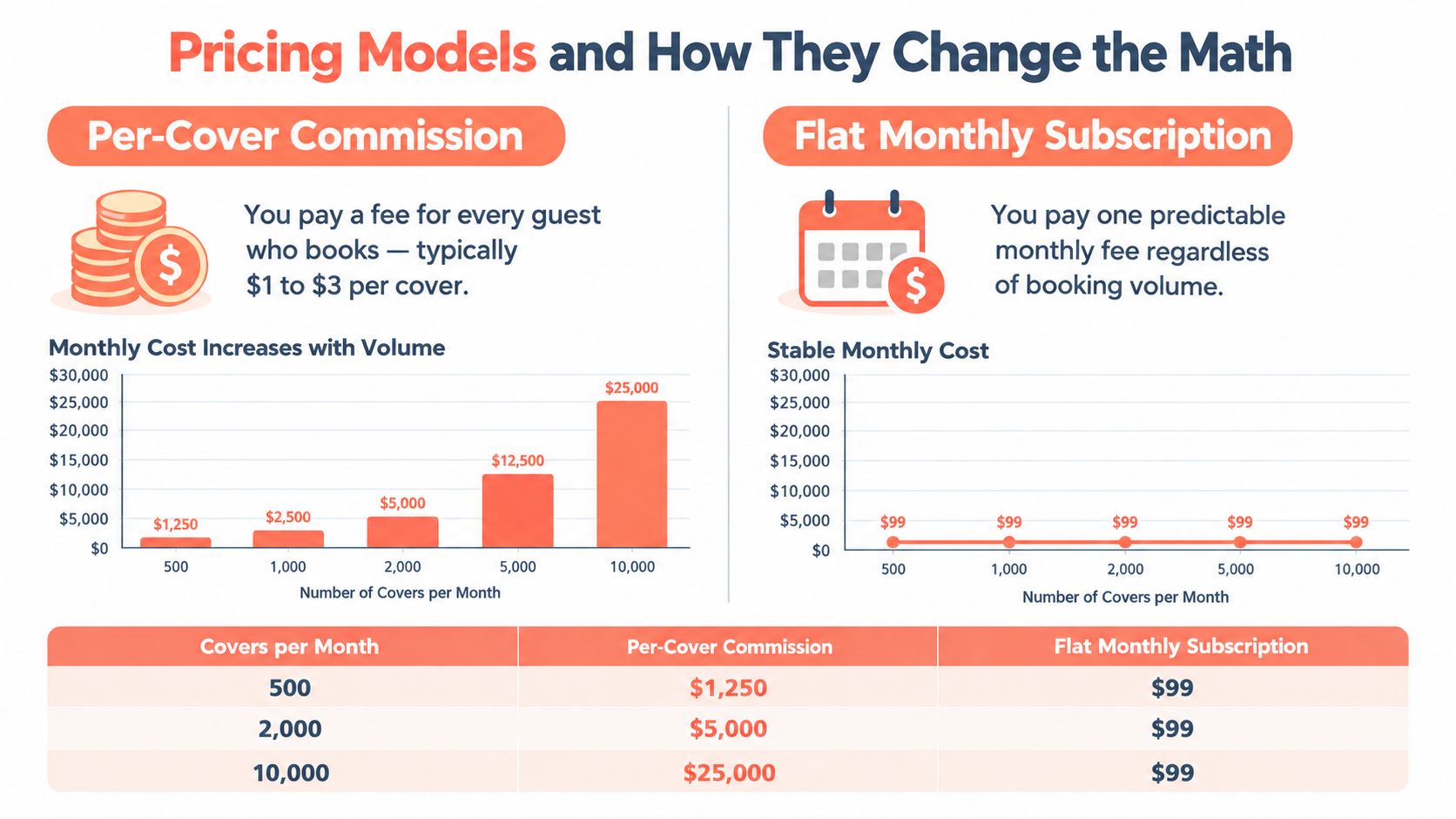
The question is simple: does success make the bill grow? If the answer is yes, the operator should price that into the decision before service starts. A restaurant that wants to hold margin should care more about that structure than a long feature list.
If your team already thinks in recurring-service terms elsewhere, the comparison with features to look for in social tools is useful. It shows how clear subscription pricing beats vague add-ons when time is tight.
How to Choose and What to Ask Before You Sign
Choose the system that matches your room's pace, compliance rules, and pricing structure without adding hidden work. Ignore broad promises. Ask what happens when demand gets messy, because that is where the cost shows up.
The criteria that matter
Start with the pricing model. If the fee rises with every cover, the operator needs to know that before service gets busy. Then check the capacity engine. If it cannot handle timing, table sizes, and demand without constant manual babysitting, it will not help on a full night.
Next, verify the GKS boundary if the restaurant is in Belgium. The provider should explain clearly what belongs in the reservation tool and what belongs in the certified cash register process. If that answer is vague, move on.
The integration with the POS matters too, but only if it improves the floor instead of adding another dashboard to watch. Support quality and contract length matter because problems never happen during office hours.
Ask these questions before signing:
- How are confirmed covers priced? If there is a per-cover fee, the growth penalty needs to be clear.
- How does the system manage no-shows and late arrivals? The answer should mention controls, not just reminders.
- What happens when the floor is full but a better table opens? The host should be able to make that switch fast.
- How do deposits, guest notes, and booking data stay separate from fiscal records? This is critical in Belgium.
- What is included in setup and support? Hidden implementation costs are where good deals get expensive.
Ask for proof of response times and a clear support process. A short answer in sales means little if the team disappears once service starts. The same evaluation discipline applies elsewhere, and features to look for in social tools shows how a checklist beats vague promises when comparing vendors.
A good platform lets the host run a bad Friday without panic. If it cannot do that, it is just software.
10seat fits independent restaurants in Benelux that want commission-free reservation management, a fast setup, and a capacity engine built around the host screen rather than a marketing widget.