What Is the Best Online Booking System in 2026?
Find out what is the best online booking system for restaurants in 2026. Compare top tools, features, and pricing in this expert guide.
The best online booking system isn't necessarily the one with the most attractive calendar. It's the one that protects capacity, spaces demand, seats tables intelligently, captures useful guest information, and fits the restaurant's commercial model. That distinction matters because restaurant booking has evolved from a simple website form into a live operating system for the dining room.
OpenTable, founded in San Francisco on July 2, 1998, helped establish the model by connecting diner convenience with live restaurant inventory. By 2024, it had expanded to more than 55,000 restaurants across more than 80 countries, showing how real-time availability and network reach became central to the category (OpenTable's history and market development). The right choice today depends on how that model fits a particular floor plan, service rhythm, guest relationship, and compliance environment.
| Restaurant priority | Best-fit system direction | Main reason |
|---|---|---|
| New diner acquisition | Network platform | Marketplace reach can create demand |
| Predictable repeat business | Direct-booking software | The restaurant retains the booking relationship |
| Complex dining room | Table management platform | Capacity, pacing, and seating rules matter |
| Belgian compliance | Integrated booking and POS workflow | Reservation and sales records must reconcile |
| Busy independent restaurant | Direct system with operational controls | Margin and floor efficiency stay under the operator's control |
Table of Contents
- Why “Best” Depends on More Than the Widget
- The Six Criteria That Actually Matter
- Commission, Subscription, or Direct Software
- Capacity, Pacing, and Auto Seating in Practice
- GKS Compliance and the Integration Problem in Benelux
- Matching the System to Your Restaurant Type
- The Case for Direct Booking and What 10seat Does Differently
- Common Questions Before You Switch
Why “Best” Depends on More Than the Widget
“Best” depends on capacity, seating logic, and pricing model. A polished booking widget can still create double bookings, overload the kitchen at the same moment, or leave the host rebuilding the floor plan manually during service. A colleague's recommendation may also reflect a different room, a different average spend, or a stronger dependence on marketplace demand.
Restaurant operators should test every platform against six practical questions:
- Can it manage the actual capacity of the room?
- Can it assign tables intelligently?
- Can it pace arrivals across the service?
- Can it build useful guest profiles?
- Can the team set it up without a long training project?
- Does the pricing remain predictable as bookings grow?
The distinction between booking capture and operational control is significant. Industry guidance identifies channel management, real-time availability, pacing, no-show handling, floor management, and waitlist control as core capabilities for a serious restaurant reservation system (restaurant reservation system comparison guidance). A widget handles the first step. A proper system helps the dining room absorb the demand.
The three commercial choices
Most platforms fit one of three models. Network platforms charge for access to an existing diner audience. Subscription systems prioritise a recurring software fee and operational tools. Direct-booking systems focus on reservations made through the restaurant's own website, social channels, QR codes, or booking page.
Each model solves a different problem. A new venue may value discovery, while an established neighbourhood restaurant may already generate enough demand and need to stop paying for guests it has reached itself.
Belgian operators also need to assess the relationship between reservations, payments, and the cash register. The GKS requirement makes compliance part of the software decision, not an administrative detail to investigate after implementation.
Practical rule: A booking system should be judged by what happens at 19:00 on a full Saturday, not by how attractive the setup screen looks.
A useful shortlist scorecard prevents feature-led purchasing. By the end of the evaluation, an operator should know which system type fits the room, rather than merely which vendor has the prettiest calendar.
The Six Criteria That Actually Matter
A restaurant booking system earns its place when it reduces decisions during service. The following six criteria give an owner or GM a practical way to score a shortlist. The restaurant reservation system guide can also help operators frame the difference between a basic booking form and a working reservation operation.
Capacity handling
Strong capacity handling understands that a dining room contains different tables, sections, turn times, and service limits. It can protect a terrace, bar, private room, or chef's counter without treating every seat as interchangeable. Weak capacity handling records only a cover total and leaves the host to solve table combinations manually.
A strong system should show whether a party fits the available inventory before accepting the booking. It should also prevent a late online reservation from undermining a service plan already built around large parties or tasting menus.
Auto-seating
Strong auto-seating uses party size, table rules, time, and floor-plan availability to suggest a workable table. A two-top arriving late in the evening may fit near the bar, while a larger party may require a join or split across tables. Weak auto-seating just adds bookings to a calendar and leaves the team to interpret the consequences.
Pacing control
Pacing prevents the kitchen and front of house from receiving an avoidable wave of arrivals. A strong implementation spaces reservations across seating intervals and respects different turn times for lunch, dinner, brunch, and tasting menus. A weak one accepts every available time slot until the room appears full, even when the kitchen cannot support the arrival pattern.
Guest profiles
Guest profiles should capture information that improves hospitality, such as allergies, preferences, special occasions, and VIP flags. A useful profile helps a host recognise a repeat guest and avoid asking the same question at every visit. A weak system stores only a name, phone number, and booking date.
Ease of setup
A system that requires lengthy training loses value before the first busy service. Strong software lets an owner configure tables, rules, services, booking channels, and messages without a separate technical project. Weak software may offer more settings but makes routine changes dependent on a vendor or a specialist.
Pricing
Pricing should match the restaurant's booking pattern. A strong model makes the cost of a direct reservation easy to understand and forecast. A weak model introduces unclear charges, escalating commissions, or thresholds that become painful once the restaurant grows.
| Criterion | What strong looks like | What weak looks like | Score (1–5) |
|---|---|---|---|
| Capacity handling | Protects tables, sections, services, and live availability | Treats every table as identical | |
| Auto-seating | Assigns practical tables using party and floor rules | Logs bookings without seating logic | |
| Pacing | Controls arrival flow across the service | Clusters reservations together | |
| Guest profiles | Stores allergies, occasions, preferences, and history | Stores only contact details | |
| Setup | Lets the team configure rules quickly | Requires specialist support for routine edits | |
| Pricing | Scales in a clear and predictable way | Adds unclear or escalating charges |
The operator's current system should receive a score before any sales demonstration influences the decision.
Commission, Subscription, or Direct Software
The pricing model changes the economics of every reservation. Network platforms such as TheFork and OpenTable can provide access to diners already searching for restaurants, but their model is built around fees connected to reservations sourced through that network. A restaurant gains reach, yet the cost of that reach needs to be separated from the cost of software.
OpenTable's current model, for example, includes per-cover fees for bookings from its diner network and lower per-cover fees for reservations made through a restaurant's own website, alongside subscription pricing (operator-focused reservation fee comparison). That structure can make sense for a venue actively buying discovery. It becomes less attractive when regulars already arrive through the restaurant's own site, social profile, or direct link.
Network platforms
TheFork and OpenTable belong in the network category when the comparison concerns their marketplace-driven pricing model. They can help a venue capture demand beyond its existing audience, but the restaurant should calculate whether those bookings create incremental covers or just move an existing guest through a paid channel.
Guest ownership also matters. A restaurant needs access to useful booking history and preferences, not just a service calendar. If valuable data sits behind a paid platform or remains difficult to export, the restaurant loses part of the long-term relationship.
Subscription platforms
Subscription systems, including Zenchef, generally make the software cost easier to forecast. Their appeal grows when booking volume is steady and the restaurant needs guest profiles, reminders, floor-plan support, and direct booking without relying entirely on marketplace discovery.
The trade-off is straightforward. A flat software cost doesn't create demand by itself. The restaurant still needs a strong website, an effective booking path, accurate opening hours, and a marketing plan that sends guests to the direct channel.
Direct-booking software
Direct-booking systems, including Formitable and 10seat, are designed around reservations made through channels controlled by the restaurant. Direct reservations don't carry a marketplace commission under the model described in the operator comparison above, but the restaurant remains responsible for attracting the guest.
A useful comparison should score each model against the six operational criteria, not just the monthly invoice.
| Pricing model | Examples | Capacity handling | Auto-seating | Pacing | Guest profiles | Setup | Pricing predictability |
|---|---|---|---|---|---|---|---|
| Per-cover commission | TheFork, OpenTable | Often strong where floor tools are included | Usually available on advanced plans | Depends on configuration | Stronger on enterprise-oriented plans | Can require more training | Variable as covers grow |
| Monthly subscription | Zenchef and similar systems | Usually built around direct inventory | Common in restaurant-focused products | Often configurable | Generally suited to repeat guests | Moderate setup | Easier to forecast |
| Direct-booking software | Formitable, 10seat | Depends on the product's table engine | Important differentiator | Should be checked carefully | Controlled by the restaurant | Must be simple for small teams | Usually clearest for direct bookings |
The full cost of commission deserves a separate calculation using the restaurant's own average spend, booking mix, and repeat-guest rate. The real cost of per-cover commission is not visible in a widget preview.
Capacity, Pacing, and Auto Seating in Practice
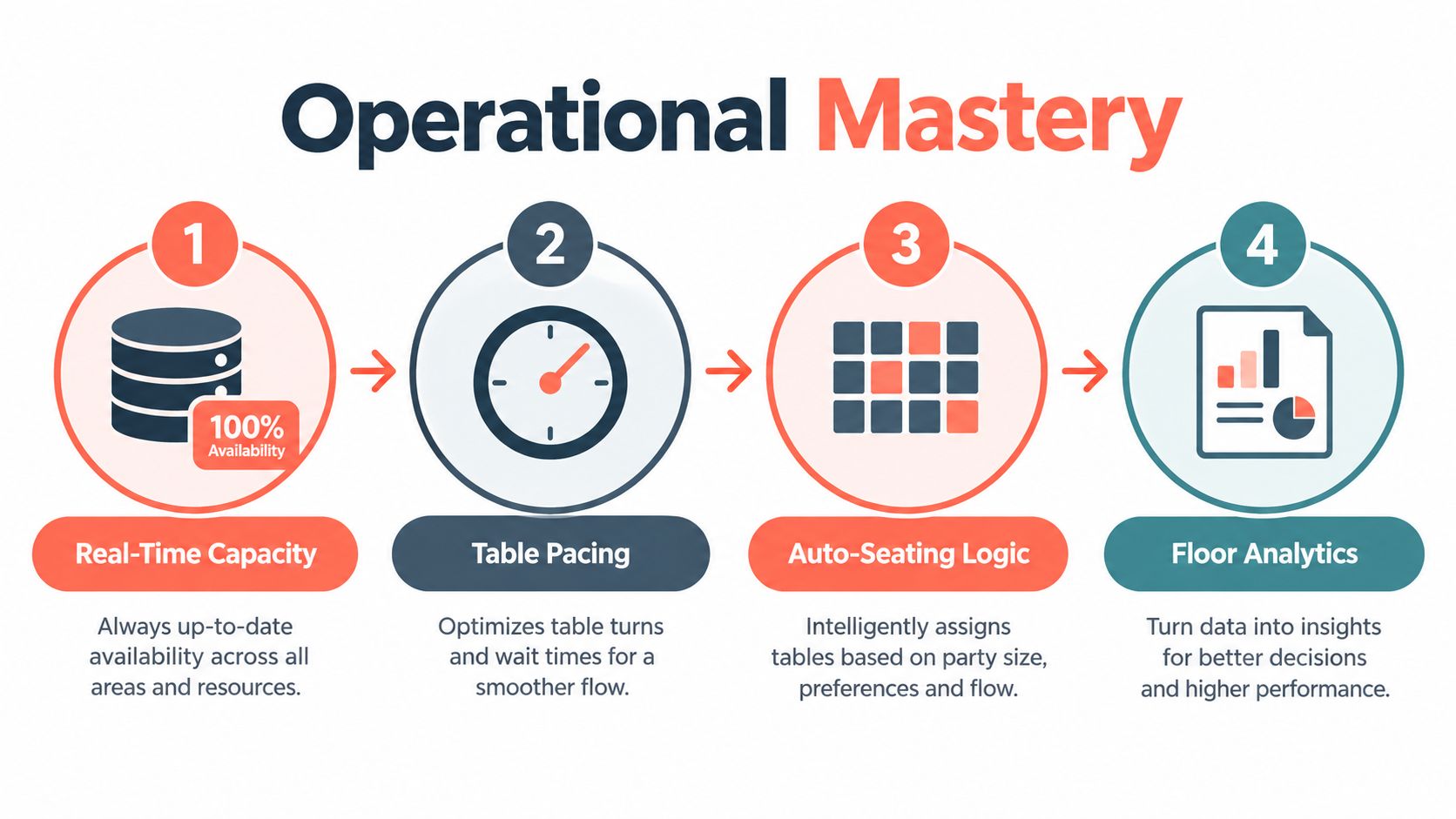
At 19:00, a walk-in arrives while a party of six is running late and the terrace closes because of rain. A booking form only shows which times remain open. A floor-management system must recalculate the service around those changes, protect the kitchen from a sudden rush, and tell the host which tables can still be used.
The host needs one live view of the room. Reservations from the website, phone, concierge, social channels, QR codes, and third-party platforms should update the same inventory. That central view prevents one channel from selling a table another channel has already promised, a principle also covered in guidance on reservation capture and operational controls.
What the system does during service
At 19:00, the system should show the walk-in as immediate demand, the late six as a delayed arrival, and the closed terrace as unavailable capacity. It should then recalculate table combinations, expected departures, and the remaining space for later bookings. The host can make a decision from the floor plan instead of comparing separate calendars.
Pacing determines whether the next arrivals fit the kitchen's workload. If several parties are due within the same interval, the system should hold or redistribute future slots rather than keep selling every nominally available time. That protects prep, service timing, and the host stand during the busiest part of the evening.
Auto-seating should turn the updated floor plan into a usable recommendation. It needs to account for party size, joined tables, section restrictions, and tables reserved for later arrivals. When the terrace closes, the system should identify indoor options and show which combinations remain practical. A cover count without a seating recommendation leaves the hardest decision to the host.
Walk-in management keeps the remaining demand visible. The host should see open tables, expected departures, waitlist parties, and the difference between booked and walk-in covers without maintaining a parallel spreadsheet.
Policies and guest context
No-show controls should match the restaurant's spend level and booking lead time. Deposits, card guarantees, reminders, and confirmation messages give operators different ways to protect the room. Guidance on reservation policy and no-show guidance reports that no-shows can range from 5% to 7% on a typical night and reach 11% to 20% without confirmations. The system should let managers set different policies by service, party size, or booking channel.
Guest profiles add context at the host stand. Preferences, relevant notes, and table history help staff deliver consistent hospitality without relying on memory.
A platform that cannot show booked covers, walk-ins, and usable tables at 19:00 is a calendar with a booking button, not a floor-management system.
GKS Compliance and the Integration Problem in Benelux
Belgian restaurant operators can't treat reservations, payment, and checkout as unrelated workflows. Under Belgium's GKS rules, horeca businesses with annual restaurant and catering turnover above €25,000 excluding VAT must use a certified cash register system (Belgian GKS requirements).
The GKS consists of three parts: a cash register, a fiscal data module, and a VAT signing card. That structure means a booking system should fit cleanly with the restaurant's certified sales-recording process. A reservation itself isn't the same as a completed sale, but the transition from booked party to checked-in table, payment, and checkout needs to remain consistent.
Where integration fails
A manual reservation export may look workable in a quiet operation. It becomes fragile when staff copy party details between a booking calendar, POS, accounting tool, and spreadsheet. Names can be duplicated, bookings can be marked incorrectly, and the final sales record may no longer match the service activity.
A stronger workflow connects the booking record to the operating systems without creating parallel records. Operators evaluating VAT and restaurant workflows can also review this practical guide to VAT on food, while confirming the final compliance setup with their accountant or implementation specialist.
Every channel needs one inventory
The modern funnel extends well beyond a website widget. A restaurant may receive demand through Google Reserve, QR codes on menus and signage, Instagram and Facebook action buttons, phone calls, WhatsApp confirmations, and automated phone agents handling Dutch, French, and English.
That variety creates one clear requirement. Each channel should feed the same live availability rather than another dashboard for the host to monitor.
| System | GKS / POS integration | Channels covered | Compliance gap |
|---|---|---|---|
| Standalone widget | Limited or manual | Website | Reservation and sales records can remain separate |
| Marketplace platform | Depends on POS connection | Marketplace, website, app | Direct and network bookings may follow different workflows |
| Restaurant reservation system with POS connection | Designed for a connected process | Website, phone, QR, social, direct links | Requires correct configuration and testing |
| Booking plus manual spreadsheet | None | Any channel entered by staff | High risk of duplicate or incomplete records |
For a Belgian venue, the best system is the one that reduces reconciliation work and keeps the booking funnel visible without weakening certified checkout processes.
Matching the System to Your Restaurant Type
The right booking model changes with the room. A fine-dining restaurant, a terrace-led brasserie, and a multi-location group don't need the same controls, even if all three use a reservation widget.
| Restaurant type | Recommended system type | Top criterion | Main trade-off |
|---|---|---|---|
| Fine dining | Direct-booking system with deposits and guest profiles | Guest history and booking commitment | Less marketplace discovery |
| Brasserie | Floor-management system with pacing | Turn and arrival control | More setup for table rules |
| Casual dining chain | Hybrid network and direct system | Volume and channel visibility | More complex channel management |
| Bar or lounge | Time-slot reservation system | Time rules and minimum spend | Less flexibility for spontaneous visits |
| Brunch venue | Pacing-focused direct system | Slot control across sittings | Strong rules can limit walk-in space |
| Multi-location group | Centralised platform with local controls | Shared reporting and location flexibility | More governance and permissions |
Fine dining
Fine dining venues should prioritise deposits, tasting-menu schedules, dietary notes, and detailed guest profiles. Network reach can help a new restaurant, but an established room usually gains more from protecting the relationship with repeat guests.
The likely six-month trade-off is lower discovery in exchange for stronger control over guest data and booking quality.
Brasseries and bistros
Brasseries need pacing, terrace planning, large-party rules, and a practical walk-in queue. A system that requires manual floor-plan rebuilding every time the terrace opens will slow service exactly when demand is strongest.
The likely trade-off is setup complexity. More precise rules take time to configure, but they prevent the host from solving the same seating problem repeatedly.
Casual dining chains
Casual groups often need a hybrid approach. A network channel can introduce new guests, while direct booking keeps regular demand closer to the restaurant's own marketing and website. The site experience matters because restaurant owners need to attract diners with better site UX before the booking engine can convert them.
The likely trade-off is operational complexity across locations and channels.
Bars, brunches, and groups
Bars and lounges need time slots, event rules, minimum-spend handling, and a clear distinction between seated bookings and walk-ins. Brunch restaurants need pacing that protects multiple sittings without filling every table at the same moment.
Multi-location groups should centralise core rules while allowing each venue to control its own floor plan, opening hours, and service style. The likely trade-off is governance. Shared data is useful only when local teams can still make sensible service decisions.
The Case for Direct Booking and What 10seat Does Differently
Direct booking makes the strongest commercial case when a restaurant already generates demand through its own website, social channels, regular guests, and local reputation. Paying a network fee for a guest who already searched for the restaurant by name can reduce contribution margin without adding meaningful acquisition value.
The operational argument is equally important. A direct system should combine availability, seating rules, pacing, reminders, walk-ins, and guest profiles in one workflow. That prevents the host from toggling between a widget, a POS screen, and a spreadsheet while guests are waiting at the door.
Expert comparison data reports that deposits or automated SMS reminders can reduce no-shows from the mid-teens into low single digits, while automation can reduce host labour from roughly three to four hours per shift to about one to one and a half hours in busy operations (reservation system feature comparison). The exact result depends on configuration, service style, and booking policy, but the labour estimate gives operators a concrete ROI test.
How the models compare
10seat offers direct reservation management with live availability, table management, booking pages, confirmations, reminders, and controls for capacity and time slots. Its fit should be judged against the same six criteria used for every other shortlist option, not against promotional claims.
| Criterion | Network platforms, such as TheFork and OpenTable | Other direct software | 10seat |
|---|---|---|---|
| Capacity | Often connected to advanced floor tools | Varies by product | Built around live reservation and table controls |
| Auto-seating | Usually available on stronger plans | Depends on table-management depth | Designed to map bookings to floor rules |
| Pacing | Available, but configuration must be tested | Often configurable | Focuses on controlling availability and arrivals |
| Guest relationship | May be shared with the network | Generally restaurant-owned | Direct-booking relationship |
| Setup | Can require broader implementation | Usually lighter | Intended for independent restaurant workflows |
| Pricing | Includes variable network-related costs | Direct software pricing | Direct-booking pricing model |
A same-day decision checklist is simple:
- Calculate current booking cost: Separate software fees from acquisition fees.
- List required integrations: Include POS, payments, accounting, website, and communication channels.
- Test one full service: Run a pilot through lunch and dinner, including changes and walk-ins.
- Measure labour: Record how long the host spends managing bookings before and after setup.
Operators can review the 10seat product before deciding whether its direct-booking workflow fits the room.
Common Questions Before You Switch
Can historical data move?
A vendor should explain how reservations, guest notes, and tags can be imported through CSV or API. The transfer process should be tested before the old system is closed, and guest data should remain exportable. A platform that makes migration unclear creates unnecessary switching risk.
What makes a useful trial?
A meaningful pilot includes a full service, lunch and dinner, walk-ins, cancellations, no-shows, and a larger party. The test should also include a floor-plan change, because software that works only under ideal conditions hasn't been properly evaluated.
Does the system fit Belgian GKS requirements?
The booking workflow should support accurate check-in information, party size, contact details, and a date-range export for operational review. GKS itself concerns certified sales recording, so the booking and POS relationship must be validated with the restaurant's accountant or compliance adviser rather than assumed from a marketing page.
How should no-shows be managed?
Deposits, card guarantees, and confirmation messages each suit different restaurants. A high-spend tasting-menu venue may need stronger commitment than a casual café with short booking lead times. The policy should reflect average spend, table value, and the cost of an empty seat.
The strongest answer to “what is the best online booking system” is therefore practical: choose the platform that protects the room, preserves the guest relationship, reduces host workload, and fits the restaurant's compliance obligations.
10seat gives independent restaurants a direct booking workflow with live availability, table management, pacing controls, guest profiles, and automated reservation communication. Visit 10Seat to assess the system against one real service before committing to a full switch.