Seating Chart Software Compared for Restaurants in 2026
Compare seating chart software for restaurants by features, pricing, POS integrations, and capacity tools. Find the right fit for fine dining, casual
The global seating chart software market was valued at about $0.4 billion in 2025 and is projected to reach $0.9 billion by 2034, with a projected 9.2% compound annual growth rate (MarketIntelo seating chart software market report). That growth makes sense. Restaurants aren't buying floor-plan decoration. They're buying a way to turn reservations, walk-ins, table combinations, guest requirements, and service pacing into more controlled decisions during a busy shift.
A restaurant owner should judge seating chart software by covers per shift, solver speed, rule flexibility, integration quality, and compliance fit. A polished drag-and-drop editor matters, but it won't rescue a host who can't place a late party without blocking a larger table, or a manager who can't see which sections are available.
Table of Contents
- Why Seating Chart Software Is Now Operational Infrastructure
- The Four Jobs Seating Chart Software Must Actually Do
- What Separates a Floor Plan Editor From a Real Seating Engine
- How TheFork, OpenTable, Zenchef, Formitable, and 10seat Compare
- Pricing Models and the Commission Question
- Matching Software to Your Service Style
- GKS Compliance and Implementation in Belgium
Why Seating Chart Software Is Now Operational Infrastructure
A seating chart earns its place in the tech stack only when it improves decisions during service. It sits between demand and execution: a reservation arrives through a booking page, marketplace, phone call, or walk-in list, then the system must assign a table without ignoring party size, timing, section capacity, accessibility needs, guest preferences, or kitchen pace.
That operational role has moved digital seating from an optional host-stand add-on to core infrastructure. Cloud deployment represented 82.5% of revenue in 2025, while restaurant reservation software was estimated at $798.95 million in 2025 and projected to reach $1.70898 billion by 2035, according to MarketIntelo restaurant reservation software report. The implication for operators is practical: reservation demand and floor decisions now need to work in the same system, not through separate screens and manual updates.
What the system controls
Judge the platform by usable capacity at each point in service, not by how attractive its floor-plan editor looks.
| Operational Function | Business Impact | What to Measure |
|---|---|---|
| Capacity planning | Prevents physical seats from being mistaken for available inventory | Covers by time slot, zone, and table configuration |
| Reservation assignment | Protects pacing and reduces blocked tables | Manual overrides, rejected combinations, and reassignment speed |
| Live floor control | Keeps hosts, servers, and managers aligned | Clicks per status change and delay between clearing and reuse |
| Guest record management | Preserves preferences and service context | Profile completeness, allergy visibility, and duplicate records |
| POS and booking connections | Reduces duplicate entry and reconciliation work | Sync reliability, failed updates, and export quality |
A strong system should show more than tables and chairs. It should expose covers by shift, return an assignment quickly, apply rules for combinations and zones, and keep availability accurate as tables move from seated to dining, cleared, or unavailable. Test it with a late arrival, a changed party size, a no-show, and simultaneous online and walk-in demand.
The floor team also needs a clear recovery path. If a table becomes unavailable after a service issue, the manager should be able to adjust inventory without rebuilding the plan or calling support.
Practical rule: A seating chart is useful only when it improves the next service decision.
Prioritize integration depth, automatic seating performance, rule flexibility, host usability, transparent pricing, and multi-location control. Require a live disruption test before buying. A product that cannot show how it handles a blocked table or conflicting demand has not proved operational value.
The Four Jobs Seating Chart Software Must Actually Do
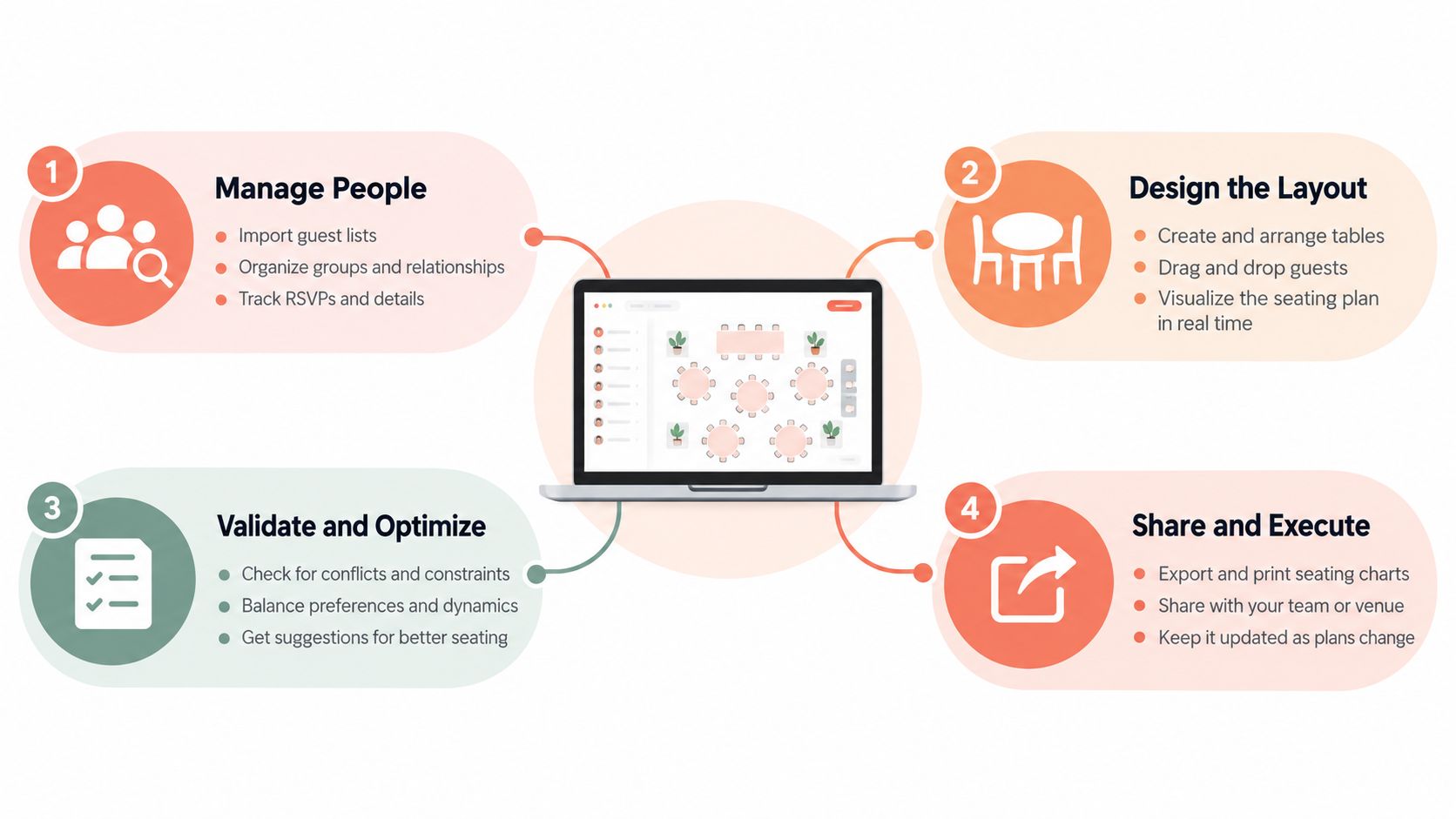
A restaurant seating chart system has four jobs. The first is capacity planning. It must represent tables, seats, zones, service periods, combinations, and turn assumptions accurately enough to show what can be sold. Counting every chair as guaranteed inventory creates false availability and forces the floor team to fix bad promises later.
The second job is demand assignment. Reservations and walk-ins need placements that protect pacing rather than filling the first open table. A good trial should test a small party arriving before a larger booking, a guest requesting a preferred zone, and a table that becomes unavailable after a service issue.
The third job is floor coordination. Hosts need current statuses such as seated, dining, dessert, cleared, and unavailable without excessive clicking. Servers and managers need the same picture, or the host stand becomes a bottleneck built on conflicting information.
The fourth job is record connection. Guest profiles, reservations, table assignments, and, where supported, check data should move reliably between the reservation platform and POS. A system that creates another isolated database increases work instead of reducing it.
Test each job during a trial
A serious evaluation should use the restaurant's own floor plan and a realistic booking sheet.
- Capacity: Build the actual table combinations, blocked sections, and service rules. Check whether the system distinguishes theoretical seats from sellable capacity.
- Assignment: Add bookings with different party sizes and timing. See whether recommendations protect later demand or create awkward gaps.
- Coordination: Change statuses from the host screen while another team member watches the floor. Count how much manual work is needed.
- Connection: Create, amend, cancel, and complete reservations. Confirm that the guest record and relevant operational data remain consistent across systems.
The failure mode is usually obvious. Capacity errors create overbooking, assignment errors produce stranded tables, coordination errors cause unnecessary waits, and connection errors force staff to type the same information twice.
What Separates a Floor Plan Editor From a Real Seating Engine
A floor-plan editor stores a picture. A seating engine makes decisions.
The first technical benchmark is solver speed. A system should recalculate placements after a cancellation, late arrival, party-size change, priority tag, table reset, or new walk-in without making the host wait. A study on restaurant table management using constraints reported that full booking sheets of 200 covers could be solved in less than 0.5 seconds on average (University of Toronto constraint-based seating study). That benchmark matters because live service requires repeated decisions, not one perfect layout created before opening.
A practical trial should introduce several disruptions during a peak period. The operator should watch whether the system proposes a usable alternative, explains the constraint, and preserves future availability. If the host has to rebuild the floor manually, the product is still functioning as an editor.
Dynamic logic matters more than visual polish
The second benchmark is operational and financial impact. A real engine should account for usable tables, section restrictions, reservation duration, turn times, and party-fit rules. It should avoid treating every physical seat as interchangeable.
Computational research using real Atlanta restaurant data found that dynamic reservation control improved revenue by 3.5% under low-load conditions and 7.3% under high-load conditions, compared with first-come, first-served policies (MIT restaurant revenue management study). The lesson is more important than the percentages. Seating logic should respond differently when the dining room is light and when demand is intense.
Operators should track:
- Covers per available hour, not only total covers.
- Peak occupancy by section and table type.
- Wait-list conversion and walk-in placement.
- No-shows and unused reservation capacity.
- Revenue from constrained sections, where the wrong assignment blocks valuable demand.
The best recommendation isn't simply “table available.” It explains which future booking the placement protects.
Rigid opening and closing rules are easy to understand, but timing-based rules are more useful during volatile service. They can prioritize early turns, longer stays, preferred guests, or adjacent table combinations. Floor-plan polish helps staff maintain the layout. Adaptable logic is what changes the result on the books.
How TheFork, OpenTable, Zenchef, Formitable, and 10seat Compare
The right comparison starts with the operating model, not the logo. TheFork and OpenTable bring marketplace reach, while Zenchef and Formitable focus more directly on reservation and restaurant-management workflows. 10seat is built around commission-free reservation management for independent restaurants in the Benelux, with live table control and automated seating functions.
Published pricing and integration details change, so operators should request a written quote and confirm the exact POS and fiscal setup before signing.
| Platform | Starting Price (EUR/mo) | Commission Model | POS Integrations | Auto-Seating | GKS / Belgium Ready |
|---|---|---|---|---|---|
| TheFork | Request current quote | Marketplace and booking fees may apply | Confirm by POS | Reservation and table tools, depth varies | Confirm the required fiscal setup |
| OpenTable | Request current quote | Published comparison materials may show per-cover fees | Broad connector availability, confirm locally | Table and reservation assignment | Confirm local requirements |
| Zenchef | Request current quote | Base subscription and possible per-cover charges | Strong European integration focus | Advanced reservation and table workflows | Confirm certified integration and scope |
| Formitable | Request current quote | Subscription model, confirm current terms | Designed for independent restaurant workflows | Reservation and table management | Confirm GKS support before purchase |
| 10seat | Request current quote | Commission-free positioning, confirm plan limits | Depends on the selected POS connection | Capacity Engine and Smart Auto Seating | Dependent on POS and fiscal configuration |
TheFork
TheFork makes sense for restaurants that want marketplace demand alongside table management. Its strength is diner discovery and network reach, but the operator should separate reservations that come through the marketplace from direct bookings when assessing acquisition cost and repeat behavior.
OpenTable
OpenTable suits restaurants that value a broad international diner network and premium guest data. Its per-cover model needs closer scrutiny at high volume, because the cost follows every seated cover rather than remaining fixed. The operator should also test whether its table-combination logic matches the actual dining room.
Zenchef
Zenchef is the strongest candidate for an operator prioritizing a European all-in-one workflow and deep POS connectivity. It deserves a detailed implementation test, especially around guest records, table turns, waitlist handling, and the exact Belgian fiscal configuration.
Formitable
Formitable is a practical fit for independents that want a lighter reservation workflow without building an enterprise project. It may suit a smaller operation with straightforward table rules, but complex seating constraints should be tested rather than assumed.
10seat
10seat supports live table visibility, party-size and guest-tag priorities, and automated table suggestions. Its limitation is marketplace reach. An operator choosing it should already have dependable direct demand or use separate acquisition channels. Its product details are available through the 10seat reservation and table management product page.
For event-style layouts rather than live restaurant service, a dedicated seating chart tool may be more appropriate. Restaurant operators comparing marketplace economics can also review 10seat's comparison with TheFork, then verify current commercial terms directly with each provider.
Pricing Models and the Commission Question
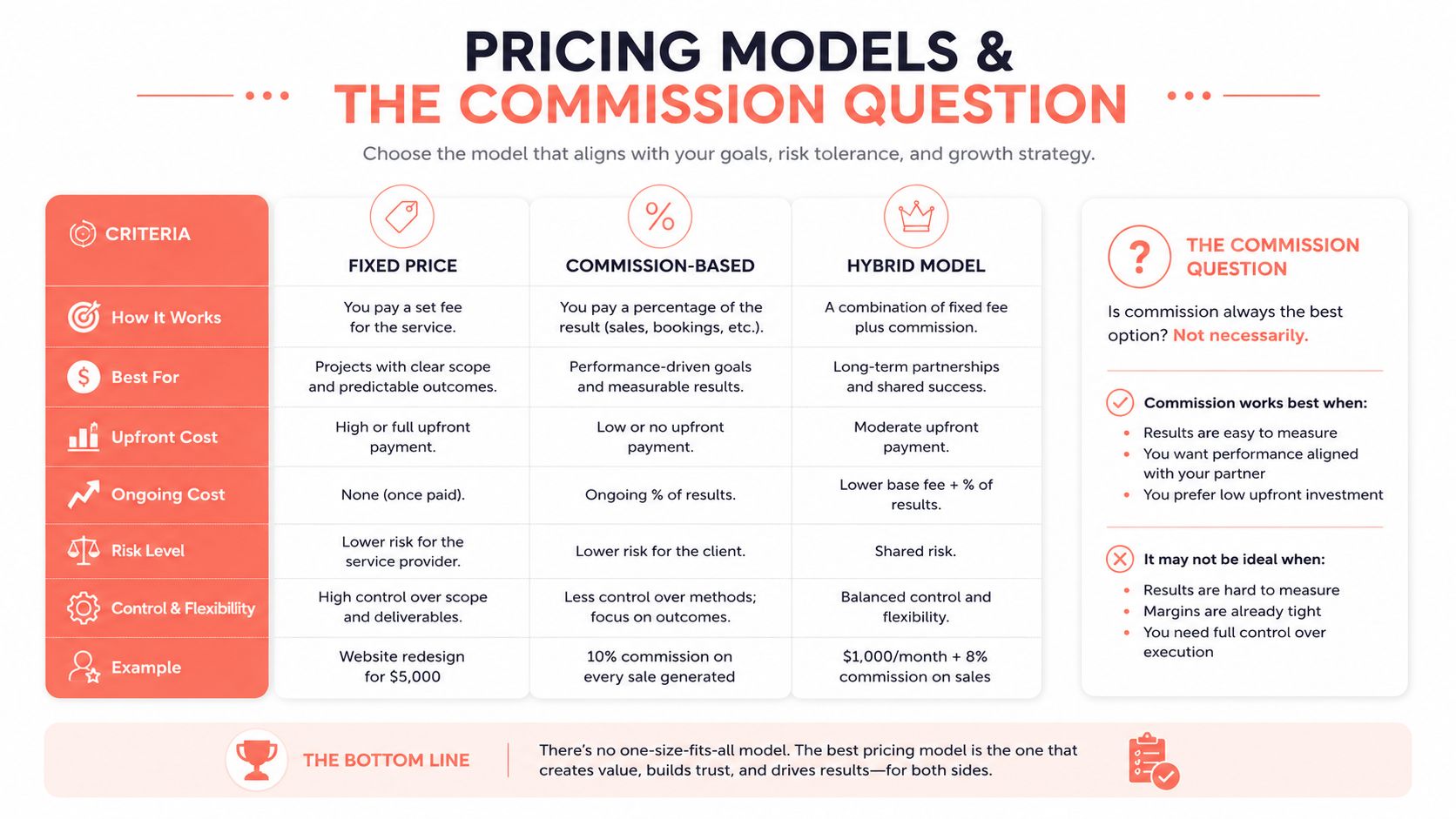
Restaurant seating chart software usually follows one of three pricing structures.
Flat SaaS charges a recurring subscription. It's easier to forecast and rewards restaurants that seat meaningful volume through direct channels. Hybrid pricing combines a base fee with a charge per seated diner or reservation. Marketplace pricing ties cost to demand delivered through a third-party network, which can be valuable when the marketplace fills otherwise empty tables.
The commercial figures in the comparison brief include Formitable from EUR 79 per month and 10seat from EUR 99 per month, while Zenchef is described at around EUR 89 base plus EUR 0.35 to EUR 0.50 per seated diner. The same comparison identifies TheFork at roughly EUR 1.50 to EUR 2.50 per diner, and OpenTable at roughly EUR 25 to EUR 45 monthly plus EUR 0.25 to EUR 0.50 per cover. These figures should be verified before purchase because plans, markets, and contract terms change.
The simple break-even logic lands near 200 covers per month for many European operators, but that calculation only works when the plans being compared include equivalent features and demand sources. A flat fee can still be poor value if it doesn't deliver usable seating automation or reliable integrations.
The hidden cost is inflexibility
Pricing pages rarely show the cost of rigid rules. Fixed service times, strict deposits, and inflexible cancellation windows can simplify administration, but they may also reject demand that could have fitted around the existing booking pattern.
Independent industry commentary reports that flexible reservation timing can lift revenue by up to 21% versus rigid scheduling (restaurant software comparison and flexible timing analysis). That figure shouldn't be treated as a guaranteed result for every venue. It does establish the right question: can the software adapt availability when the dining room, kitchen, and demand pattern change?
A marketplace can also shift no-show exposure and customer ownership away from the platform and onto the restaurant. Before accepting a cheaper-looking plan, the operator should calculate subscription cost, commission, no-show loss, guest acquisition value, direct-booking share, and the staff time spent repairing bad assignments.
A fuller breakdown of these economics is available in the real cost of per-cover commission.
Matching Software to Your Service Style
A fine-dining restaurant shouldn't buy the same system as a high-volume casual operation. The dining room's constraints determine the right product.
Fine dining with tasting menus
For a tasting-menu restaurant serving 60 to 80 covers nightly, 10seat is the primary choice when party-fit rules, table priorities, and controlled pacing matter most. The backup choice is OpenTable, particularly when international diner reach is a meaningful acquisition requirement.
Fine dining operators should be careful with marketplace dependence. A curated dining room often needs control over booking context, timing, guest history, and communication. A marketplace can add reach, but it can also introduce a guest relationship that the restaurant doesn't fully own.
The trial should focus on tasting-menu duration, allergies, accessibility requirements, preferred tables, late arrivals, and paired table combinations. If the host needs to make repeated manual corrections, visual elegance won't matter.
Casual dining and brunch
A high-volume casual operator handling 150 or more covers per service should start with Zenchef when POS depth and table-turn reporting are central. TheFork is a reasonable backup where built-in demand generation is more important than direct-booking economics.
Casual restaurants face a different failure mode. They need speed, simple status changes, fast walk-in placement, and accurate availability while the floor turns quickly. OpenTable's per-cover pricing can become expensive at volume, so the operator should model the fee against direct demand before choosing it.
Multi-location groups
A group managing three or more venues should prioritize Zenchef's central dashboard and cross-location guest database. TheFork Manager is the lighter alternative when the group wants a simpler operational layer and marketplace access.
Central control should include permissions, shared guest records, location-specific rules, reporting, and consistent implementation. A product that works beautifully in one dining room can become difficult when every venue maintains its own naming conventions and table logic.
Operating advice: Choose the platform that matches the most difficult service, not the easiest location.
Restaurants managing private events should also separate guest seating logic from broader venue controls. A practical venue safety guide for organizers can help teams handle event-specific access, staffing, and safety planning alongside the seating workflow.
GKS Compliance and Implementation in Belgium
Belgian restaurants should connect seating software to fiscal planning without treating them as the same system. Registered cash system rules require hospitality operators with annual turnover above EUR 25,000 from restaurant and catering services, excluding drinks and VAT, to issue receipts through a cash register system, according to Belgian registered cash system guidance.
GKS 2.0 timing depends on the register's purchase period. Registers bought before January 1, 2018 face a deadline of July 1, 2027. Registers bought between January 1, 2018 and December 31, 2021 must comply by July 1, 2028. Registers bought from January 1, 2022 onward have until January 1, 2029, based on the published GKS 2.0 transition timetable.
A practical implementation sequence
- Confirm the threshold and register status. Establish whether the restaurant falls under the registered cash system obligation, then document the current fiscal hardware.
- Map the integration boundary. Identify which system issues receipts, which stores reservations, and whether seating changes reach the POS accurately.
- Pilot one location. Test table turns, cancellations, walk-ins, receipt handling, and staff permissions before expanding.
- Train the host team. Staff need a clear duplicate-receipt process and firm rules about which actions belong in the seating platform or cash system.
- Measure the result. Track covers, reassignment time, unused capacity, waitlist conversion, and reconciliation effort.
Review VAT on food and restaurant operations while mapping the wider compliance workflow. Choose software that fits the restaurant's POS and fiscal setup, not the one with the polished floor plan.
10seat provides commission-free reservation management, live table control, capacity planning, and automated seating for independent restaurants in the Benelux. Operators can test party-fit rules, manage walk-ins, and connect reservations to the floor without adding a marketplace commission. Visit 10Seat to assess the workflow and select a suitable plan.