Restaurant Reservations App Guide
Find the right restaurant reservations app for your venue. Compare pricing models, core features, and GKS compliance to optimize your dining room operations.
Friday service starts with a familiar problem. The booking diary looks full, but the room still has awkward gaps, a four-top is holding a two-person booking, and the host is trying to answer the phone while moving walk-ins around confirmed reservations. By the time the dining room reaches its peak, the software has recorded every booking but hasn't helped the team make the best use of the floor.
A restaurant reservations app should do more than replace paper. It should help the team decide which table fits each party, when the table can turn, where a walk-in can fit, and how the kitchen pace will be affected. That operational distinction matters as online booking becomes a primary customer touchpoint. The global restaurant reservation software market was valued at USD 79.9 million in 2025 and is projected to reach USD 130 million by 2034, implying a 5.7% CAGR, while more than two-thirds of dining establishments rely on online booking, according to restaurant reservation software market data.
Table of Contents
- Moving Beyond the Digital Booking Diary
- Core Features That Drive Dining Room Efficiency
- Comparing Pricing Models and Platform Focus
- Matching the Software to Your Venue Type
- Navigating Belgian GKS Compliance Requirements
- Executing a Smooth Migration and Implementation
- Measuring the Return on Your Reservation System
Moving Beyond the Digital Booking Diary
At 7:15 on a busy Friday, a basic digital diary shows a sequence of names and arrival times. It may prevent double bookings, send confirmations, and display the number of expected guests. It doesn't necessarily know that the four-person table beside the pass is needed for a larger party later, or that seating a two-person booking at that table could create a difficult gap in the next seating wave.
A true orchestration engine treats the floor plan as a live operating system. It considers party size, arrival time, table combinations, service duration, and the relationship between adjacent tables. The Cornell Hospitality report on table management describes the problem as finding the best table mix from multiple inputs, while related restaurant analytics research highlights the detailed reservation characteristics and customer data collected by booking systems. A booking is therefore not just a time slot. It is an operational decision that affects the room, the host stand, and the kitchen.
What changes during the rush
Suppose a brasserie has a six-top, two four-tops, and several smaller tables. A paper diary or basic calendar can accept the bookings. It can't reliably decide whether two small parties should use separate tables, whether a larger party should be split across a flexible configuration, or whether a walk-in can be placed without blocking a later reservation.
An effective restaurant reservations app connects the booking page to table logic. The host sees practical options instead of manually checking the plan, calling the manager, and rewriting notes. The system can also protect known availability while allowing the team to use genuine gaps in the room.
Practical rule: A reservation system earns its place at the host stand when it reduces decisions during the busiest part of service, not when it merely stores more bookings.
The result is less frantic coordination and a more consistent guest experience. That connects directly with the wider idea of a revenue-driving customer experience, where the quality of the operational handoff affects what guests feel in the room. Operators replacing a paper diary should also review the practical differences between a reservation book for restaurants and a system that actively manages capacity.
The real question for owners
The useful question isn't, “Does the software take reservations?” Most systems can do that. The better question is, “Can the system help this team use the existing room more intelligently without creating another screen for the host to fight?”
That requires a floor plan that reflects reality, booking rules that match the service, and a clear process for exceptions. If the restaurant still has to calculate every table move by hand, the digital diary hasn't solved the main problem.
Core Features That Drive Dining Room Efficiency
A long feature list doesn't guarantee a better service. The important capabilities are the ones that reduce manual decisions, protect confirmed bookings, and help the restaurant use its room without overloading the kitchen.
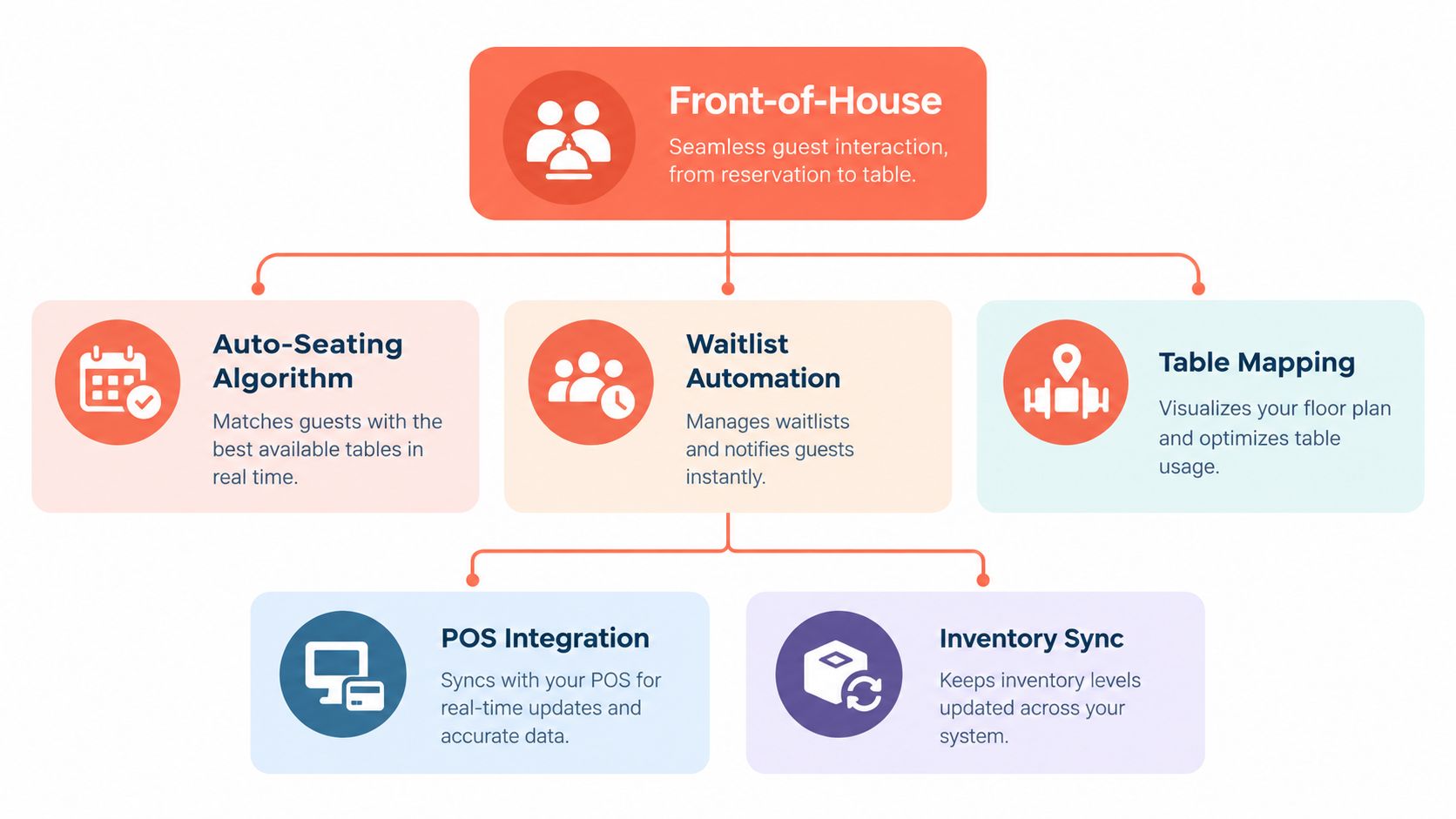
Auto-seating must understand the room
A basic widget offers available times. A smarter system connects those times to table configurations. It should account for party size, arrival sequence, table combinations, and expected turnover instead of treating every booking as an isolated slot.
The research on restaurant table management shows that the right assignment policy depends on demand shape, particularly party-size distribution and arrival rate. That means there isn't one universal seating rule. A restaurant with many couples needs different logic from a venue receiving large family groups or tasting-menu bookings.
The practical test is simple. Enter a realistic Friday evening and inspect the proposed seating plan. If the system fills the easiest tables first and leaves an unusable pattern later, its automation isn't helping.
Walk-in handling should protect the promise
Walk-ins are valuable, but they shouldn't be accepted blindly. A waitlist and walk-in feature should show which gaps are genuinely usable, how long a party can remain seated, and whether the next reservation can still be honored.
A strong workflow lets the host record a walk-in, assign a realistic estimate, and place the party into an opening without repeatedly recalculating the entire room. This prevents the common failure where a restaurant appears full online but has empty tables, or accepts a walk-in and then delays a confirmed booking.
Guest information needs a service purpose
Guest profiles are useful when they help the team deliver better hospitality. Allergies, seating preferences, special occasions, and previous notes should be visible at the right moment, not buried in an archive that nobody checks.
The data also supports demand planning and segmentation. Reservation platforms collect booking and guest attributes that can help restaurants understand arrival patterns and plan table use, but only if the team records information consistently. A note such as “prefers quiet corner” has operational value. A long collection of unstructured comments does not.
The booking page should also work across the restaurant's website, social channels, and QR touchpoints. The fewer steps between interest and confirmation, the less work falls back on the phone. A practical starting point is the reservations management product, followed by a live test using the actual devices and booking paths guests use.
Comparing Pricing Models and Platform Focus
Reservation software usually charges for one of two things, access to an operating system or access to a demand network. Those are different purchases, and a restaurant shouldn't compare them as if they provide the same value.
A discovery-led service may help diners find a venue and can bring incremental demand. A commission-free system focuses more narrowly on direct bookings, table management, and protecting the restaurant's margin. TheFork, OpenTable, Zenchef, and Formitable can therefore be discussed as examples of different platform positions, not as interchangeable products.
OpenTable's Core and Pro plans include a free website-reservations component, meaning reservations through a venue's own website aren't charged on those plans, according to its restaurant pricing plans. That detail matters because a venue needs to separate direct-booking costs from fees attached to third-party demand or other services.
| Model Type | Cost Structure | Best Suited For |
|---|---|---|
| Discovery network | May combine platform access with booking-related fees or commissions | Restaurants seeking marketplace visibility and new diner demand |
| Subscription software | Recurring plan for booking and operational tools | Restaurants prioritising direct reservations and predictable budgeting |
| Commission-free management | Fixed software cost without a fee on each direct cover, depending on the plan | Independent venues protecting margin on repeat and website bookings |
| Hybrid platform | Subscription, optional marketing services, and different booking sources | Groups that need both demand generation and operational control |
Calculate the cost of a booking
The useful calculation starts with the booking source. A restaurant should record direct website bookings, marketplace bookings, phone bookings, and walk-ins separately. It should then compare the software cost and any booking-related charges against the operational value created by better table use.
A low headline price can be expensive if staff still spend the shift fixing seating conflicts. A higher subscription can be sensible if it reduces manual work and helps convert gaps into legitimate covers. The calculation should include fees, staff time, missed availability, no-shows, and the value of direct guest relationships.
An operator evaluating the technology stack may also find SaaS SEO services useful for understanding how software companies position subscription products, but restaurant owners should apply the same discipline to their own buying decision. The relevant question is not which plan looks cheapest. It is which cost structure matches the venue's booking mix. Current plan details should be checked directly on the 10seat pricing page before a purchase.
Matching the Software to Your Venue Type
The right system follows the service model. A tasting-menu restaurant, a neighbourhood brasserie, and a weekend brunch venue may all need online reservations, but their seating rules and failure points are different.
Fine dining and tasting menus
Fine dining operators need control over pacing, duration, deposits, and guest information. A late arrival can affect several courses, while a cancellation can leave a difficult gap that cannot always be filled at short notice.
The booking flow should support clear arrival windows, payment-backed protection where appropriate, and accurate notes for dietary requirements and occasions. Table assignment should avoid placing a short booking into a configuration that the restaurant needs for a longer experience. Managers should also be able to adjust availability without rebuilding every service from scratch.
Brasseries and bistros
A brasserie usually needs more flexibility. The room may contain mixed table sizes, regular walk-ins, short lunches, longer dinners, and guests who arrive without a booking. Static service times and rigid table layouts create problems because service changes throughout the day.
The system should allow the team to:
- Set useful booking rules: Separate lunch, dinner, bar, and terrace availability where the operation requires it.
- Protect future demand: Keep tables available for later bookings instead of filling the entire room at the first seating.
- Use gaps intelligently: Offer realistic openings without exposing tables that the host cannot turn in time.
- Record preferences quickly: Keep notes short enough that the team can use them during service.
Brunch venues and high-volume casual dining
Brunch operators need speed and clear walk-in handling. The best system supports rapid confirmations, party-size controls, table combinations, and a visible waitlist. A booking page that creates awkward gaps can be worse than no booking page because the restaurant loses the ability to manage its own capacity.
The test should happen during the hardest service, not a quiet weekday. Build a sample shift with the actual room shape, expected party mix, blocked tables, and walk-in demand. Then ask the host to handle a cancellation, a late arrival, a table change, and a walk-in without manager intervention.
Operators assessing adjacent hospitality software can review material about event management for hotels to understand how broader booking environments handle groups and experiences. A restaurant still needs to prioritise its own room, service length, and staffing reality.
A system that forces the venue to change its operating model isn't flexible software. It's an additional operating constraint.
Navigating Belgian GKS Compliance Requirements
Belgian operators need to keep the reservation layer and the cash register layer aligned. The Geregistreerd Kassasysteem, or GKS, concerns the recording and settlement of eligible hospitality activity, while a reservation app manages the guest's booking and the restaurant's capacity.
The two systems don't perform the same job. A reservation is not a cash-register ticket, and a booking record doesn't replace the required sales record. The practical requirement is a reliable flow from the guest's booking and arrival information into the restaurant's certified point-of-sale process, with staff understanding where the final transaction is recorded.
Confirm whether the venue is in scope
Belgian hospitality operators have a long-standing threshold of more than €25,000 in annual turnover from restaurant and catering services, excluding drinks and VAT, before a registered cash system is required, according to the Belgian GKS guidance on when the registered cash system applies. Once a venue is in scope, all hospitality activity must be settled through the cash register system, and eligible meals and drinks sold in the establishment require a GKS ticket.
The rollout is also changing. From July 1, 2025, GKS 2.0 is being phased in for more food-service and retail businesses, and by July 2026 it becomes mandatory for all hospitality and catering businesses under the new rollout, according to the official GKS 2.0 information. The updated requirement applies when products or services are sold on-site and cash payments are accepted. Inspectors can view sales data remotely without visiting the business.
Audit the connection before switching
A restaurant should ask the software provider four practical questions:
- What is certified? Verify the certification and the exact point-of-sale setup, rather than assuming that a booking integration provides GKS compliance.
- Where is the sale recorded? Confirm that staff know the reservation system isn't the final cash register.
- What data is transferred? Check how arrivals, cancellations, deposits, and payments are represented in the operational workflow.
- What happens during an outage? Document the fallback process and assign responsibility for reconciliation.
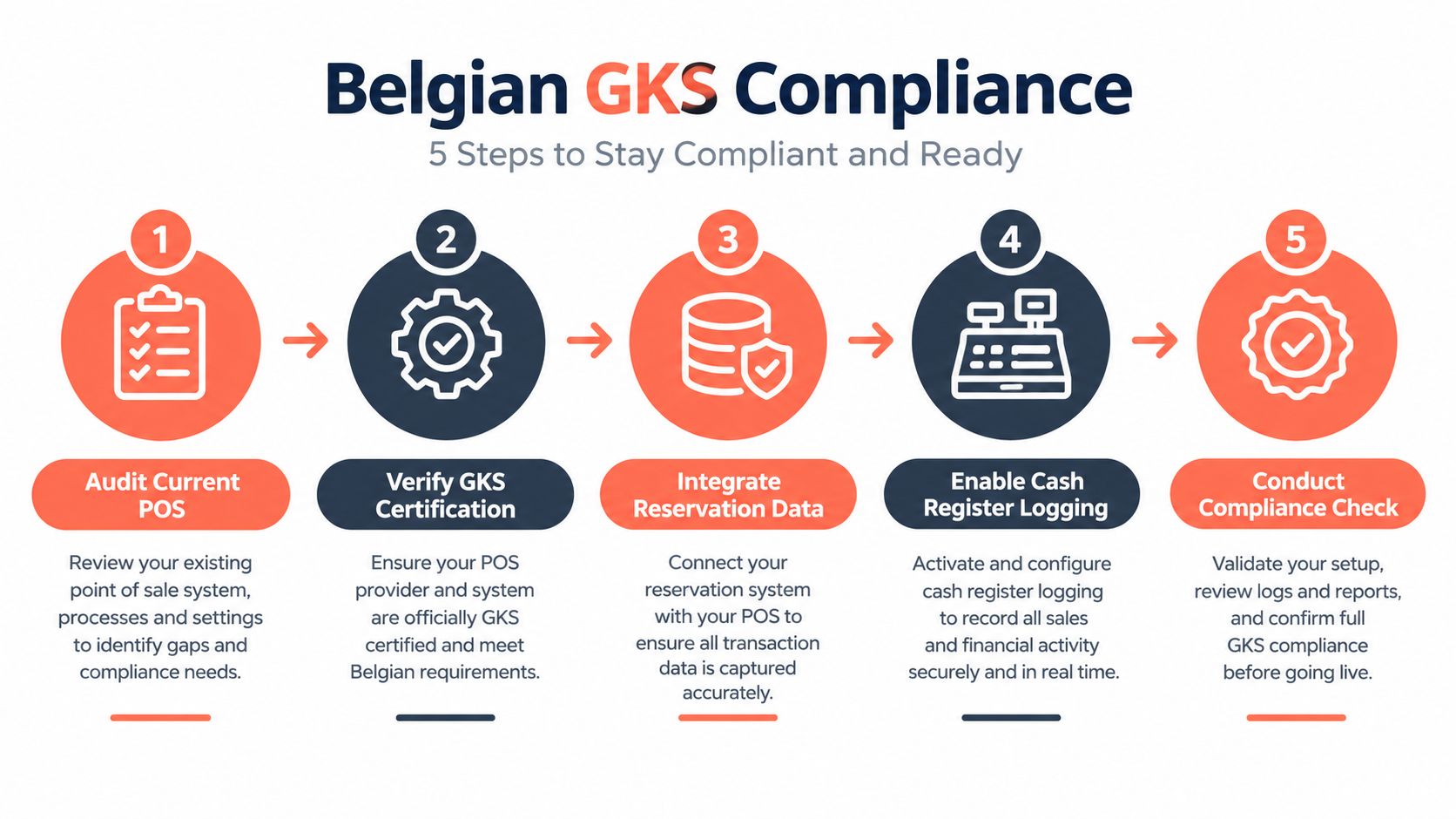
The safest implementation pairs a reservations specialist with the POS provider and the accountant or compliance adviser. That avoids the common mistake of treating a front-of-house booking tool as a substitute for a registered cash system.
Executing a Smooth Migration and Implementation
A reservation system change becomes risky when the team treats it as a software installation instead of a service change. The restaurant has to protect guest data, preserve confirmed bookings, train the host stand, and keep the booking channel reliable throughout the transition.
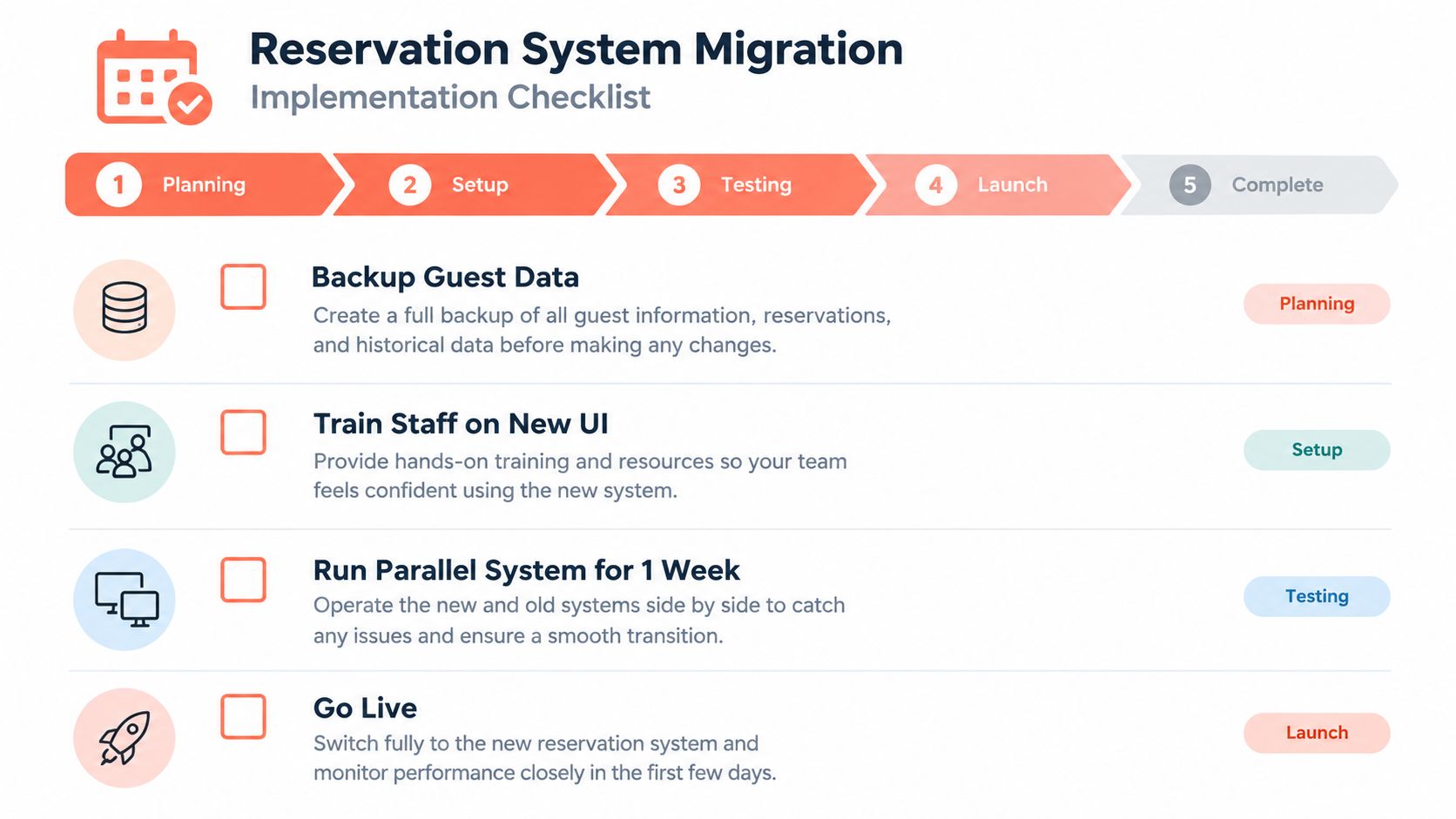
The cleanest approach is staged. Start by exporting the existing guest and reservation data, then review it for duplicates, outdated notes, and incomplete contact details. Keep a secure copy of the original file before importing anything into the new system.
Build the operational model first
The floor plan should be configured before the public booking page goes live. Map every table, combination, blocked area, terrace section, bar seat, and service restriction. Then define the rules for party sizes, booking windows, turnover expectations, deposits, cancellations, and walk-ins.
A sensible migration sequence looks like this:
- Back up the existing records: Preserve confirmed bookings, guest contact details, notes, and future special events.
- Recreate the room: Enter the actual tables and combinations, not an idealised layout.
- Configure service rules: Match availability to kitchen pacing, staffing, and the restaurant's real opening pattern.
- Test every booking route: Check the website, booking link, social profile, QR code, confirmation email, and cancellation path.
- Train around real incidents: Practise a late arrival, a no-show, a table move, a cancellation, and a walk-in.
- Assign one owner: A named manager should approve changes and resolve discrepancies during the transition.
Keep the host screen narrow
Hosts don't need every management option during service. The live screen should make the next decision obvious, show the relevant guest note, and provide a fast way to seat, delay, move, or cancel a party.
Training works better when it uses the restaurant's own floor plan and upcoming bookings. Staff should learn the actions they perform under pressure, not every setting in the administration panel. The manager can then monitor the first services closely and compare the digital plan with what happened in the room.
A rapid setup option is available through the 10seat product page, but any provider should be tested against the restaurant's real data and service pattern before launch. The booking page must remain accurate at every stage, because a polished migration that loses a confirmed reservation is still a failed migration.
Measuring the Return on Your Reservation System
A reservation system should be judged by operational outcomes, not by the number of features in its dashboard. The manager needs a short weekly view of no-shows, covers by service, table use, waitlist conversion, booking-source mix, and the time hosts spend resolving seating decisions.
No-show protection provides one clear example of measurable impact. In the 2026 Resos No-Show Index, protected reservations recorded a 0.80% no-show rate, representing 1,907 no-shows out of 238,539 reservations, while reservations without a payment requirement recorded a 2.47% no-show rate, representing 85,589 no-shows out of 3,461,164 reservations, according to the Resos no-show data. The figures show why deposits and payment-backed policies deserve careful testing, although the guest communication must make confirmation, cancellation, and refund terms clear.
Use a practical review checklist
After implementation, a GM should ask:
- Are tables assigned intelligently? Review whether the system uses the available configurations or just fills the first open slot.
- Are gaps being used safely? Check whether walk-ins and late bookings fit without damaging later reservations.
- Is the kitchen pace stable? Compare arrival waves with the pass and dining room workload.
- Are notes actionable? Remove clutter and keep only information that changes service.
- Are direct bookings worth protecting? Separate website bookings from third-party demand and review the true cost of each source.
- Does the system support compliance? Confirm that reservation activity and POS settlement remain clearly separated and properly connected.
The return may appear as fewer frantic calls, better use of existing tables, fewer missed reservations, or more reliable pacing rather than as a single dramatic revenue figure. The strongest restaurant reservations app makes those improvements visible in the weekly operating review.
10Seat provides commission-free reservation management for independent restaurants in the Benelux, with online booking, table allocation, availability controls, guest profiles, and live floor management. Restaurant owners and GMs can review how 10Seat handles table orchestration and direct reservations, then test the workflow against the actual room and service model.