Restaurant Reservation Table Explained for Busy Hosts
Learn what a restaurant reservation table is, how it maps bookings to tables, and how to optimize capacity. Includes ROI tips for 10seat users.
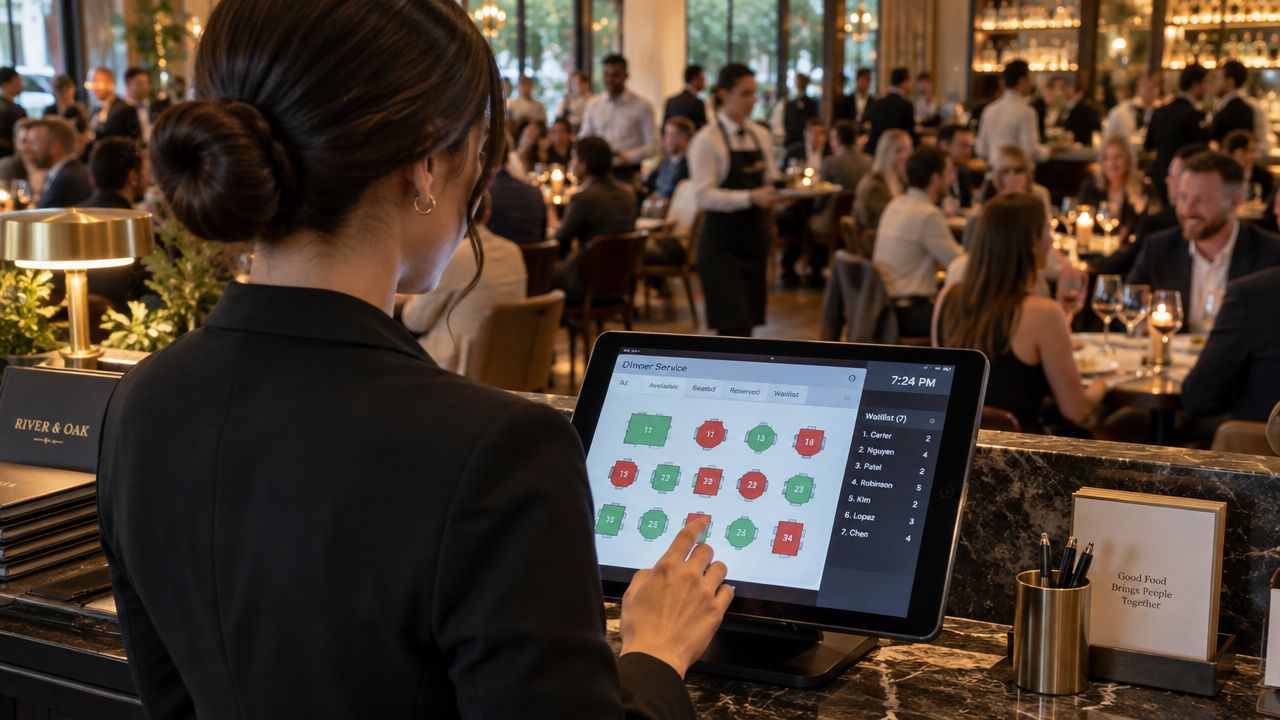
Saturday service is full, the phone is ringing, two walk-ins are waiting, and a four-top has arrived early. The host needs to know which tables are available, which are being held, and which can be reset before the next booking. A paper list of names can't answer that quickly. A working restaurant reservation table can.
The reservation table is the dining room's control tower. It connects a guest, a party size, a time slot, a table, and a live status so the team can pace the service instead of reacting to every arrival. Used properly, it shows where capacity exists, where the kitchen is about to tighten, and which table combinations can absorb a change.
This guide moves from the basic view to practical capacity planning, dynamic allocation, no-show controls, and Belgian billing compliance. It also shows how a clearer table map can save hours of manual planning across a week, while helping a busy shift run with fewer avoidable decisions. For restaurants that also use printed prompts at the table, promotional table talker printing can support offers or service messages without adding another task to the host stand.
Table of Contents
- Understanding the Reservation Table View and How It Works
- Key Fields and Layouts Inside a Modern Reservation Table
- How to Map Reservations to Tables and Plan Capacity Without Guesswork
- Common Mistakes With Reservation Tables and How Dynamic Allocation Fixes Them
- Belgian Operations and GKS Compliance for Your Reservation and Billing Flow
- Putting Your Reservation Table to Work Starting Tonight
Understanding the Reservation Table View and How It Works
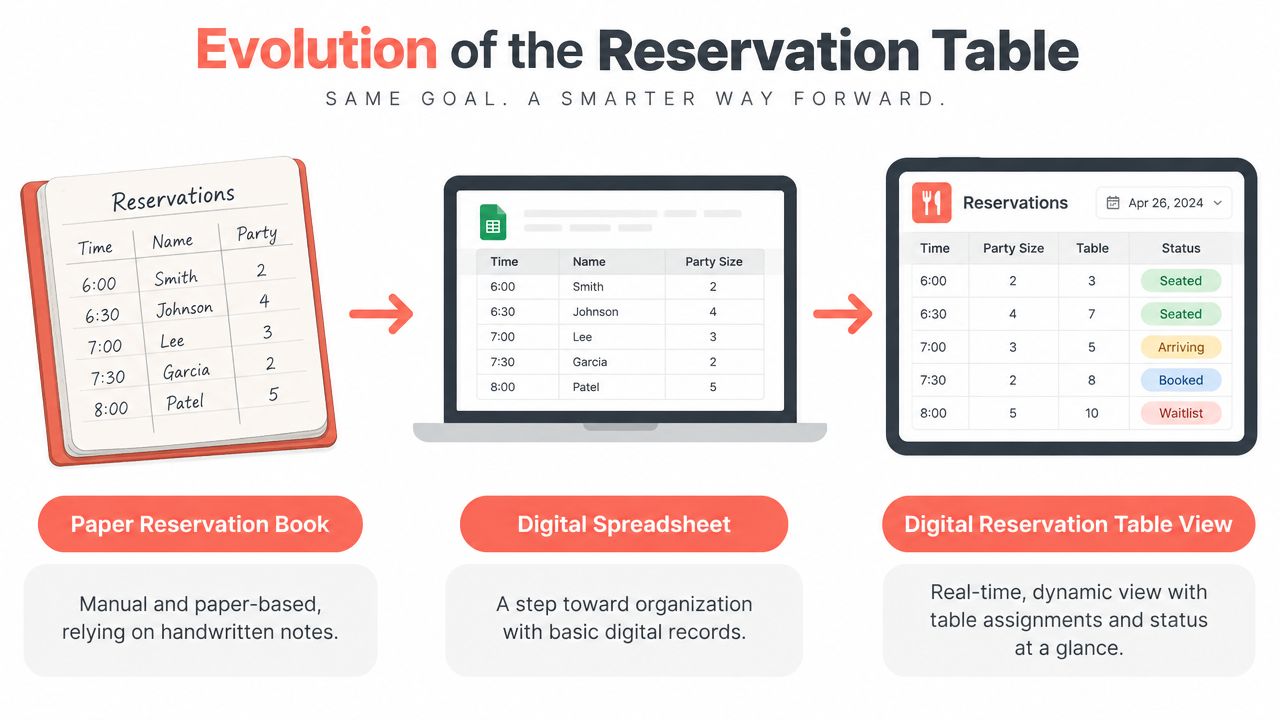
The old reservation book was simple. A host wrote a guest name beside a time, added the party size, and tried to remember which table would work. That system could function in a small dining room, but it forced the host to hold too much information in memory.
A digital reservation table turns the same information into a live seating puzzle. Each booking has a position in time, a number of covers, an assigned or available table, and a status. The host can then see not only who is coming, but how those bookings interact across the entire service.
Read the view in four passes
-
Start with time. The host scans the service from opening to closing and looks for clusters. A quiet early period may offer flexibility, while a concentrated peak requires strict pacing.
-
Check covers. A booking for two doesn't use the dining room in the same way as a booking for six. Party size affects table choice, combinations, and the number of remaining seats in each zone.
-
Review the table relationship. The table may be fixed, pooled with similar tables, or available for a combination. This distinction matters when a late booking arrives or a walk-in party needs seating.
-
Read the live status. Confirmed, arrived, seated, completed, cancelled, and no-show are operational states, not decorative labels. Each one changes what the host can safely offer.
The view should answer a practical question in seconds: what can be seated now, and what must remain protected for later? If the screen only lists names, it isn't showing enough of the operation.
Reservations became a standard operating practice as modern restaurants needed better control of scarce seats and busy demand. A historical analysis describes table reservations as mainly a 20th-century innovation, with formal reservation systems becoming more important as restaurants developed and busy urban markets needed demand management. Restaurant-ing Through History explains the development of restaurant reservations.
Key Fields and Layouts Inside a Modern Reservation Table
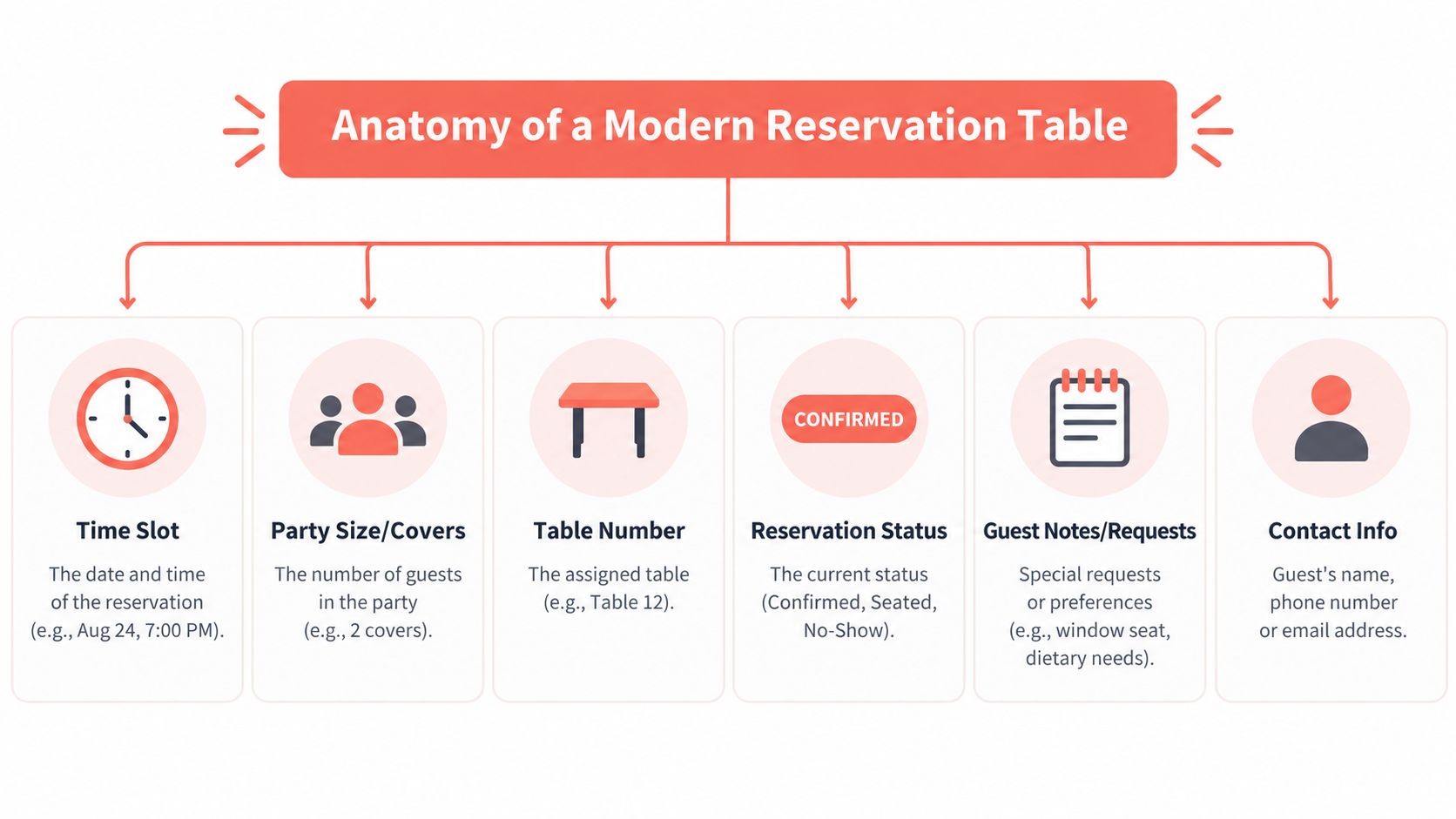
A useful reservation entry gives the host enough information to make a seating decision without opening several screens. Each field should answer one operational question.
The fields that affect the floor
-
Time slot: This establishes when the table is expected to be occupied. It also helps the host identify overlapping arrivals and protect the next booking.
-
Party size or covers: Covers determine whether the reservation fits a two-top, four-top, larger table, or combination. The number also feeds the service pacing decision.
-
Table number: A table reference connects the reservation to the floor. If the booking isn't tied to a fixed table, the system should still show the eligible pool.
-
Reservation status: Confirmed, seated, completed, cancelled, and no-show tell the team what has happened and what capacity has returned.
-
Guest notes and requests: Allergies, accessibility needs, high chairs, celebrations, and seating preferences can change the suitable table. Notes should help the team act, not become a second unstructured diary.
-
Contact information: A reliable phone number or email gives the restaurant a way to confirm, clarify, or release a booking when circumstances change.
A practical table management software guide can help a manager assess whether these fields are connected to the floor plan or merely stored as booking details.
Match the layout to the task
The timeline view is best before service. It shows arrival waves, gaps, table duration, and pressure points across the evening. The floor-plan view is best during service because it shows occupied, available, held, and cleaning tables in their physical positions.
The list view is useful for searching a guest, checking notes, or reviewing the full booking record. It shouldn't be the only view during a rush, because a list hides the spatial relationship between tables.
Practical rule: Before opening the doors, use the timeline. During the rush, use the floor plan. After service, use the list and status history to identify patterns.
Colour, filters, and drag-and-drop controls should reduce reading time. A host shouldn't need to interpret a complicated dashboard while greeting guests. The strongest setup keeps the current service visible, makes table status obvious, and limits the screen to decisions that affect the next seating.
How to Map Reservations to Tables and Plan Capacity Without Guesswork
A packed Saturday can still produce empty seats. One table sits untouched because a party was assigned elsewhere, while another arrival reaches the door before the kitchen or floor team is ready. The reservation table is a live capacity puzzle, not a static floor plan. Dynamic table mapping can help a restaurant gain 10% to 15% more covers per busy shift without adding tables, provided the operating limits are set first.
Capacity comes from the kitchen's output, the floor team's coverage, the menu's pace, and the time needed to clear and reset each table. 10seat's capacity management guidance covers the relationship between availability and operating constraints.
A reservation interval should match the time a table really needs. If the promised slot is shorter than the restaurant's actual menu and service pace, the next party waits and the host loses control. The cover cap must also reflect kitchen throughput, staffing, section coverage, reset speed, and menu format.
Set the rules in the right order
-
Measure table duration. Review how long different party types occupy tables during early, peak, and late periods. Use the actual operating pattern, not an ideal target.
-
Set the cover cap around the bottleneck. If the kitchen reaches its limit before the dining room fills, slow the arrival pattern. If clearing and resetting tables takes longer, use wider intervals or protected gaps.
-
Pool compatible tables. A four-top might serve two couples early in the evening and a larger party later. Keeping each booking fixed to one table removes that flexibility.
-
Protect table combinations. A combined table should remain available only when the service can absorb the party. A large booking can use more practical capacity than its cover count suggests.
-
Keep selective walk-in space. A walk-in opportunity exists only when the table can be seated and cleared without colliding with a confirmed booking.
The framework below is a starting point, not a promise. Test each interval and cap against the restaurant's menu, staffing, and service pattern.
| Service Style | Recommended Interval | Turns Per Service | Cover Cap Logic |
|---|---|---|---|
| Casual dining | Based on actual table time and reset speed | 1.5 to 2.5 turns | Cap follows kitchen throughput, staffing, and section coverage |
| Fine dining | Longer interval where courses and pacing require it | 1.0 to 1.5 turns | Protects service quality and avoids compressing the guest experience |
These turnover benchmarks, and the warning against shortening slots without matching operational capacity, come from industry guidance on managing restaurant reservations.
A practical ROI test compares the additional covers with the average contribution per cover. If dynamic mapping produces 10% to 15% more covers per busy shift without adding tables, the owner can judge whether the extra revenue justifies the system and operating changes.
For a small team, the time saving comes from removing repeated manual permutations. A manager who spends several hours each week drawing combinations and correcting assignments can redirect that time to prep, training, or guest recovery. 10seat's Smart Auto Seating maps online reservations to efficient configurations, and its product page describes setup in five minutes, 10seat product details.
Common Mistakes With Reservation Tables and How Dynamic Allocation Fixes Them
A packed Saturday can expose a reservation table's weakness before the first guest sits down. If every booking receives a fixed table, the host may protect individual reservations while creating empty pockets across the room. The floor plan looks full in the system, yet available seats remain unusable.
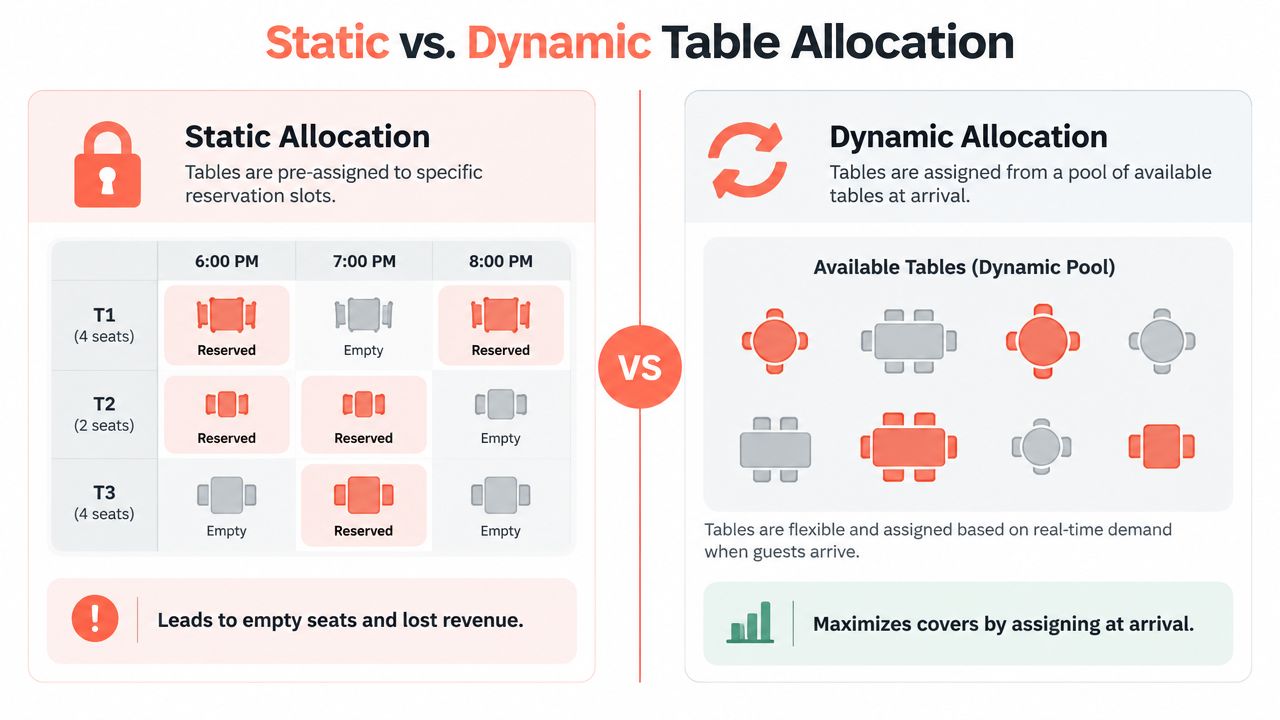
Static and pooled allocation
Static allocation assigns a table when the reservation is made. That approach gives each booking a clear destination, but it leaves little room to respond when party size, arrival time, or table status changes.
A two-person booking placed on a four-top can block a larger party later. Meanwhile, a smaller table may sit unused because the host cannot easily see another workable combination. The reservation table becomes a fixed floor plan instead of a live capacity puzzle.
Pooled allocation keeps compatible tables available within a defined group. The host or system assigns the best current option closer to arrival, using party size, occupancy, table status, and upcoming demand. Academic research on reservation pooling treats this as a service-efficiency decision, not only a software feature. The Cornell-hosted academic study on reservation pooling examines how shared capacity can be used more effectively.
A reported seating framework found a 23% average space-efficiency improvement and an 18% average customer-throughput improvement when assignments used real-time flow data. The reported seating framework supports the static-versus-pooled argument, although each restaurant should test the approach against its own floor, menu, and staffing pattern.
The practical aim is to gain roughly 10% to 15% more covers per busy shift without adding tables. That result depends on accurate table data, sensible pooling rules, and a team that updates statuses promptly. Dynamic mapping does not create capacity. It reveals capacity that static assignments hide.
Protect conversion while managing no-shows
No-show controls involve a clear trade-off. Strict or complicated cancellation barriers may reduce no-show intentions, while also reducing booking intentions. A policy that protects every table but discourages too many guests can lose demand before service begins. Recent research on cancellation barriers and booking behaviour examines that tension.
Set the policy around demand and daypart:
- Quiet periods: Use a lighter confirmation process and avoid unnecessary friction.
- Busy nights: Consider a card guarantee or deposit where local practice and payment rules allow it.
- Special occasions: Set a clear cancellation deadline and state it before confirmation.
- All services: Define a fair arrival hold and give staff a clear process for contacting the guest before releasing the table.
Published guidance reports no-show rates ranging from 10% to 20% for venues without strong controls, while protected reservations are often reported below 5%. The no-show policy overview from Ring Foods provides that comparison. The 2026 Resos No-Show Index recorded 2.33%, based on 87,953 no-shows across 3,768,761 advance reservations at 2,417 restaurants between August 2025 and July 2026. The 2026 Resos index methodology and results offers a benchmark, but your own cancellation and arrival records should guide the final policy.
The booking model affects the cost calculation too. TheFork, OpenTable, Zenchef, and Formitable may suit restaurants seeking marketplace reach or specific booking tools, with commercial terms that can include commission. 10seat uses a commission-free reservation management approach, so compare each option by discovery needs, operational control, and total cost.
Belgian Operations and GKS Compliance for Your Reservation and Billing Flow
A reservation table controls the guest journey, but it doesn't replace the billing record. In Belgium, the restaurant's seating and payment workflow must be aligned so that on-site meals and drinks are recorded through the appropriate registered cash register process when GKS rules apply.
The original GKS requirement covered restaurants with at least €25,000 in table-service turnover and caterers. From July 2025, GKS 2.0 expanded the scope to businesses that sell on-site and accept cash payments. For restaurant and catering turnover above €25,000 excluding VAT, the practical guidance remains that the business must use a registered cash register system and issue VAT tickets for on-site meals and drinks. The official GKS 2.0 information explains the scope and obligations.
Keep the operational trail connected
The host should be able to identify the booking, seating status, and final table activity without creating contradictory records. The cash register should then handle the compliant sale and ticket process. This separation keeps reservations focused on capacity while the billing system handles fiscal requirements.
A manager reviewing systems should ask:
- Does the reservation record connect cleanly to the seated party?
- Can the team distinguish cancelled, no-show, and completed visits?
- Does the billing workflow support VAT tickets for on-site meals and drinks?
- Can the restaurant preserve a clear operational record if a booking changes tables?
Repeated non-compliance can carry administrative penalties of up to €5,000, according to a Belgian GKS 2.0 compliance explainer. That makes the decision operational and financial, not purely technical.
Restaurants can also review how VAT treatment affects menu and billing design through this practical guide to VAT on food. Belgian operators should still confirm their specific obligations with a qualified accountant or the relevant authorities, particularly if the business model includes mixed takeaway, delivery, catering, or on-site sales.
Putting Your Reservation Table to Work Starting Tonight
The next useful test isn't a software demo. It's a real service with the current floor, current team, and current menu.
Before opening, the owner or GM should audit the reservation table in a few minutes:
- Check the floor map: Confirm every active table, combination, blocked seat, and unavailable section.
- Review the arrival waves: Identify the periods where bookings cluster and compare them with kitchen capacity.
- Test party-size rules: Check whether smaller parties are consuming tables needed for larger bookings.
- Inspect the statuses: Remove stale holds and ensure cancellations return capacity immediately.
- Record the exceptions: Note early arrivals, late arrivals, walk-in squeezes, and tables that required manual reassignment.
For the next busy service, one change is enough. Pool compatible tables instead of fixing every booking to a table at the moment of booking. After service, compare the planned seating with what happened, then adjust the interval, cap, or combination rule.
The objective is practical: a clearer capacity picture, fewer manual decisions, and a realistic path to 10% to 15% more covers per busy shift where the floor has unused flexibility. Guidance on restaurant host duties and training can help managers turn the table view into consistent host behaviour rather than leaving each decision to personal judgment.
The reservation table becomes valuable when the team uses it as a live operating model. It should help the host seat the right party at the right table without compromising the next booking or the kitchen's ability to deliver.
10seat provides commission-free reservation management, live floor-plan table status, and smart allocation for independent restaurants in the Benelux. Visit 10seat to see how its reservation table tools can help map bookings, manage walk-ins, and run a calmer service with the tables already in the dining room.