Restaurant Reservation System Free: Real Costs and Tradeoffs
Restaurant Reservation System Free. Compare free restaurant reservation system options by feature limits, integrations, and total cost. Learn when a free plan
A free restaurant reservation system looks harmless on paper. Then Saturday night hits, the host is buried under calls, the walk-in list is on paper, and the “free” plan has stopped taking new bookings because the month's cap is gone. That is when the cost shows up, in missed covers, rushed apologies, and a room that feels less controlled than it should.
| Model | What it looks like | What usually hurts |
|---|---|---|
| Per-cover commission | No big upfront fee, then a charge on seated guests | Margin leaks on every busy service |
| Flat monthly subscription | One predictable bill | Caps on covers, locations, or staff seats |
| Free plus upgrade | Free entry, then paid features for the real work | The plan is fine until you need deposits, SMS, CRM, or deeper floor control |
A restaurant reservation system free enough to try is useful. A free plan that cannot survive a full Saturday is just a trap with a friendly signup page.
Table of Contents
- The Free Plan That Quietly Broke on a Busy Saturday
- Three Pricing Models You Will Actually Encounter
- What Free Tiers Really Include and Where They Stop
- The Features That Separate a Widget From an Operational System
- How Fast Can You Get a Free System Running
- Integrations, POS, and Belgian Compliance
- When a Free Plan Is Enough and When to Upgrade
- Questions Restaurant Owners Ask Before Switching
The Free Plan That Quietly Broke on a Busy Saturday
The room was full by 7:45 p.m. in a 40-cover bistro, and the host was trying to run service from three places at once. The tablet had the floor plan, a paper waitlist sat beside the till, and the phone kept lighting up with guest calls. The free reservation tier had hit its monthly cap earlier in the week, but nobody noticed until new bookings stopped landing.
That is the moment owners usually underestimate. Guests who booked online days earlier still expect the table, the team still has to juggle the room, and the system that looked “free” is now blocking demand when the dining room needs it most. A missed booking is rarely just one missed cover, it turns into comped desserts, awkward re-seating, and a front-of-house team that starts improvising.
Practical rule: if the plan can stop accepting reservations without loud warnings, it is not a safety net, it's a liability.
For operators buying paper goods, smallwares, or backup supplies, even a budget alternative like budget-friendly hospitality supplies from Simply Hospitality can feel smarter than paying for software that fails at the door. Reservation software should be judged the same way. Not by the signup screen, but by what happens when the room is full and the host needs it to behave.
The actual question is simple. Can the free version carry a full service without buckling at the seams?
Three Pricing Models You Will Actually Encounter
A pricing page only makes sense if you read it like a restaurant operator. The question is simple: where does the platform take its money after the guest books? If the answer is hidden, the true cost usually shows up later, right when service gets busy.
Read the pricing page like a restaurant operator
A per-cover commission model looks cheap at first, then starts taking a cut from every seated guest. That hurts most in a room that fills quickly, because the fee follows volume and eats margin on your busiest nights.
A flat monthly subscription is easier to budget. The catch is the ceiling, which usually sits on bookings, staff seats, or locations. The bill stays stable until the plan gets too small for the room.
A free plus upgrade model is what many owners see first. The booking widget works, but deposits, CRM, POS sync, SMS, and stronger reporting sit behind paid tiers. That is why the pricing page matters more than the demo.
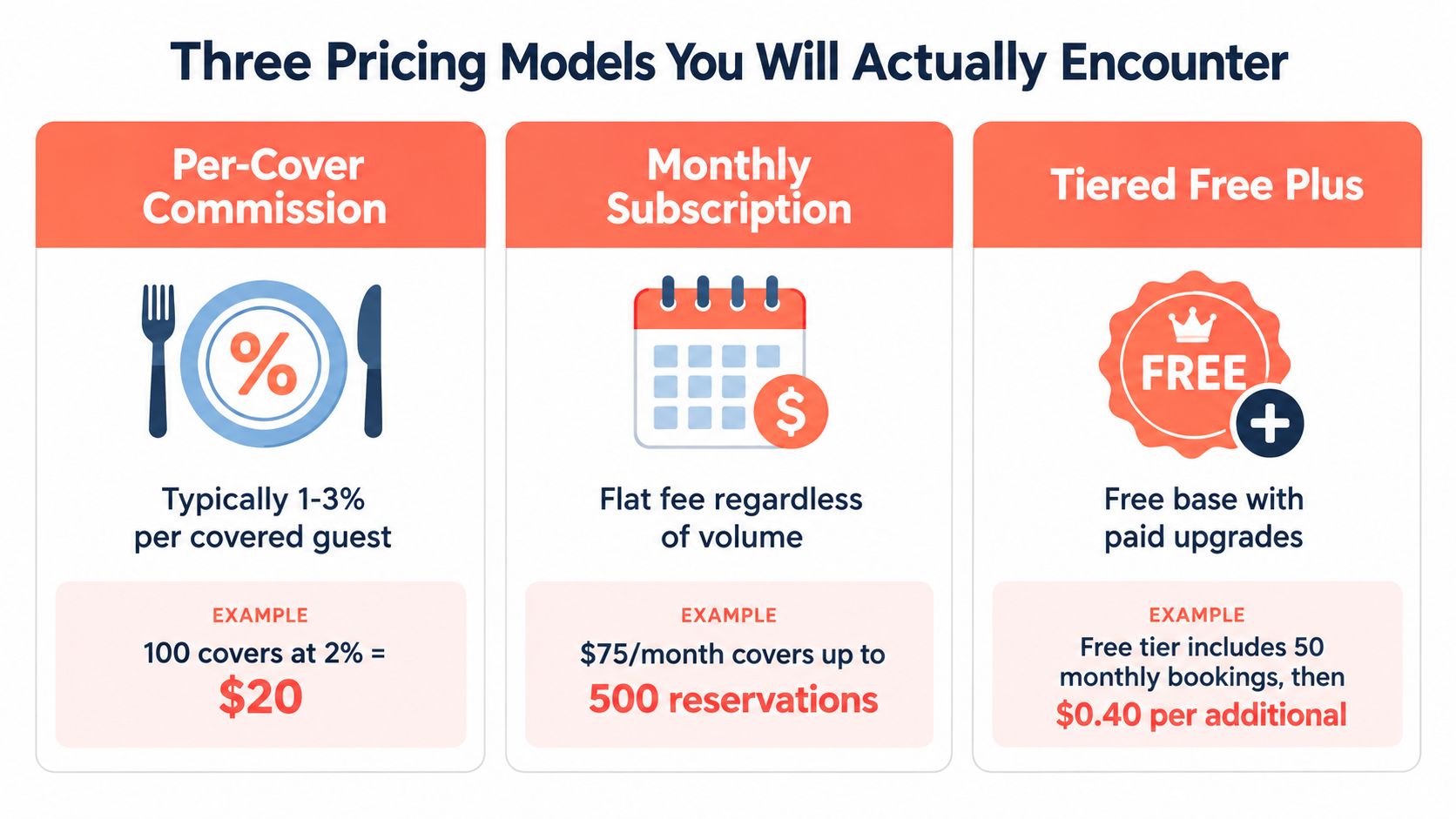
Read the fine print fast. Look for a booking cap, a per-cover fee, or a feature gate on deposits and reminders. If the page hides all three, the platform is not cheap. It is just delaying the honest conversation.
For operators who want a clear flat-cost reference, 10seat pricing shows the kind of structure that makes margin planning straightforward when you are comparing it with per-cover models.
What Free Tiers Really Include and Where They Stop
Free tiers are useful for testing, not for pretending scale doesn't exist. They usually cap bookings or covers per month, limit the number of locations, restrict staff seats, shorten guest data retention, and remove the features that protect service. The booking form still exists, but the operational layer gets thin fast.
The limits that matter before the price does
A small free plan can be fine for a single quiet venue, but the cap can disappear under real trade volume much faster than expected. A 40-cover room with two turns on Saturday and brunch on top can blow past the monthly ceiling that many free plans use as their line in the sand. The harder limit is not just volume, it is the friction that appears once the room needs waitlists, deposits, and deeper reporting.
Most free plans also hold back the parts that matter to the host stand. Guest notes, profile history, no-show controls, and custom branding often sit outside the free tier. That means the team gets a basic booking form, but not the working memory of the dining room.
| Limit Type | Common Free Cap | Where It Breaks | Operational Impact |
|---|---|---|---|
| Monthly bookings or covers | Low volume entry tier | Once service gets steady | New bookings stop, or the plan forces an upgrade |
| Locations | Single site | As soon as a second room opens | No central control for groups |
| Staff seats | Very limited | During split shifts and manager handoffs | Shared access becomes a chore |
| Guest data retention | Short history window | When regulars return after months | Less personalised service, weaker follow-up |
| Deposits and no-show fees | Often excluded | For peak demand or special menus | More empty tables and more risk |
| Waitlist tools | Sometimes missing | Peak service, especially weekends | Hosts juggle paper and memory instead of one screen |
A comparison page worth reading carefully is the one at 10seat's reservation system guide, because it frames the difference between a free starter tool and a system that can support service.
The free tier breaks first in the moments that are easiest to ignore, not the ones that look dramatic in a sales demo.
The Features That Separate a Widget From an Operational System
A widget takes a booking. An operational system helps the room seat better, keep the phone quieter, and cut avoidable no-shows. The difference shows up after confirmation, not during the form fill.
On a busy night, the weak point is usually not the button. It is the follow-through. A basic tool sends a confirmation and stops there. A real system keeps the booking alive with reminders, guest context, floor control, and a waitlist that matches the room's true capacity.
What changes on the floor
Independent benchmark-style comparisons point to a basic digital reservation tool sitting around 10-14% no-show rates and roughly ±12 minutes wait-time accuracy, while automated SMS reminders can move wait accuracy to about ±10 minutes and cut host labor to roughly 1-1.5 hours per shift. That is the part operators feel. Confirmation emails alone do not hold up when the dining room is under pressure.
Deposit capture matters for the same reason. A small deposit of €5-€15 per cover can protect the service when demand spikes and seats would otherwise sit empty. Free tiers usually stop before that point, which leaves the restaurant with a tool that records demand but does not defend it.
A host stand does not need more messages. It needs fewer surprises.
The rest of the stack is where free plans usually fall short. Real-time floor-plan control, table combinations for larger parties, guest profiles, and an integrated waitlist let the room breathe during peak service. If a system cannot move tables on the fly, pace arrivals, or keep guest notes tied to the booking, it is collecting names, not managing service.
| Feature | Widget, basic | Operational System | Real-world impact |
|---|---|---|---|
| Confirmation | One email | Email plus SMS or rules-based routing | Fewer no-shows, less follow-up work |
| Floor plan | None or static | Live table management | Faster seating, better pacing |
| Guest profiles | Bare minimum | Notes, allergies, visit history | More personal service, fewer mistakes |
| Waitlist | Manual | Integrated queue and alerts | Better guest flow during peaks |
| Reporting | Weekly count | Source, pacing, and table usage detail | Better scheduling and menu timing |
The gap is operational, not cosmetic. A booking widget fills slots. An operational system helps the team control service, protect revenue, and keep the room moving when every table matters.
How Fast Can You Get a Free System Running
A serious free tool should not feel like a software project. If setup takes half a day, the platform is asking the restaurant to pay with labor instead of money. That is a bad trade for an owner-chef or GM who already has a service to run.
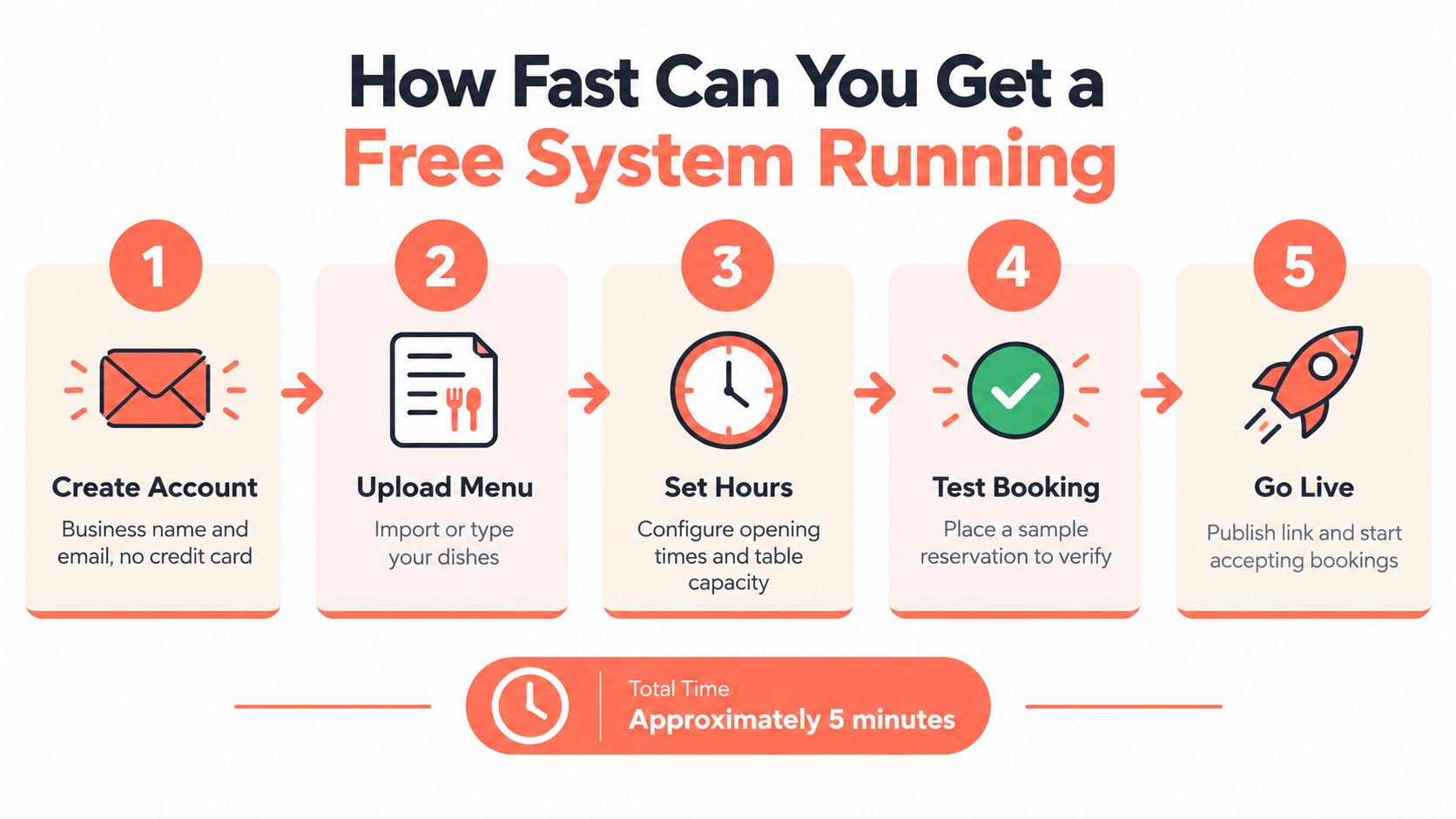
Five minutes means five actual decisions
-
Create the account. Business name and email should be enough for a legitimate free start, with no credit card demand on entry.
-
Set the room basics. Opening windows, service intervals, maximum party size, and the table count need to be set before the first guest books.
-
Map the floor. Drag tables onto a grid or import the room. Booths, two-tops, and window tables should be assigned where they belong.
-
Connect the booking path. The widget can go on the website with a single embed, or the venue can use a hosted booking page on its own domain.
-
Route the notifications. Confirmation by email should be automatic, SMS only if the plan includes it, and a fallback phone should exist for after-hours.
A careful operator can go live in 20-30 minutes. A rushed one can be taking bookings during the lunch prep window. Time-to-first-booking is the metric that matters here, not the number of menus the dashboard can display.
When a setup flow is this clean, it stops feeling like software adoption and starts feeling like basic service prep.
Integrations, POS, and Belgian Compliance
A reservation tool that sits alone is just an inbox with a floor plan. The useful version connects to the rest of the operation, because the host, the payment flow, and the compliance paperwork all touch the same guest. The more isolated the system, the more work the team does twice.
The three connections that matter
POS sync matters because booked covers should flow into the broader service picture without manual copying. Payment tools matter because deposits and no-show fees need a clean path through the checkout stack. Marketing tools matter because guest data should not die in a CSV export.
Belgian operators also need to think about compliance at the booking stage. GDPR consent has to be explicit, not pre-checked, and guest data retention needs clear rules. Free plans often leave those details to the owner, which is a bad place to discover a legal gap.
Belgium also has the GKS layer. Once annual turnover from restaurant and catering services exceeds €25,000 excluding VAT, horeca operators must use a GKS, and the rule applies to meals consumed on site as well as regular catering activity, according to the registered cash register guidance. If a business stays below the threshold, it does not need a GKS, but it still has to issue a VAT receipt for meals and accompanying drinks served on the premises, as Belgian horeca guidance states. In other words, reservation and payment workflows cannot be designed in isolation from fiscal rules.
Practical rule: if the booking system cannot sit cleanly beside the POS and the receipt workflow, the front of house will end up doing the integration by hand.
10seat's integration page at 10seat integrations is a good example of why this matters, because operators need reservations, payments, and room control to behave like one process, not three disconnected ones. That is also where deposit handling starts to matter more than the original booking widget.
When a Free Plan Is Enough and When to Upgrade
A free plan works for a small room that runs predictably and does not need many moving parts. It falls apart once the dining room starts throwing up exceptions every week. The true test is operational friction, not brand loyalty or feature envy.
The signals that say upgrade
If the widget is hitting a booking cap, the plan is already too small. If the host is manually reshuffling the waitlist, the room has outgrown the free layer. If the first no-show loss lands and there is no deposit or card-hold option, the software is failing to protect revenue.
Pay for the problem you have. SMS confirmations and reminders help when guests forget. Deposit holds help when no-shows keep taking prime tables. Multi-shift permissions help when more than one manager needs control. Those are working tools, not extras.
Some restaurants never need more than a free plan. A 28-cover neighborhood spot doing about 35 covers a service, owner-managed, with one location and no third-party delivery, may never justify a subscription. A room that small can still run well on a free tool, because the operation is simple enough to manage by feel.
| Trigger Signal | What Breaks | Paid Fix | Approx. Monthly Cost |
|---|---|---|---|
| Booking cap reached | New reservations stop or get blocked | Higher volume tier | Varies by plan |
| Manual waitlist juggling | Hosts waste time and miss seat turns | Integrated waitlist and pacing | Varies by plan |
| No-show losses | Empty seats on prime services | SMS reminders, deposits, card holds | Varies by plan |
| Multiple managers | Access gets messy | Staff permissions and roles | Varies by plan |
| More than one site | No central control | Multi-location dashboard | Varies by plan |
Use a simple breakeven test. If the paid plan replaces enough host labor or saves enough covers to justify the monthly fee, upgrade. If it does not, stay free and keep the room simple. Check five things before you decide, volume, no-shows, waitlist pain, staff complexity, and whether the plan can still accept every booking you expect.
The 10Seat pricing model fits operators who want flat cost and no per-cover surprises. That is the cleanest way to compare software when margin already feels thin.
Questions Restaurant Owners Ask Before Switching
The first question is usually about commission, and it should be. Per-cover fees and payment-processing fees are not the same thing, and vendors blur that line whenever they can. A platform can say “commission-free” and still charge for deposits, card handling, or network-sourced bookings.
The next question is about hidden costs. SMS overages, third-party integrations, onboarding help, and guest-data migration are the usual surprises. If the free plan is the front door and the paid tools are the actual restaurant, the owner should know that before the first booking lands.
Belgian operators also ask about GDPR and data portability. Guest profiles, visit history, and retention rules should be exportable if the venue leaves the platform, because data lock-in is the most expensive hidden cost in this category. Any system that makes leaving painful is a system that deserves suspicion.
A short answer on transition is simple. Yes, a free plan can run alongside a paid one during a move, especially for restaurants coming from marketplace-heavy tools such as OpenTable or Resy. The key is to keep one source of truth for bookings and export the guest data before the old system is turned off.
10Seat gives independent restaurants a commission-free way to manage reservations and tables without paying per cover. If the goal is to keep control of the room, the guest data, and the monthly cost, visit 10Seat and compare it against the plan you're using now.