Restaurant Booking Management System: A Practical Guide
Learn how a restaurant booking management system fills seats, cuts no-shows, and fits Belgian GKS rules. Practical guide for owner-chefs and GMs.
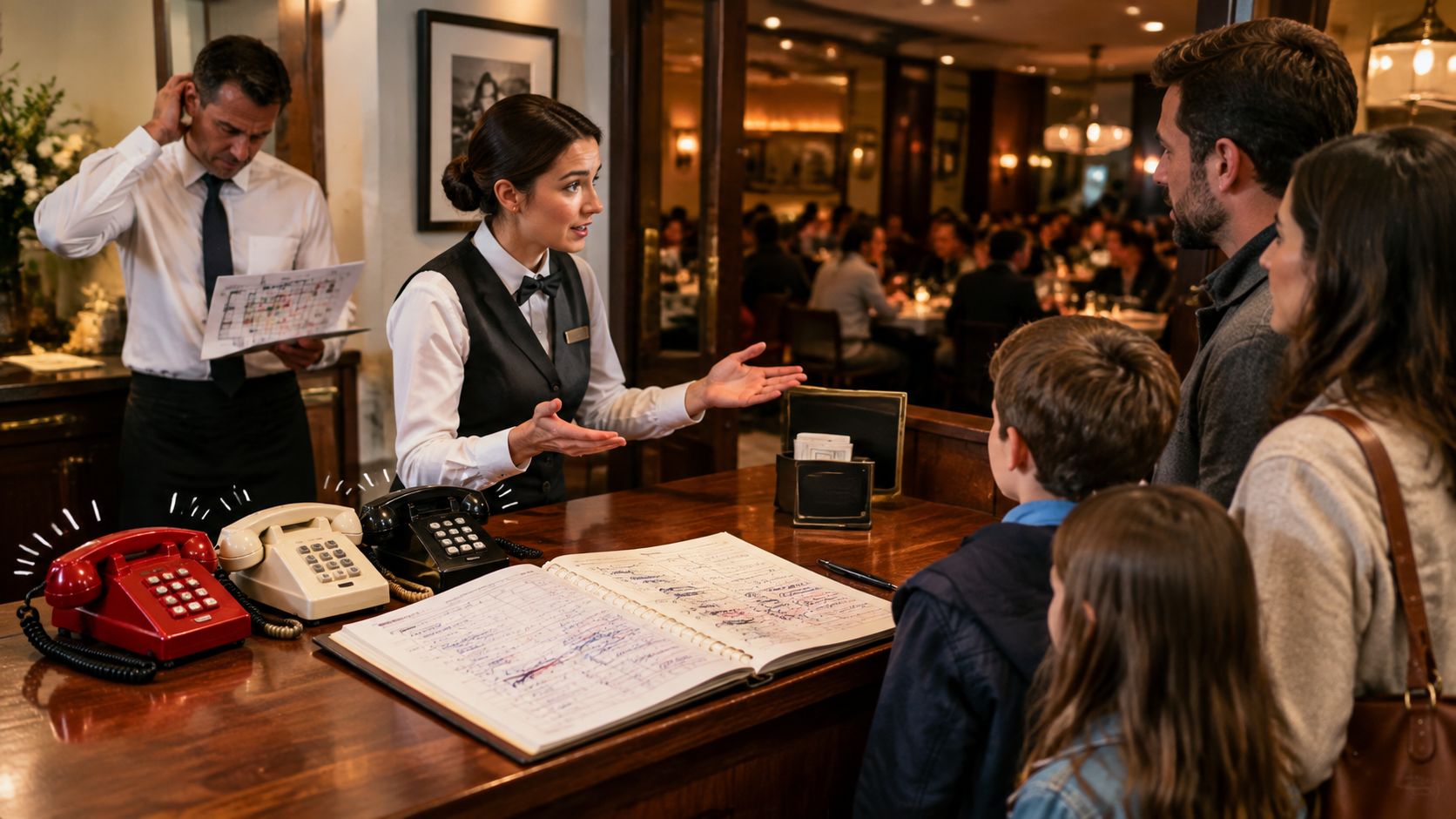
At 19:45 on a packed Friday, the host stand stops being a desk and becomes a traffic junction. Three phones ring at once, a four-top walks through the door, the 20:00 booking window has a no-show, and the floor manager is crossing out names on a paper chart while two parties wait at the bar.
The host pulls a name, searches for a table, quotes a wait, then reseats a couple who arrived early. Every hesitation has a cost. An idle table can mean a lost cover, and a party that waits too long may receive a comped drink just because nobody could give a reliable answer.
A restaurant booking management system should remove that hesitation. It should show reservations, walk-ins, table status, turnover timing, and party requirements on one live screen, then suggest the next workable seat before the host has to calculate it manually. The right system isn't a calendar with a nicer interface. It's a real-time matching engine for the dining room.
Table of Contents
- The Friday Night That Changes How You Run Service
- What a Restaurant Booking Management System Actually Does
- Core Features That Move Covers and Save Minutes
- The Real ROI Behind Fewer Empty Seats
- Commission Platforms Versus Flat Fee Systems
- Choosing and Rolling Out the Right System
- Belgian GKS Compliance and Your Booking Workflow
- KPIs, Integrations, and Your Next Step
The Friday Night That Changes How You Run Service
At 19:45, the floor isn't short of demand. It's short of usable information.
The host needs to know whether the four-top can fit without breaking the 20:00 seating plan, whether the no-show table can be released, and whether the couple at the bar can take a smaller table without forcing another reseat later. A paper chart can record bookings, but it can't continuously recalculate the floor as guests arrive late, parties change size, or tables remain occupied longer than expected.
That distinction matters because restaurant demand is uncertain. A large independent study covering 3,768,761 reservations across 2,417 restaurants recorded an average no-show rate of 2.33%, while earlier work cited in a Wiley article reported U.S. reservation non-fulfillment as high as 28% in OpenTable data. Classic operations research on one restaurant found no-shows ranging from 3% to 15%, with special occasions reaching 40% in some cases. The figures come from different settings, but the operational lesson is consistent: a full booking sheet doesn't guarantee a full dining room. (Resos research on restaurant no-shows)
The floor changes faster than the booking book
A table marked “reserved” may be empty because the guests are late. A table marked “occupied” may be close to clearing, or it may have just received mains. A walk-in party might fit perfectly at a table that the host would otherwise leave blocked for a larger booking later in the service.
The host's job is therefore a sequence of quick decisions:
- Pull the next reservation and verify the party.
- Find a compatible table, not merely an empty one.
- Quote a wait based on actual turnover.
- Protect the next service window.
- Reassign guests when the floor changes.
A digital system earns its place when it makes those decisions faster and more accurately. Research on a web-based restaurant reservation information system using First-Come, First-Served logic reported a 37% reduction in average wait time compared with a previous manual process, with zero observed errors across load scenarios, although latency spikes appeared under heavy traffic. (Reservation-system queueing findings)
Practical rule: A booking system should help the host decide where the next party sits, not merely confirm that the party exists.
What a Restaurant Booking Management System Actually Does
A useful system performs four floor-level jobs.
First, it captures demand from every route guests use. That includes phone calls, a website booking widget, Google, Instagram, marketplace channels, and walk-ins. Without a shared inbox, staff members duplicate bookings, miss calls, and spend service time checking separate lists. For restaurants handling heavy phone demand, dedicated dining industry phone support can sit alongside digital booking capture rather than forcing every reservation through one channel.
Second, it assigns seats using more than a time slot. The engine considers party size, table shape, service period, highchair needs, accessibility requirements, and future bookings. A table for two isn't automatically the right table for every pair, especially when combining tables could damage the next seating.
Third, it paces service. The host needs to see which tables are seated, ordering, in main course, paying, or likely to clear soon. A system that flags a table expected to free up within the next fifteen minutes gives the host a defensible wait estimate instead of a guess.
Fourth, it remembers guests. Useful profile fields include allergies, preferred tables, visit history, special occasions, and no-show records. The information should support hospitality, not turn the host into a data-entry clerk.
A forty-cover example
A regular books through Instagram for two and adds a highchair request. The system recognises the guest profile, places the party at table six because the configuration works, and sends the allergy note to the relevant service workflow before the host walks to the kitchen.
That sequence removes several separate tasks. The host doesn't search a notebook, check a social-media message, inspect the floor manually, and repeat an allergy warning from memory. The booking becomes an operational instruction.
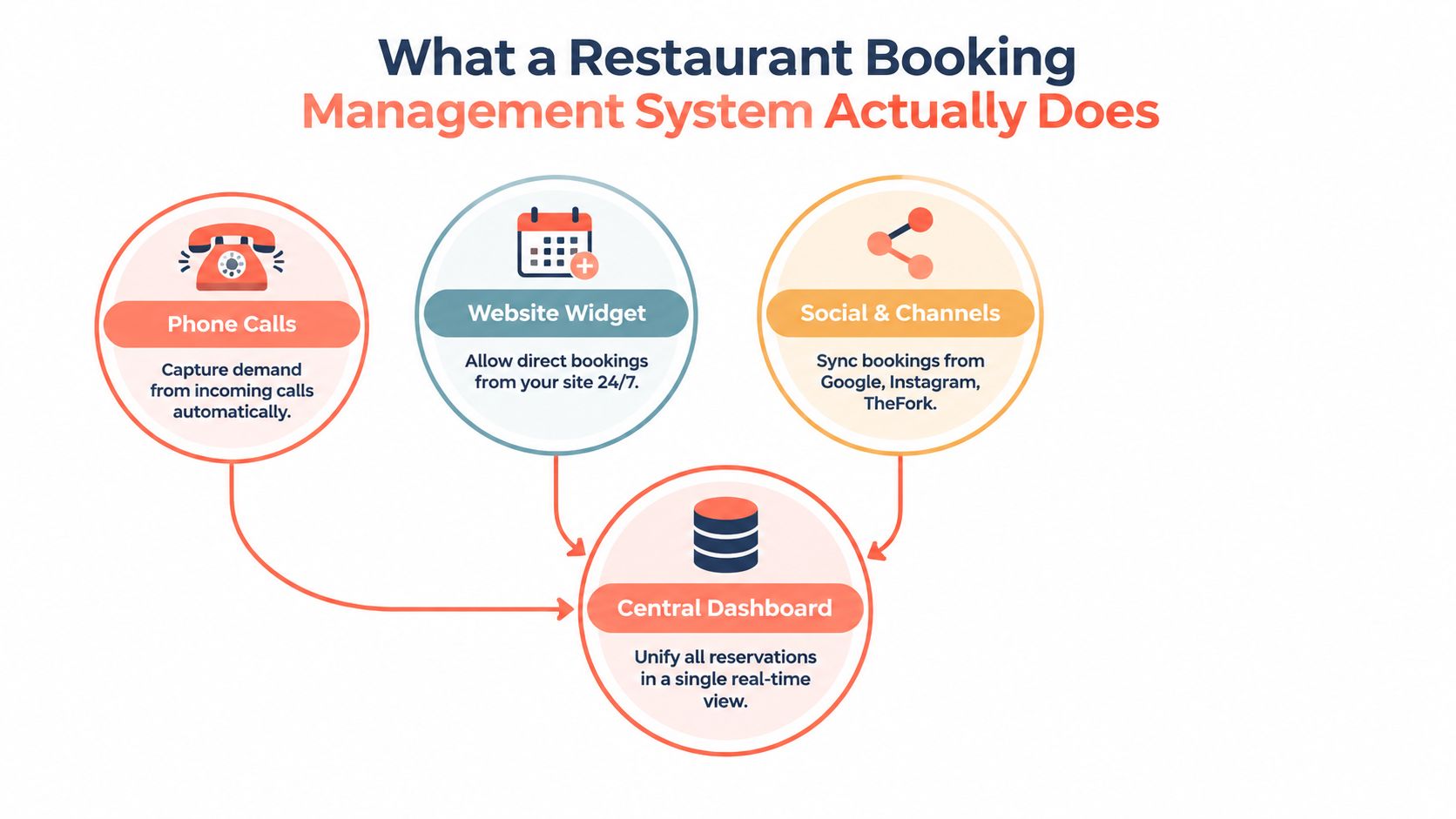
The system isn't a POS, a full CRM, or a marketing platform. It feeds those tools with cleaner reservation, seating, and guest data. The booking layer should remain focused on matching demand to capacity while passing the right information to the rest of the stack.
Core Features That Move Covers and Save Minutes
Feature lists are only useful when each feature changes a decision on the floor.
Channel capture
A Google Booking button and website widget should send reservations into the same inbox as phone bookings and social reservations. The host stops switching between screens, and the manager can see the true demand picture before opening more inventory.
Visual table management
A live floor plan should show each table's state, with clear distinctions between open, seated, ordered, main course, and bill. Drag-and-drop reassignment lets the host react to early arrivals and changing party sizes without rewriting the whole service plan.
A focused guide to table management software can help operators assess whether a floor plan supports actual service decisions or merely displays a static map.
Capacity rules
The capacity engine should let managers hold two covers for a priority service window, block a table between 13:00 and 13:30 for a turn buffer, and cap online party size when the kitchen or floor can't support larger groups. These controls prevent online availability from consuming the flexibility required to run service properly.
Waitlist and walk-ins
A virtual queue should record arrival time, party size, and seating requirements, then message guests when their table is close. Replacing a clipboard with a time-aware queue gives the host a cleaner way to fill cancellations and manage the bar wait.
Deposits and no-show controls
Deposit rules should vary by service and risk. A venue might apply a €10 card hold per person on Friday and Saturday, but that specific policy should only be used if it fits the restaurant's guest mix and local payment rules. Evidence on no-shows supports configurable deposits, card authorisations, reminders, and penalty rules because booking count alone doesn't predict realised covers. (Operational no-show evidence)
Guest profiles and reporting
Guest profiles should capture only information staff can use. Reporting should show covers per service, booking source, average spend, and no-show rate by channel. Operators who want to display guest feedback on a website can review Bragly testimonial widgets, but testimonials shouldn't replace operational reporting.
The test is simple. During a busy service, can the host make the next seating decision without opening another system?
The Real ROI Behind Fewer Empty Seats
Restaurant owners should calculate booking software like a lender would. The relevant question isn't whether the dashboard looks modern. It's whether the system recovers covers, protects turn timing, and removes paid staff time from repetitive booking work.
The evidence gives a useful starting point. No-show rates vary sharply by restaurant and booking context, from 2.33% recorded on average in one large independent dataset to much higher levels in other datasets and special-occasion services. That spread makes policy design more important than a universal benchmark. (No-show dataset and operational implications)
A second measurable lever is wait time. A web-based reservation system using FCFS logic reported a 37% reduction in average wait time against a manual process, though heavy traffic created latency spikes. That result doesn't promise the same outcome for every venue, but it shows why queue logic, floor-plan state, and system responsiveness belong in the ROI calculation. (Queueing and wait-time findings)
A defensible calculation
For a hypothetical 60-cover bistro turning tables twice on a Friday, an owner can model recovered covers without claiming that the result is guaranteed. If operational improvements recovered 8 covers at an average spend of €45, the service gain would be €360, or roughly €2,800 per month across a typical run of services. Those are planning assumptions, not verified industry outcomes, so the manager should replace them with actual POS data during a trial.
| Lever | Mechanism | Monthly Gain |
|---|---|---|
| Recovered covers | Better pacing, waitlist use, and table matching | Covers multiplied by actual average spend |
| Lower no-show loss | Confirmations, deposits, card authorisations, and clear penalties | Avoided empty-seat revenue loss |
| Host time | Fewer phone interruptions and less manual reseating | Paid minutes returned to service |
| Booking accuracy | One live inventory view across channels | Fewer double-bookings and avoidable comps |
A practical trial should compare covers, no-shows, wait time, and host phone time before and after activation. Operators assessing demand generation separately can try Sup for restaurant influencer programs, but acquisition activity should remain separate from the booking engine's operational measurement.
The system reaches breakeven when its monthly cost is lower than the value of the recovered covers and time it produces. Any claim of a payback period should come from the restaurant's own baseline, not a vendor's generic promise. Margin context can be checked in this guide to restaurant profit margins.
Commission Platforms Versus Flat Fee Systems
The commercial model matters as much as the feature set.
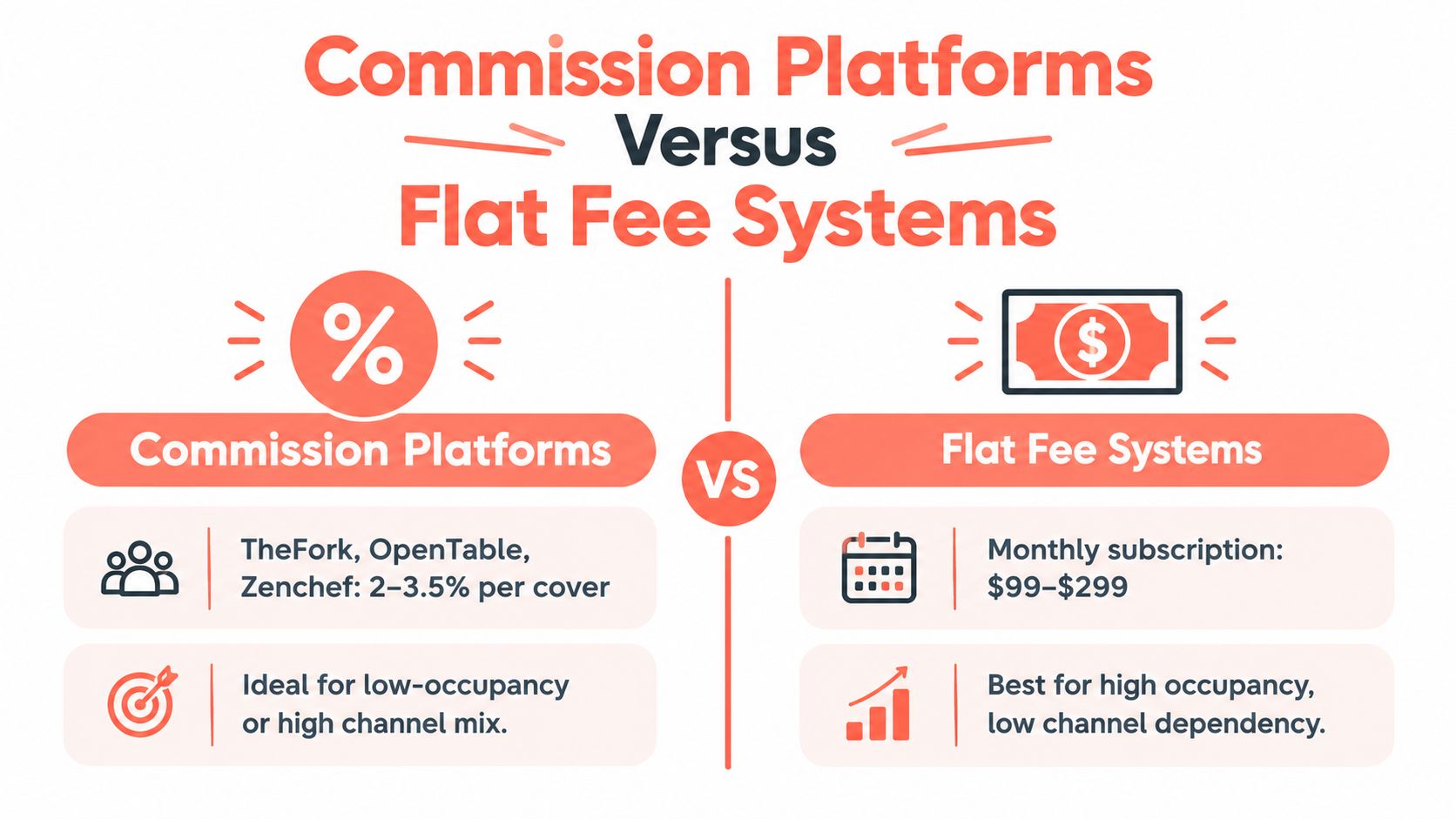
Commission platforms such as TheFork, OpenTable, and Zenchef generally make sense when discovery is a central need and direct repeat demand is limited. The restaurant pays for access to a marketplace or booking network, usually through a per-diner commission structure. That cost rises with volume, but the platform may provide reach, guest acquisition, and a management dashboard in the same package.
Flat-fee systems such as Formitable, 10seat, and CoverManager charge a recurring subscription rather than tying the software bill directly to every cover. That model suits venues with strong direct demand, repeat guests, and enough booking volume to make per-cover fees uncomfortable. The trade-off is that flat-fee systems typically don't provide the same marketplace placement.
The crossover calculation
A commission rate must be tested against actual monthly covers. At 1,200 monthly covers, a 2.5% commission equals €1,350. That amount can sit comfortably above many flat subscription tiers, but the calculation only applies to covers subject to that commission, not necessarily every seat served.
| Model | Main advantage | Main cost to inspect |
|---|---|---|
| Commission | Marketplace discovery and variable cost | Per-cover fees and paid visibility |
| Flat fee | Predictable cost as direct volume grows | User charges, integrations, SMS credits, and add-ons |
| Hybrid | Flexibility across direct and marketplace demand | More complicated reporting and channel control |
A restaurant with more than 35% of bookings from organic repeat guests should test whether commission is being paid for demand it already owns. That threshold is a decision rule, not a universal law, and the restaurant should verify it against channel-level revenue and guest retention.
The right comparison isn't “which platform has more features?” It's “which channel produces profitable covers after fees?” A detailed review of the real cost of per-cover commission helps frame that calculation.
Choosing and Rolling Out the Right System
An owner-chef can narrow the shortlist in an afternoon by starting with evidence from the restaurant, not vendor demonstrations.
Pull the last three months of covers and separate them by booking channel. Add no-show rate, average spend, peak-hour occupancy, and the time the host spends answering calls. That profile shows whether the underlying problem is weak demand, poor conversion, empty seats, or a floor that can't be paced accurately.
Five tests for the shortlist
A serious vendor should demonstrate these functions using the restaurant's own floor plan:
- Live table map: The system should optimise by party size and table configuration, not place names on a timeline.
- Google synchronisation: Google Business Profile availability should update in both directions rather than create a second booking queue.
- Deposit handling: The platform should support deposits, card authorisations, reminders, and no-show records.
- POS connection: Native integration or a documented API is preferable to manual exports.
- GKS-ready data flow: Belgian operators need a clean path from booking and payment events to the certified cash register process.
A sandbox hides the difficult parts. A 14-day pilot with real data exposes duplicate records, weak floor-plan rules, slow screens, and staff resistance before the contract becomes an operational problem.
Rollout by service risk
The first week should migrate reservations and train hosts on the live floor. The second should activate confirmations and deposits on peak services. The third should add the waitlist and walk-in module. The fourth should review the KPI dashboard and adjust pacing rules.
One owner or chef-manager should sign off after a 30-day review. Without a single accountable decision-maker, staff will return to paper, personal phones, and side lists whenever service gets difficult.
The rollout succeeds when the host can use the system under pressure, not when the manager completes the training module.
Belgian GKS Compliance and Your Booking Workflow
Belgian operators need to treat the booking system and the cash register as connected operational layers, not interchangeable software.
The Geregistreerd Kassasysteem, or GKS, applies to the HoReCa sector. Official guidance states that restaurant and catering operators earning at least €25,000 annually from restaurant and catering services, excluding beverages, must use a registered cash register system. The requirement is built around a certified POS, a Fiscal Data Module that stores and signs transaction data securely, and a Virtual Smart Card linked to the merchant's VAT number. (Official Belgian GKS guidance)
The booking platform doesn't replace the certified cash register. Its job is to pass reservation, deposit, cancellation, and payment information cleanly into the fiscal workflow so staff don't re-enter the same event in several places. A deposit recorded in the booking system but missing from the POS creates an avoidable reconciliation problem.
Deadlines require a system decision
GKS 2.0 is being rolled out from July 2026 for new hospitality businesses. Existing systems transition according to purchase date. Systems purchased before 1 January 2018 have a deadline of 1 July 2027, purchases from 1 January 2018 through 31 December 2021 have a deadline of 1 July 2028, and purchases from 1 January 2022 have a deadline of 1 January 2029. (Belgian GKS 2.0 transition dates)
Operators should confirm how their booking workflow fits beside those deadlines. A reservation tool can manage seating, but the fiscal system remains responsible for compliant transaction recording.
A practical compliance check
- Verify certification: Check that the relevant cash register system appears on the official approved list.
- Test the integration: Prefer direct POS integration or a documented API over a manual CSV workflow.
- Record deposits clearly: Document whether a deposit is treated as a payment, a credit, or a cancellation charge.
- Protect the audit trail: Confirm how booking and payment records are stored and retrieved.
- Check the threshold: Track restaurant and catering sales separately from beverages when assessing the €25,000 rule.
A booking system should reduce front-of-house handling, not make the host responsible for fiscal interpretation. The accountant, POS provider, and booking vendor should agree on the data path before launch.
KPIs, Integrations, and Your Next Step
A general manager doesn't need another dashboard full of decorative charts. The useful dashboard connects one operational problem to one controllable feature.
For cover growth, the manager reviews table matching, pacing rules, waitlist conversion, and direct booking availability. For no-shows, the manager reviews confirmation delivery, deposits, card authorisations, and channel-specific behaviour. For waiting time, the manager examines queue order, table status, and the speed at which the host receives a reliable next-table recommendation.
The available evidence supports treating no-shows as a variable rather than a fixed benchmark. Recorded rates range widely across datasets, while a digital queueing system has shown a 37% reduction in average wait time against a manual process. Those facts justify measurement, not guaranteed targets. (Restaurant queueing evidence)
| KPI | Industry baseline | Target | Feature that moves it |
|---|---|---|---|
| No-show rate | Varies materially by venue and booking context | Set from the restaurant's verified baseline | Deposits, reminders, card authorisations |
| Average wait time | Establish a manual-process baseline | Reduce without overloading the kitchen | Queue logic and live table states |
| Cover utilisation | Compare booked covers with realised covers | Improve through accurate matching | Capacity engine and auto-seating |
| Table turn time | Measure by service band | Protect planned seating windows | Pacing rules and dwell-time tracking |
| Repeat-guest share | Track by channel and guest profile | Increase direct repeat demand | Guest profiles and first-party booking |
| Deposit conversion | Measure on peak services | Improve retained demand without guest friction | Deposit and payment controls |
Integrations that deserve priority
POS synchronisation should come first because it links covers to spend. Payment terminals, channel managers, Google Reserve, CRM and email tools, accounting software, and review platforms follow according to the restaurant's actual workflow. Every integration should remove a duplicate entry or create a decision the manager can act on.
A practical decision for this week is small. Pick two KPIs, select one weak service slot, and run a 30-day trial with deposits enabled on peak nights. Belgian operators should also commit to a white-listed fiscal setup once the applicable turnover threshold is reached, with the booking workflow tested beside the certified cash register rather than after it.
10seat provides commission-free reservation management for independent restaurants in Benelux, with online booking, live floor visibility, table matching, walk-in handling, and automated confirmations. Visit 10Seat to review a booking workflow built around filling the tables already available, then test it against the two KPIs that matter most to the next service.