How to Choose an Online Table Booking App for Restaurants
Discover how to choose the best online table booking app with comparisons, key features, use cases, and an ROI framework for independent restaurants.
Friday service is already moving when the phone rings. A guest wants a table, two online bookings have changed party size, the paper reservation book is open beside the till, and the host is trying to decide whether a four-top can absorb a late booking without delaying the kitchen. That isn't a booking problem alone. It's a seating operations problem.
A suitable online table booking app should do more than collect names and times. It should connect demand to the actual floor plan, protect kitchen pacing, adjust for party-size changes, and help the host make fast decisions during service. The right system also gives the restaurant clearer control over direct bookings, guest communication, no-show policies, and operational reporting.
Table of Contents
- Introduction to Online Table Booking App
- Understanding What Online Table Booking Apps Do
- Key Features to Evaluate Capacity Optimization Auto-Seating Integrations
- Comparing Top Online Table Booking Apps
- Use Cases and Venue Configurations
- Implementation Steps and GKS Compliance
- Decision Framework and ROI Analysis
Introduction to Online Table Booking App
The market has moved well beyond paper diaries and basic website forms. The modern online restaurant reservation system market is estimated at about USD 2.68 billion in 2026 and projected to reach USD 6.46 billion by 2035, implying a 10.3% CAGR over that period. Market estimates place North America at roughly 45%, Europe at about 30%, and Asia-Pacific at around 20%, showing that table-booking software has become a major hospitality technology category rather than a niche convenience tool. Business Research Insights estimates for the online restaurant reservation system market support that broader shift.
For an owner-chef, the important question isn't whether guests can book online. Most systems can handle that. The useful question is whether the app helps the restaurant decide where and when each party should sit after the booking arrives.
This guide evaluates the full operating picture: reservation lifecycle, capacity control, auto-seating, integrations, vendor pricing models, venue configurations, Belgian GKS compliance, and return on investment. It also focuses on the decision that affects a busy shift most, how the restaurant balances availability, party sizes, pacing, and floor plans in real time.
A well-configured system can save a host up to 15 minutes per shift on seating decisions, provided the floor plan, pacing rules, and availability settings reflect the way the restaurant operates.
Understanding What Online Table Booking Apps Do
A basic booking widget answers one question: is a time available? A serious reservation platform answers a harder question: which table configuration keeps the room, service team, and kitchen balanced?
The reservation lifecycle starts when a guest selects a time and party size through a website, booking page, social link, or other digital channel. The system then checks availability against service hours, table combinations, pacing limits, and booking rules. That booking isn't finished when the confirmation email leaves. The restaurant still has to handle changes, cancellations, late arrivals, walk-ins, table turns, and the possibility that several parties arrive together.
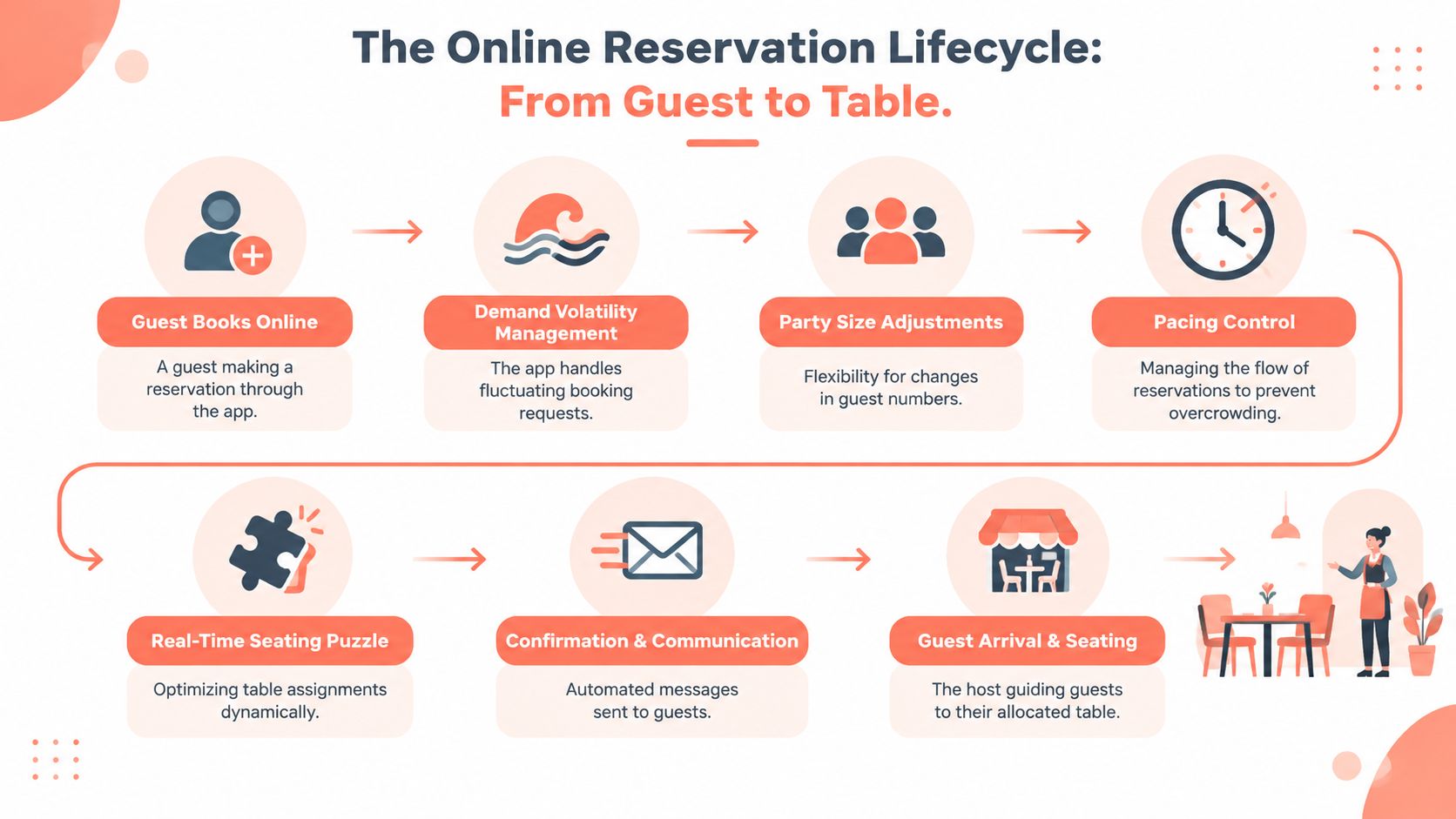
The operational gap appears after the booking lands. Demand can arrive in uneven waves, a party of six can become a party of four, and a table that looks available may be needed for a reservation arriving later. A system that accepts every possible booking can create a full reservation book but a badly paced dining room.
Recent industry data suggests that booking behavior is concentrated in short lead times. Over 66% of diners wait until the day of booking, while 59% prefer online reservations, according to Tableo's 2025 restaurant reservation trends. The same dataset reports reservations up 21% year over year and booking-technology costs down 12%, which points to a practical conclusion: many restaurants don't need more intake. They need better execution after demand arrives.
The four decisions that matter during service
- Capacity control: The app should expose only the capacity the kitchen and dining room can handle for each service period.
- Party-size management: A change from two guests to three can affect table combinations, service sections, and future availability.
- Pacing: Bookings should be distributed so the kitchen doesn't receive an avoidable wave of orders at one time.
- Live seating: The host needs a current view of occupied, reserved, cleaning, and available tables, not a static list.
Auto-seating is useful only when it understands those conditions. It should assign the most efficient available configuration while preserving future flexibility. That can mean seating two guests at a two-top instead of occupying a larger table, or combining tables only when the booking profile and service plan justify it.
Practical rule: Availability should reflect operational capacity, not the maximum number of chairs on the floor.
The best online table booking app therefore acts as an operating layer between guest demand and the dining room. It helps the restaurant fill unused spaces without adding tables, while keeping the host in control when real-world service changes the plan.
Key Features to Evaluate Capacity Optimization Auto-Seating Integrations
The right platform earns its place by improving three areas: capacity decisions, seating speed, and data connection. Attractive booking pages matter, but they won't fix a floor plan that releases the wrong tables or a host screen that takes too long to use.
Capacity optimization comes first
A capacity engine should model the restaurant's actual table inventory. It needs rules for combined tables, blocked seats, service sections, opening hours, turn times, and different availability profiles for different services. Fine dining on a Saturday evening shouldn't use the same release logic as a weekday lunch or a brunch with fast table turns.
The engine should also protect future demand. If a four-top is the only practical option for a later party, the system shouldn't casually allocate it to a smaller booking when a suitable two-top remains available. In such situations, an online table booking app becomes an operational tool rather than a digital diary.
Restaurants should review whether the platform can:
- Map real tables: Include table numbers, combinations, sections, and unavailable areas.
- Control release rules: Set availability by service, day, party size, and time window.
- Handle changes: Recalculate seating when a guest adds or removes people.
- Support walk-ins: Show safe opportunities without exposing every open seat online.
- Protect pacing: Limit the number of bookings released into a kitchen bottleneck.
A detailed explanation of how restaurants should align floor plans, availability, and demand is available in this guide to restaurant capacity management.
Auto-seating should reduce decisions, not remove judgment
A host shouldn't spend several seconds comparing table combinations while guests wait at the entrance. Smart auto-seating should surface a clear recommendation based on the current floor state, upcoming bookings, party size, and room rules. The host still needs the ability to override the suggestion, but the normal decision should be fast and obvious.
The useful test is simple. During a simulated rush, can a new team member understand which table to use without asking the manager? If not, the software may have features, but it doesn't have operational clarity.
The seating screen should distinguish between:
- occupied tables,
- guests who have arrived,
- tables awaiting reset,
- confirmed future reservations,
- flexible tables,
- blocked tables,
- and safe walk-in capacity.
That visibility reduces the risk of double-seating and prevents the common mistake of treating a dirty or protected table as immediately available.
Integrations must support the service flow
The reservation system should connect to the website and booking links first. POS, payment, guest-profile, and communication integrations should then add useful context rather than create duplicate administration.
Restaurants should ask vendors to demonstrate the complete handoff:
- A guest books online.
- The reservation appears on the floor plan.
- The party-size or time change updates availability.
- The host seats the guests.
- The visit and spend information become available for reporting where the integration supports it.
Reservation reporting becomes more valuable when it shows channel-level conversion and guest behavior. Industry reservation analytics frameworks commonly track more than 50 operational metrics, including cancellation rate, no-show rate, repeat-visit percentage, spending patterns, and promotions. SevenRooms' reservation reporting overview illustrates the breadth of reporting restaurants may need, although each platform's exact metrics and integrations differ.
The minimum dashboard should show booking source, cancellation behavior, no-shows, party-size patterns, repeat visits, and the difference between booked capacity and seated capacity. Without those views, management is forced to judge performance from anecdotes and a crowded reservation list.
Comparing Top Online Table Booking Apps
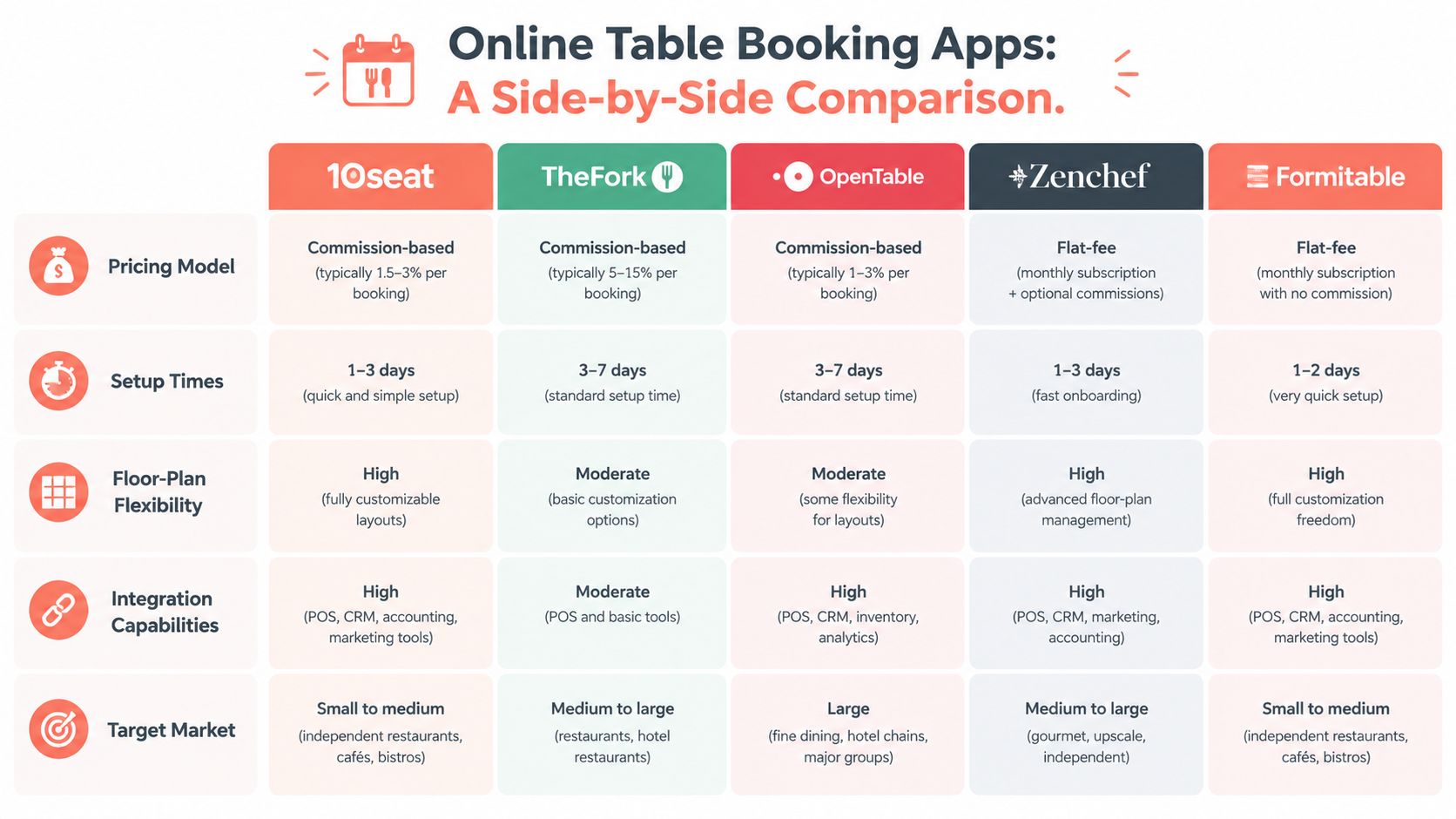
Pricing should be compared by booking channel, not only by monthly subscription. A flat-fee system can make direct website reservations predictable, while a marketplace model may add commission or per-cover charges when the platform supplies the guest. Neither model is automatically right. The restaurant must decide whether it needs customer acquisition, operational control, or both.
| Platform | Pricing model to examine | Floor-plan and seating focus | Suitable evaluation question |
|---|---|---|---|
| 10seat | Commission-free reservation management for independent restaurants in Benelux | Capacity Engine, Smart Auto Seating, floor-plan control, live seating | Can the system improve use of existing tables without adding booking cost? |
| TheFork | Compare subscription and marketplace or per-cover terms for the relevant market | Reservation intake, guest discovery, table management | What does an acquired guest cost compared with a direct booking? |
| OpenTable | Compare subscription terms with network and channel-level cover charges | Reservation management, marketplace reach, guest data tools | Is network exposure worth the variable cost for the restaurant's guest mix? |
| Zenchef | Review the contracted subscription and direct-booking scope | Direct booking, guest relationship tools, operational management | Does the system keep direct demand and guest data easy to manage? |
| Formitable | Review subscription terms, booking channels, and transaction conditions | Booking, guest communication, and restaurant workflow | Does the platform fit the venue's service model without unnecessary complexity? |
The comparison should include setup effort, floor-plan flexibility, host-interface speed, POS and website integrations, guest profiles, cancellation controls, and reporting. Vendor names alone don't reveal the right choice. A small independent restaurant may value predictable direct-booking costs, while a venue actively seeking marketplace discovery may accept variable acquisition fees.
The practical buying test
Every vendor should receive the same live scenario: a booking for two becomes a booking for three, a four-top is occupied, one table is still being cleaned, and a walk-in party arrives. The restaurant should watch how quickly the host can respond and whether the system protects later bookings.
Owner-operator test: Don't buy from a feature list. Run the busiest fifteen minutes of service inside the demo.
For independent Benelux restaurants, 10seat is positioned as a commission-free reservation management option with capacity and seating controls. The product should be assessed alongside the alternatives against the restaurant's actual channel mix, floor plan, staff habits, and tolerance for variable booking costs. A broader guide to online booking site selection can help structure that comparison.
Use Cases and Venue Configurations
A restaurant shouldn't copy another venue's settings. The correct configuration depends on table mix, menu length, kitchen constraints, guest behavior, and the amount of flexibility the floor can absorb.
Fine dining
A fine-dining room benefits from protected pacing and strict table ownership. The floor plan might include small tables near the entrance, larger tables along the main dining room, and one or more combinations reserved for special occasions or larger parties.
The booking rules should:
- release tables in controlled waves,
- protect larger configurations for suitable party sizes,
- record allergies and occasion notes,
- allow enough time for longer meals,
- and avoid sending too many bookings into the kitchen together.
The host screen should prioritize reservation sequence and table readiness. A party arriving early shouldn't automatically receive a table needed for a later booking unless the manager approves the change.
Brasserie or bistro
A brasserie needs more flexibility. Guests may arrive early, parties can include mixed sizes, and the restaurant often has a combination of reservations and walk-ins. A practical layout can divide the room into window tables, central two-tops, movable four-tops, and a small number of combinable tables.
The system should keep some capacity flexible rather than releasing every table for online booking. A two-top can absorb a small party, while movable tables can be held for larger groups or a walk-in surge. The manager should also create separate lunch and dinner profiles because the same floor can behave very differently across those services.
Casual dining and brunch
Brunch usually needs speed, clean table status, and strong short-lead availability. The layout may use compact two-tops, larger shared configurations, and tables that can turn quickly once the party leaves.
The reservation profile should keep online availability open for short-lead demand while protecting the kitchen from a concentrated arrival wave. Staff need clear status buttons for seated, finished, cleaning, and ready. If the system cannot show those states clearly, the host will fall back to verbal updates and a second manual list.
Bar or lounge with seated service
A bar or lounge often has mixed inventory, some tables, counter seats, booths, and areas that become available only under certain conditions. The platform should treat each area as a defined resource instead of presenting the entire venue as one undifferentiated pool.
A useful configuration separates:
- dining tables,
- lounge seating,
- bar seats,
- event or high-top areas,
- and tables that require a minimum spend or specific service rule.
That structure lets the operator accept bookings without promising a seating type the venue can't guarantee. Availability should also account for noise, sight lines, and staff coverage, not just seat count.
Implementation Steps and GKS Compliance
Implementation should happen before a busy service, not during one. The restaurant needs a clean floor plan, agreed booking rules, trained staff, and a clear understanding of how reservation data relates to the till and payment process.
A practical launch sequence
- Create the account and define the venue. Set up the restaurant, opening hours, services, booking channels, and staff access. 10seat's setup process is described as taking five minutes with no credit card required, and its product details are available on the 10seat product page.
- Build the floor plan. Add tables, combinations, sections, blocked areas, and the party sizes each table can handle.
- Configure service profiles. Create separate rules for lunch, dinner, brunch, special events, and any service with different pacing.
- Train the team. The host should practice booking changes, cancellations, late arrivals, walk-ins, table resets, and manager overrides.
- Run a dry service. Test a normal booking, a party-size change, a cancellation, a no-show, and a walk-in before activating public availability.
- Review costs and channels. Confirm direct booking terms, any messaging costs, payment conditions, and the chosen plan through the 10seat pricing page.
Belgian GKS requirements
Belgian hospitality operators must use a registered cash register system, known as GKS, when annual turnover from restaurant and catering services excluding drinks exceeds EUR 25,000. The system must issue GKS receipts for meals and drinks served on-site, as explained in Belgian white cash register guidance.
Belgium is moving to GKS 2.0. New hospitality businesses must comply from July 2026, while existing operators transition according to when their current cash register was purchased. The published transition deadlines include July 1, 2027, July 1, 2028, and January 1, 2029. The GKS 2.0 transition schedule should be checked against the restaurant's specific situation.
Once the EUR 25,000 threshold is crossed, the obligation continues even if turnover later falls below it. Reported penalties are EUR 1,500 for a first violation, EUR 3,000 for a second, and EUR 5,000 for subsequent violations, according to Belgian GKS compliance FAQs. Reservation software doesn't replace the registered cash register. Before launch, the operator should confirm how reservations, deposits, payments, receipts, and POS records connect, using resources such as these best practices for mobile payment integration as a technical planning reference.
For Belgian venues, the booking rollout and GKS review should be treated as related projects, but not as the same system.
Decision Framework and ROI Analysis
A restaurant should choose the app that solves its most expensive operational constraint. If the main issue is guest discovery, marketplace reach may matter. If demand already exists, the priority should be capacity allocation, host speed, direct-booking economics, and no-show control.
Start with a simple scorecard:
| Decision factor | Question for ownership |
|---|---|
| Restaurant size | Does the floor plan need basic booking intake or active table optimization? |
| Guest mix | Are bookings mainly small parties, larger groups, regulars, tourists, or a combination? |
| Budget | Is the cost fixed, commission-based, or affected by booking volume? |
| Operational return | Can the system save host time and reduce avoidable empty seats? |
| Control | Can managers adjust pacing, availability, and party-size rules without vendor support? |
| Reporting | Can the operator identify which channels and segments create profitable visits? |
The brief's operational target is up to 15 minutes saved per shift on seating decisions. A restaurant should validate that figure locally by timing the host during a normal shift before and after configuration. It should also track the opportunity to achieve 10 to 15% more covers per busy shift, a stated product objective for capacity-led seating optimization, rather than treating the figure as guaranteed revenue.
Segment no-show risk instead of using one blanket rule
No-show policies need segmentation. A 2026 index covering 3.7 million reservations recorded an overall no-show rate of 2.33%. Bookings for 1 to 2 guests recorded 2.63%, while bookings for 10 or more guests recorded 1.15%. By lead time, same-day bookings recorded 2.09%, bookings made 2 to 6 days ahead reached 2.67%, and bookings made 30 or more days ahead recorded 1.96%. These figures are reported in the restaurant reservation no-show index.
The operational response shouldn't be automatic overbooking. Smaller parties, longer-lead reservations, late-night periods, and historically weak segments may need different confirmation timing, deposits, or reminder treatment. Large parties may require earlier contact for planning reasons even when their recorded no-show rate is lower.
A separate analysis estimates that an average restaurant loses about $5,971 per year from no-shows, with late-night and high-risk periods disproportionately affected, as covered in the same industry source. The restaurant should compare that potential loss with software cost, staff time, recovered covers, and the value of a cleaner service.
Decision standard: Select the platform that improves the restaurant's actual bottleneck, then measure time saved, seated covers, no-shows, direct-booking cost, and guest data quality every service period.
10seat provides commission-free reservation management for independent restaurants in Benelux, with online booking, floor-plan control, capacity optimization, Smart Auto Seating, and live table management. Visit 10Seat to review whether its seating workflow fits the restaurant's service and start testing a more controlled way to manage every booking after it arrives.