Hospitality Management Software Explained for Restaurants
Learn what hospitality management software covers, from POS to PMS and analytics, and how to choose the right fit for your venue type.
Friday service is already moving when the host spots the problem. Two online bookings have landed on tables that are also marked available in the floor plan, a walk-in party is waiting, and the kitchen is pacing behind because the dining room has been seated in the wrong order. The reservation book, point-of-sale system, payment terminal, and manager's spreadsheet each contain part of the truth, but nobody has the full picture.
That's the practical reason hospitality management software matters. It isn't a badge for a large hotel group or a collection of impressive features. For an independent restaurant, it's the operating layer that connects demand, tables, orders, payments, guest details, and decisions made during a live shift.
The category is expanding beyond back-office administration. The global hotel and hospitality management software market was estimated at USD 4.18 billion in 2025 and is projected to reach USD 7.03 billion by 2033, with a projected 7.2% CAGR from 2026 to 2033, according to Grand View Research's hospitality management software market analysis. Different methodologies produce different forecasts, including estimates of USD 3.62 billion in 2025 rising to USD 4.78 billion by 2030 at a 5.5% CAGR, and another estimate of USD 7.52 billion in 2025 reaching USD 10.52 billion by 2030 at a 6.95% CAGR, as outlined in The Business Research Company's market report. The direction is consistent, operators are investing in digital systems that coordinate service.
This guide focuses on independent restaurants and small groups. It explains what the main modules do, how needs change by venue, how to measure payback in covers and staff hours, how to test vendors, and what Belgian operators need to know about GKS 2.0. The central buying principle is simple: usable integration matters more than a long feature list.
Table of Contents
- Introduction What Hospitality Management Software Really Means Today
- Understanding Hospitality Management Software and How the Pieces Fit Together
- Core Features That Run Service From Booking to Bill
- How Needs Differ by Venue Type and Service Model
- Benefits ROI and How to Measure Payback in Covers and Hours
- How to Evaluate Vendors Without Buying Complexity You Will Not Use
- Making Your Choice and Staying Compliant in Belgium
Introduction What Hospitality Management Software Really Means Today
A busy Friday can expose a weak system before the first order reaches the kitchen. The booking may be in one calendar, the floor plan in another, and a guest's allergy note buried in a message thread. The host then spends time checking screens, a table waits longer than planned, and the kitchen receives orders in an uneven rush. Nothing looks catastrophic on its own, yet the shift loses covers, minutes, and control.
Hospitality management software keeps the information needed for service in the right place at the right time. The reservation tool should show genuine availability. Table management should help the host seat guests without breaking the room's pace. POS and payments should connect the sale to the closing figures. Reporting should help a manager separate a one-off difficult service from a process that keeps costing time or revenue.
The wider market reflects this move toward connected operations. North America is identified as the largest region, while Asia-Pacific is described as the fastest-growing region in Grand View Research's market coverage. For an independent restaurant, that does not create a case for buying a hotel-style platform. It creates a case for selecting the few connections that fit the way the venue takes bookings, seats tables, serves food, and closes checks.
The operational question behind the software question
Start with the shift, not the sales presentation. Ask:
- Can the host see the live floor without checking several systems?
- Can the team protect a large booking while combining smaller tables intelligently?
- Can a manager tell whether lost revenue comes from no-shows, weak pacing, soft demand, or avoidable administration?
- Can guest preferences reach the right staff without depending on memory?
The answers point to different requirements. A small brasserie may need quick reservation handling and flexible table combinations. A fine-dining room may place greater value on pacing, expected dining duration, and detailed guest notes. A small group may need consistent operating rules across locations, while still allowing each manager to work at the speed of their own service.
The practical test is simple: does the system remove duplicate entry, support decisions while the floor is live, and return value in covers, staff hours, or better control? A long feature list matters less than a reliable connection between the tools the team already uses.
Understanding Hospitality Management Software and How the Pieces Fit Together
In plain English, hospitality management software is a connected set of tools that helps a venue manage demand, service, money, and guest relationships. Hotels often organize this around a property management system, or PMS. Restaurants usually build the stack around reservations, table management, POS, payments, kitchen operations, inventory, and reporting.
A useful analogy is a kitchen brigade. The expediter needs to know what each section is doing, the grill needs the right tickets, and the pass needs one coordinated view of the meal. If every section works from a different order sheet, the chef spends the service reconciling information instead of controlling flow. Software works the same way. Each module has a job, but the value appears when the modules exchange reliable information.
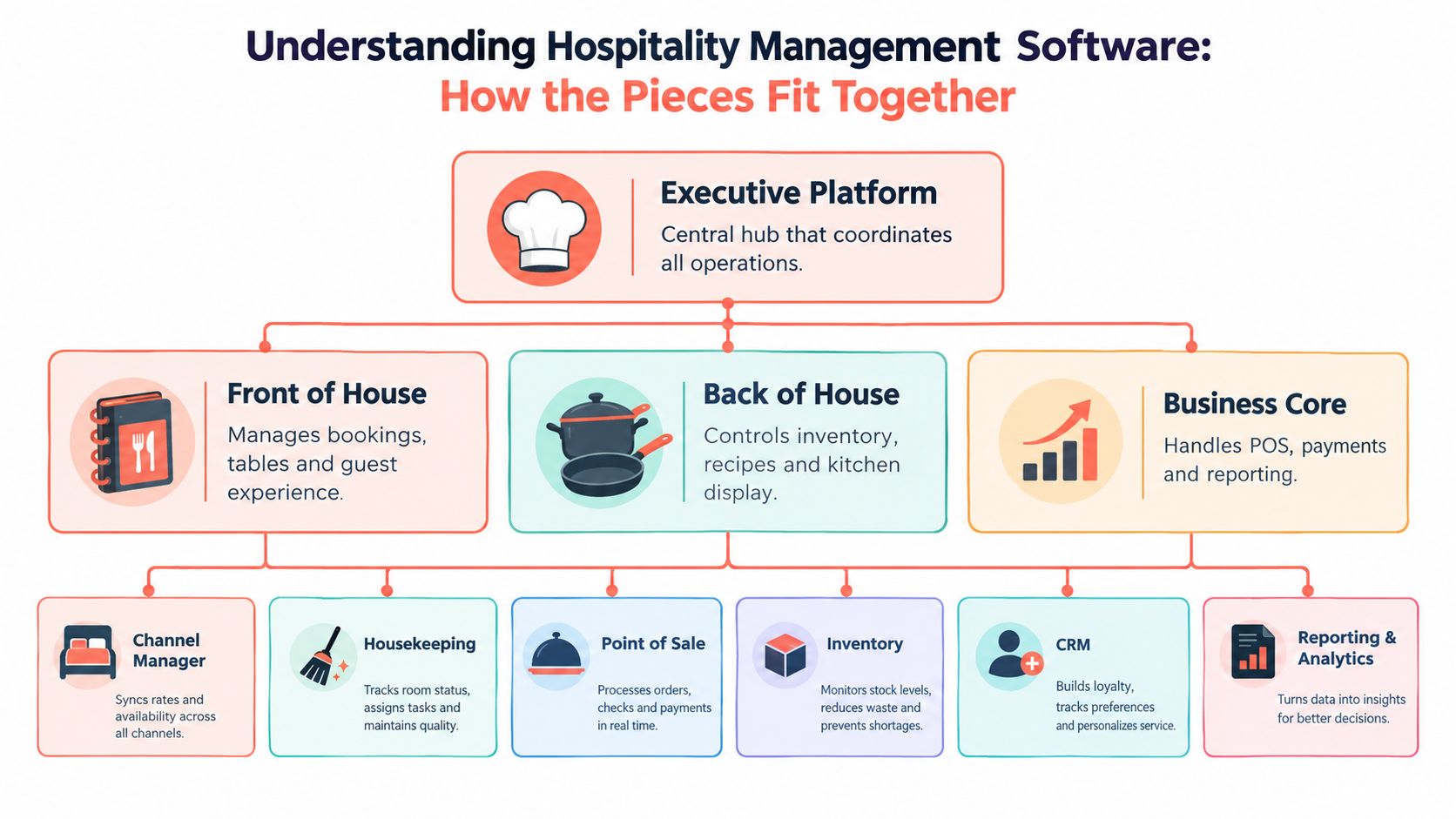
The main layers of the stack
At the top sits the operational platform, the place where managers need a coherent view of the business. Under it, three practical pillars usually appear:
- Front of house: Reservations, table availability, guest records, waitlists, seating, and communication.
- Back of house: Inventory, recipes, procurement, kitchen display, preparation workflows, and waste control.
- Business core: POS, payments, sales reporting, labor information, and financial controls.
Hotels add another layer of complexity. A PMS coordinates room reservations, check-in, room assignments, billing, and housekeeping. Operators comparing hotel platforms may find a useful technical overview in this guide to Opera PMS systems, especially when they need to understand how a PMS fits into a broader property stack.
The connected tools matter because a reservation changes more than a calendar. It affects table availability, expected covers, service pacing, staffing pressure, and sometimes purchasing. A hotel booking can affect housekeeping priorities, room status, guest communications, and payment records.
Integrated does not always mean usable
An integrated stack allows systems to exchange information through native connections or APIs. A unified guest record can prevent staff from keeping separate notes in a reservation tool, POS, email platform, and spreadsheet. Cloud-native systems can also make updates available across devices, provided the workflows are designed well.
But a bundle of connected products can still feel fragmented. If the host must open several screens to make one seating decision, the integration exists technically but fails operationally. A focused restaurant platform should reduce decisions to a clear workflow, not move the same complexity into a more modern interface.
Operators can review the practical capabilities available in 10seat's restaurant software features while mapping their own stack. The important test is not whether every module exists. It's whether the information needed for the next service decision appears without duplicate entry or unnecessary searching.
Core Features That Run Service From Booking to Bill
A restaurant manager doesn't experience software as a market category. The manager experiences it as a series of decisions, accept the booking, place the party, send the order, manage the pace, close the bill, and review the result. The useful features are the ones that make those decisions faster and more accurate.
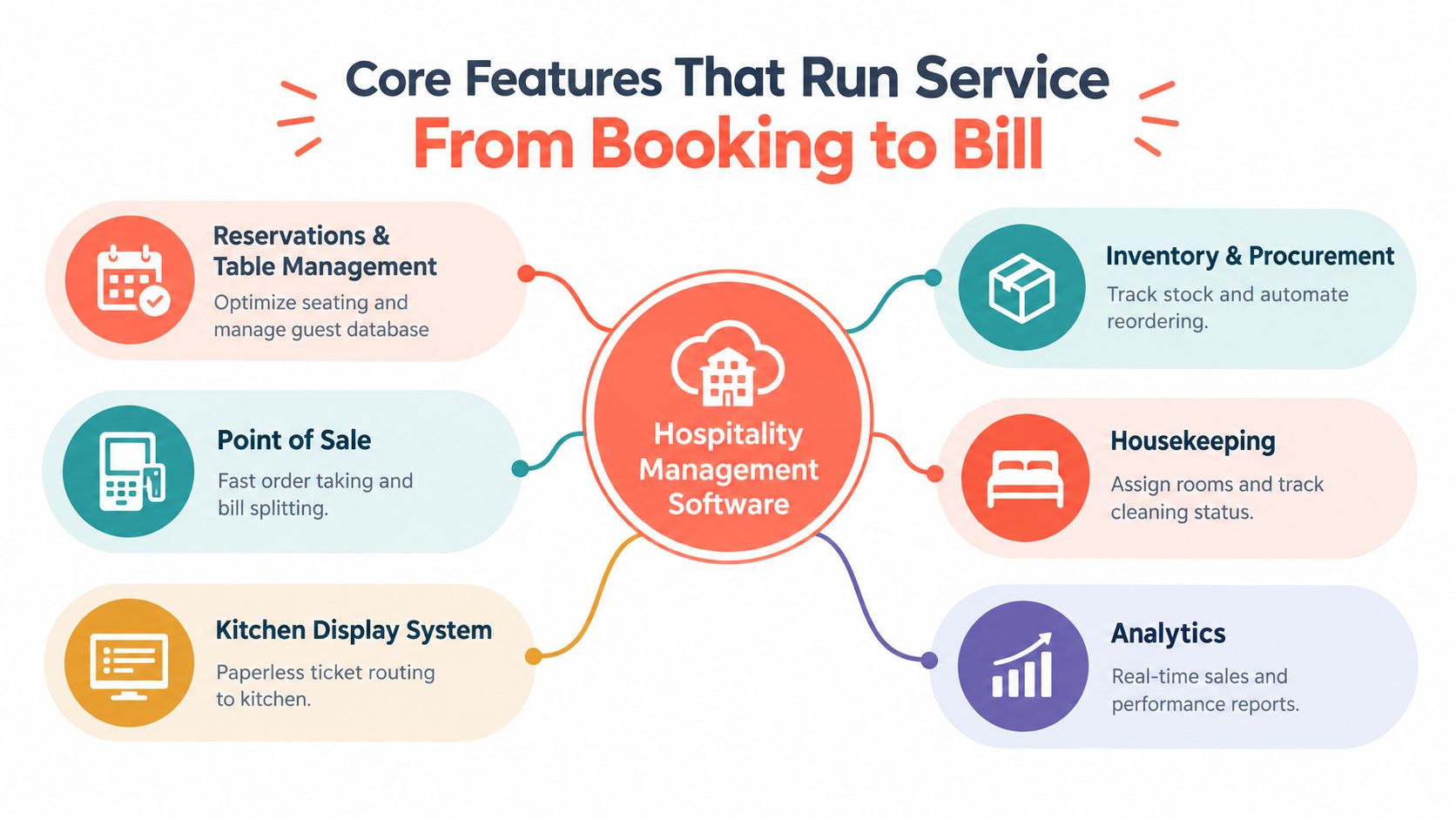
Reservations and table management
A reservation module handles online bookings, confirmations, reminders, cancellations, and changes. A serious table-management system goes further by storing a guest database, tracking table availability, visualizing the restaurant layout, and providing analytics. Independent restaurant software and academic implementations identify guest records, reservation tracking, layout visualization, and analytics as core capabilities in table-management systems, as documented in research on computerized reservation and table-booking systems.
During service, the floor plan should answer practical questions immediately. Which tables are free? Which party is late? Can a walk-in fit without compromising an upcoming booking? Can two smaller reservations share a larger configuration? The host needs a live view, not a static seating chart.
Practical rule: A table plan earns its place when it helps the host make a better seating decision before the kitchen and dining room absorb the consequences.
For restaurants assessing this workflow, 10seat's reservations management product provides an example of a focused reservation and floor-management approach.
POS, payments, and kitchen control
The POS records orders, modifiers, discounts, taxes, bill splits, and payments. Integration with table management prevents the front of house from treating the guest journey as separate from the financial record.
A kitchen display system routes tickets to the right preparation area and reduces reliance on handwritten chits. The value depends on configuration. Poor routing turns paper chaos into screen chaos, so menus, modifiers, courses, and printer or display rules need to reflect the actual kitchen.
Payments should close the loop cleanly. Staff need to split bills, apply corrections, and reconcile the shift without creating a second administrative task after service.
Inventory, staffing, and analytics
Inventory and procurement tools connect recipes, stock counts, supplier pricing, ordering, and waste records. They help managers see whether margin pressure comes from recipe cost, supplier changes, portion control, or purchasing discipline.
Scheduling tools match labor to expected demand, while reporting tools show sales by service, menu item, channel, table, and period. Benchmarking works better against a range than a single average because it reveals both downside risk and top-performing operating bands. Nory's restaurant benchmarking guidance emphasizes reviewing recipe cost, supplier pricing, labor scheduling, and portion control over recurring periods so managers can confirm that an improvement persists.
The strongest setup keeps the chain visible. A booking creates expected demand, table management shapes the seating plan, POS records the sale, inventory explains the cost, and analytics gives the manager a basis for the next decision.
How Needs Differ by Venue Type and Service Model
The same software can be appropriate for several venues, but the priority order changes. A tasting-menu restaurant doesn't manage a Friday night like a brunch café, and a multi-location group can't judge software only from the perspective of one host stand.
| Venue Type | Top Priority Modules | Key Outcome to Optimize |
|---|---|---|
| Fine dining | Reservations, pacing controls, guest profiles, table management | Protect the experience while balancing duration and kitchen flow |
| Brasserie or bistro | Reservations, walk-in handling, live floor plan, POS integration | Seat demand flexibly without creating uneven service waves |
| Brunch café | Fast booking intake, party-size rules, waitlist, table turnover visibility | Keep a high-volume service moving without overloading the pass |
| Multi-location group | Central reporting, permissions, shared guest data, integrations | Maintain local flexibility with consistent operating visibility |
Fine dining needs control before volume
Fine dining managers often need accurate arrival information, detailed guest notes, occasion tracking, and a clear view of how long tables are likely to remain occupied. The software should help the host protect pacing rather than fill every possible gap. A system that accepts bookings without considering the room's rhythm can create a perfect-looking calendar and a poor service.
Guest records also matter more when the experience depends on recognition. Allergies, preferences, anniversaries, and prior interactions should be visible in a useful form, with access controlled appropriately.
Brasseries and cafés need speed and flexibility
A brasserie usually deals with a mixed stream of advance reservations and walk-ins. The host needs to combine tables, handle late arrivals, and make quick decisions while the dining room changes in real time. The right platform supports those actions without forcing staff to rebuild the floor plan manually.
Brunch venues have a different pressure. Demand arrives in concentrated waves, party sizes vary, and the kitchen can become the limiting factor. Availability rules, waitlists, pacing controls, and clear turnover information often matter more than extensive hotel-style modules.
Groups need consistency without suffocating local teams
A small restaurant group needs shared standards, but each location may have a different room shape, menu, service time, and customer pattern. Central reporting can reveal performance differences, while local managers still need control over tables, availability, and shift decisions.
The buying mistake is treating venue type as a label rather than an operating model. The better question is: where does the current service lose time, covers, or information? That answer should determine the module priority.
Benefits ROI and How to Measure Payback in Covers and Hours
Software payback should be measured in the language of the restaurant. That usually means covers, no-shows, labor hours, seating speed, and average check, not a vague promise of efficiency.
A simple model starts with four questions:
- How many additional covers can the existing floor accept without damaging service?
- How many no-shows or late cancellations can better reminders and reservation policies prevent?
- How much administrative time can the team remove from calls, spreadsheets, and duplicate entry?
- How much faster can the host decide where to seat the next party?
The available evidence supports treating no-shows as an economic issue, not merely an annoyance. Independent analysis of restaurant reservations finds that a reservation policy can justify penalties as high as the meal price under certain conditions, and it also considers discounts for reservation customers within an optimal pricing model, as discussed in research on restaurant reservation economics.
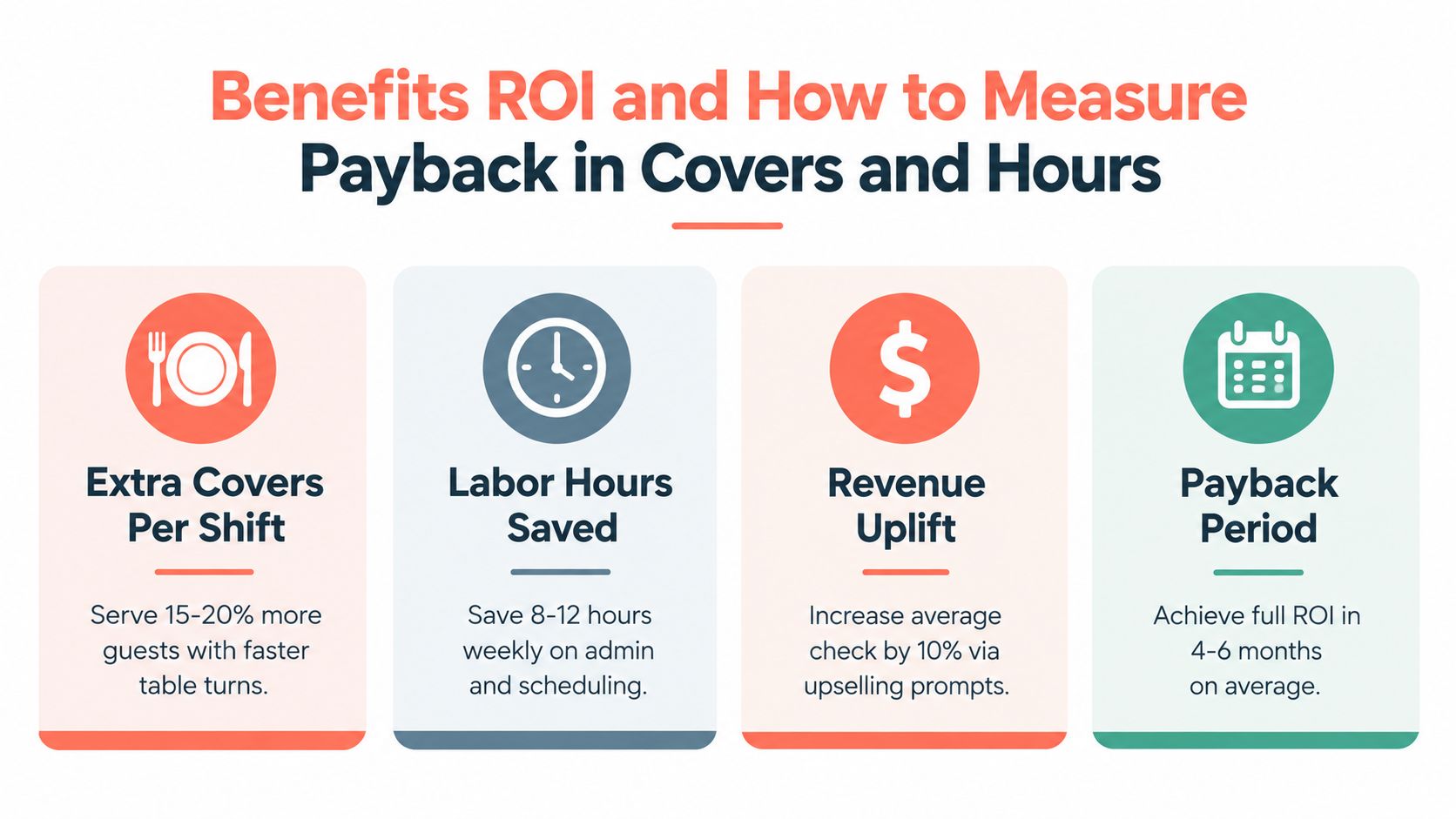
A practical covers-and-hours calculation
Suppose a restaurant seats three additional covers per busy shift because the host can use existing tables more intelligently. If the restaurant's contribution margin per cover is €30, that produces €90 per shift before software cost. The €30 figure is an example assumption, not a market statistic, so each operator should replace it with the venue's own contribution margin.
If better reservation handling also removes two hours of weekly administration, the restaurant can value those hours at the actual loaded labor cost or, more conservatively, treat them as management capacity returned to the operation. The calculation is simple:
Monthly operational value = extra covers × contribution margin × relevant shifts, plus saved hours × hourly value.
This model is more useful than copying an advertised uplift. It also exposes the trade-off between a commission-based reservation channel and a commission-free reservation platform. TheFork, OpenTable, Zenchef, and Formitable use different commercial models and packages, so the operator should compare the total cost per direct cover, not just the monthly subscription. 10seat's pricing page can be used as one reference point when building that comparison.
Track the result without fooling the team
A 30-day baseline should record covers by service, no-shows, cancellations, average seating delay, reservation handling time, and manager administration. After a change, the same measures should be reviewed by comparable service periods. Range-based benchmarking is particularly useful for recipe cost, labor, supplier pricing, and portion control because it shows whether performance sits inside a healthy operating band, as explained in EventUploader's guide to event ROI measurement.
The purpose isn't to make every shift look better. It's to determine whether the software improves the specific constraint that justified the purchase.
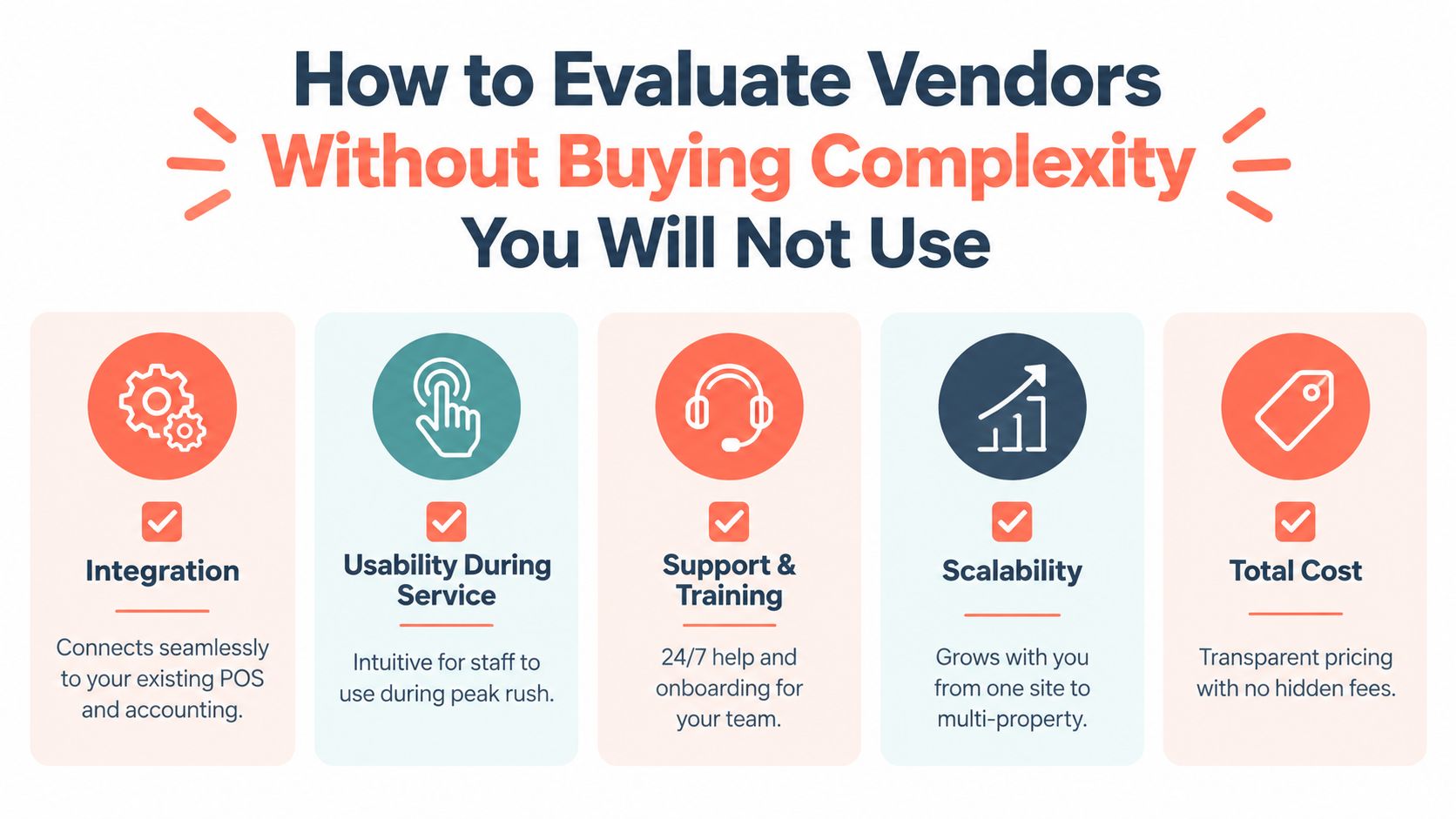
How to Evaluate Vendors Without Buying Complexity You Will Not Use
A vendor demo is easy to pass. A Friday night is harder. The evaluation should therefore happen around real operating tasks, not a tour of every available feature.
Start with the handoffs
Ask the vendor to demonstrate the exact path from booking to seating to payment. The important questions are practical:
- Integration: Does the reservation platform connect with the existing POS, accounting tools, payment provider, and reporting workflow?
- Guest data: Can the restaurant maintain a usable guest profile without duplicating records?
- API access: Are connections documented, supported, and included in the commercial plan?
- Availability rules: Can managers control party sizes, pacing, table combinations, and walk-in capacity?
- Data ownership: Can the operator export reservation, guest, and performance data in a usable format?
A platform that claims integration but requires staff to copy information between screens hasn't solved the main problem.
Test it with the host who will use it
The host should run the trial, not only the owner or IT contact. Give the team common pressure points: a late party, a cancellation, a walk-in, a large booking, a table that needs to be held, and a change that affects the next seating wave.
Score the system on decision speed and recovery from mistakes. If a new host needs a long explanation to make a basic change, the software may create training debt during the busiest part of the week.
Check support, cost, and scale
Support needs to match the operation. Ask how onboarding works, who answers urgent service questions, and what happens when an integration fails. Transparent pricing should include implementation, payments, messaging, extra locations, data export, and any usage-based charges.
Scalability doesn't always mean buying a complex platform on day one. A small group may need shared reporting and permissions now, then more advanced connections later. The right vendor can grow with the business without forcing the first site to operate like a large property.
A focused restaurant tool such as 10Seat is one example of a platform built around reservations and table management, including a distraction-free floor screen and Smart Auto Seating logic. The relevant test is whether that narrow focus solves the venue's bottleneck better than a broader system filled with unused modules.
The best trial is a real shift, with real staff, real table rules, and a manager watching what still gets written on paper.
Making Your Choice and Staying Compliant in Belgium
A sound choice starts with the venue's service model and a clear baseline. Record covers, no-shows, seating speed, and administration before changing the workflow. Then test the system during a real service. The useful question is whether it reduces decisions and duplicate work when the pass is busy, not whether it offers the longest feature list.
Belgian operators must also align the POS and hospitality stack with the Geregistreerd Kassasysteem, or GKS. The registered cash register obligation applies to restaurants and catering businesses when annual turnover from restaurant and catering services exceeds €25,000 excluding VAT. Businesses below that threshold are not required to use a GKS, according to Horeca Vlaanderen's GKS guidance.
For GKS 2.0, the tolerance period ended on 31 March 2026, stricter enforcement started in April 2026, and new hospitality businesses must use GKS 2.0 from 1 July 2026, according to Belgian GKS 2.0 compliance guidance. Existing businesses are scheduled to transition according to the purchase date of their current cash register: 1 July 2027 for systems bought before 1 January 2018, 1 July 2028 for systems bought from 1 January 2018 through 31 December 2021, and 1 January 2029 for systems bought from 1 January 2022 onward. Businesses may migrate earlier when a certified cash register and FDM are available, as described in Belgian guidance on the GKS 2.0 tolerance period.
The POS decision should sit alongside the restaurant's tax process, including the practical points in this guide to VAT on food. Before signing, confirm certification, integration behavior, receipt handling, and transition responsibility with the vendor and accountant.
Document one busy service, measure the friction, run a controlled trial, and compare it with the baseline. 10Seat provides commission-free reservation management for independent restaurants in the Benelux, including online bookings, live table availability, guest profiles, and floor management. Review the workflow at 10Seat, then measure changes in covers, no-shows, and team hours.