Capacity Planning Optimization for Restaurants
Master capacity planning optimization to increase covers and reduce wait times. Learn pacing, table mix strategies, and KPIs for a more profitable dining room.
Friday service is full, the host stand is crowded, and the kitchen is firing continuously. Yet the closing figures can still disappoint because a packed dining room isn't the same as a well-planned operation. Capacity planning optimization means matching seats, tables, labor, kitchen output, and guest demand so the restaurant moves more covers through the shift without damaging service.
Table of Contents
- The Hidden Cost of a Packed Dining Room
- Mastering Table Mix and Reservation Pooling
- Pacing Arrivals to Protect the Kitchen
- Choosing the Right Reservation Platform
- Tracking KPIs and Navigating Local Compliance
- Executing Your Optimization Strategy
The Hidden Cost of a Packed Dining Room
At 7:00 p.m., every table may be occupied, but that doesn't mean the room is performing well. A large party can sit at a table that should have served smaller bookings, several reservations can arrive together, and the kitchen can become the actual constraint long before the dining room reaches its physical maximum.
The result is familiar. Guests wait for tables, tickets slow down, courses bunch at the pass, and the host team stops making deliberate decisions. A table that turns late can cost the restaurant more than an empty seat, because it also delays the next booking and increases pressure on every station behind it.
Practical rule: The useful question isn't “How many seats fit?” It's “How many guests can the whole operation serve at an acceptable pace?”
A floor plan review should therefore include the restaurant floor plan layout, but the layout is only one input. The team also needs arrival times, average dining duration, kitchen throughput, section coverage, walk-in patterns, and cancellations. A restaurant that fills every chair while overwhelming the pass hasn't optimized capacity. It has transferred the bottleneck.
Revenue lost through friction
No-shows create another gap between booked capacity and actual covers. One industry calculation, based on 3,768,761 reservations across 2,417 restaurants, puts the average restaurant no-show rate at 2.33% (Resos restaurant no-show benchmark). Another source reports that typical U.S. full-service restaurants lose roughly 5% to 7% of reservations on a normal night, with rates rising above 20% on holiday weekends (NovaTab's no-show guidance).
Those figures aren't interchangeable benchmarks, but they show why a single no-show assumption is risky. Policies, booking channels, occasion, weather, and local habits all affect the unused inventory.
Paid demand generation can help restaurants fill more seats with AdManage.ai, but advertising won't fix a service system that can't absorb the resulting arrivals. The operational answer is to control when guests arrive, which tables they use, and how much work the kitchen can accept in each time block.
Mastering Table Mix and Reservation Pooling
A rigid table mix creates hidden capacity loss. If a room contains many fixed two-tops but receives mostly larger parties, the restaurant may have plenty of seats on paper while lacking usable combinations. The opposite problem appears when large tables remain blocked for small bookings during a busy period.
The starting point is historical party-size data. Review bookings and walk-ins by service period, then compare demand with the tables available in each section. The objective isn't to create one permanent mix. It's to understand which configurations support the actual demand pattern and when the room needs to change.
A Cornell study on restaurant table-mix optimization found that a simulated annealing heuristic produced the optimal solution in 7 of 8 test problems and averaged within 0.1% of optimal. A simpler model stayed within 1% of the simulated annealing solution, and changing the table mix daily improved performance by more than 1% compared with keeping a weekly mix fixed (Cornell table-mix study).
Treat inventory as a flexible grid
Reservation pooling changes the assignment logic. Instead of treating each reservation as permanently tied to one table, the system holds compatible tables as a shared inventory and assigns the most efficient combination when the booking arrives.
In a Cornell simulation, pooling reduced turn time in 19.3% of scenarios in Study 1, with mean turn time falling from 110.0 minutes to 107.1 minutes. In Study 2, pooling reduced turn time in 11.3% of scenarios, with the locked-reservation condition averaging 129.6 minutes before the pooled outcome (Cornell reservation-pooling study).
The result isn't universal. Pooling works when party-size distribution, table compatibility, and booking patterns create fragmentation. It can backfire when combinations are physically awkward, when staff can't reset the room quickly, or when the system makes assignments that look efficient mathematically but feel poor for guests.
A practical table-mix review should ask:
- Party-size fit: Which combinations dominate each service period?
- Merge rules: Which tables can be joined without slowing service?
- Release timing: When should a large table become available for smaller bookings?
- Guest context: Which tables suit accessibility needs, celebrations, or quiet dining?
- Reset reality: Can the team clear and rebuild the configuration quickly?
A decision-based seating approach has also outperformed a naïve algorithm when demand was high and specific threshold values were selected, supporting dynamic seating rules rather than one static assignment method (Tufts seating-optimization study).
For the host team, the practical change is significant. A reservation isn't just a slot. It's a demand signal that must be matched with the best available combination of seats, service time, and kitchen capacity.
The following walkthrough shows how table management software can support those decisions during a live shift.
A focused restaurant table management system should let managers adjust availability, table combinations, pacing limits, and walk-in rules without forcing the host to search through unrelated screens.
Pacing Arrivals to Protect the Kitchen
The dining room can't sell capacity that the kitchen can't process. A room may have open seats, but if the pass is already overloaded, accepting more arrivals just converts unused seating into longer waits and inconsistent food quality.
Queueing models make the constraint clear. Columbia Business School's queueing notes state that average total capacity must be strictly greater than average demand, with additional margin for fluctuations in arrivals and service rates (queueing theory guidance). Planning against the daily average isn't enough. Short bursts can create queues even when the overall shift appears manageable.
Build a time-block control
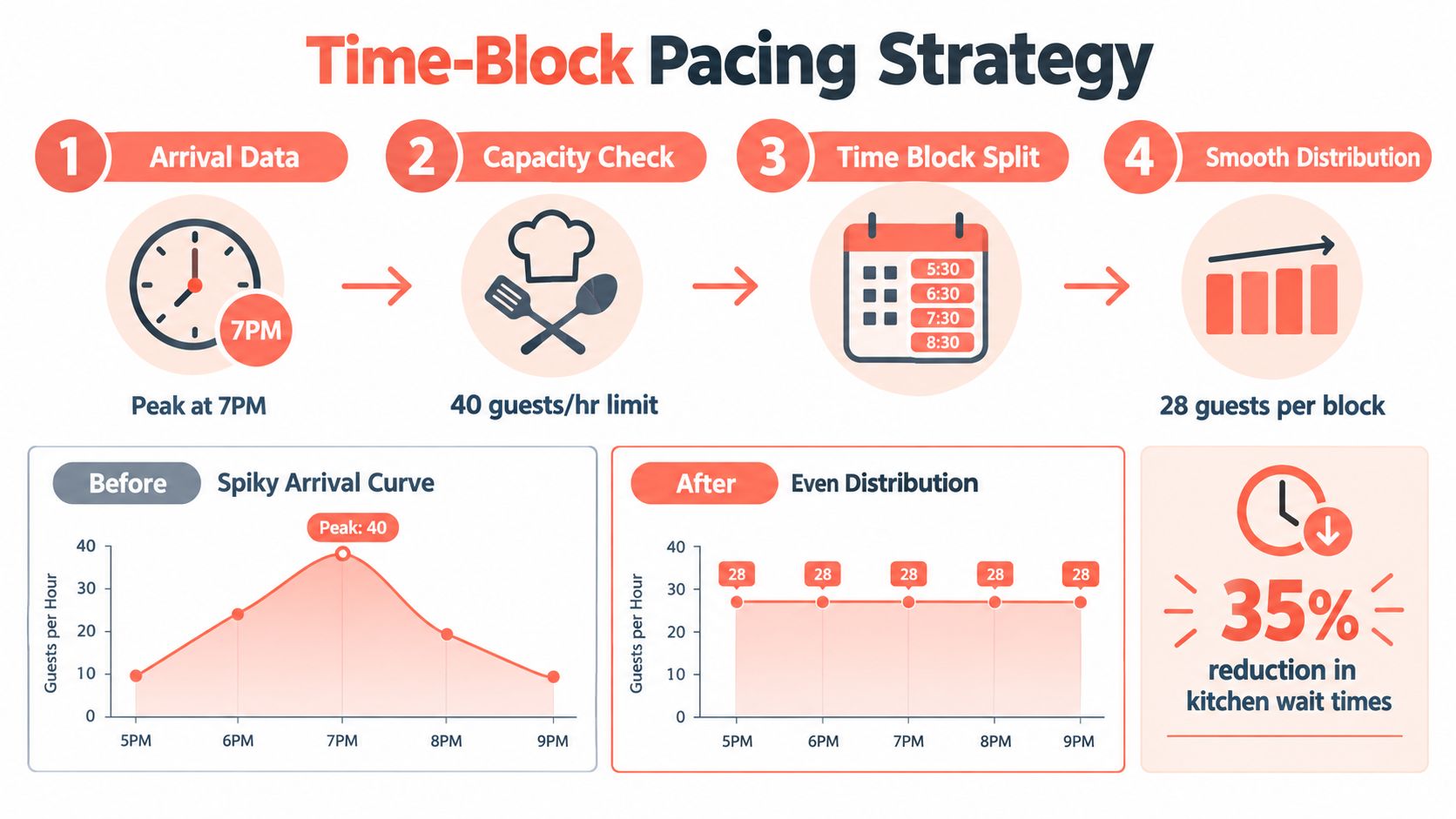
Start with the kitchen's practical output by period. Review ticket times, fire rates, course delays, staffing, and the moments when the pass stops accepting work comfortably. Then divide reservations into smaller arrival blocks instead of releasing too many covers at one time.
A workable process looks like this:
- Map arrivals. Identify the busiest arrival window and separate bookings from expected walk-ins.
- Set a kitchen ceiling. Use the team's observed throughput, not an optimistic theoretical maximum.
- Spread bookings. Move flexible reservations into earlier or later slots while preserving guest choice.
- Protect buffers. Hold a controlled amount of availability for late arrivals, walk-ins, and service recovery.
- Review live conditions. If the kitchen falls behind, slow new seating rather than allowing the queue to compound.
Operational test: If the host can sell a table but the kitchen can't start the meal cleanly, that table isn't available capacity.
Walk-ins need the same discipline. A walk-in squeeze should depend on current table status, expected dining duration, kitchen load, and the number of reservations approaching. It shouldn't depend only on whether a table appears empty on the floor plan.
The model also has to account for variability. Arrival timestamps, service times, utilization by interval, abandonment, and routing patterns reveal where the bottleneck forms. Evaluate expected waits, queue lengths, and service levels by period, because a daily average hides the exact moment when the shift breaks.
The platform used for pacing should make those controls visible to the host, not bury them in an administrative report. A short delay at the door can protect the kitchen, preserve ticket quality, and prevent a much longer delay for every party already seated.
Choosing the Right Reservation Platform
Reservation software affects capacity planning in two ways. It determines how easily the team can make live seating decisions, and its pricing model changes the financial value of filling additional covers.
The comparison should include more than booking pages. Managers should examine table assignment, pacing controls, shared inventory, walk-in handling, guest records, POS connectivity, reporting, and the amount of attention required at the host stand.
Compare the commercial model
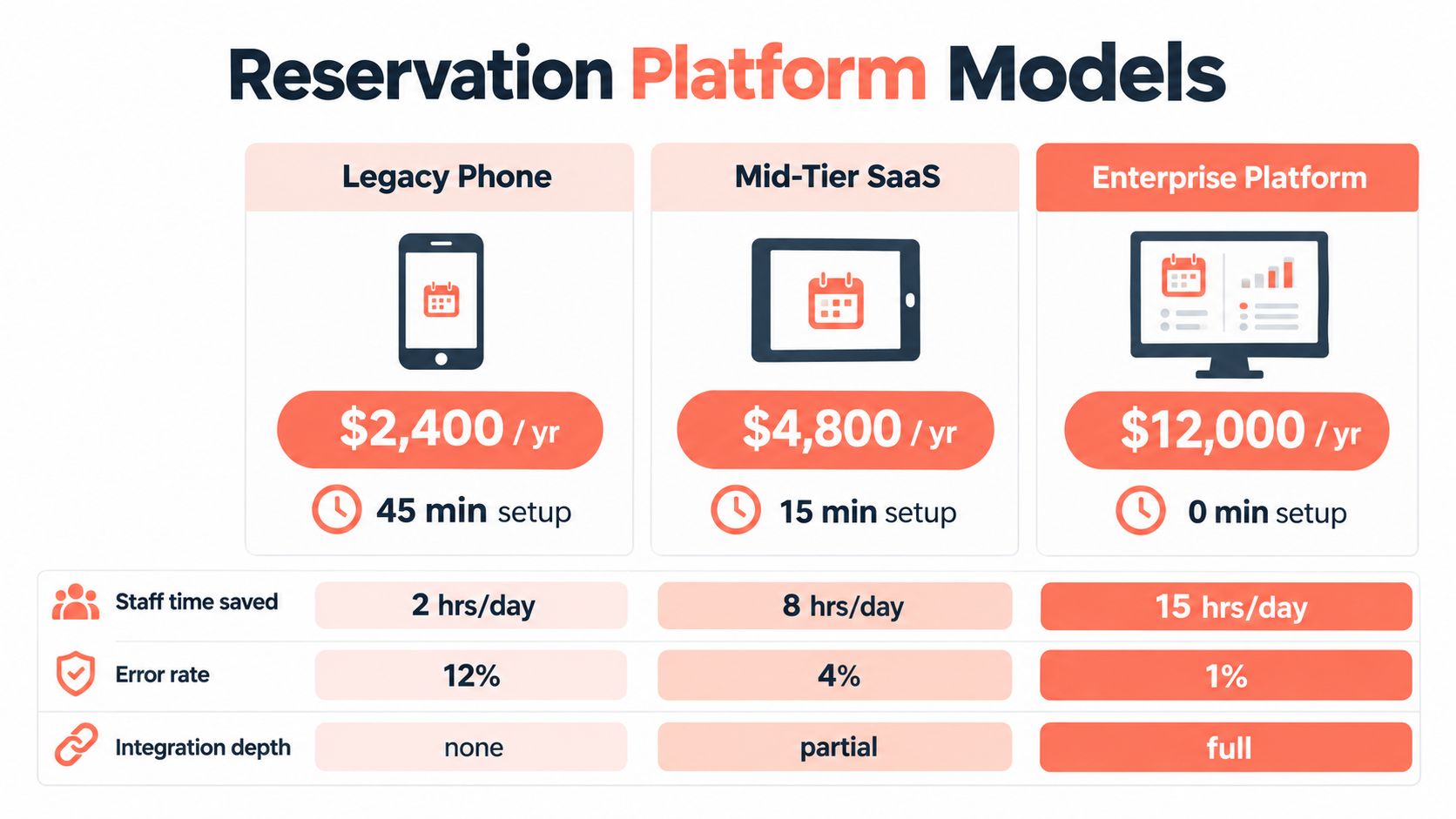
TheFork, OpenTable, Zenchef, and Formitable can be evaluated as alternatives with different pricing structures, features, integrations, and commercial terms. Some platforms use commissions or per-cover charges, while others rely more heavily on fixed subscriptions or negotiated packages. The right comparison depends on booking volume, acquisition value, direct demand, and the restaurant's tolerance for variable costs.
A commission-free model changes the calculation. When the restaurant fills more seats through its own booking flow, it doesn't automatically increase a percentage-based reservation cost for every additional cover. That doesn't make every commission model unsuitable, but it does mean the manager should calculate total cost against direct bookings, channel mix, and actual operational value.
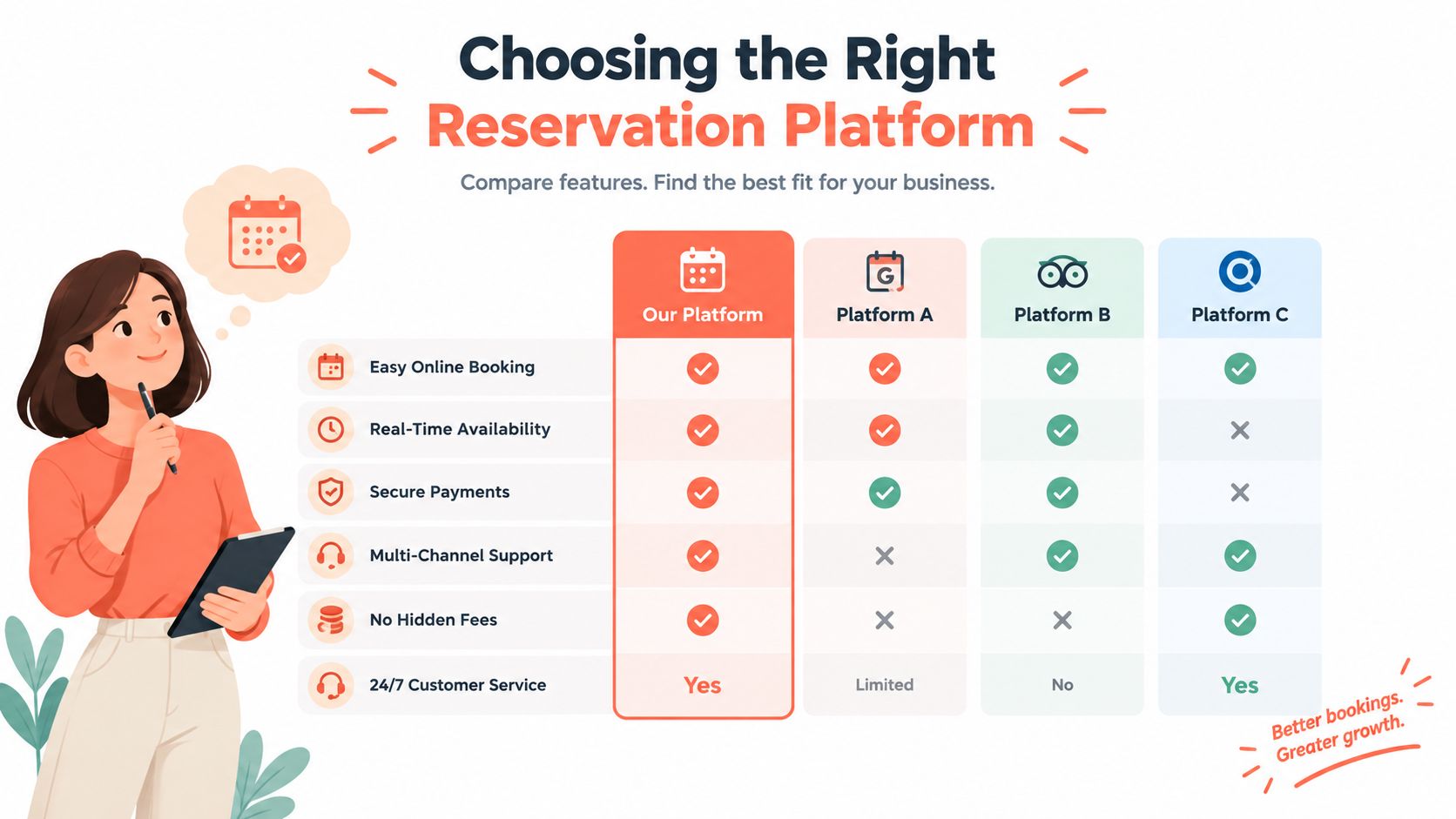
The host interface matters just as much. During service, the team needs to see table status, arrival pressure, turn expectations, notes, and available combinations without navigating a cluttered dashboard. A focused screen supports fast decisions, while manual reassignment across disconnected tools encourages rigid seating.
A direct booking page should also work across the restaurant's existing touchpoints. A digital menu QR code setup can be useful when the restaurant wants guests to access information from the table, but the booking flow still needs to pass accurate party size, time, and contact details into the same operational system.
Make the tool earn its place
The useful question isn't whether a platform has the longest feature list. It's whether it helps the team make better decisions during the busiest part of the shift.
Check whether the system can:
- Control availability: Close or open time blocks by section, hour, party size, or service condition.
- Assign dynamically: Match reservations to compatible tables without locking inventory too early.
- Manage exceptions: Handle cancellations, late arrivals, table changes, and walk-ins in one view.
- Connect records: Carry guest preferences and booking information into the service workflow.
- Support direct demand: Let the restaurant take reservations from its own website and other chosen channels.
A restaurant reservation system online should reduce manual coordination, not create another screen the host must monitor.
10seat is one commission-free option for independent restaurants in Benelux. Its Capacity Engine, Smart Auto Seating, Auto Seating Puzzle, and Walk-in Squeeze are designed to manage existing table inventory, service pacing, and live floor decisions without adding tables.
Tracking KPIs and Navigating Local Compliance
Optimization becomes guesswork when the team records only total covers and revenue. A useful dashboard shows when capacity was available, when it was blocked, and which constraint prevented the restaurant from using it.
The core measures should be reviewed by service period, section, and party size. Average table turns reveal how often inventory is reused. Utilization by interval shows when the room or a section is underloaded or overstrained. No-show rate exposes the gap between booked demand and actual attendance.
Average table turns are calculated as effective seatings divided by the number of tables, while maximum theoretical turns are calculated as operating hours divided by average dining time in hours (table-turnover calculation guidance). The theoretical figure is a ceiling, not a target. Cleaning, ordering, cooking, payment, guest comfort, and table assignment all affect the practical result.
Essential Capacity KPIs
| Metric | Target Benchmark | Optimization Lever |
|---|---|---|
| Average table turns | Track by service period and section | Adjust dining-time assumptions, reset workflow, and table assignment |
| No-show rate | Compare with the 2.33% average benchmark from Resos and the 5% to 7% typical U.S. full-service range reported by NovaTab, noting that the sources describe different datasets and contexts | Confirmations, deposits, cancellation rules, and controlled overbooking |
| Utilization by interval | Review against kitchen and floor capacity, not only daily averages | Reservation pacing, section availability, and walk-in release rules |
| Average dining time | Compare by party size and daypart | Menu pacing, order sequencing, payment process, and guest communication |
| Waiting time | Evaluate by period and service level | Arrival smoothing, queue controls, and targeted peak staffing |
| Abandonment rate | Track when guests leave before seating or service | Accurate ready times, door communication, and realistic availability |
No-show policy should reflect demand volatility. A normal evening and a holiday weekend don't carry the same risk, and a restaurant shouldn't apply the same booking controls blindly across both situations.
Belgian GKS considerations
For Belgian restaurants, capacity planning must connect cleanly with the GKS, or Geregistreerd Kassasysteem. The reservation record describes expected demand, while the certified POS records the fiscal transaction. Those systems shouldn't contradict one another through duplicate entries, missing table references, or manual adjustments that the team can't reconcile later.
The reservation system doesn't replace the certified cash register. Instead, it should pass operational information into the service flow without undermining fiscal reporting. Managers need clear controls for table changes, split bills, cancellations, no-shows, and corrections, with staff trained on which action belongs in the reservation tool and which belongs in the GKS.
A practical compliance review should include:
- Data ownership: Define whether the reservation system or POS is authoritative for each field.
- Change control: Record who changes a table, booking status, or transaction.
- Reconciliation: Compare seated parties, completed checks, cancellations, and no-shows.
- Staff training: Teach hosts and servers the correct workflow before a busy service.
- Audit readiness: Keep reports understandable enough for management and fiscal review.
The best capacity dashboard joins operational and financial reality. It shows not only how many guests arrived, but whether those arrivals became correctly recorded transactions without slowing the door or the kitchen.
Executing Your Optimization Strategy
Capacity planning optimization should begin with the next service, not a large software project. The manager can test the operating model with the data already available from reservations, POS reports, kitchen tickets, and the floor team's observations.
Start with a short audit:
- Map the room. Record every table, combination, section, seat count, and accessibility constraint.
- Review demand. Sort recent bookings by party size, arrival time, cancellations, no-shows, and walk-ins.
- Find the bottleneck. Identify whether the constraint is tables, hosts, servers, the pass, a preparation station, or payment.
- Set pacing rules. Divide arrivals into workable time blocks and define when the host should slow seating.
- Train decisions. Give the host team clear rules for late arrivals, walk-in squeezes, table merges, and kitchen holds.
- Review after service. Compare the plan with actual arrivals, waits, turns, ticket flow, and guest complaints.
The restaurant shouldn't optimize only for maximum covers. A deliberate reduction in available tables can protect operations, and one recent industry survey reports that 20% of operators were willing to reduce tables available for that reason (industry survey report). The correct target is profitable throughput with a guest experience the team can repeat.
A platform such as 10Seat can support this process by combining table layout rules, pacing limits, availability controls, and live seating decisions in one workflow. Managers can review the 10Seat product when the current system forces hosts to coordinate tables manually or leaves kitchen capacity outside the booking logic.
The strongest operating rhythm is simple. Measure each service, adjust one or two variables, brief the team, and check whether the change improved flow without creating a new bottleneck. That discipline turns a full dining room into a controlled, repeatable service.
10Seat offers commission-free reservation management for independent restaurants in Benelux, with tools for table optimization, pacing, auto-seating, and walk-in control. Visit 10Seat to assess whether its workflow can help align your bookings, floor plan, kitchen capacity, and GKS-ready service records.